
1. Introduzzjoni
Thank you for choosing the Kaiser KSW-5004 Rechargeable Bluetooth Speaker. This portable speaker is designed to deliver clear audio with versatile connectivity options, including Bluetooth, USB, Micro SD, and AUX input. It also features an auxiliary RGB light and KSR-Link technology for wireless stereo pairing. This manual provides essential information for safe and efficient use of your speaker.
2. Informazzjoni dwar is-Sigurtà
- Aqra l-istruzzjonijiet kollha qabel tuża l-apparat.
- Keep the speaker away from water, moisture, and high temperatures.
- Tippruvax tiżżarma, issewwi, jew timmodifika l-ispiker. Dan jannulla l-garanzija.
- Uża biss il-kejbil tal-iċċarġjar provdut jew wieħed ekwivalenti ċċertifikat.
- Evita li tesponi l-batterija għal temperaturi estremi jew dawl tax-xemx dirett.
- Naddaf l-ispiker b'ċarruta ratba u niexfa. Tużax prodotti tat-tindif likwidi jew aerosols.
3. Kontenut tal-Pakkett
Jekk jogħġbok iċċekkja l-pakkett għall-oġġetti li ġejjin:
- Kaiser KSW-5004 Rechargeable Bluetooth Speaker
- Cable tal-Iċċarġjar tal-USB
- Manwal għall-Utent
4. Prodott Aktarview
Quddiem View

Figura 4.1: Quddiem view of the KSW-5004 speaker, showcasing the speaker grille and RGB light ring.
Top Control Panel

Figure 4.2: Top panel controls including buttons for 'LUCES' (Lights), 'MODO LINK' (Mode/Link), Play/Pause, and Volume/Track navigation.
Rear Connection Panel
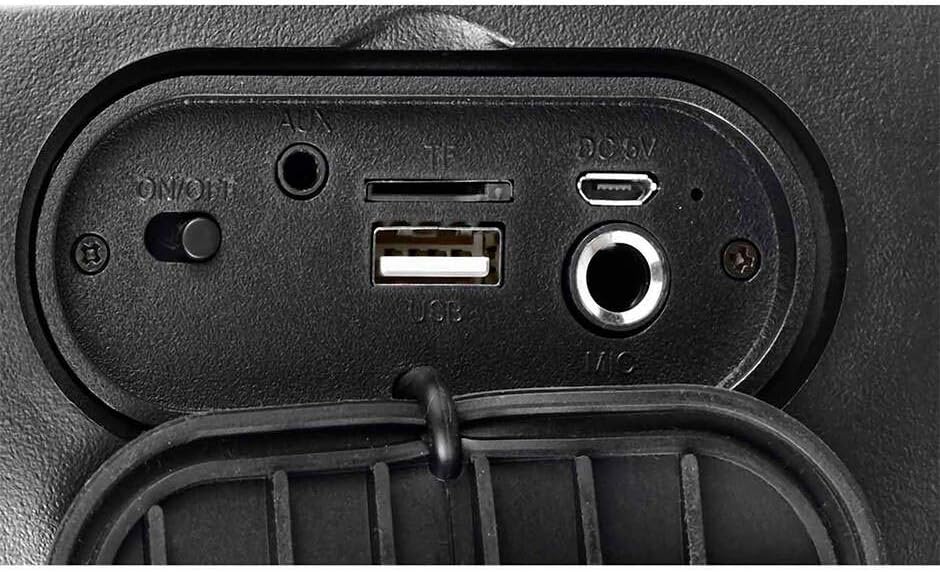
Figure 4.3: Rear connection panel with ON/OFF switch, AUX input, TF (Micro SD) card slot, USB port, DC 5V charging port, and Microphone input.
5. Setup
5.1 Iċċarġjar tal-Ispeaker
Before first use, fully charge the speaker. Connect the provided USB charging cable to the DC 5V port on the speaker and the other end to a USB power adapter (not included) or a computer's USB port. The charging indicator will illuminate during charging and turn off when fully charged.
5.2 Tixgħel/Jitfi
Sib il- ON/OFF switch on the rear connection panel. Slide the switch to the ON position to power on the speaker. Slide it to the OFF position to power off.
6. Istruzzjonijiet Operattivi
6.1 Tqabbil tal-Bluetooth
- Turn on the speaker. It will automatically enter Bluetooth pairing mode, indicated by a flashing light or audible prompt.
- Ippermetti l-Bluetooth fuq l-apparat mobbli tiegħek (smartphone, tablet, laptop).
- Fittex għal apparati Bluetooth disponibbli u agħżel "KSW-5004" mil-lista.
- Once connected, the speaker will emit a confirmation tone, and the light indicator will become solid.
6.2 KSR-Link (True Wireless Stereo - TWS)
To pair two KSW-5004 speakers for a stereo sound experience:
- Ensure both KSW-5004 speakers are powered on and not connected to any Bluetooth device.
- Fuq wieħed mill-ispikers, agħfas u żomm il-buttuna "MODO LINK" buttuna. L-ispiker se joħroġ ton ta’ tqabbil.
- Iż-żewġ kelliema jikkonnettjaw ma' xulxin awtomatikament. Jinstema' ħoss ta' konferma ladarba jkunu konnessi.
- Now, enable Bluetooth on your device and connect to the primary speaker (the one you pressed the 'MODO LINK' button on). Both speakers will play audio in stereo.
6.3 Daqq tal-USB / Mikro SD
Insert a USB flash drive or a Micro SD card (TF card) into the corresponding port on the rear connection panel. The speaker will automatically detect the storage device and begin playing audio files. Uża l- Preċedenti/Volum Down u Li jmiss / Volum 'il fuq buttuni biex jinnavigaw binarji.
6.4 Input AUX
Qabbad apparat awdjo estern (eż., MP3 player, laptop) mal- AUX port using a 3.5mm audio cable (not included). The speaker will automatically switch to AUX mode. Use the connected device to control playback.
6.5 Kontroll tad-Dawl RGB
Agħfas il- "LUCES" button on the top control panel to cycle through different RGB light modes or to turn the light off.
6.6 Kontroll tal-Volum u t-Track
- Agħfas il- Preċedenti/Volum Down buttuna (K-) to decrease volume. Press and hold to go to the previous track.
- Agħfas il- Li jmiss / Volum 'il fuq buttuna (K+) to increase volume. Press and hold to go to the next track.
- Agħfas il- Play/Pawsa buttuna (||) biex tilgħab jew twaqqaf l-awdjo.
7. Manutenzjoni
- Imsaħ l-ispiker b'ċarruta ratba, niexfa u mingħajr suf.
- Tużax prodotti tat-tindif li joborxu, xama', jew solventi.
- Aħżen l-ispiker f'post frisk u niexef meta ma jkunx qed jintuża għal perjodi twal.
- Recharge the battery periodically if not used for a long time to maintain battery health.
8 Issolvi l-problemi
| Problema | Kawża Possibbli | Soluzzjoni |
|---|---|---|
| L-ispiker ma jixgħelx. | Il-batterija hija eżawrita. | Iċċarġja l-ispiker kompletament. |
| L-ebda ħoss mill-ispiker. | Volume is too low or muted. Incorrect input source. | Increase volume on speaker and connected device. Ensure correct mode (Bluetooth, USB, SD, AUX) is selected. |
| L-apparat Bluetooth ma jistax jingħaqad. | Speaker not in pairing mode. Bluetooth is off on device. Device is too far. | Ensure speaker is in pairing mode. Turn on Bluetooth on your device. Move device closer to speaker (within 10m). |
| KSR-Link (TWS) not working. | Speakers already paired to other devices. | Ensure both speakers are unpaired from any other Bluetooth devices before initiating KSR-Link pairing. |
| USB/Micro SD playback issues. | Mhux appoġġjat file format. Corrupted media. | Żgura l-awdjo files are in a supported format (e.g., MP3). Try a different USB drive or Micro SD card. |
9. Speċifikazzjonijiet
| Karatteristika | Speċifikazzjoni |
|---|---|
| Mudell | KSW-5004 |
| Qawwa tal-Ħruġ | 10W RMS |
| Daqs tal-Kelliem | 4 pulzieri |
| Verżjoni Bluetooth | 5.0 |
| Medda Bluetooth | Sa 10 metri |
| Konnettività | Bluetooth, USB, Micro SD (TF), AUX (3.5mm) |
| Sors tal-Enerġija | Mħaddma bil-batterija |
| Ħajja tal-batterija | Sa 10-il siegħa (b'volum moderat) |
| Dimensjonijiet (L x W x H) | 16.2 x 14.7 x 24.3 ċm |
| Piż | 1.16 kg |
| Kulur | Iswed |
| Karatteristiċi Speċjali | RGB Light, KSR-Link (TWS), Water Resistant |
| Apparati Kompatibbli | Laptop, MP3 Player, Smartphone, Tablet |

Figure 9.1: KSW-5004 speaker with indicated dimensions.
10. Garanzija u Appoġġ
For warranty information or technical support, please refer to the warranty card included with your product or contact Kaiser customer service directly. Keep your purchase receipt as proof of purchase.