
Introduzzjoni
This manual provides essential information for setting up, operating, maintaining, and troubleshooting your ASUS TUF Gaming A17 Laptop, model TUF706IH-ES75. Please read this guide thoroughly to ensure optimal performance and longevity of your device.

Figure 1: ASUS TUF Gaming A17 Laptop (TUF706IH-ES75) - Front View
X'hemm fil-Kaxxa
Verify that all items are present upon unboxing your ASUS TUF Gaming A17 Laptop:
- TUF Gaming A17 TUF706 Laptop
- Adapter tal-Enerġija & Kurdun
- Gwida għall-Utent
- Karta ta' Garanzija
Setup
1. L-Ewwel Tixgħil
- Qabbad l-adapter tal-enerġija mal-port tad-dħul tal-enerġija tal-laptop u mbagħad ma' sokit tal-enerġija.
- Iftaħ l-għatu tal-laptop. Il-laptop jista’ jixgħel awtomatikament, jew jista’ jkollok bżonn tagħfas il-buttuna tal-qawwa li tinsab fuq it-tastiera.
- Follow the on-screen instructions to complete the Windows 10 Home setup. This includes selecting your region, language, and setting up your user account.
2. Konnessjoni Periferali
Il-laptop tiegħek għandu diversi portijiet għall-konnessjoni ta' apparati esterni:
- Portijiet USB: Connect USB devices such as mice, keyboards, or external storage drives. The laptop includes 1 USB 2.0 port and 3 USB 3.0 ports.
- Port HDMI: Connect an external display or TV using an HDMI cable.
- Port Ethernet: Għal konnettività ta' netwerk bil-fili.
- Awdjo Jack: Qabbad headphones jew kelliema esterni.

Figura 2: Portijiet tan-Naħa tax-Xellug

Figure 3: Right Side Ports and Vents
3. Software Updates with MyASUS
The MyASUS application helps keep your system updated and optimized. It provides essential updates, system diagnostics, and access to customer support.
Video 1: MyASUS Product Video. This video demonstrates how to use the MyASUS application for system updates, diagnostics, and personalized settings.
Istruzzjonijiet Operattivi
1. Tastiera u Touchpad
The laptop features a desktop-style keyboard with a dedicated Numpad and customizable Aura RGB backlighting. The touchpad supports multi-touch gestures for navigation.
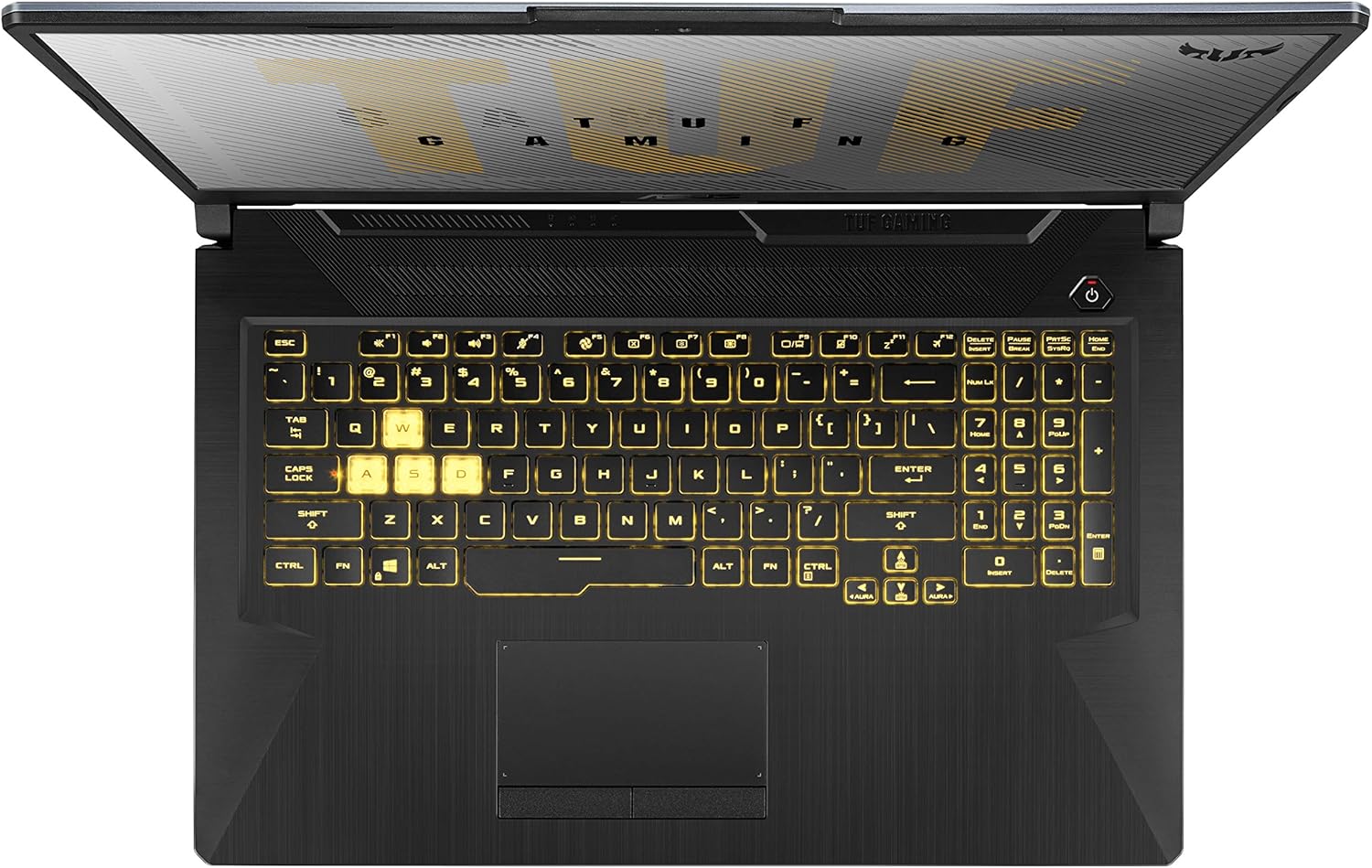
Figura 4: It-tqassim tat-tastiera
2. Karatteristiċi tal-Wiri
The 17.3-inch Full HD (1920x1080) IPS-Type display offers a 120Hz refresh rate for smoother visuals, especially during gaming.
3. Modi ta 'Prestazzjoni
The laptop's cooling system supports various scenario profiles (Silent, Performance, Turbo) to optimize fan speed and performance based on your usage. These can typically be adjusted via the MyASUS application or dedicated function keys.
4. Multi-Monitor Support
Extend your workspace by connecting external monitors using the DisplayPort 1.4 and HDMI 2.0b outputs.
5. Awdjo
Experience enhanced audio with upgraded speakers featuring DTS:X Ultra technology, providing louder sound and deeper bass.
Video 2: TUF Gaming A17 Product Video. This video highlights key features of the ASUS TUF Gaming A17, including its performance, durability, and cooling system.
Manutenzjoni
1. Sistema ta 'tkessiħ
The laptop features an Anti-Dust Cooling (ADC) system with dual self-cleaning fans to maintain stability and prevent dust buildup. Regularly ensure that the cooling vents are not obstructed to allow for optimal airflow.

Figure 5: Rear Cooling Vents
2. Kura tal-batterija
The laptop is equipped with a 90Wh battery. To prolong battery lifespan, avoid frequently discharging the battery completely and store the laptop in a cool, dry place when not in use for extended periods. Utilize the battery health management features available in MyASUS.
3. Manutenzjoni tas-Softwer
Regularly check for and install operating system updates and driver updates through Windows Update and the MyASUS application to ensure system stability and security.
4. Tindif
Uża drapp artab u mingħajr suf biex tnaddaf l-iskrin u l-uċuħ ta' barra. Għal tbajja' iebsa, neħħi ftit drapp.ampTista' tuża drapp imnaddaf bl-ilma jew b'tindif ħafif u mhux abrażiv. Evita li tisprejja likwidi direttament fuq il-laptop.
Issolvi l-problemi
If you encounter issues with your laptop, consider the following steps:
- Ebda Qawwa: Kun żgur li l-adapter tal-enerġija huwa konness sew kemm mal-laptop kif ukoll ma' sokit tal-enerġija li jaħdem. Ipprova sokit differenti jekk disponibbli.
- Kwistjonijiet tal-Wiri: If the screen is blank or flickering, try connecting an external monitor to determine if the issue is with the laptop's internal display or the graphics card.
- Tnaqqis fil-Prestazzjoni: Check for background applications consuming excessive resources. Ensure your operating system and drivers are up to date.
- Is-sħana żejda: Ensure cooling vents are clear of obstructions. Consider adjusting performance profiles in MyASUS to a less aggressive setting if not gaming.
- Problemi tas-Software: Use the 'One-click diagnosis' feature in the MyASUS application to identify and resolve common software-related issues.
For more detailed troubleshooting or persistent issues, refer to the ASUS support websit jew ikkuntattja lis-servizz tal-konsumatur.
Speċifikazzjonijiet
| Karatteristika | Speċifikazzjoni |
|---|---|
| Mudell | TUF706IH-ES75 |
| Proċessur | AMD Ryzen 7 4800H (Quad-core, 4.2 GHz) |
| Grafika | NVIDIA GeForce GTX 1650 4GB GDDR6 |
| Wiri | 17.3-inch FHD (1920x1080) 120Hz IPS-Type |
| RAM | 16GB DDR4 3200MHz |
| Ħażna | 512GB PCIe NVMe M.2 SSD + 1TB HDD |
| Sistema Operattiva | Windows 10 Home |
| Konnettività bla fili | Gigabit Wi-Fi 5 (802.11ac), Bluetooth |
| Portijiet | 1x USB 2.0, 3x USB 3.0, HDMI, Ethernet, Audio Jack |
| Batterija | 1 batterija tal-Lithium Metal (inkluża) |
| Dimensjonijiet (LxWxH) | 15.7 x 10.6 x 1 pulzieri |
| Piż | 5.7 liri |
Garanzija u Appoġġ
Your ASUS TUF Gaming A17 Laptop comes with a warranty. Please refer to the included Warranty Card for detailed terms and conditions. For technical support, driver downloads, and further assistance, visit the official ASUS support website or use the MyASUS application.
The laptop is built with durable MIL-STD-810H military standard construction, designed to withstand various environmental conditions.