Introduzzjoni u Matulview
The Lenovo Flex 5 14 is a versatile 2-in-1 laptop designed for adaptability and performance. Featuring a 14.0" Full HD Touch Display and powered by an AMD Ryzen 5 4500U processor with AMD Radeon Graphics, this device offers multiple usage modes and includes a digital pen for intuitive interaction. Its thin and lightweight design makes it highly portable for various environments, from home entertainment to professional use.
Karatteristiċi tal-Prodott
- Disinn 2-in-1: Seamlessly switch between Laptop, Tent, Stand, and Tablet modes thanks to the 360-degree hinge.
- 14.0" FHD Touch Display: Enjoy a vibrant 1920 x 1080 IPS touchscreen with narrow bezels for an immersive viewing esperjenza.
- AMD Ryzen 5 4500U Processor: Experience responsive performance for productivity, gaming, and content creation with integrated AMD Radeon Graphics.
- Digital Pen Included: Enhance your creativity and productivity with the included digital pen for writing, drawing, and precise navigation.
- Physical Privacy Shutter: The HD 720p camera features a physical shutter for enhanced privacy.
- Dolby Audio Speakers: Dual 2W speakers with Dolby Audio provide clear and immersive sound.
- Long Battery Life & Quick Charge: Up to 10 hours of battery life with quick charge support (80% in 1 hour with 65W adapter).
- Konnettività: Equipped with 2x2 Wi-Fi 5 (802.11 ac), Bluetooth 4.2, 2 USB-A ports, 1 USB-C port, and an HDMI port.

Image: Lenovo Flex 5 14 2-in-1 Laptop in laptop mode with the included digital pen.

Image: Lenovo Flex 5 14 2-in-1 Laptop in tent mode, showcasing its flexible hinge and digital pen usage.
Gwida ta' Setup
- Spakkja l-Apparat: Carefully remove the laptop, AC adapter, digital pen, and user guide from the packaging.
- Qabbad l-Enerġija: Plug the AC adapter into the laptop's power port (or USB-C port if using a compatible USB-C charger) and then into a power outlet.
- L-Ibbutjar Inizjali: Open the laptop lid and press the power button (located on the right side) to turn on the device. Follow the on-screen instructions to complete the Windows 10 setup process.
- Digital Pen Setup: Insert the AAAA battery into the digital pen. The pen is ready to use without pairing. You can customize its functions via the Lenovo Pen Settings app.
- Qabbad mal-Wi-Fi: During Windows setup or afterward, connect to your preferred Wi-Fi network.
- Aġġornamenti tas-Sistema: Ensure your operating system and drivers are up to date for optimal performance and security.
Istruzzjonijiet Operattivi
Using the 2-in-1 Modes
- Modalità tal-Laptop: Use the device as a traditional laptop for typing and productivity.
- Modalità Tinda: Fold the display back to form a tent shape. Ideal for watching videos or presentations.
- Modalità Stand: Fold the display back further, resting the keyboard face down. Suitable for media consumption or touch-based applications.
- Modalità Pillola: Fold the display completely back against the keyboard. The keyboard and touchpad will automatically disable, allowing full touchscreen and digital pen interaction.
Touchscreen and Digital Pen
- Navigazzjoni bil-Mess: Use gestures like tap, swipe, pinch-to-zoom directly on the screen.
- Pinna Diġitali: Use the included pen for precise input, drawing, and note-taking. The barrel buttons can be customized for various functions.
Shutter tal-Privatezza tal-Kamera
To ensure privacy, slide the physical shutter located above the webcam to cover or uncover the camera lens. A red indicator will be visible when the camera is covered.
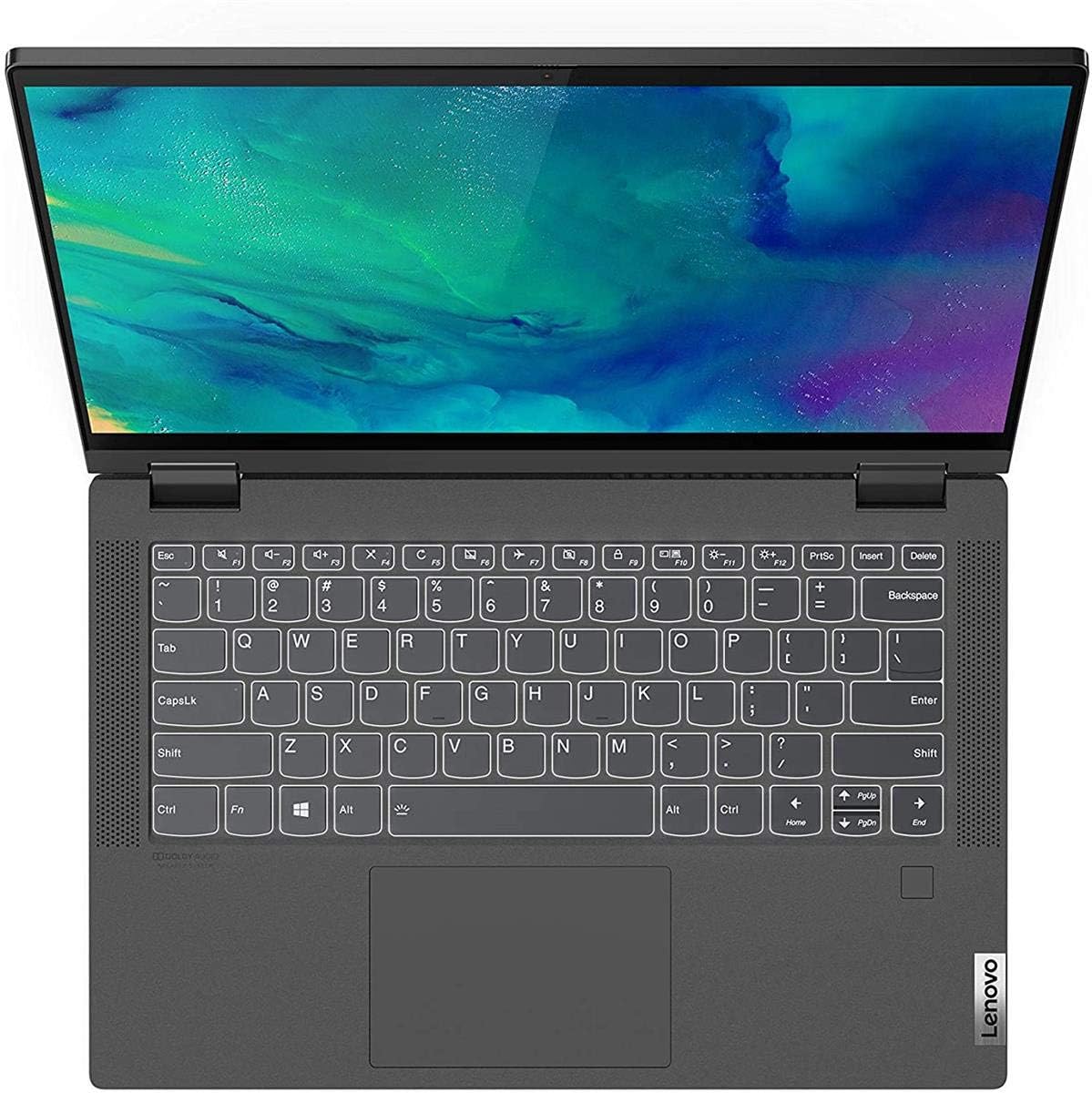
Immaġni: Minn fuq għal isfel view of the Lenovo Flex 5 14 keyboard and touchpad, highlighting the layout and integrated fingerprint reader.
Vidjo: Reviżjoni dettaljataview of the Lenovo IdeaPad Flex 5 14, showcasing its 2-in-1 functionality, stylus, and overall design. This video provides a comprehensive look at the laptop's features and how they can be used in various modes.
Manutenzjoni
- Tindif: Uża drapp artab u mingħajr suf biex tnaddaf l-iskrin u x-chassis. Evita kimiċi ħarxa.
- Kura tal-batterija: Biex ittawwal il-ħajja tal-batterija, evita temperaturi estremi u ħoll il-batterija kompletament ta' spiss.
- Aġġornamenti tas-Software: Regularly install operating system and driver updates to maintain performance and security.
- Ġestjoni tal-Ħażna: Naddaf perjodikament dak li mhux meħtieġ files and applications to free up storage space and improve system speed.
Issolvi l-problemi
- L-Apparat Mhux Jixgħel: Ensure the AC adapter is securely connected and the battery has sufficient charge. Try a different power outlet.
- Kwistjonijiet tal-iskrin: If the screen is unresponsive or flickering, try restarting the device. Check for driver updates.
- Digital Pen Not Working: Ensure the AAAA battery is correctly inserted and has charge.
- Prestazzjoni bil-mod: Close unnecessary applications, check for system updates, and ensure sufficient free storage space.
- Problemi ta' Konnettività: For Wi-Fi or Bluetooth issues, try toggling the respective settings off and on, or restart the device. Ensure drivers are updated.
Speċifikazzjonijiet
| Karatteristika | Dettall |
|---|---|
| Daqs tal-Wiri tal-Iskrin Permanenti | 14 Pulzier |
| Riżoluzzjoni tal-Iskrin | 1920 x 1080 pixel (FHD IPS) |
| Proċessur | 2.1 GHz AMD Ryzen 5 4500U |
| RAM | 16 GB DDR4 |
| Hard Drive | 256 GB SSD |
| Koproċessur tal-Grafika | Grafika Integrata tal-AMD |
| Tip bla fili | 802.11ac (Wi-Fi 5) |
| Numru ta 'USB 3.0 Ports | 2 |
| Ħajja Medja tal-Batterija | 10 Sigħat |
| Sistema Operattiva | Windows 10 |
| Piż tal-oġġett | 3.63 liri |
| Dimensjonijiet tal-Prodott | 12.66 x 0.67 x 8.34 pulzieri |
| Kulur | Griż tal-grafita |
| Karatteristika Speċjali | Qarrej tal-marki tas-swaba' |
X'hemm fil-Kaxxa
- Lenovo Flex 5 14 2-in-1 Laptop
- AC Adapter (65W USB-C)
- Pinna Diġitali
- Gwida għall-Utent
Video: A full review of the Lenovo Flex 5 with AMD Ryzen 4500U, detailing its features, performance, and overall user experience. This video provides insights into the laptop's capabilities and design aspects.
Garanzija u Appoġġ
Your Lenovo Flex 5 14 laptop comes with a standard manufacturer's warranty. For specific warranty terms and conditions, please refer to the included warranty documentation or visit the official Lenovo support website. Extended protection plans are available for purchase separately.
- Pjan ta' Protezzjoni ta' 2 Snin: Disponibbli għax-xiri.
- Pjan ta' Protezzjoni ta' 4 Snin: Disponibbli għax-xiri.
- Protezzjoni Kompleta: Pjan ta' kull xahar li jkopri xiri eliġibbli tal-passat u tal-futur.
For technical assistance, driver downloads, or service requests, please contact Lenovo customer support or visit their online support portal.