
Introduzzjoni
The Power Dynamics PPA30 is a versatile 30W 100V amplifier designed for small to medium-sized public address and background music applications. This amplifier features multiple input options including microphone inputs, stereo line inputs, Bluetooth connectivity for wireless streaming, and a built-in MP3 player with USB and SD card support. A remote control is included for convenient operation.
Informazzjoni dwar is-Sigurtà
Please read these instructions carefully before using the device. Keep this manual for future reference. Always observe the following safety precautions:
- Tesponix l-apparat għax-xita jew l-umdità.
- Tiftaħx il-kaxxa. Ġewwa m'hemm l-ebda partijiet li jistgħu jiġu sservisjati mill-utent. Irreferi għal kull manutenzjoni f'idejn persunal kwalifikat.
- Tiżgura l-provvista tal-enerġija voltage jaqbel mar-rekwiżiti speċifikati fuq l-apparat.
- Ipproteġi l-korda tad-dawl milli jimxi fuqu jew maqrusa.
- Disconnect the device from the mains during lightning storms or when unused for long periods.
- Place the device on a stable, level surface with adequate ventilation.
Kontenut tal-Pakkett
Jekk jogħġbok iċċekkja li l-oġġetti kollha huma preżenti u f'kundizzjoni tajba malli tiftaħ il-pakkett:
- Power Dynamics PPA30 Ampaktar ħaj
- Kejbil tal-Enerġija
- Kontroll mill-bogħod
- Manwal għall-Utent
Prodott Overview
Front Panel
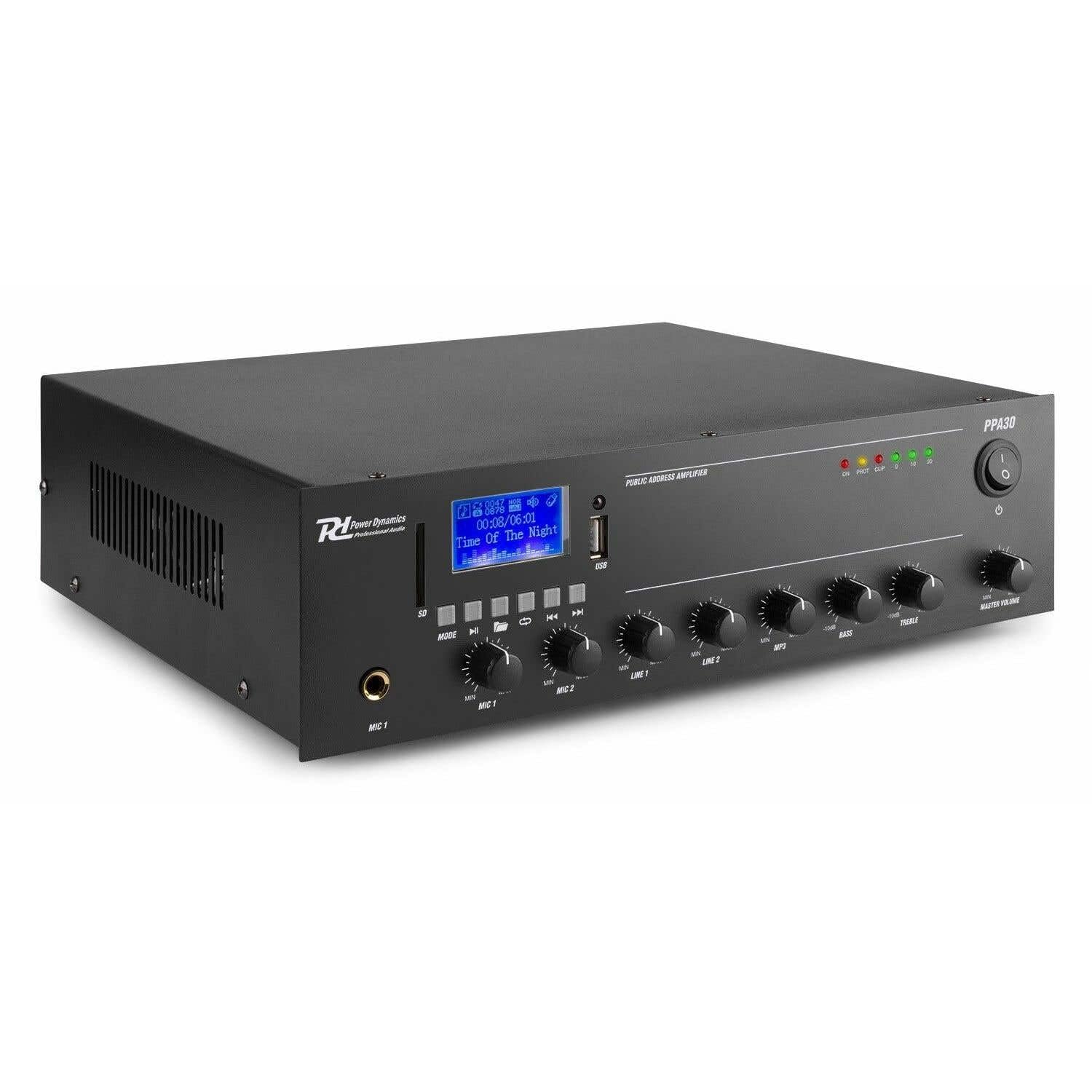
Figure 1: Front Panel Layout of the PPA30 Amplifier. Din l-immaġni turi l- amplifier's front face, including the display screen, USB/SD card slots, control buttons for media playback, input volume controls for microphones and line inputs, bass and treble adjustments, and the master volume knob. The power switch and indicator lights are also visible.
The front panel provides access to all primary controls and indicators:
- Swiċċ tal-Enerġija: Dawwar il- amplifier mixgħul jew mitfi.
- Skrin tad-displej: Juri l-modalità attwali, l-informazzjoni dwar it-trakka, u indikaturi oħra tal-istatus.
- USB/SD Card Slots: For connecting USB drives or SD cards for MP3 playback.
- Buttuna tal-Modalità: Switches between input sources (Bluetooth, USB, SD, Line 1, Line 2).
- Kontrolli tal-Daqq tal-Midja: Play/Pause, Previous, Next, Repeat.
- MIC 1 & MIC 2 Inputs: Inputs ta' jack ta' 6.3mm għall-mikrofoni.
- MIC 1 & MIC 2 Volume Controls: Adjusts the volume for each microphone input.
- LINE 1 & LINE 2 Volume Controls: Jaġġusta l-volum għall-inputs tal-linja.
- MP3 Volume Control: Adjusts the volume for USB/SD/Bluetooth playback.
- Kontrolli tal-Bass u t-Treble: Jaġġusta l-frekwenzi baxxi u għoljin tal-ħruġ tal-awdjo.
- Volum Master: Jikkontrolla l-volum tal-output ġenerali tal- ampaktar ħaj.
- Dwal indikaturi: Power (ON), Protection (PROT), Clip, and Output Level (0, 10, 20).
Panel ta' wara

Figure 2: Rear Panel Connections of the PPA30 Amplifier. This image illustrates the back of the amplifier, detailing the AC power input, DC input, speaker output terminals (COM, 8Ω, 70V, 100V), and RCA line inputs (LINE OUT, LINE 1, LINE 2, MIC 2). Safety warnings and product information are also visible.
The rear panel houses the power input, speaker outputs, and additional audio inputs:
- Input tal-Enerġija AC: Jikkonnettja mal-provvista ewlenija tal-enerġija.
- Input DC: Optional 12V DC power input.
- Terminali tal-Ħruġ tal-Ispeaker: Connections for 100V, 70V, and 8 Ohm speakers. Ensure correct impedance matching.
- LINE OUT: RCA output for connecting to another ampapparat li jerfa 'l-ħajja jew li jirrekordja.
- LINE 1 & LINE 2 Inputs: RCA stereo inputs for external audio sources (e.g., CD player, mixer).
- Input MIC 2: Additional 6.3mm jack input for a microphone.
Kontroll mill-bogħod

Figure 3: Remote Control for the PPA30 Amplifier. This image shows the handheld remote control with buttons for power, mode selection, volume adjustment, track navigation, EQ settings, and direct number input for track selection.
The remote control allows for convenient operation from a distance. Functions include power on/off, mode selection, volume control, track navigation, and EQ settings.
Setup
- Pjazzament: Pożizzjona l amplifier on a flat, stable surface. Ensure adequate ventilation around the unit to prevent overheating.
- Konnessjoni tal-Ispeaker: Connect your 100V, 70V, or 8 Ohm speakers to the appropriate terminals on the rear panel. Ensure correct polarity (+ to + and - to - or COM). For 100V/70V systems, ensure your speakers are compatible and correctly wired for constant voltage.
- Konnessjoni tas-Sors Awdjo:
- Mikrofoni: Plug microphones into the MIC 1 or MIC 2 inputs on the front panel.
- Line Devices: Connect external audio sources (e.g., CD player, mixer) to the LINE 1 or LINE 2 RCA inputs on the rear panel.
- Karta USB/SD: Insert a USB drive or SD card into the respective slot on the front panel for MP3 playback.
- Konnessjoni tal-Enerġija: Connect the supplied power cable to the AC power input on the rear panel and then to a suitable mains outlet.
- Qawwa Inizjali Mixgħula: Ixgħel il- amplifier using the power switch on the front panel. The 'ON' indicator light should illuminate.
Istruzzjonijiet Operattivi
Għażla tas-Sors tad-Dħul
Agħfas il- MODALITÀ button on the front panel or remote control to cycle through available input sources: Bluetooth, USB, SD, Line 1, Line 2.
Operazzjoni Bluetooth
- Agħżel il-modalità Bluetooth billi tuża l- MODALITÀ button. The display will indicate Bluetooth mode.
- Fuq l-ismartphone, it-tablet, jew il-kompjuter tiegħek, attiva l-Bluetooth u fittex apparati disponibbli.
- Select "PPA30" from the list of devices to pair. Once paired, you can stream audio wirelessly to the ampaktar ħaj.
- Adjust the MP3 volume control on the front panel or the volume buttons on the remote control.
Daqq tal-Kard USB/SD
- Daħħal USB drive jew SD card li fiha awdjo MP3 files fis-slot korrispondenti.
- Il- amplifier should automatically switch to USB or SD mode and begin playback. If not, select the correct mode using the MODALITÀ buttuna.
- Use the Play/Pause, Previous, Next, and Repeat buttons on the front panel or remote control to manage playback.
- Adjust the MP3 volume control.
Użu tal-mikrofonu
- Connect your microphone(s) to the MIC 1 or MIC 2 inputs.
- Slowly increase the corresponding MIC 1 or MIC 2 volume control until the desired level is reached.
- Avoid setting the volume too high to prevent feedback or clipping (indicated by the 'CLIP' light).
Użu tal-Input tal-Linja
- Connect your external audio source to the LINE 1 or LINE 2 RCA inputs.
- Select the appropriate line input using the MODALITÀ buttuna.
- Adjust the corresponding LINE 1 or LINE 2 volume control.
Kontroll tat-Ton
Uża l- BASS u TREBLE knobs on the front panel to adjust the low and high frequencies of the overall audio output to suit your preference or room acoustics.
Master Volum
Il- VOLUM MASTER knob controls the overall output level of all active audio sources. Adjust this to achieve the desired listening volume.
Manutenzjoni
- Tindif: Uża drapp ratba u niexfa biex tnaddaf il-barra tal- ampTużax prodotti tat-tindif jew solventi li joborxu.
- Ventilazzjoni: Kun żgur li l-fetħiet tal-ventilazzjoni ma jkunux imblukkati biex tevita sħana żejda.
- Ħażna: Jekk se taħżen l-unità għal perjodu estiż, skonnettjaha mill-elettriku u aħżenha f'post frisk u niexef.
Issolvi l-problemi
| Problema | Kawża Possibbli | Soluzzjoni |
|---|---|---|
| Ebda qawwa | Kejbil tal-enerġija mhux imqabbad; Swiċċ tal-enerġija mitfi; L-ebda enerġija mis-sokit. | Check power cable connection; Turn power switch on; Test outlet with another device. |
| Ebda output tal-ħoss | Incorrect input selected; Volume too low; Speaker connections loose; Speakers faulty. | Select correct input (MODE button); Increase Master Volume and input specific volume; Check speaker wiring; Test with different speakers. |
| Ħoss distort | Volume too high (clipping); Incorrect tone settings; Faulty audio source. | Reduce Master Volume or input volume until 'CLIP' light is off; Adjust Bass/Treble controls; Test with a different audio source. |
| Il-Bluetooth mhux qed jgħaqqad | Bluetooth mode not selected; Device not in pairing mode; Interference. | Tiżgura amplifier is in Bluetooth mode; Make sure your device's Bluetooth is on and searching; Move closer to the amplifier; Erġa' ibda ż-żewġ apparati. |
| Problemi ta' daqq bil-USB/SD | Skorretta file format; Korrott files; Il-karta USB/SD mhux imdaħħla sew. | Tiżgura files are MP3 format; Try a different USB/SD card; Reinsert the card/drive. |
Speċifikazzjonijiet
| Karatteristika | Speċifikazzjoni |
|---|---|
| Brand | Dinamika tal-Qawwa |
| Mudell | PPA30 |
| Qawwa tal-Ħruġ | 30 Watts |
| Numru ta 'Kanali | 2 |
| Voltage (AC) | 220-230 Volt (AC) |
| Dimensjonijiet tal-oġġett (LxWxH) | 27 x 32 x 8.6 ċm |
| Piż tal-oġġett | 3.25 Kilogrammi |
| Tip ta 'Immuntar | Freestanding |
| Temperatura operattiva | Sa 40 Grad Celsius |
| Ċertifikazzjonijiet | CE, RoHS |
Garanzija u Appoġġ
This product is covered by a standard manufacturer's warranty. Please refer to the warranty card included in your package for specific terms and conditions. For technical support, service, or warranty claims, please contact your retailer or the Power Dynamics customer service department. Keep your proof of purchase for warranty validation.
For more information, visit the official Power Dynamics websit: www.power-dynamics.eu