

Introduzzjoni
Thank you for choosing the XO B24 Foldable Bluetooth Headphones. This manual provides essential information for the safe and efficient use of your device. Please read it carefully before use and retain it for future reference.
The XO B24 headphones are designed for comfort and portability, featuring high-quality materials and a secure fit for an optimal audio experience.
Prodott Overview
The XO B24 headphones offer both wired and wireless connectivity, a built-in microphone for calls, and a foldable design for easy storage and transport.
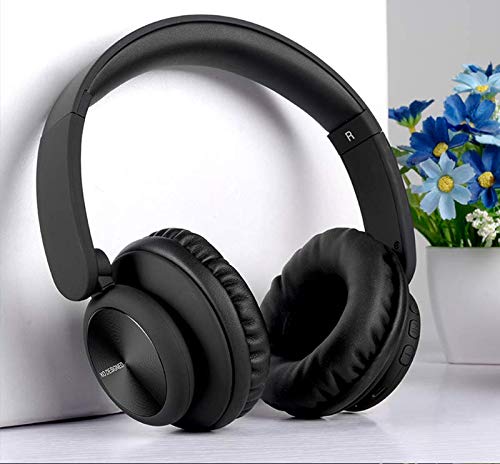
Image: XO B24 Foldable Bluetooth Headphones, showcasing their over-ear design and black color.
Speċifikazzjonijiet
| Karatteristika | Deskrizzjoni |
|---|---|
| Isem tad-Ditta | XO |
| Isem tal-Mudell | B24 |
| Numru tal-Mudell | XO-B24 |
| Kulur | Iswed |
| Fattur tal-Forma tal-Headphone | Fuq il-widna |
| Teknoloġija tal-Konnettività | Bil-fili, Mingħajr fili (Bluetooth) |
| Jack tal-headphone | 3.5 mm Jack |
| Teknoloġija tal-Komunikazzjoni mingħajr Fili | Bluetooth |
| Karatteristiċi Speċjali | Includes Microphone, Foldable Design |
| Mikrofonu | Iva |
| Kanċellazzjoni tal-Ħoss | Nru |
| Tip ta' Kontroll | Volume Control, Touch Control |
| Apparati Kompatibbli | Multi-apparat |
| Batterija Meħtieġa | Iva |
Setup
1. Iċċarġjar tal-Headphones
- Qabbad il-kejbil tal-iċċarġjar USB provdut mal-port tal-iċċarġjar fuq il-headphones.
- Plug the other end of the USB cable into a compatible USB power source (e.g., computer, wall adapter).
- The LED indicator will illuminate during charging and turn off or change color once fully charged.
2. Tqabbil tal-Bluetooth
- Kun żgur li l-headphones huma ċċarġjati kompletament.
- Press and hold the Power button on the headphones until the LED indicator flashes rapidly, indicating pairing mode.
- Fuq l-apparat tiegħek (smartphone, tablet, kompjuter), attiva l-Bluetooth u fittex apparati disponibbli.
- Select "XO B24" from the list of found devices.
- Once paired, the LED indicator will stop flashing and may show a solid light or flash slowly.
3. Konnessjoni bil-Wajers (Mhux Obbligatorja)
- Insert one end of the 3.5mm audio cable into the headphone jack on the XO B24.
- Plug the other end of the 3.5mm audio cable into the audio output jack of your device.
- The headphones will operate in wired mode, conserving battery life.
Istruzzjonijiet Operattivi
Qawwa mixgħul/mitfi
- Qawwa Mixgħul: Agħfas u żomm il-buttuna tal-Power għal madwar 3 sekondi sakemm l-indikatur LED jixgħel.
- Itfi: Agħfas u żomm il-buttuna tal-Power għal madwar 3-5 sekondi sakemm l-indikatur LED jintefa.
Daqq tal-Mużika
- Play/Pawsa: Agħfas il-buttuna Multi-funzjoni (spiss il-buttuna tal-Qawwa) darba.
- Track li jmiss: Press and hold the Volume Up button or a dedicated 'Next' button.
- Track preċedenti: Press and hold the Volume Down button or a dedicated 'Previous' button.
Kontroll tal-Volum
- Żid il-Volum: Agħfas il-buttuna Volum 'il fuq.
- Naqqas il-Volum: Agħfas il-buttuna Volum 'l isfel.
Ġestjoni tas-Sejħiet
- Tweġiba/Tmiem Sejħa: Agħfas il-buttuna b'diversi funzjonijiet darba.
- Irrifjuta Sejħa: Agħfas u żomm il-buttuna Multi-funzjoni għal madwar 2 sekondi.
Mekkaniżmu li jintwew
- To fold the headphones for storage, gently rotate the earcups inwards towards the headband until they are compact.
- To unfold, reverse the process, ensuring the earcups click securely into place.
Manutenzjoni
- Tindif: Uża drapp artab u niexef biex tnaddaf il-headphones. Tużax prodotti tat-tindif jew solventi li joborxu.
- Ħażna: Meta ma tkunx qed tużahom, aħżen il-headphones f'post frisk u niexef, 'il bogħod mix-xemx diretta u minn temperaturi estremi. Uża d-disinn li jintrewa għal ħażna kompatta.
- Kura tal-batterija: Biex ittawwal il-ħajja tal-batterija, evita li tiċċarġja l-headphones għalkollox ta’ spiss. Iċċarġjahom regolarment, anke jekk ma tkunx qed tużahom kontinwament.
- Evita l-umdità: Keep the headphones away from water and excessive humidity.
Issolvi l-problemi
| Problema | Soluzzjoni |
|---|---|
| Il-headphones ma jixegħlux. | Kun żgur li l-headphones huma ċċarġjati kompletament. Qabbadhom ma' sors ta' enerġija u erġa' pprova. |
| Ma tistax tqabbad permezz tal-Bluetooth. | Make sure the headphones are in pairing mode (LED flashing rapidly). Disable and re-enable Bluetooth on your device. Move closer to the headphones. |
| L-ebda ħoss jew volum baxx. | Check the volume levels on both the headphones and your connected device. Ensure the headphones are properly paired or the 3.5mm cable is securely connected. |
| Il-kwalità tal-ħoss hija fqira. | Ensure there are no obstructions between the headphones and your device. Try moving closer to your device. Disconnect and reconnect the Bluetooth connection. |
| Il-mikrofonu mhux qed jaħdem. | Ensure the headphones are properly connected and selected as the audio input device on your system. Check if the microphone is muted on your device. |
Garanzija u Appoġġ
The XO B24 Foldable Bluetooth Headphones come with a standard manufacturer's warranty. Please refer to the warranty card included in your product packaging for specific terms and conditions.
For technical support, troubleshooting assistance, or warranty claims, please contact your retailer or the official XO customer service. Contact information can typically be found on the product packaging or the manufacturer's websit.