
1. Prodott Aktarview
The PNY NVIDIA Quadro P620 is a professional graphics card designed for various demanding professional workflows. It features a 512 CUDA core Pascal GPU and 2GB of ultra-fast GDDR5 GPU memory, enabling the creation and manipulation of complex 2D and 3D models. Its flexible single-slot, low-profile form factor ensures compatibility with a wide range of computer chassis, including those with limited space and power. The card supports up to four 4K displays (4096 x 2160 at 60Hz) with HDR color, providing an expansive visual workspace for detailed creative and analytical tasks.
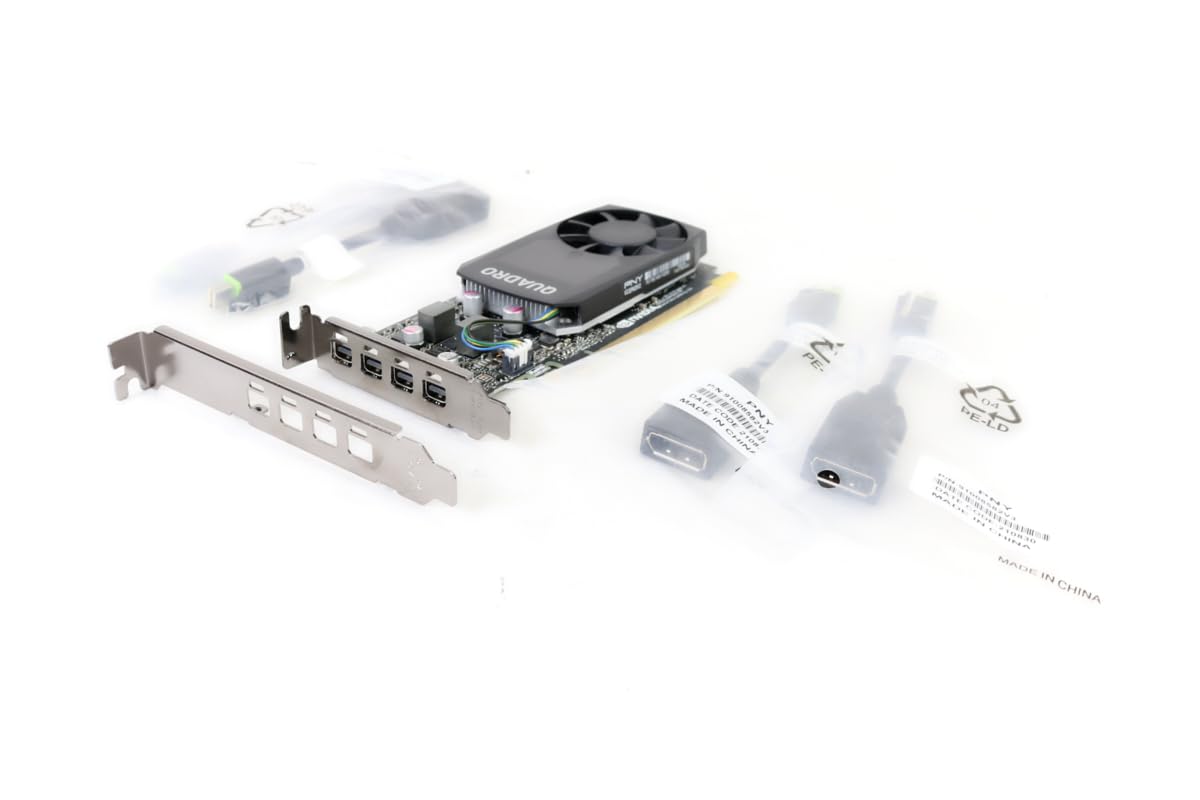
Figure 1.1: PNY Quadro P620 Graphics Card, front view.
2. Setup u Installazzjoni
This section provides instructions for installing your PNY Quadro P620 graphics card into a compatible desktop computer system.
2.1 Rekwiżiti tas-Sistema
- Slott PCI Express x16 disponibbli.
- Compatible power supply (no external power connector required for P620).
- Minimum 2GB system memory recommended.
- Supported operating system (Windows, Linux).
2.2 Installazzjoni tal-Ħardwer
- Mitfi u Skonnettja: Itfi l-kompjuter tiegħek kompletament u skonnettja l-kejbil tal-enerġija mis-sokit tal-ħajt.
- Kaxxa Miftuħa tal-Kompjuter: Neħħi l-pannell tal-ġenb tal-kaxxa tal-kompjuter tiegħek biex taċċessa l-motherboard.
- Sib is-Slott tal-PCIe: Identify an available PCI Express x16 slot on your motherboard. If replacing an existing graphics card, carefully remove it.
- Installa Low-Profile Parentesi (jekk meħtieġ): The PNY Quadro P620 is a low-profile card. If your system requires a full-height bracket, ensure the correct bracket is attached. The card typically ships with both options.
- Daħħal il-Karta tal-Grafika: Align the graphics card with the PCIe x16 slot and press down firmly until it is securely seated. A click may be heard.
- Karta Sikura: Use a screw or retention clip to secure the graphics card to the computer case.
- Qabbad id-Displays: Connect your display cables (Mini DisplayPort) to the graphics card outputs. Adapters may be required for HDMI or DVI.
- Agħlaq il-Kaxxa u Ixgħelha: Replace the computer case side panel, reconnect the power cable, and power on your computer.

Figure 2.1: PNY Quadro P620 graphics card with a low-profile bracket detached, illustrating its compact design.

Figura 2.2: Minn fuq għal isfel view of the PNY Quadro P620 graphics card, showing the fan and heatsink assembly.
2.3 Installazzjoni tas-sewwieq
After hardware installation, you must install the appropriate drivers for your operating system to ensure optimal performance and functionality.
- Niżżel is-Sewwieqa: Żur is-sit uffiċjali tal-PNY jew tal-NVIDIA websit (www.nvidia.com/sewwieqa) and download the latest Quadro drivers for your specific operating system and P620 model.
- Installa Sewwieqa: Run the downloaded driver installer and follow the on-screen prompts. It is recommended to perform a clean installation.
- Erġa' ibda s-Sistema: Erġa' ibda l-kompjuter tiegħek wara li titlesta l-installazzjoni tas-sewwieq.
3. Operazzjoni
The PNY Quadro P620 is designed for professional applications requiring reliable graphics performance and multi-display support.
3.1 Konfigurazzjoni ta' Wiri Multiplu
The card supports up to four displays via its Mini DisplayPort outputs. To configure multiple displays:
- Ensure all displays are connected to the graphics card.
- Access your operating system's display settings (e.g., Windows Display Settings, NVIDIA Control Panel).
- Detect and arrange your displays as desired (extend, duplicate, or single display).
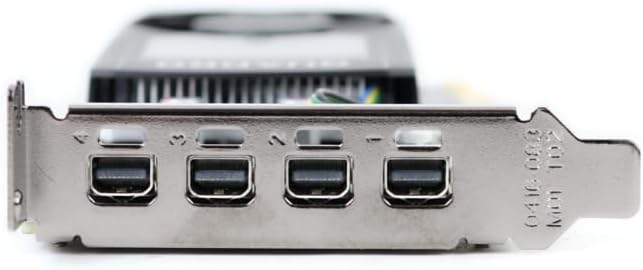
Figura 3.1: Close-up view of the four Mini DisplayPort outputs on the PNY Quadro P620 graphics card.
3.2 Professional Software Compatibility
The Quadro P620 is optimized for professional applications such as CAD (e.g., SolidWorks), 3D modeling, video editing, and other design and engineering software. Ensure your software is updated to leverage the full capabilities of the GPU.
4. Manutenzjoni
Manutenzjoni xierqa tgħin biex tiżgura l-lonġevità u l-prestazzjoni ottimali tal-karta grafika tiegħek.
- Aġġornamenti tas-sewwieq: Regularly check for and install the latest graphics drivers from the NVIDIA website. Driver updates often include performance improvements, bug fixes, and compatibility enhancements.
- Tindif tat-Trab: Periodically clean dust from the graphics card's fan and heatsink using compressed air. Ensure the computer is powered off and unplugged before cleaning. Excessive dust can impede airflow and lead to overheating.
- Fluss tal-Arja tas-Sistema: Ensure your computer case has adequate airflow to prevent heat buildup, which can affect the graphics card's performance and lifespan.
5 Issolvi l-problemi
If you encounter issues with your PNY Quadro P620, refer to the following common troubleshooting steps.
5.1 L-ebda Output tal-Wiri
- Iċċekkja l-Konnessjonijiet: Ensure all display cables are securely connected to both the graphics card and the monitor.
- Karta ta' Replacement: Power off your computer, unplug it, open the case, and carefully reseat the graphics card in its PCIe slot.
- Ivverifika l-Enerġija: Although the P620 does not require external power, ensure your power supply is functioning correctly and providing sufficient power to the motherboard and PCIe slot.
- Test with Another Display/Cable: Try connecting the computer to a different monitor or using a different display cable to rule out external display issues.
5.2 Driver-Related Issues
- Erġa' installa s-sewwieqa: If you experience crashes or graphical glitches, try uninstalling the current drivers and performing a clean installation of the latest drivers from the NVIDIA websit.
- Check for Conflicts: Ensure no other graphics drivers (e.g., integrated graphics) are conflicting with the Quadro drivers. Disable integrated graphics in the BIOS if necessary.
5.3 Kwistjonijiet ta' Prestazzjoni
- Monitora Temperaturi: Use monitoring software to check the GPU temperature. High temperatures can lead to throttling and reduced performance. Ensure proper cooling and clean any dust.
- Riżorsi tas-Sistema: Verify that your system meets the recommended requirements for the applications you are running. Insufficient RAM or CPU can bottleneck GPU performance.
- Settings tal-Applikazzjoni: Adjust graphics settings within your professional applications to balance performance and visual quality.
6. Speċifikazzjonijiet Tekniċi
Below are the key technical specifications for the PNY Quadro P620 graphics card (Model: VCQP620V2-PB).
| Karatteristika | Speċifikazzjoni |
|---|---|
| Koproċessur tal-Grafika | NVIDIA Quadro P620 |
| Arkitettura GPU | Pascal |
| CUDA Cores | 512 |
| Daqs tar-RAM tal-Grafika | 2 GB |
| Tip ta' RAM tal-Grafika | GDDR5 |
| Interface tal-memorja | 128-bit |
| Faxxa tal-Memorja | 80 GB/s |
| Veloċità tal-Arloġġ tal-GPU | 2 GHz (Boost) |
| Veloċità tal-Arloġġ tal-Memorja | 1 GHz |
| Interface tal-Output tal-Vidjo | 4x Mini DisplayPort 1.4 |
| Riżoluzzjoni Massima tal-Wiri | 4x 4096x2160 @ 60Hz or 4x 5120x2880 @ 60Hz (with DisplayPort 1.4) |
| Fattur tal-Formola | Slot Uniku, Baxx Profile |
| Apparati Kompatibbli | PC desktop |
| Numru ta 'Fannijiet | 1 |
| Piż tal-oġġett | 4 Gramma (madwar) |
| Isem tal-Mudell | VCQP620V2-PB |
| UPC | 751492633312 |
7. Informazzjoni dwar Garanzija
PNY products typically come with a limited warranty. The specific terms and duration of the warranty may vary by region and product. Please retain your proof of purchase.
For detailed warranty information, including coverage, limitations, and how to make a claim, please refer to the official PNY website or the warranty documentation included with your product at the time of purchase.
8. Appoġġ għall-Klijent
For technical assistance, driver downloads, product registration, and other support inquiries, please contact PNY customer service or visit their official websit.
- PNY Official Websit: www.pny.com
- Telefon ta' Appoġġ Tekniku: 1-800-230-0130 (Amerika ta' Fuq)
- Downloads tas-Sewwieqa: Żur www.nvidia.com/sewwieqa for the latest NVIDIA Quadro drivers.

Figure 8.1: Retail packaging for the PNY Quadro P620, displaying technical support contact details.