
atolla CH-204U3-K
Atolla 4-Port USB 3.0 Hub User Manual
Model: CH-204U3-K
Introduzzjoni
Thank you for choosing the Atolla 4-Port USB 3.0 Hub. This device expands a single USB 3.0 port into four additional USB 3.0 data ports, offering high-speed data transfer and a dedicated smart charging port. Each data port features an individual on/off switch for convenient control. This manual provides detailed instructions for setup, operation, and maintenance to ensure optimal performance of your hub.
Karatteristiċi Ewlenin
- SuperSpeed Syncing: Four USB 3.0 data ports capable of syncing data at speeds up to 5Gbps.
- Port tal-Iċċarġjar Intelliġenti: One dedicated charging port providing up to 2.4 Amps for charging devices like iPads and iPhones.
- Swiċċijiet Individwali Mixgħul/Mitfi: Each USB data port is equipped with an illuminated individual on-off switch for independent control.
- Disinn robust: Compact case with a sleek glossy UV finish and a durable 65 cm (25.59 inch) cord.
- Kompatibilità Wiesgħa: Plug and play functionality with Windows, Mac OS X, and Linux, requiring no drivers. Supports hot swapping.
- Adapter tal-Enerġija Esterni: Includes a 5V/3A AC power adapter for stable power delivery to connected devices.
Kontenut tal-Pakkett
- Atolla 4-Port USB 3.0 Hub
- 5V/3A AC Power Adapter
- Gwida ta' Setup Rapidu (dan il-manwal)
Setup Istruzzjonijiet
- Qabbad l-Adapter tal-Enerġija: Plug the included 5V/3A AC power adapter into the DC 5V input port on the Atolla USB 3.0 Hub. Then, plug the power adapter into a wall outlet. This ensures stable power for all connected devices, especially power-hungry ones like external hard drives.
- Qabbad mal-Kompjuter Tiegħek: Connect the USB 3.0 cable from the Atolla USB 3.0 Hub to an available USB 3.0 port on your computer (laptop or desktop). The hub is plug-and-play, so no drivers are required.
- Qabbad it-Tagħmir Tiegħek: You can now connect your USB devices (e.g., flash drives, external hard drives, keyboards, mice, printers) to the four USB 3.0 data ports on the hub. Use the individual on/off switches to activate or deactivate each port as needed.

Image: The Atolla 4-Port USB 3.0 Hub, showing the hub itself, the included 5V/3A AC power adapter, and the USB 3.0 cable for connecting to a computer.
Tħaddim taċ-Ċentru
Using Data Ports
The four USB 3.0 data ports allow you to connect multiple USB devices to your computer simultaneously. These ports support SuperSpeed data transfer rates of up to 5Gbps, making them ideal for transferring large files malajr.

Image: A diagram illustrating the four USB 3.0 data ports and the dedicated smart charging port on the Atolla USB hub, highlighting their functions and data transfer speeds.
Individual On/Off Switches
Each of the four data ports has an independent on/off switch. This feature allows you to power on or off individual devices connected to the hub without unplugging them. This is useful for conserving power or managing device connections.
- To Turn On a Port: Tap the corresponding button next to the port. The blue LED indicator will illuminate.
- To Turn Off a Port: Press and hold the corresponding button for approximately 2 seconds. The blue LED indicator will turn off.

Image: A hand demonstrating the use of the individual on/off switches on the Atolla USB hub, with text indicating how to turn ports on and off.
Port tal-Iċċarġjar intelliġenti
The dedicated smart charging port (marked with a lightning bolt icon) provides up to 2.4 Amps of power, suitable for charging smartphones, tablets, and other USB-powered devices. This port is designed for charging and does not support data transfer.

Image: A visual representation of a USB cable plugged into the smart charging port of the Atolla USB hub, with a lightning effect indicating power delivery.
Kompatibilità
The Atolla 4-Port USB 3.0 Hub offers broad compatibility with various operating systems and devices:
- Sistemi Operattivi: Compatible with Windows 10, 8.1, 8, 7, Vista, XP, Mac OS X (10.x or above), and Linux.
- Apparati: Supports a wide range of USB devices including keyboards, mice, PCs, laptops, headsets, U-disks (USB flash drives), external hard drives, and game machines.
- Plug and Play: Fully plug and play, requiring no additional drivers for installation.
- Skambju sħun: Supports hot swapping, allowing you to connect or disconnect devices while the hub is powered on without needing to restart your computer.

Image: A graphic illustrating the universal compatibility of the Atolla USB hub with icons representing various devices such as keyboards, PCs, mice, headsets, U-disks, and game machines.
Speċifikazzjonijiet
| Attribut | Dettall |
|---|---|
| Dimensjonijiet tal-Prodott | 4.25 x 1.69 x 0.91 pulzieri (108 x 43 x 23 mm) |
| Piż tal-oġġett | 6.8 uqija |
| Numru tal-Mudell | CH-204U3-K |
| Brand | atolla |
| Kulur | Iswed |
| Interface tal-Ħardwer | USB, USB 3.0 |
| Adapter tal-Enerġija | 5V/3A AC Power Adapter |
| Veloċità tat-Trasferiment tad-Data | Sa 5Gbps (USB 3.0) |
| Ħruġ tal-Port tal-Iċċarġjar | Sa 2.4 Amps |
| Pajjiż ta' Oriġini | Iċ-Ċina |
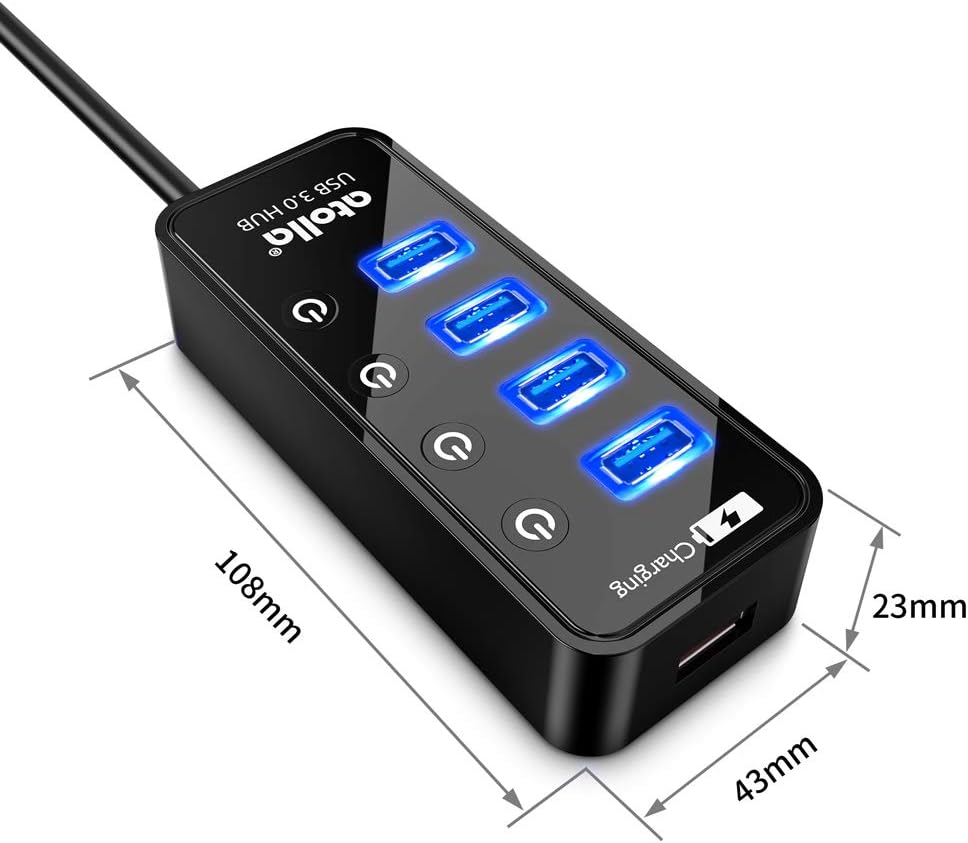
Image: A diagram showing the physical dimensions (length, width, height) of the Atolla 4-Port USB 3.0 Hub in millimeters.
Issolvi l-problemi
- Apparat Mhux Rikonoxxut:
- Ensure the hub's USB cable is securely connected to a USB port on your computer.
- Verify that the power adapter is properly connected to the hub and a working power outlet.
- Ipprova qabbad l-apparat direttament mal-port USB tal-kompjuter tiegħek biex tikkonferma li l-apparat innifsu qed jaħdem.
- If using an individual switch, ensure the port is turned on (blue LED illuminated).
- Ipprova port USB differenti fuq il-kompjuter tiegħek.
- Veloċità baxxa tat-Trasferiment tad-Data:
- Ensure both the hub and your connected device are USB 3.0 compatible for optimal speeds. Connecting a USB 2.0 device to a USB 3.0 port will result in USB 2.0 speeds.
- Confirm the hub is connected to a USB 3.0 port on your computer (usually blue colored).
- Ensure the power adapter is connected and providing sufficient power, especially for external hard drives.
- Charging Not Working or Slow:
- Ensure the device is connected to the dedicated smart charging port (lightning bolt icon).
- Verify the power adapter is connected and working.
- Some devices may require higher charging currents than the hub can provide, or may charge slower than with their original wall charger.
- Konnessjoni intermittenti:
- Iċċekkja l-konnessjonijiet kollha tal-kejbil għal laxkezza.
- Kun żgur li l-adapter tal-enerġija huwa konness sew.
- Avoid connecting too many power-hungry devices simultaneously without sufficient external power.
Manutenzjoni
To ensure the longevity and optimal performance of your Atolla USB 3.0 Hub, follow these simple maintenance guidelines:
- Tindif: Use a soft, dry cloth to wipe the surface of the hub. Avoid using liquid cleaners or abrasive materials, as they may damage the finish or internal components.
- Ħażna: Meta ma tkunx qed tużah għal perjodi twal, aħżen il-hub f'post frisk u niexef 'il bogħod mix-xemx diretta u minn temperaturi estremi.
- Immaniġġjar: Handle the hub with care. Avoid dropping it or subjecting it to strong impacts, which could damage internal circuitry.
- Ventilazzjoni: Ensure the hub is placed in an area with adequate ventilation to prevent overheating, especially when multiple devices are connected and active.
Garanzija u Appoġġ
The Atolla 4-Port USB 3.0 Hub is guaranteed by an atolla 18-Month WarrantyDin il-garanzija tkopri difetti fil-manifattura u tiżgura li l-prodott tiegħek jaħdem kif mistenni taħt użu normali.
For technical support, warranty claims, or any questions regarding your Atolla product, please contact Atolla customer service. You can typically find contact information on the Atolla official webis-sit jew permezz tal-bejjiegħ bl-imnut minn fejn xtrajt il-prodott.
Please have your model number (CH-204U3-K) and purchase details ready when contacting support.
Ask a question about this manual
Ask about setup, troubleshooting, compatibility, parts, safety, or missing instructions. Manuals+ will review the question and use this page’s manual context to help answer it.