
1. Introduzzjoni u Fuqview
Thank you for choosing the Comix S3508D Desktop Micro-Cut Paper Shredder. This manual provides essential information for the safe and efficient operation, maintenance, and troubleshooting of your new shredder. Please read it thoroughly before use and retain it for future reference.
The Comix S3508D is designed for personal and home office use, offering secure destruction of sensitive documents, CDs/DVDs, and credit cards with its micro-cut technology. Key features include:
- Continuous shredding for up to 30 minutes.
- Separate waste bin design for CD/DVD fragments, allowing for easy waste separation.
- Energy-saving technology that automatically shuts off the device after 30 minutes of inactivity.
2. Istruzzjonijiet Importanti dwar is-Sigurtà
Biex tnaqqas ir-riskju ta' korriment jew ħsara, jekk jogħġbok osserva l-prekawzjonijiet ta' sigurtà li ġejjin:
- Żomm fejn ma jintlaħaqx mit-tfal u l-annimali domestiċi. The shredder has sharp blades and moving parts.
- Avoid loose clothing, jewelry, and long hair near the paper entry slot.
- Do not insert fingers or hands fis-slot tad-dħul tal-karta.
- Do not spray any flammable products onto the shredder or use it near flammable materials.
- Unplug the shredder before moving, cleaning, or emptying the waste bin.
- Do not shred metal objects, wet paper, or adhesive labels as this can damage the blades.
- Ħaddem it-tqattigħ fuq wiċċ ċatt u stabbli.
- Do not overload the shredder. Refer to the maximum sheet capacity in the specifications.
- Do not open the shredder housing. M'hemm l-ebda partijiet li jistgħu jintużaw mill-utent ġewwa.
3. Komponenti tal-Prodott
Familiarize yourself with the main parts of your Comix S3508D shredder:
- Ras tat-tqattigħ: Contains the cutting mechanism and control panel.
- Slott tad-Dħul tal-Karta: For inserting documents.
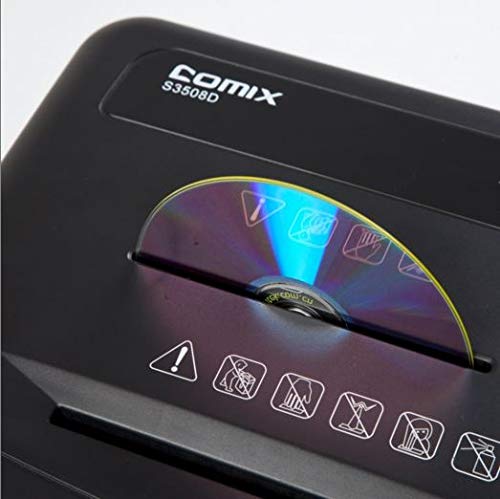
- CD/DVD Entry Slot: A separate slot for optical media.
- Swiċċ tal-Kontroll: For selecting ON/OFF, Auto, Forward, and Reverse modes.
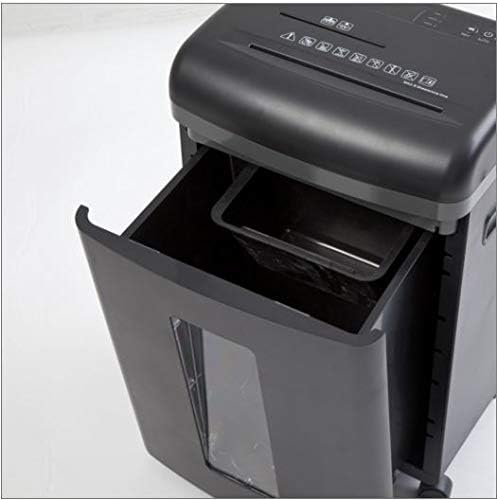
- Bin tal-Iskart: Collects shredded paper and media.
- CD/DVD Waste Compartment: A smaller, separate compartment within the main bin for shredded optical media.
- Xandara: Roti għal mobilità faċli.
4. Setup
- Ippakkja: Neħħi l-imballaġġ bir-reqqa tal-magna tat-tqattigħ. Żomm l-imballaġġ għal trasport jew ħażna fil-futur.
- Pożizzjoni: Place the shredder on a level and stable surface. Ensure there is enough space around the unit for proper ventilation and access to the power outlet.
- Qabbad l-Enerġija: Ipplaggja l-korda tad-dawl fi żbokk elettriku standard.
- Iċċekkja l-Kaxxa: Kun żgur li l-kontenitur tal-iskart ikun imdaħħal sew fil-body tax-shredder. Ix-shredder mhux se jaħdem jekk il-kontenitur ma jkunx imqiegħed sew.
5. Istruzzjonijiet Operattivi
Control Switch Functions:
- MITFI: Ix-shredder huwa mitfi.
- AUTO: The shredder is in standby mode. It will automatically start when paper is inserted and stop when shredding is complete. This is the recommended setting for normal operation.
- QUDDIEM: Manually runs the shredder forward. Use this for continuous shredding if needed, but be mindful of the duty cycle.
- REVERSI: Manually runs the shredder in reverse. Use this to clear paper jams.
Tqattigħ ta' Dokumenti:
- Issettja s-swiċċ tal-kontroll għal AUTO.
- Insert up to 8 sheets of A4 (70gsm) paper straight into the paper entry slot. The shredder will automatically start and stop.
- Teċċedix il-kapaċità massima tal-folji biex tevita l-imblukkar u l-ħsara.
Shredding CDs/DVDs and Credit Cards:
- Issettja s-swiċċ tal-kontroll għal AUTO.
- Insert one CD/DVD or credit card at a time into the dedicated CD/DVD entry slot.
- The shredded media will fall into the separate CD/DVD waste compartment within the main bin.
Ċiklu ta' ħidma:
The Comix S3508D is designed for a continuous run time of 30 minutes ON, followed by a 40 minuti OFF cool-down period. Exceeding the duty cycle may cause the shredder to overheat and activate its thermal protection, temporarily shutting down the unit. Allow it to cool down before resuming operation.
6. Manutenzjoni
It-tbattil tal-iskartar:
- Always set the control switch to OFF and unplug the shredder before emptying the bin.
- Iġbed il-kontenitur tal-iskart minn quddiem it-tqattigħ tal-karti.
- Dispose of the shredded waste. Remember to empty the separate CD/DVD compartment as well.
- Żerżaq il-kontenitur tal-iskart lura f'postu sakemm tikklikkja sew.
Żejtjar tat-tqattigħ:
Regular oiling is recommended to maintain optimal performance and extend the life of your shredder, especially after emptying the waste bin 2-3 times or after heavy use. Use shredder oil (vegetable oil is not recommended).
- Issettja s-swiċċ tal-kontroll għal OFF.
- Applika linja rqiqa ta’ żejt tat-tqattigħ tal-karti tul is-slott tad-dħul tal-karta.
- Issettja s-swiċċ tal-kontroll għal QUDDIEM for 2-3 seconds to distribute the oil, then switch back to OFF.
Tindif:
Imsaħ il-barra tax-shredder b'ċarruta ratba u niexfa. Tużax prodotti tat-tindif jew solventi li joborxu.
7 Issolvi l-problemi
| Problema | Kawża Possibbli | Soluzzjoni |
|---|---|---|
| It-tqattigħ ma jaħdimx. | 1. Korda tal-enerġija mhux imdaħħla.
2. Waste bin not properly inserted. 3. Sħana żejda. |
1. Ensure power cord is securely plugged into an outlet.
2. Push the waste bin firmly into place. 3. Allow the shredder to cool down for 40 minutes. |
| Ġamm tal-karta. | 1. Too much paper inserted.
2. Paper inserted incorrectly. |
1. Set switch to REVERS to clear paper. Remove excess paper.
2. If jam persists, unplug, carefully remove paper, then plug in and try REVERS mill-ġdid. |
| Shredder runs continuously in AUTO mode. | Sensor is blocked or dirty. | Unplug the shredder and clean the paper entry sensor (usually a small clear window) with a soft cloth. |
8. Speċifikazzjonijiet
| Karatteristika | Dettall |
|---|---|
| Brand | Komix |
| Mudell | S3508D |
| Tip imqatta | Mikro-qatgħa |
| Daqs tat-tqattigħ | 2 x 12 mm |
| Standard Sheet Capacity (70gsm) | 8 folja |
| CD/DVD/Card Capacity | 1 kull darba |
| Wisa' tad-Dħul | 220 mm |
| Veloċità Shred | 2.3 meters/minute |
| Iċ-Ċiklu tax-Xogħol | 30 minuti FUQ / 40 minuta FUQ |
| Karatteristika Speċjali | Mod ta 'Iffrankar tal-Enerġija |
| Piż tal-oġġett | 2.2 liri |
| ASIN | B083XFNHQH |
9. Garanzija u Appoġġ
Comix products are manufactured to high-quality standards. For warranty information, please refer to the warranty card included with your purchase or contact your retailer. For technical support or service inquiries, please contact Comix customer service through the contact information provided on the official Comix webis-sit jew id-dokumentazzjoni tax-xiri tiegħek.