
1. Introduzzjoni
This user manual provides detailed instructions for the operation and maintenance of your Lenovo Tab M10 TB-X605L Tablet. Please read this manual thoroughly before using your device to ensure proper functionality and to prevent damage. Keep this manual for future reference.
2. Kontenut tal-Pakkett
Ivverifika li l-pakkett tiegħek fih l-oġġetti li ġejjin:
- Lenovo Tab M10 TB-X605L Tablet
- Cable USB
- Adapter tal-Enerġija
- Gwida Quick Start
- Karta ta' Garanzija
If any items are missing or damaged, please contact your retailer or Lenovo customer support.
3. Layout tal-Apparat
Familiarize yourself with the physical features and buttons of your tablet.

Figura 3.1: Quddiem View - This image displays the front of the Lenovo Tab M10 TB-X605L tablet, featuring its 10.1-inch display. The front camera is visible at the top center, and the screen shows a digital clock and date, along with user profile icons at the bottom.
- Kamera ta' quddiem: Used for video calls and selfies.
- Wiri: 10.1-inch IPS FHD touchscreen.
- Mikrofonu: Għall-input tal-vuċi.
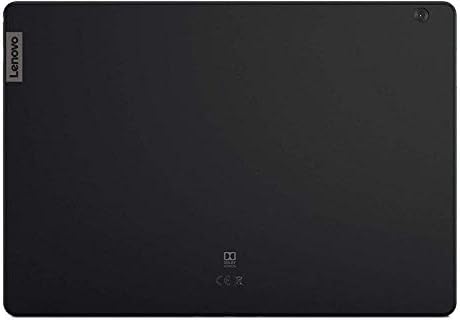
Figura 3.2: Lura View - This image shows the rear of the Lenovo Tab M10 TB-X605L tablet. The Lenovo logo is positioned on the top left, and the rear camera is located in the top right corner. The back panel has a matte black finish.
- Kamera ta' wara: Għat-teħid ta' ritratti u vidjows.
- Kelliem: Għall-output tal-awdjo.
- Buttuna tal-Qawwa: Biex tixgħel/titfi l-apparat jew tpoġġih fil-modalità rqad.
- Buttuni tal-Volum: Biex taġġusta l-volum.
- Port USB-C: Għall-iċċarġjar u t-trasferiment tad-dejta.
- Slott tal-Karta SIM/MicroSD: For inserting a Nano SIM card and a microSD card.
4. Setup
4.1. Iċċarġjar tal-batterija
Before first use, fully charge the tablet battery. Connect the USB cable to the tablet's USB-C port and the power adapter, then plug the adapter into a power outlet. The charging indicator will show the charging status.
4.2. Installazzjoni ta' SIM Cards u MicroSD Cards
The tablet supports one Nano SIM card for 4G LTE connectivity and a microSD card for expanded storage.
- Locate the SIM/MicroSD card slot on the side of the tablet.
- Uża l-għodda tal-ejector tas-SIM provduta biex tiftaħ it-trej.
- Carefully place the Nano SIM card and/or microSD card into the tray with the gold contacts facing down.
- Imbotta t-trej bil-mod lura fl-islott sakemm tikklikkja f'postu.
4.3. L-Ewwel Tixgħel u l-Konfigurazzjoni
- Agħfas u żomm il-buttuna Power sakemm jidher il-logo Lenovo.
- Segwi l-istruzzjonijiet fuq l-iskrin biex tlesti s-setup inizjali, inkluż l-għażla tal-lingwa, il-konnessjoni Wi-Fi, is-setup tal-kont Google, u s-settings tas-sigurtà.
5. Istruzzjonijiet Operattivi
5.1. Modalità Mixgħul/Mitfi u Modalità Rieqed
- Qawwa Mixgħul: Press and hold the Power button until the device vibrates and the screen lights up.
- Itfi: Agħfas u żomm il-buttuna tal-Enerġija, imbagħad agħżel "Itfi" mill-għażliet.
- Modalità Sleep: Briefly press the Power button to turn the screen off and enter sleep mode. Press it again to wake the device.
5.2. Basic Gestures
- Tektek: Agħżel oġġett jew iftaħ applikazzjoni.
- Mess u Żomm: Aċċessa l-menus kuntestwali jew iċċaqlaq l-oġġetti.
- Swipe: Innaviga permezz tal-iskrins jew skrollja l-kontenut.
- Oqros: Iżżumja 'l ġewwa jew 'il barra fuq l-immaġnijiet u web paġni.
5.3. Konnettività tan-Netwerk
- Wi-Fi: Mur fuq Settings > Netwerk u internet > Wi-Fi biex tikkonnettja man-netwerks Wi-Fi disponibbli.
- 4G LTE: Ensure a Nano SIM card is installed. Go to Settings > Netwerk u internet > Netwerk mobbli to manage mobile data settings.
- Bluetooth: Mur fuq Settings > Apparati konnessi > Bluetooth biex tqabbad ma' apparati Bluetooth bħal headphones jew speakers.
5.4. Użu tal-kamera
Open the Camera application to take photos or record videos. Tap the screen to focus, and press the shutter button to capture. Switch between front and rear cameras as needed.
5.5. Ġestjoni tal-Applikazzjonijiet
Install new applications from the Google Play Store. To uninstall an app, touch and hold its icon on the home screen or app drawer, then drag it to the "Uninstall" option, or go to Settings > Apps u notifiki > Ara l-apps kollha.
6. Manutenzjoni
6.1. Tindif tat-Tablet
Use a soft, lint-free cloth to clean the screen and body of the tablet. Do not use abrasive cleaners, alcohol, or solvents, as these can damage the surfaces. Avoid getting moisture into openings.
6.2. Aġġornamenti tas-Software
Iċċekkja u installa regolarment aġġornamenti tas-softwer biex tiżgura prestazzjoni u sigurtà ottimali. Mur fuq Settings > Sistema > Aġġornament tas-sistema.
6.3. Kura tal-batterija
- Evita li tesponi l-pillola għal temperaturi estremi.
- Tħallix il-batterija tiċċarġja kompletament ta' spiss.
- Uża biss il-ċarġer oriġinali jew dak kompatibbli ċċertifikat.
7 Issolvi l-problemi
Din it-taqsima tindirizza kwistjonijiet komuni li tista’ tiltaqa’ magħhom bit-tablet tiegħek.
7.1. It-Tablet Ma Jixgħelx
- Kun żgur li l-batterija hija ċċarġjata. Qabbad il-ċarġer u stenna ftit minuti qabel ma tipprova tixgħelha.
- Agħfas u żomm il-buttuna tal-Qawwa għal mill-inqas 10-15-il sekonda biex twettaq restart furzat.
7.2. Screen Is Unresponsive
- Erġa' ibda t-tablet billi żżomm il-buttuna tal-Power.
- Kun żgur li l-iskrin ikun nadif u ħieles minn debris jew umdità.
7.3. Ma nistax nikkonnettja mal-Wi-Fi
- Kun żgur li l-Wi-Fi huwa attivat fis-Settings.
- Erġa' ibda r-router tal-Wi-Fi tiegħek.
- Forget the network in tablet settings and try reconnecting.
7.4. Poor 4G LTE Signal
- Check that the Nano SIM card is correctly inserted.
- Ensure mobile data is enabled in Settings.
- Mexxi lejn żona b'kopertura tan-netwerk aħjar.
8. Speċifikazzjonijiet
| Mudell | Lenovo Tab M10 TB-X605L |
| Sistema Operattiva | Android |
| Wiri | 10.1-inch IPS FHD (1920 x 1200) Touchscreen |
| Proċessur | Octa Core, 1.8 GHz (MediaTek) |
| RAM | 3 GB |
| Ħażna | 32 GB (espandibbli permezz ta' microSD) |
| Kamera ta' wara | 5.0 MP |
| Kamera ta' Quddiem | 2.0 MP |
| Netwerk | 4G LTE (1 Nano SIM supported) |
| Konnettività | Wi-Fi (802.11g), Bluetooth, Cellular |
| Kapaċità tal-batterija | 4850 mAh |
| Dimensjonijiet | 26.8 x 18.6 x 7.2 ċm (Pakkett) |
| Piż | 1.1 kg (Pakkett) |
9. Informazzjoni dwar is-Sigurtà
- Tippruvax tiżżarma, isewwi jew timmodifika l-apparat lilek innifsek.
- Keep the device away from extreme heat, direct sunlight, and liquids.
- Uża biss aċċessorji u chargers approvati.
- Armi l-apparat u l-batterija tiegħu b'mod responsabbli skont ir-regolamenti lokali.
- Avoid using the device in environments that require full attention, such as while driving.
10. Garanzija u Appoġġ
Your Lenovo Tab M10 TB-X605L Tablet is covered by a limited warranty. Please refer to the warranty card included in your package for detailed terms and conditions. For technical support, service, or further assistance, please visit the official Lenovo support websit jew ikkuntattja lis-servizz tal-konsumatur tagħhom.
Official Lenovo Support: support.lenovo.com