
1. Introduzzjoni
The WAVLINK 8-Port Fast Ethernet Switch is designed to expand your network connectivity with ease. It features 8 RJ45 ports supporting 10/100 Mbps auto-negotiation and Auto-MDI/MDIX, eliminating the need for crossover cables. This plug-and-play device is ideal for extending network connections in various environments, from home offices to conference rooms, providing a reliable and efficient solution for your networking needs. It incorporates Green IT technology for energy saving.
2. Kontenut tal-Pakkett
Ivverifika li l-pakkett tiegħek fih l-oġġetti li ġejjin:
- WAVLINK 8-Port 10/100 Mbps Fast Ethernet Switch (Model RC-N081M2-EU)
- Adapter tal-Enerġija
- Manwal għall-Utent
3. Karatteristiċi tal-prodott
- 8 RJ45 10/100 Mbps ports with auto-negotiation and Auto-MDI/MDIX.
- Green IT technology for up to 75% energy savings.
- IEEE802.3x flow control ensures reliable data transfer.
- Durable ABS plastic housing for desktop mounting.
- Plug and Play: No configuration or software required.
- Layer 2 switch functions including IGMP Snooping, Port Mirroring, and Spanning Tree.
4. Hardware Matulview
The WAVLINK Fast Ethernet Switch features a compact design with essential ports and indicators for easy monitoring and connectivity.
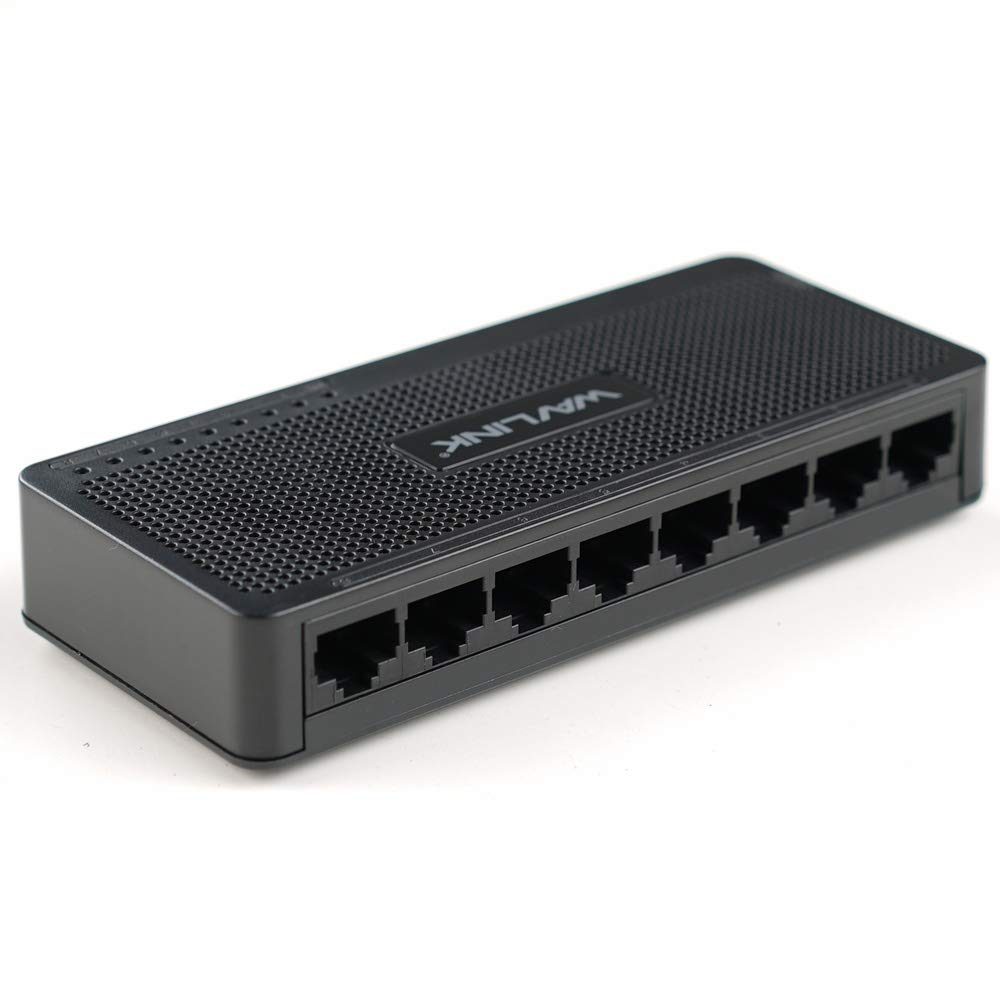
Figura 4.1: Fuq view of the WAVLINK 8-Port Fast Ethernet Switch, showing the brand logo and ventilation holes.
Front Panel
The front panel includes the 8 RJ45 Ethernet ports and LED indicators for status monitoring.

Figura 4.2: Quddiem view of the switch, displaying the eight RJ45 Ethernet ports.
- Portijiet RJ45 (1-8): Connect your network devices (computers, printers, gaming consoles, etc.) using standard Ethernet cables.
- Indikaturi LED: Each port has an associated LED that indicates connection status and activity.
Panel ta' wara
Il-pannell ta' wara tipikament ikun fih il-port tad-dħul tal-enerġija.

Figura 4.3: Ġenb view of the switch, illustrating its compact dimensions (13cm x 5.5cm x 2.1cm) and the power input port.
- Input ta' Enerġija: Qabbad l-adapter tal-enerġija pprovdut hawn.
5. Gwida ta' Setup
The WAVLINK Fast Ethernet Switch is designed for simple plug-and-play installation. No complex configuration is required.
5.1 Konnessjoni tas-Swiċċ
- Pjazzament: Choose a stable, flat surface for the switch, such as a desktop. Ensure adequate ventilation around the device.
- Qabbad l-Enerġija: Plug the provided power adapter into the switch's power input port, then plug the other end into a standard electrical outlet. The power LED on the switch should illuminate.
- Qabbad mar-Router/Modem: Use an Ethernet cable to connect one of the switch's RJ45 ports to a LAN port on your router or modem.
- Qabbad l-Apparati tan-Netwerk: Connect your computers, printers, network-attached storage (NAS), gaming consoles, or other network devices to the remaining RJ45 ports on the switch using Ethernet cables.

Figure 5.1: Connection diagram illustrating how the switch integrates into a network, connecting to a router and multiple end devices like computers, printers, and gaming consoles.

Figure 5.2: Visual representation of the plug-and-play setup, showing Ethernet cables ready for connection to the switch's ports.
Once all connections are made, the switch will automatically detect and configure the connected devices. The corresponding port LEDs will light up to indicate an active connection.
6. Tħaddim tas-Swiċċ
The WAVLINK Fast Ethernet Switch operates automatically once powered on and connected. It functions as a central connection point for your wired network devices.
- Trasferiment tad-Data: The switch intelligently forwards data packets between connected devices at 10/100 Mbps speeds.
- Auto-MDI/MDIX: This feature automatically detects the type of Ethernet cable (straight-through or crossover) and adjusts accordingly, simplifying connections.
- Indikaturi LED:
- Aħdar Solidu: Indicates a stable link connection.
- Aħdar li jteptep: Indicates data activity on the port.
- Mitfi: No device connected or device is powered off.

Figure 6.1: The Ethernet switch acting as a splitter, providing additional wired connections for multiple devices such as laptops, gaming consoles, and printers.
7. Manutenzjoni
To ensure optimal performance and longevity of your WAVLINK Fast Ethernet Switch, follow these simple maintenance guidelines:
- Żomm Nadif: Regularly wipe the exterior of the switch with a soft, dry cloth. Avoid using liquid cleaners or aerosols.
- Ventilazzjoni: Ensure that the ventilation holes are not blocked to prevent overheating.
- Itfi l-Enerġija b'Mod Sikur: If you need to power off the device, disconnect the power adapter from the electrical outlet.
- Kundizzjonijiet Ambjentali: Operate the switch within the recommended temperature range of 0°C to 40°C (32°F to 104°F). Avoid extreme humidity.
8 Issolvi l-problemi
If you encounter issues with your WAVLINK Fast Ethernet Switch, refer to the following common problems and solutions:
8.1 Ebda Qawwa
- Kun żgur li l-adapter tal-enerġija huwa konness sew kemm mas-swiċċ kif ukoll ma' sokit elettriku li jaħdem.
- Ivverifika li s-sokit tal-enerġija qed jaħdem billi tqabbad apparat ieħor.
8.2 No Link/Activity LED
- Iċċekkja li l-kejbil Ethernet huwa konness sew kemm mal-port tas-swiċċ kif ukoll mal-apparat tan-netwerk.
- Ipprova kejbil Ethernet differenti biex teskludi kejbil difettuż.
- Kun żgur li l-apparat tan-netwerk konness ikun mixgħul u qed jaħdem sew.
- Ipprova qabbad l-apparat ma 'port differenti fuq is-swiċċ.
8.3 Veloċità baxxa tan-Netwerk
- Ensure all connected devices and cables support 10/100 Mbps speeds.
- Iċċekkja għal traffiku eċċessiv tan-netwerk jew applikazzjonijiet li jużaw ħafna bandwidth u li jaħdmu fuq apparati konnessi.
- Verify that your router/modem is providing adequate internet speed.
9. Speċifikazzjonijiet
| Karatteristika | Deskrizzjoni |
|---|---|
| Brand | WAVLINK |
| Numru tal-Mudell | RC-N081M2-EU |
| Numru ta' Portijiet | 8 |
| Tip ta 'port | RJ45 |
| Rata ta' Trasferiment tad-Data | 10/100 Mbps (Ethernet veloċi) |
| Awto-Negozjar | Appoġġjati |
| Awto-MDI/MDIX | Appoġġjati |
| Kontroll tal-Fluss | IEEE802.3x |
| Materjal tad-Djar | Plastic ABS |
| Installazzjoni | Desktop |
| Temperatura operattiva | 0°C ~ 40°C (32°F ~ 104°F) |
| Dimensjonijiet (Approx.) | 13 ċm x 5.5 ċm x 2.1 ċm (5.1 pulzieri x 2.2 pulzieri x 0.8 pulzieri) |
10. Rekwiżiti tas-Sistema
The WAVLINK Fast Ethernet Switch is compatible with any operating system that supports standard Ethernet connectivity. No specific drivers are required for the switch itself.
- Microsoft Windows (10/8/2012/7/2008/Vista/2003/XP/2000/Me/NT/98/95/3.11)
- macOS
- NetWare
- UNIX
- Linux
11. Garanzija u Appoġġ
WAVLINK products are designed for reliability and performance. For warranty information and technical support, please refer to the warranty card included with your product or visit the official WAVLINK websit. Żomm l-irċevuta tax-xiri tiegħek għal pretensjonijiet ta' garanzija.
For further assistance, you may contact WAVLINK customer support through their official channels.