
Andoer HDV-201LM
Andoer HDV-201LM 1080p Digital Video Camera User Manual
Model: HDV-201LM
1. Introduzzjoni
This manual provides detailed instructions for the safe and effective use of your Andoer HDV-201LM Digital Video Camera. Please read this manual thoroughly before operating the device and retain it for future reference.
The Andoer HDV-201LM is a 1080p Full HD digital video camera featuring a 5-megapixel CMOS sensor, capable of capturing video at 1920x1080p at 30 frames per second and still images up to 24 megapixels (interpolated). It includes a 16X digital zoom, a 3.0-inch TFT-LCD screen with 270-degree rotation, and supports external accessories via a hot shoe mount.
2. Kontenut tal-Pakkett
Iċċekkja li l-oġġetti kollha elenkati hawn taħt huma inklużi fil-pakkett tiegħek. Jekk xi oġġetti huma neqsin jew bil-ħsara, jekk jogħġbok ikkuntattja lill-bejjiegħ tiegħek.
- 1 x Andoer HDV-201LM Digital Video Camera
- 1 x Camera Bag
- 2 x Rechargeable 3.7V 800mAh Batteries (one pre-installed)
- 1 x USB Cable
- Kejbil 1 x AV
- 1 x Kontroll mill-bogħod
- 1 x Camera User Manual (English)
- 1 x 0.39X Wide-Angle Lens
- 1 x Mikrofonu Estern
- 1 x Microphone Connection Cable
- 1 x Microphone User Manual (Chinese)
Note: A memory card is not included. A Class 10 or higher SD card (up to 32GB) is strongly recommended for optimal performance.
3. Identifikazzjoni tal-Partijiet
Familiarize yourself with the various components of your digital video camera.

Figura 3.1: Quddiem view of the Andoer HDV-201LM camera with attached wide-angle lens and external microphone.

Figura 3.2: Dettaljat views highlighting the hot shoe mount, control buttons, battery compartment, and 1/4-inch tripod thread.
- Lenti: Main optical component for capturing images and videos.
- Skrin LCD: 3.0-inch TFT-LCD display for viewing and menu navigation. Rotates 270 degrees.
- Buttuna tal-Qawwa: Jixgħel jew jitfi l-kamera.
- Record/Stop Button: Initiates or stops video recording.
- Buttuna tar-Ritratti: Jaqbad stampi fissi.
- Lieva taż-Żum (W/T): Adjusts digital zoom (Wide/Telephoto).
- Buttuna tal-menu: Jaċċessa s-settings tal-kamera.
- Buttuni tan-Navigazzjoni: Użat għan-navigazzjoni u l-għażla tal-menù.
- Immuntar taż-żarbun sħun: For attaching external accessories like microphones or LED lights.
- It-Tripod Thread: 1/4-inch thread for mounting the camera on a tripod.
- Kompartiment tal-batterija: Fiha l-batterija rikarikabbli.
- Slot tal-Kard SD: Għall-inserzjoni ta' memory card.
- Port USB: For connecting to a computer or charging.
- Prodott AV: Għall-konnessjoni ma' televiżjoni.
- Dawl tal-Mili LED: Provides additional illumination in low-light conditions.
4. Setup
4.1. Iċċarġjar tal-batterija
- Iftaħ l-għatu tal-kompartiment tal-batterija.
- Insert the provided 3.7V 800mAh battery, ensuring correct polarity. If an insulator tab is present, remove it before insertion.
- Agħlaq l-għatu tal-kompartiment tal-batterija.
- Connect the camera to a power source using the USB cable. The charging indicator will illuminate.
- Ladarba jkun iċċarġjat kompletament, id-dawl indikatur jinbidel jew jintefa.
4.2. Daħħal Kard tal-Memorja
- Kun żgur li l-kamera tkun mitfija.
- Sib l-islott tal-karta SD.
- Insert a Class 10 or higher SD card (up to 32GB) into the slot until it clicks into place.
- Biex tneħħiha, agħfas il-karta bil-mod sakemm toħroġ 'il barra.
4.3. Attaching the Wide-Angle Lens
- Remove the protective cap from the camera lens.
- Carefully screw the 0.39X wide-angle lens onto the camera's main lens thread until secure.

Figure 4.1: The camera with the 0.39X super wide-angle lens attached, demonstrating its expanded field of view.
4.4. It-twaħħil tal-Mikrofonu Estern
- Slide the external microphone into the hot shoe mount on top of the camera.
- Connect the microphone cable to the camera's external microphone input port.
5. It-tħaddim tal-Kamera
5.1. Tixgħil / Mitfi
- To power on, open the LCD screen or press the Qawwa buttuna.
- To power off, close the LCD screen or press and hold the Qawwa buttuna.
5.2. Reġistrar Vidjows
- Ensure the camera is in video mode (indicated on the LCD screen). If not, press the Modalità buttuna biex taqleb.
- Agħfas il- Irrekordja/Waqqaf button to start recording. A red indicator will typically flash.
- Agħfas il- Irrekordja/Waqqaf buttuna għal darb'oħra biex tieqaf tirrekordja.
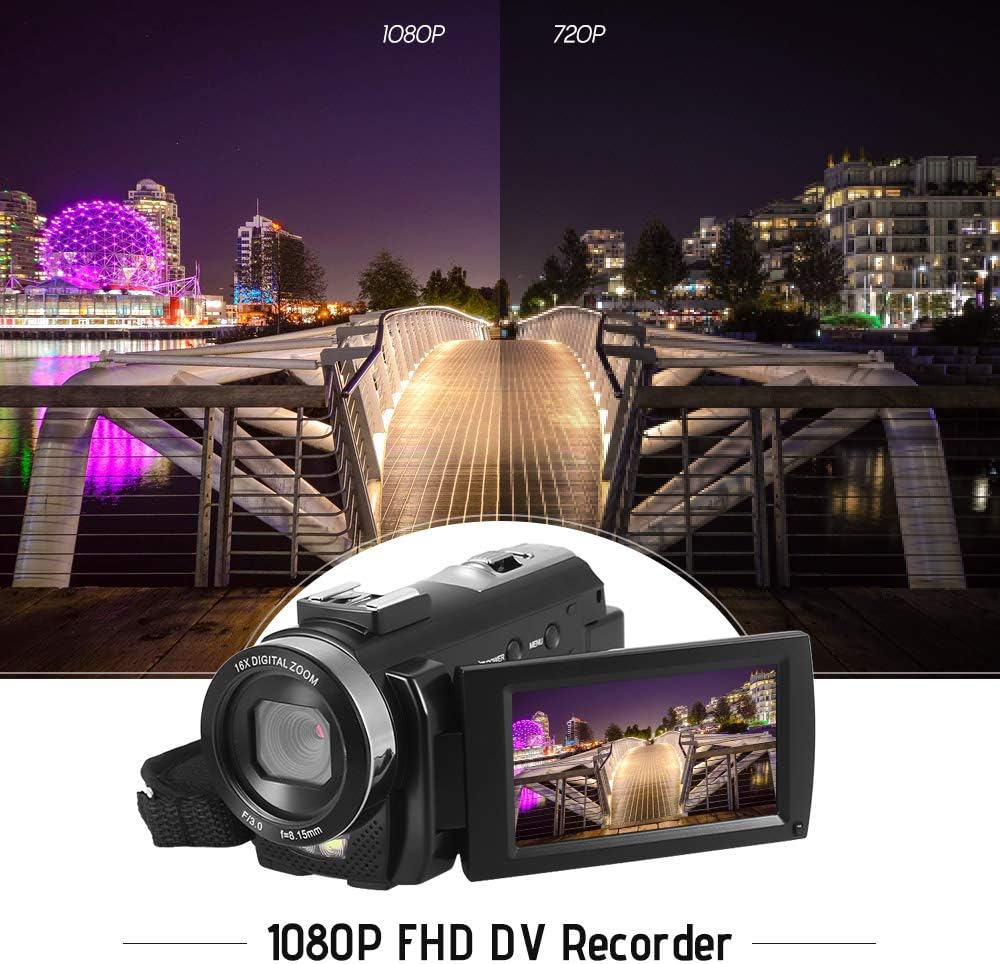
Figure 5.1: The camera is capable of recording in 1080p Full HD and 720p HD resolutions.
5.3. Teħid tar-Ritratti
- Ensure the camera is in photo mode. If not, press the Modalità buttuna biex taqleb.
- Ikkwadra r-ritratt tiegħek billi tuża l-iskrin LCD.
- Agħfas il- Ritratt button to capture an image.
5.4. L-użu taż-Zoom Diġitali
- Uża l- W (Wisa') u T (Telephoto) lever to adjust the 16X digital zoom.

Figure 5.2: The camera's 16X digital zoom allows for closer views of subjects.
5.5. Settings tal-Menu
- Agħfas il- Menu buttuna biex taċċessa s-settings.
- Use the navigation buttons to scroll through options such as:
- Bilanċ abjad: Auto, Daylight, Cloudy, Fluorescent, Tungsten.
- Modalità Xena: Auto, Night, Portrait, Landscape, Backlight, Sport, Party, Beach, High Sensitivity.
- Modalità ta' Sparar: Single, Continuous.
- Espożizzjoni: Adjust ±3.0EV.
- Self-Timer: Off, 2s, 5s, 10s.
- Mitfi Awtomatiku: Off, 1min, 3min, 5min.
- Lingwa: English, German, French, Spanish, Italian, Turkish, Russian, Portuguese, Dutch, Simplified Chinese, Traditional Chinese, Japanese, Polish.
- Funzjonijiet oħra: Face Detection, Smile Capture, Beauty Face, Anti-Shake.
- Agħfas il- OK or Irrekordja/Waqqaf buttuna biex tikkonferma l-għażliet.
- Agħfas il- Menu buttuna għal darb'oħra biex toħroġ.
5.6. Konnessjoni ma' TV
- Use the provided AV cable to connect the camera's AV output to your television's AV input.
- Select the correct AV input channel on your TV to view camera content.
6. Manutenzjoni
6.1. Tindif tal-Kamera
- Uża drapp artab u niexef biex tnaddaf il-korp tal-kamera.
- Għal-lenti u l-iskrin LCD, uża drapp u soluzzjoni speċjalizzati għat-tindif tal-lentijiet. Evita kimiċi ħarxa.
6.2. Ħażna
- Aħżen il-kamera f'post frisk u niexef 'il bogħod mix-xemx diretta u minn temperaturi estremi.
- Neħħi l-batterija jekk il-kamera mhux se tintuża għal perjodu estiż.
7 Issolvi l-problemi
| Problema | Kawża Possibbli | Soluzzjoni |
|---|---|---|
| Il-kamera ma tixgħelx. | Il-batterija hija eżawrita jew mhux imdaħħla sew. | Charge the battery fully. Ensure the battery is inserted with correct polarity and the insulator tab is removed. |
| Cannot record video or take photos. | Il-karta tal-memorja hija mimlija, mhux imdaħħla, jew korrotta. | Insert a memory card. Delete unnecessary files or format the card (this will erase all data). Replace the card if corrupted. |
| Kwalità fqira tal-vidjow/immaġni. | Insufficient lighting, dirty lens, or incorrect settings. | Ensure adequate lighting. Use the LED fill light if necessary. Clean the lens. Adjust white balance and scene mode settings. |
| Il-kamera tiffriża jew ma tibqax tirrispondi. | Glitch tas-softwer jew batterija baxxa. | Remove and reinsert the battery to reset the camera. Ensure the battery is charged. |
8. Speċifikazzjonijiet
| Karatteristika | Speċifikazzjoni |
|---|---|
| Brand | Andoer |
| Mudell | HDV-201LM |
| Sensor tal-Immaġni | Sensor CMOS 5 Megapixel |
| Riżoluzzjoni tal-vidjo | 1920x1080P (FHD 30fps), 1280x720 (HD 30fps), 640x480 (VGA 30fps), 320x240 (VGA 30fps) |
| Format tal-vidjo | AVI |
| Riżoluzzjoni tal-Immaġni | 24MP (Interpolated), 20MP (Interpolated), 16MP (Interpolated), 12MP (Interpolated), 10MP (Interpolated), 7M Wide (Interpolated), 5MP, 3MP, 2M Wide, VGA |
| Format tal-Immaġni | JPG |
| Zoom Diġitali | 16X |
| Lenti | ff (F/3.0 f=8.15mm) |
| Apertura Max | 8.15 F |
| Skrin LCD | 3.0-inch TFT-LCD (16:9), 270-degree rotation |
| Ħażna | Karta SD (sa 32GB, Klassi 10 rakkomandata) |
| Konnettività | USB 2.0, AV Output (NTSC/PAL) |
| Provvista tal-Enerġija | 1 x Batterija Rikargabbli ta' 3.7V 800mAh |
| Batterija tal-Kontroll mill-bogħod | 1 x 3V CR2025 Battery |
| Appoġġ tas-Sistema Operattiva | Windows XP/Vista/7/8/10 |
| Karatteristiċi Speċjali | Anti-shake, Face Detection, Smile Capture, Beauty Face, Self-Timer, LED Fill Light, Hot Shoe Mount |
| Dimensjonijiet | 13.5 x 5.5 x 6.5 cm (5.3 x 2.2 x 2.6 pulzieri) |
| Piż | 273g (9.6oz) bil-batterija |
| Kulur | Iswed |
9. Garanzija u Appoġġ
Għal informazzjoni dwar il-garanzija u appoġġ tekniku, jekk jogħġbok irreferi għad-dokumentazzjoni pprovduta max-xiri tiegħek jew ikkuntattja lill-bejjiegħ tiegħek. Żomm il-prova tax-xiri tiegħek għal kwalunkwe talba dwar il-garanzija.
Ask a question about this manual
Ask about setup, troubleshooting, compatibility, parts, safety, or missing instructions. Manuals+ will review the question and use this page’s manual context to help answer it.