
1. Introduzzjoni
Grazzi tax-xiriasinil-Moukey MAMP1 220W Bluetooth Dual Channel Power Amplifier. Dan amplifier is designed to provide powerful and versatile audio amplification for various applications, including karaoke, home theater systems, and general audio playback. It features multiple input options, Bluetooth 5.0 connectivity, and intuitive controls for an enhanced audio experience. Please read this manual thoroughly before use to ensure proper operation and to maximize the product's performance.
2. Istruzzjonijiet tas-Sigurtà
Biex tevita xokk elettriku, nar, jew ħsara lill-unità, jekk jogħġbok osserva l-prekawzjonijiet ta' sigurtà li ġejjin:
- Tesponix din l-unità għax-xita jew l-umdità.
- Tiftaħx is-casing. Ġewwa m'hemm l-ebda partijiet li jistgħu jiġu rranġati mill-utent. Irreferi għal kull manutenzjoni f'idejn persunal kwalifikat.
- Tiżgura l-provvista tal-enerġija voltage jaqbel mar-rekwiżiti speċifikati fuq l-unità.
- Place the unit on a stable, flat surface with adequate ventilation. Do not block ventilation openings.
- Keep the unit away from heat sources, direct sunlight, and excessive dust.
- Disconnect the power plug from the outlet if the unit will not be used for an extended period.
- Tħaddimx l-unità b'idejk imxarrbin.
3. Kontenut tal-Pakkett
Ivverifika li l-oġġetti kollha huma preżenti fil-pakkett:
- Moukey MAMP1 Qawwa AmpUnità lifier
- Kontroll mill-bogħod
- Antenna FM
- Manwal għall-Utent (Dan id-dokument)
4. Prodott Aktarview
4.1 Front Panel Controls and Functions
The front panel provides access to all primary controls and input ports for easy operation.

Image: Detailed diagram of the Moukey MAMP1 front panel, highlighting each control and port with corresponding numbers.
- Swiċċ tal-Enerġija: Ixgħel jew jitfi l-unità.
- USB / SD Slot: Għad-daqq tal-awdjo files from USB drives (max 32GB) or SD cards (max 16GB).
- Buttuna tal-Modalità: Cycles through input modes (Bluetooth, USB, SD, AUX, FM).
- Buttuna BT: Jaqleb direttament għall-modalità Bluetooth.
- Prev Button: Jaqbeż għat-trakka/stazzjon ta' qabel.
- Buttuna Play/Pause: Jdoqq jew iwaqqaf id-daqq tal-awdjo.
- Buttuna Li jmiss: Jaqbeż għat-trakka/stazzjon li jmiss.
- Wiri LED: Shows current mode, track information, or frequency.
- Folder / Track: Navigates through folders or tracks on USB/SD.
- Pum tal-Volum Master: Jaġġusta l-volum ġenerali tal-ħruġ.
- Jack tal-headphone: 3.5mm output for monitor headphones.
- Microphone 1 Input: 6.35mm jack for microphone connection.
- Microphone 2 Input: 6.35mm jack for a second microphone connection.
- Pum tal-Volum tal-Mikrofonu: Jaġġusta l-volum tal-mikrofoni konnessi.
- Pum Eku: Jikkontrolla l-effett tal-eku għall-mikrofoni.
- Pum tal-bass: Jaġġusta l-ħruġ tal-awdjo ta' frekwenza baxxa.
- Pum tat-Triple: Jaġġusta l-ħruġ tal-awdjo ta' frekwenza għolja.
- Pum tal-Bilanċ: Jaġġusta l-bilanċ tal-kanal tax-xellug/tal-lemin.
- Jack tal-Input AUX: Input ta' 3.5mm għal apparati awdjo esterni.
- Selettur tal-Input: Rotary switch to select between CD, AUX, DVD, and MP3/W inputs.
4.2 Konnessjonijiet tal-Panew ta' wara
The rear panel houses the main audio input and output connections.

Immaġni: Wara view of the Moukey MAMP1 amplifier, showing all input and output ports.

Image: Detailed diagram of the Moukey MAMP1 rear panel, highlighting each connection point.
- Audio Input for DVD (RCA): Connect DVD players or other audio sources.
- Audio Input for CD (RCA): Connect CD players or other audio sources.
- Line Out Jack (RCA): For connecting to another ampapparat li jerfa 'l-ħajja jew li jirrekordja.
- Ġak tal-Antenna FM: Qabbad l-antenna FM inkluża għar-riċeviment tar-radju.
- Speaker Output Jacks: Connect passive speakers (4-16 Ohm impedance).
- Input tal-Kejbil tal-Enerġija: Qabbad il-korda tal-enerġija AC.
5. Setup
5.1 Tqegħid
Poġġi l- amplifier on a flat, stable surface. Ensure there is sufficient space around the unit for proper ventilation to prevent overheating.
5.2 Konnessjoni tal-Enerġija
Connect the power cable to the Power Cable Input on the rear panel of the amplifier, then plug the other end into a suitable AC power outlet (115V AC).
5.3 Konnessjoni tal-Ispeaker
Il-MAMP1 amplifier supports two sets of passive speakers with an impedance of 4-16 Ohms. Use appropriate speaker wire to connect your speakers to the Speaker Output Jacks on the rear panel.

Image: Diagram illustrating how to connect speakers to the amplifier's binding posts.
- Rotate and loosen the speaker knob on the binding post.
- Insert the bare wire (remove approximately 10mm of insulation) into the hole. Ensure correct polarity (+ to + and - to -).
- Tighten the knobs to secure the wires firmly.
5.4 Input Device Connection
Connect your audio sources (CD player, DVD player, tuner, etc.) to the corresponding RCA Audio Input jacks on the rear panel. For microphones, use the 6.35mm jacks on the front panel. For 3.5mm AUX devices, use the front panel AUX Input Jack.
6. Istruzzjonijiet Operattivi
6.1 Power On/Off
Agħfas il- Swiċċ tal-Qawwa fuq il-pannell ta' quddiem biex iddawwar ampIl-lifer mixgħul jew mitfi. Id-displej LED jixgħel meta l-unità tkun mixgħula.
6.2 Għażla tal-Input
Uża l- Buttuna tal-Modalità on the front panel or the remote control to cycle through available input sources (Bluetooth, USB, SD, AUX, FM). Alternatively, use the Selettur tal-Input knob on the front panel for RCA inputs (CD, AUX, DVD, MP3/W).
6.3 Kontroll tal-Volum
- Volum Master: Dawwar il- Buttuna tal-Volum Master to adjust the overall output level of the ampaktar ħaj.
- Volum tal-mikrofonu: Uża l- Buttuna tal-Volum tal-Mikrofonu to control the volume of connected microphones independently.
6.4 Kontroll tat-Ton
Adjust the audio characteristics using the Buttuna tal-Bass u Pum Treble to suit your preference. The Pum tal-Bilanċ allows adjustment of the left and right channel output levels.

Image: Close-up of the Moukey MAMP1 showing the Bass and Treble adjustment knobs.
6.5 Echo Control
Dawwar il- Pum Eku to add or reduce the echo effect on the microphone inputs, suitable for karaoke applications.
6.6 Tqabbil tal-Bluetooth
Biex tikkonnettja apparat Bluetooth:
- Agħfas il- Buttuna BT or cycle through modes until "BLUE" appears on the LED display.
- Ippermetti l-Bluetooth fuq l-ismartphone, it-tablet, jew il-kompjuter tiegħek.
- Fittex għal "Moukey MAMP1" in your device's Bluetooth settings and select it to pair.
- Once paired, you can stream audio wirelessly. Playback will temporarily pause during phone calls to protect privacy.
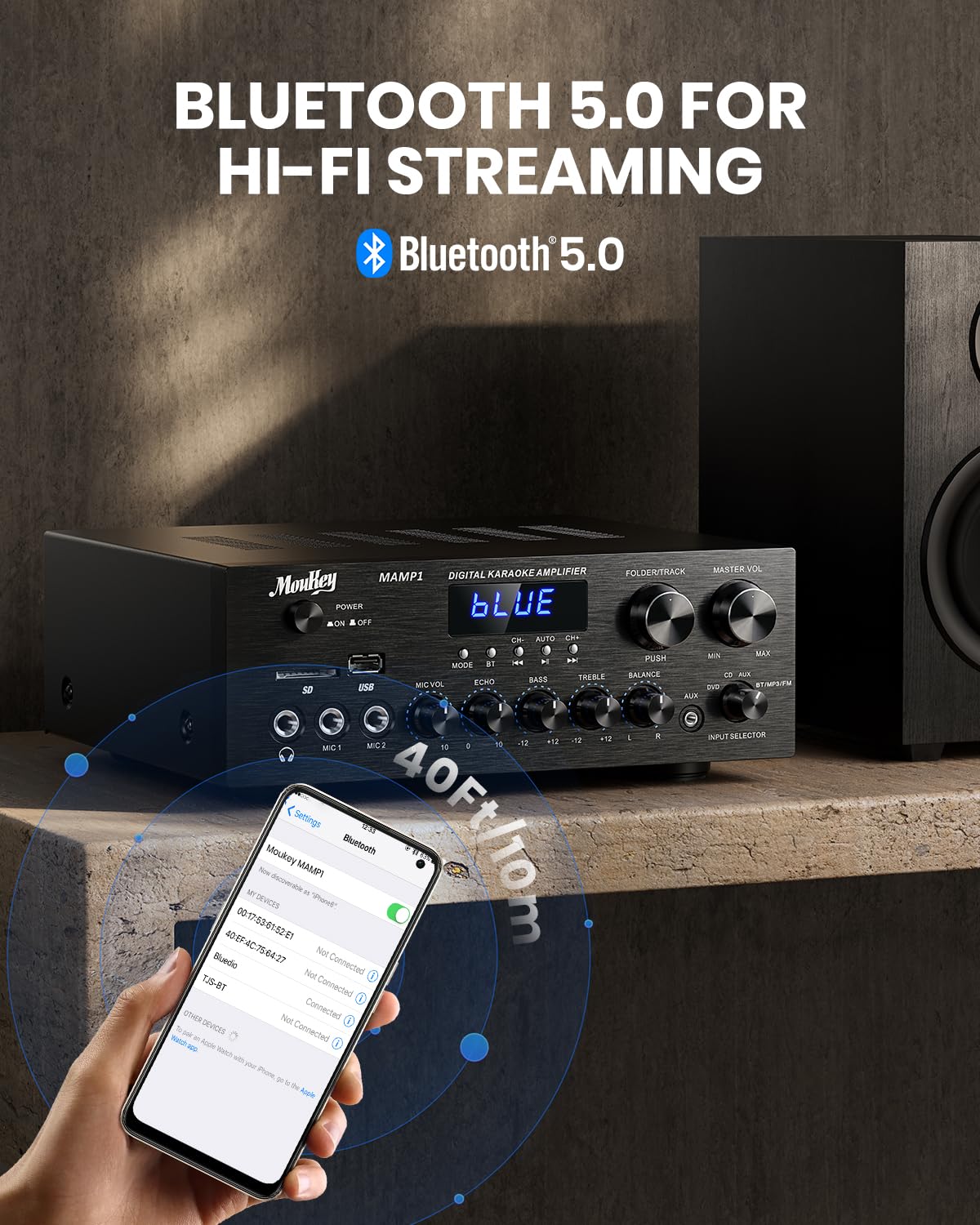
Image: The Moukey MAMP1 amplifier displaying "BLUE" on its screen, indicating Bluetooth mode, with a smartphone showing pairing options.
6.7 Daqq tal-USB/SD
Insert a USB drive (max 32GB) or SD card (max 16GB) into the respective slot on the front panel. The amplifier will automatically switch to USB/SD mode and begin playback. Use the Prev, Play/Pawsa, Li jmiss, u Fowlder/Track buttuni biex jikkontrollaw daqq.
6.8 Radju FM
Ensure the FM antenna is connected to the rear panel. Select FM mode using the Buttuna tal-Modalità. Uża l- Prev u Li jmiss buttons to tune to radio stations. The LED display will show the current frequency.
7. Manutenzjoni
Biex iżżomm il-prestazzjoni u d-dehra tiegħek ampaktar ħaj:
- Tindif: Use a soft, dry cloth to wipe the exterior of the unit. Do not use liquid cleaners or abrasive chemicals.
- Ventilazzjoni: Kun żgur li l-fetħiet tal-ventilazzjoni huma ħielsa mit-trab u l-fdalijiet.
- Ħażna: Jekk se taħżen l-unità għal perjodu estiż, skonnettjaha mill-elettriku u aħżenha f'post frisk u niexef.
8 Issolvi l-problemi
If you encounter issues with your Moukey MAMP1 amplifer, irreferi għat-tabella li ġejja għal problemi u soluzzjonijiet komuni:
| Problema | Kawża Possibbli | Soluzzjoni |
|---|---|---|
| Ebda qawwa | Kejbil tal-enerġija mhux imqabbad; Sokit tal-enerġija difettuż; Swiċċ tal-enerġija mitfi. | Ensure power cable is securely connected. Try a different power outlet. Press the power switch to ON. |
| Ebda output tal-ħoss | Incorrect input selected; Volume too low; Speakers not connected; Speaker wires loose; Mute function active. | Select the correct input source. Increase Master Volume. Check speaker connections and polarity. Ensure mute is off. |
| Il-Bluetooth mhux qed jgħaqqad | Amplifier not in Bluetooth mode; Device too far; Device already paired to another unit. | Tiżgura amplifier is in Bluetooth mode ("BLUE" on display). Move device closer to amplifier. Disconnect from other devices. |
| Mikrofonu mhux qed jaħdem | Microphone not connected; Mic volume too low; Echo knob set to minimum. | Connect microphone securely. Increase Microphone Volume. Adjust Echo knob. |
| Problemi ta' daqq bil-USB/SD | Mhux appoġġjat file format; USB drive/SD card corrupted; Capacity exceeded. | Żgura l-awdjo files are in supported formats (e.g., MP3). Try a different USB drive/SD card. Check capacity limits (USB max 32G, SD max 16G). |
Jekk il-problema tippersisti wara li tipprova dawn is-soluzzjonijiet, jekk jogħġbok ikkuntattja l-appoġġ għall-klijenti.
9. Speċifikazzjonijiet
| Karatteristika | Speċifikazzjoni |
|---|---|
| Brand | Moukey |
| Mudell | MAMP1 |
| Qawwa tal-Ħruġ | 220 Watts |
| Kanali | 2 |
| Voltage | 115 Volts (AC) |
| Impedenza tal-Ispeaker | 4-16 Ohms |
| Verżjoni Bluetooth | 5.0 |
| Medda Bluetooth | Aktar minn 12 metru (40 pied) |
| Appoġġ għall-Karta USB/SD | USB: Max 32GB, SD: Max 16GB |
| Dimensjonijiet (L x W x H) | 25cm x 21.3cm x 9.5cm (madwar 10in x 8in x 4in) |
| UPC | 715802779039 |
| Pajjiż ta' Oriġini | Iċ-Ċina |

Image: The Moukey MAMP1 amplifier with its dimensions labeled.
10. Garanzija u Appoġġ
This Moukey MAMP1 Qawwa Amplifier jiġi ma 'a garanzija ta 'sena mid-data tax-xiri. Din il-garanzija tkopri difetti fil-manifattura u xogħol taħt użu normali.
Il-garanzija ma tkoprix:
- Damage caused by accident, abuse, misuse, flood, fire, or other natural causes.
- Ħsara kkawżata minn modifika jew tiswija mhux awtorizzata.
- Damage caused by improper installation or connection.
- Cosmetic damage, such as scratches, dents, and broken plastic on ports.
For warranty claims or technical support, please contact the retailer where you purchased the product or visit the official Moukey website for contact information. Please have your purchase receipt and product model number (MAMP1) ready when contacting support.