
1. Introduzzjoni
The Hom-Io HOM-Mod-Switch2 is an in-wall smart Wi-Fi switch module designed to convert traditional lights and devices into smart, wirelessly controllable units. This module allows for remote control via a smartphone application or a compatible physical switch, and integrates seamlessly with Amazon Alexa and Google Home for voice control. It supports advanced features such as timer programming and custom scenario creation.
2. Informazzjoni dwar is-Sigurtà
TWISSIJA: Riskju ta' Xokk Elettriku. L-installazzjoni għandha titwettaq biss minn elettriċista kwalifikat jew persunal tas-servizz.
- Ensure power is disconnected at the circuit breaker before installation, maintenance, or removal.
- This device is designed for indoor use in dry locations only (IP20 rating). Do not expose to moisture or extreme temperatures.
- Teċċedix il-klassifikazzjonijiet massimi tat-tagħbija speċifikati fl-ispeċifikazzjonijiet tal-prodott.
- Verify all wiring connections are secure and correct to prevent short circuits or electrical hazards.
- Żomm fejn ma jintlaħaqx mit-tfal.
3. Kontenut tal-Pakkett
- 1 x Hom-Io HOM-Mod-Switch2 Module
- 1 x Manwal ta 'Istruzzjoni
4. Prodott Aktarview
The Hom-Io HOM-Mod-Switch2 is a compact in-wall module designed for smart control of two independent electrical circuits. It features Wi-Fi connectivity for remote operation and integration with smart home ecosystems.
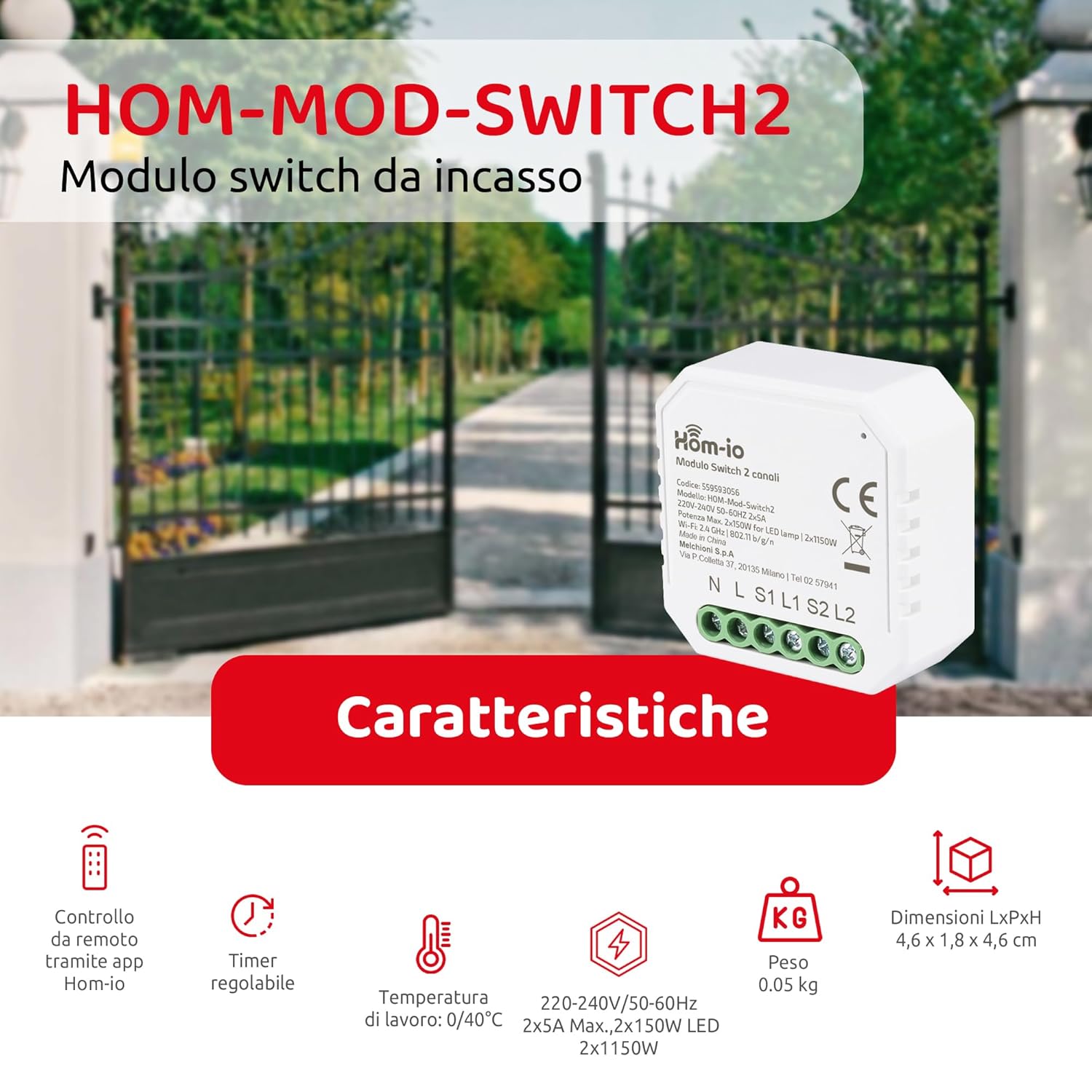
Image 1: Hom-Io HOM-Mod-Switch2 module with its technical specifications and features such as remote app control, adjustable timer, operating temperature, voltage, weight, and dimensions.
Il-karatteristiċi ewlenin jinkludu:
- Kontroll intelliġenti: Remote operation of lights and devices via smartphone or traditional wall switch.
- Kanal Doppju: Controls two separate circuits (2x5A).
- Konnettività Wi-Fi: 2.4 GHz 802.11 b/g/n for seamless integration into your home network.
- Kompatibbiltà tal-Assistent tal-Vuċi: Jaħdem ma' Amazon Alexa u Google Home.
- Funzjonijiet Avvanzati: Timer programming and custom scenario creation for automated control.
- Disinn kompatt: Suitable for installation in standard junction boxes (ø60mm).
5. Speċifikazzjonijiet
| Mudell | HOM-Mod-Switch2 |
| Brand | Hom-io |
| Vol Operattivtage | 220-240V / 50-60Hz |
| Kurrent Rated | 10 Amperes (2x5A) |
| Max Load (Resistive) | 2300 Watts |
| Max Load (LED) | 2x150W |
| Wi-Fi Standard | 2.4 GHz 802.11 b / g / n |
| Klassifikazzjoni tal-Protezzjoni Internazzjonali | IP20 (Indoor use in dry locations) |
| Temperatura operattiva | 0°C sa 40°C |
| Umdità Operattiva | ≤80% |
| Dimensjonijiet (LxWxH) | 4.6 x 1.8 x 4.6 ċm (18 x 45 x 45 mm) |
| Junction Box Compatibility | Ø60mm |
| Materjal tad-Djar | Plastik (ABS) |
| Kuntatt Materjal | Ram |
| Metodu ta' Kontroll | Remote (App, Voice), Manual Switch |
| Kompatibilità tal-Kontroll tal-Vuċi | Amazon Alexa, Google Home |
6. Setup u Installazzjoni
6.1 Dijagramma tal-Wiring
The Hom-Io HOM-Mod-Switch2 module is designed for in-wall installation within a standard Ø60mm junction box. Refer to the diagram below for proper wiring connections. Always ensure the main power supply is OFF before proceeding with any wiring.

Immaġni 2: Dettaljata view of the Hom-Io HOM-Mod-Switch2 module, illustrating its compact size and terminal connections for Line (L), Neutral (N), Load 1 (L1), Load 2 (L2), Switch 1 (S1), and Switch 2 (S2).
- Skonnettja l-Enerġija: Turn off the main power supply at the circuit breaker before starting installation.
- Connect Neutral (N): Connect the neutral wire from your electrical system to the 'N' terminal on the module.
- Connect Live (L): Connect the live wire from your electrical system to the 'L' terminal on the module.
- Connect Load 1 (L1): Connect the live wire of the first light/device to be controlled to the 'L1' terminal.
- Connect Load 2 (L2): Connect the live wire of the second light/device to be controlled to the 'L2' terminal.
- Connect Switches (S1, S2): Connect your traditional wall switches to the 'S1' and 'S2' terminals for manual control. These are typically connected to the live wire (L) and then to S1/S2. Consult a qualified electrician if unsure.
- Modulu tal-Immuntar: Carefully place the module into the junction box.
- Irrestawra l-Enerġija: Erġa' ixgħel il-provvista tal-enerġija prinċipali.
6.2 Installazzjoni u Tqabbil tal-App
To utilize the smart features of your Hom-Io switch, you need to install the Hom-io application on your smartphone or tablet.

Image 3: Hom-Io app interface on a smartphone, showing download options for App Store and Google Play, and indicating compatibility with Amazon Alexa and Hey Google.
- Niżżel l-App: Download the "Hom-io" app from the App Store (iOS) or Google Play Store (Android).
- Reġistrazzjoni/Idħol: Iftaħ l-app u rreġistra għal kont ġdid jew idħol b'wieħed eżistenti.
- Żid Apparat: Follow the in-app instructions to add a new device. Typically, this involves selecting "Electrical Switch" or "Smart Switch" and then following the pairing mode instructions.
- Daħħal il-Mod tat-Tqabbil: The module usually enters pairing mode automatically when first powered on, indicated by a blinking LED. If not, you may need to press and hold the physical switch connected to S1 for 5-10 seconds until the LED blinks rapidly.
- Qabbad mal-Wi-Fi: Ensure your smartphone is connected to a 2.4 GHz Wi-Fi network. The app will guide you through connecting the switch to your home Wi-Fi.
- Isem l-Apparat: Once paired, assign a name to your switch (e.g., "Living Room Light 1", "Kitchen Device").
7. Istruzzjonijiet Operattivi
7.1 App Control
After successful pairing, you can control your devices using the Hom-io app from anywhere with an internet connection.

Image 4: Smartphone screen displaying the Hom-Io app with a large "ON" button for controlling a smart switch, along with options for Timer and Settings.
- Kontroll mixgħul/mitfi: Tap the device icon in the app to toggle connected lights or devices on/off.
- Funzjonijiet tat-tajmer: Set schedules for automatic on/off times. Access this feature through the device settings in the app.
- Scenario Creation: Create custom scenarios to control multiple devices simultaneously or based on specific conditions (e.g., "Good Morning" scene to turn on lights and coffee maker).

Immaġni 5: Eksample of precise control, showing a smart sprinkler system being activated, illustrating the ability to accurately set the on and off times for connected devices.
7.2 Kontroll tal-Vuċi (Amazon Alexa / Google Home)
Integrate your Hom-Io switch with Amazon Alexa or Google Home for convenient voice control.
- Kont tal-Kont: In the Alexa or Google Home app, search for the "Hom-io" skill/service and link your Hom-io account.
- Skopri Mezzi: Once linked, ask your voice assistant to "Discover devices" or manually add them through the app.
- Kmandi bil-vuċi: Uża kmandi bħal:
- "Alexa, ixgħel [Isem tal-Apparat]"
- "Ħej Google, itfi [Isem tal-Apparat]"
- "Alexa, set [Device Name] to 50%" (if dimmable, though this switch is on/off)
7.3 Kontroll tas-Swiċċ Manwali
The Hom-Io HOM-Mod-Switch2 retains compatibility with traditional wall switches. You can still manually turn your lights or devices on/off using the connected physical switch, even if the Wi-Fi connection is unavailable.
8. Manutenzjoni
- Tindif: Imsaħ l-apparat b'ċarruta ratba u niexfa. Tużax prodotti tat-tindif likwidi jew aerosols.
- Aġġornamenti tal-Firmware: Periodically check the Hom-io app for available firmware updates to ensure optimal performance and security.
- Kundizzjonijiet Ambjentali: Ensure the device remains within its specified operating temperature (0-40°C) and humidity (≤80%) ranges.
9 Issolvi l-problemi
| Problema | Kawża Possibbli | Soluzzjoni |
|---|---|---|
| Device not responding to app/voice commands. | No Wi-Fi connection, incorrect pairing, power issue. |
|
| Physical switch not working. | Incorrect wiring, faulty switch. |
|
| Module gets warm. | Normal operation, or overloaded circuit. |
|
10. Informazzjoni dwar Garanzija
The Hom-Io HOM-Mod-Switch2 comes with a Garanzija tal-manifattur ta 'sena from the date of purchase. This warranty covers defects in materials and workmanship under normal use. It does not cover damage caused by misuse, unauthorized modifications, improper installation, or external factors such as power surges.
For warranty claims, please retain your proof of purchase and contact your retailer or Hom-io customer support.
11. Appoġġ
For further assistance, technical support, or to explore other Hom-io smart home products, please visit the official Hom-io websit jew ikkuntattja lis-servizz tal-konsumatur.
- Hom-io Brand Store: Visit Hom-io on Amazon
- Hom-io App Download: Download the Hom-io App