
Homcloud TY-WCS4S
Homcloud Wi-Fi Speed 4S Pan&Tilt Camera User Manual
Model: TY-WCS4S
Introduzzjoni
Thank you for choosing the Homcloud Wi-Fi Speed 4S Pan&Tilt Camera. This manual provides detailed instructions for the installation, operation, and maintenance of your new smart home security device. Please read this manual thoroughly before use to ensure proper functionality and safety.

Immaġni: Quddiem view of the Homcloud Wi-Fi Speed 4S Pan&Tilt Camera, showcasing id-disinn kompatt tiegħu.
Kontenut tal-Pakkett
Jekk jogħġbok ivverifika li l-komponenti kollha huma preżenti fil-pakkett:
- Homcloud Wi-Fi PTZ Camera (Model TY-WCS4S)
- Adapter tal-Enerġija (5V)
- Aċċessorji tal-Immuntar (viti, tappijiet tal-ħajt)
- Manwal għall-Utent
Gwida ta' Setup
1. Tixgħel
- Qabbad l-adapter tal-enerġija mal-port tad-dħul tal-enerġija tal-kamera.
- Plug the power adapter into a standard electrical outlet. The camera will power on and initiate its self-check sequence.
- Wait for the indicator light to flash, indicating it's ready for network configuration.
2. Installazzjoni tal-App u Ħolqien ta' Kont
The Homcloud camera operates with the Homcloud App. Download the app from your smartphone's app store:

- Open the Homcloud App and register a new account if you don't have one, or log in with an existing account.
3. Iż-Żieda tal-Kamera mal-App
- In the Homcloud App, tap the "+" icon (usually in the top right corner) to add a new device.
- Select "Security & Video Surveillance" or search for "Camera (Wi-Fi)".
- Follow the on-screen instructions to connect the camera to your Wi-Fi network. Ensure your Wi-Fi network is 2.4GHz, as 5GHz networks are not supported.
- You may be prompted to scan a QR code displayed on your phone screen with the camera lens. Hold the phone approximately 15-20 cm (6-8 inches) in front of the camera until you hear a confirmation sound.
- Ladarba tkun konness, tista' tagħti isem lill-kamera tiegħek u tassenjaha ma' kamra speċifika.
4. Immuntar tal-Kamera (Mhux obbligatorju)
The camera can be placed on a flat surface or mounted on a wall.
- Muntaġġ tal-ħajt: Use the provided mounting bracket, screws, and wall plugs to secure the camera to a desired wall location. Ensure the camera is positioned to cover the desired surveillance area.
Istruzzjonijiet Operattivi
Live View u Kontroll
Once connected, open the Homcloud App and select your camera to access the live video feed.
- Pan & Mejjel: Uża l-kontrolli direzzjonali fl-app biex iddawwar il-kamera orizzontalment (355°) u vertikalment (90°) mill-bogħod biex taġġusta l- viewangolu tal-ing.
- Awdjo f'żewġ direzzjonijiet: Tap the microphone icon to speak through the camera's speaker, and listen to audio from the camera's microphone.
- Snapshot & Record: Aqbad immaġni fissi jew irreġistra klipps tal-vidjow direttament mil-live view.
- Viżjoni bil-lejl: The camera automatically switches to night vision mode in low-light conditions, providing clear black and white video using its LED illuminators.
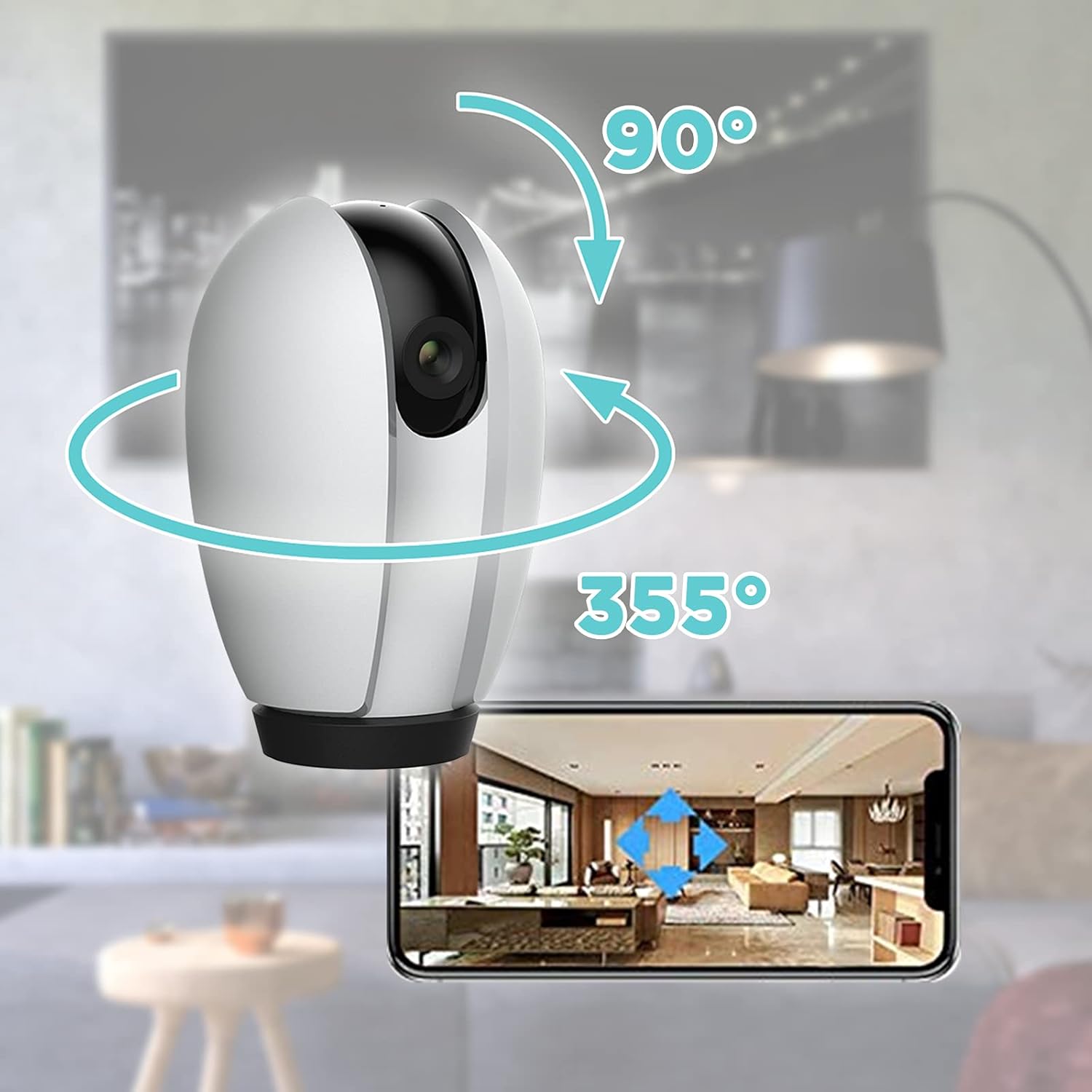
Image: Illustration of the camera's 355-degree horizontal pan and 90-degree vertical tilt capabilities, controlled via the smartphone app.
Sejbien ta' Moviment u Twissijiet
Configure motion detection settings in the app to receive alerts when movement is detected.
- Sensittività: Aġġusta s-sensittività tad-detezzjoni tal-moviment biex timminimizza l-allarmi foloz.
- Żoni ta' Attività: Iddefinixxi żoni speċifiċi fil-kamera view għall-iskoperta tal-moviment.
- Notifiki ta' Twissija: Enable push notifications to receive instant alerts on your smartphone.
Għażliet ta' Ħażna
The camera supports local storage and cloud storage (subscription may be required).
- Karta MicroSD: Insert a MicroSD card (not included) into the camera's slot for continuous recording or event-triggered recording. The camera supports up to 128GB.
- Ħażna Cloud: Check the Homcloud App for available cloud storage plans to securely store your video recordings online.
Integrazzjoni tad-Dar Intelliġenti
The Homcloud Wi-Fi Speed 4S Pan&Tilt Camera is compatible with popular smart home platforms:
- Jaħdem ma 'Alexa: Integra ma' Amazon Alexa għall-kontroll tal-vuċi.
- Jaħdem mal-Assistent tal-Google: Integrate with Google Assistant for voice control.

Image: The Homcloud camera highlighting its compatibility with Wi-Fi, Amazon Alexa, and Google Assistant for seamless smart home integration.
Manutenzjoni
- Tindif: Uża drapp artab u niexef biex tnaddaf il-lenti u l-qafas tal-kamera. Tużax prodotti tat-tindif likwidi jew materjali li joborxu.
- Aġġornamenti tal-Firmware: Regularly check the Homcloud App for firmware updates to ensure optimal performance and security.
- Ċiklu tal-Enerġija: If the camera becomes unresponsive, unplug it from the power source for 10 seconds and then plug it back in.
Issolvi l-problemi
| Problema | Kawża Possibbli | Soluzzjoni |
|---|---|---|
| Kamera offline fl-app | No power; Wi-Fi disconnected; Router issue. | Check power connection. Verify Wi-Fi signal strength. Restart router and camera. Re-add camera if necessary. |
| Ma tistax tikkonnettja mal-Wi-Fi | Incorrect Wi-Fi password; 5GHz network; Weak signal. | Kun żgur li l-password tal-Wi-Fi ta' 2.4GHz hija korretta. Mexxi l-kamera eqreb lejn ir-router. Irrisettja l-kamera u erġa' pprova. |
| Twissijiet ta' moviment mhux riċevuti | App notifications disabled; Motion detection off; Sensitivity too low. | Enable app notifications. Turn on motion detection in app. Increase sensitivity. |
| Kwalità fqira tal-vidjo | Insufficient light; Dirty lens; Weak Wi-Fi signal. | Ensure adequate lighting. Clean the camera lens. Improve Wi-Fi signal. |
Speċifikazzjonijiet
| Karatteristika | Dettall |
|---|---|
| Numru tal-Mudell | TY-WCS4S |
| Brand | Homcloud |
| Riżoluzzjoni tal-vidjo | 1080p (Effective 1080) |
| Firxa Pan | 355 grad |
| Medda Mejjel | 90 grad |
| Konnettività | Wi-Fi (2.4GHz biss) |
| Input tal-Enerġija | 5 Volts, 5 Watts |
| Materjal | Polikarbonat (PC) |
| Dimensjonijiet (L x W x H) | 12 x 10 x 6 ċm |
| Piż | 250 gramma |
| Karatteristiċi Speċjali | Night Vision, Two-Way Audio, Motion Detection |
| Użu Rakkomandat | Sorveljanza |
Garanzija u Appoġġ
Homcloud products typically come with a standard manufacturer's warranty. Please refer to the warranty card included in your product packaging or visit the official Homcloud websit għal termini u kundizzjonijiet dettaljati tal-garanzija.
For technical support, troubleshooting assistance, or any inquiries regarding your Homcloud Wi-Fi Speed 4S Pan&Tilt Camera, please contact Homcloud customer service through their official website or the contact information provided in the Homcloud App.
Riżorsi onlajn:
- Homcloud Official Websit: www.homcloud.com (Nota: Dan huwa terminu riżervat) URL peress li m'hemm l-ebda appoġġ speċifiku URL was provided in the input. Users should refer to their product documentation for exact support details.)
- Homcloud App Support Section
Ask a question about this manual
Ask about setup, troubleshooting, compatibility, parts, safety, or missing instructions. Manuals+ will review the question and use this page’s manual context to help answer it.