
Introduzzjoni
The Power Dynamics PDM25 is a compact and versatile 100V amplifier designed for small installations such as shops, restaurants, and offices. It offers easy operation, reliable performance, and a range of features including Bluetooth connectivity, an integrated MP3 player, USB input, AUX input, and a wireless remote control. This manual provides essential information for the safe and efficient use of your PDM25 ampaktar ħaj.
Istruzzjonijiet tas-Sigurtà
- Aqra sew dan il-manwal qabel ma tuża l-prodott.
- Żomm dan il-manwal għal referenza futura.
- Osserva t-twissijiet kollha u segwi l-istruzzjonijiet kollha.
- Tużax dan l-apparat ħdejn l-ilma.
- Naddaf biss b'ċarruta niexfa.
- Timblokkax il-fetħiet tal-ventilazzjoni. Installa skont l-istruzzjonijiet tal-manifattur.
- Tinstallax ħdejn xi sorsi tas-sħana bħal radjaturi, reġistri tas-sħana, stufi, jew apparat ieħor (inkluż amplifiers) li jipproduċu sħana.
- M'għandekx tegħleb l-iskop tas-sigurtà tal-plagg polarizzat jew tat-tip ta 'l-ert. Plagg polarizzat għandu żewġ xfafar b'waħda usa 'mill-oħra. Plagg tat-tip ta 'l-ert għandu żewġ xfafar u t-tielet prong ta' l-ert. Ix-xafra wiesgħa jew it-tielet prong huma pprovduti għas-sigurtà tiegħek. Jekk il-plagg ipprovdut ma jidħolx fl-iżbokk tiegħek, ikkonsulta elettriċista għas-sostituzzjoni tal-iżbokk skadut.
- Ipproteġi l-korda tad-dawl milli timxi fuqha jew maqrusa, partikolarment fil-plakek, ir-reċipjenti tal-konvenjenza, u l-punt fejn joħorġu mill-apparat.
- Uża biss aċċessorji/aċċessorji speċifikati mill-manifattur.
- Aqla’ dan l-apparat waqt maltempati tas-sajjetti jew meta ma jintużax għal perjodi twal ta’ żmien.
- Irreferi l-manutenzjoni kollha lil persunal tas-servizz kwalifikat. Is-servizz huwa meħtieġ meta l-apparat ikun ġie bil-ħsara b'xi mod, bħal korda tal-provvista tal-enerġija jew plagg ikun bil-ħsara, likwidu jkun inxtered jew oġġetti jkunu waqgħu fl-apparat, l-apparat ikun ġie espost għax-xita jew umdità, ma jaħdimx b'mod normali , jew twaqqgħet.
- TWISSIJA: Biex tnaqqas ir-riskju ta' nar jew xokk elettriku, tesponix dan l-apparat għax-xita jew l-umdità.
- ATTENZJONI: Do not open the cover. No user-serviceable parts inside. Refer servicing to qualified personnel only.
Prodott Overview
The PDM25 amplifier features a user-friendly front panel with controls for various audio sources and volume adjustments, along with a clear digital display. The rear panel provides all necessary connections for speakers, external audio sources, and power.

Figura 1: Il-Panel ta' Quddiem Fuqview of the PDM25 Ampaktar ħaj.

Figure 2: Rear Panel Connections of the PDM25 Ampaktar ħaj.
Setup
1. Spakkjar
Neħħi bil-galbu amplifier from its packaging. Inspect the unit for any signs of damage during transit. Retain the original packaging for future transport or storage.
2 Tqegħid
Poġġi l- ampPoġġi l-apparat fuq wiċċ stabbli u ċatt. Kun żgur li tventilazzjoni adegwata madwar l-unità biex tevita li tisħon iżżejjed. Evita li tpoġġih ħdejn sorsi ta’ sħana jew fid-dawl tax-xemx dirett.
3. Konnessjoni tal-Ispeaker
The PDM25 supports both 100V line speakers and low impedance (4-16 Ohm) speakers.
- For 100V Line Speakers: Connect the positive (+) terminal of your 100V speaker system to the "100V" terminal on the amplifier's rear panel. Connect the negative (-) terminal to the "COM" terminal.
- For Low Impedance Speakers (4-16 Ohm): Connect the positive (+) terminal of your speaker to the "4-16 Ohm" terminal on the amplifier's rear panel. Connect the negative (-) terminal to the "COM" terminal.
Ensure correct polarity (+ to + and - to -) for optimal sound quality. Do not connect both 100V and low impedance speakers simultaneously to the same output.
4. Konnessjoni tas-Sors Awdjo
- Input AUX: Connect external audio devices (e.g., CD player, mixer) to the RCA "AUX" input jacks on the rear panel using an RCA cable.
- Input tal-mikrofonu: Connect a microphone to the 6.3mm jack on the front panel.
- Input USB: Daħħal USB flash drive li jkun fih MP3 files fil-port USB fuq il-pannell ta' quddiem.
5. Konnessjoni tal-Enerġija
Qabbad il-kejbil tal-enerġija fornut mad-daħla tal-AC fuq il-pannell ta' wara tal- amplifier and then to a suitable mains power outlet (230 Vac/50 Hz).
Istruzzjonijiet Operattivi
1. Power On/Off
Press the "ON/OFF" switch on the front panel to power on or off the ampaktar ħaj.
2. Għażla tas-Sors
Use the "MODE" button on the front panel or the remote control to cycle through available input sources: Bluetooth, USB/MP3, AUX, and Radio. The selected mode will be displayed on the digital screen.

Figure 3: Front Panel Controls and USB Input.
3. Kontroll tal-Volum
- Volum Master: Adjust the main output volume using the large "VOLUME" knob on the front panel.
- Individual Source Volume: Adjust the volume for MP3, AUX, and MIC inputs using their respective smaller "VOLUME" knobs.
4. Kontroll tat-Tone
Use the "TREBLE" and "BASS" knobs on the front panel to adjust the high and low frequencies of the audio output.
5. Operazzjoni Bluetooth
- Select "Bluetooth" mode using the "MODE" button. The display will show "BLUE".
- On your Bluetooth-enabled device (smartphone, tablet, etc.), search for available devices and select "PDM25".
- Ladarba tkun imqabbda, tista' tistrimja l-awdjo mingħajr fili lill- ampaktar ħaj.
6. USB/MP3 Player Operation
- Insert a USB flash drive into the USB port. The amplifier will automatically switch to USB mode and begin playing MP3 files.
- Use the play/pause, next, and previous track buttons on the front panel or remote control to manage playback.
7. Tħaddim tar-Radju
In Radio mode, use the control buttons to scan for and select radio stations.
8. Kontroll mill-bogħod
The included remote control provides convenient access to power, mode selection, volume, track control, and equalizer presets.
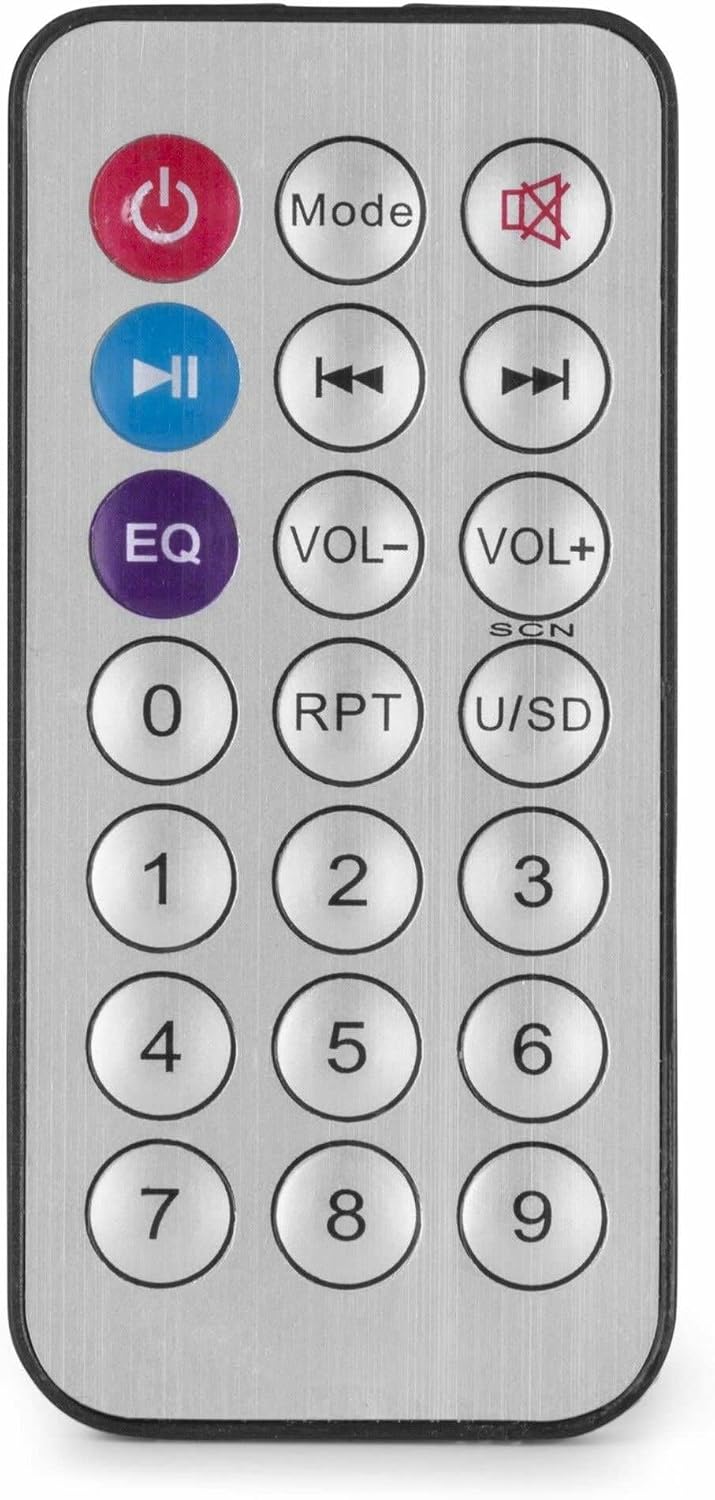
Figure 4: Wireless Remote Control.
Manutenzjoni
- Tindif: Disconnect the power before cleaning. Use a soft, dry cloth to wipe the exterior of the ampTużax prodotti tat-tindif likwidi jew aerosols.
- Ventilazzjoni: Ensure that the ventilation openings are clear of dust and debris to maintain proper airflow.
- Ħażna: Jekk se taħżen l-unità għal perjodu estiż, skonnettjaha mill-elettriku u aħżenha f'post frisk u niexef, preferibbilment fl-imballaġġ oriġinali tagħha.
Issolvi l-problemi
| Problema | Kawża Possibbli | Soluzzjoni |
|---|---|---|
| Ebda qawwa | Kejbil tal-enerġija mhux imqabbad; Sokit tal-enerġija difettuż; Ampjaqilgħu lifier off. | Check power cable connection; Test power outlet; Ensure amplifier switch is ON. |
| Ebda output tal-ħoss | Incorrect source selected; Volume too low; Speaker connections faulty; Mute activated. | Select correct input source; Increase master and source volume; Check speaker wiring; Deactivate mute function on remote. |
| Il-Bluetooth mhux qed jgħaqqad | AmpL-apparat mhux fil-modalità Bluetooth; L-apparat wisq 'il bogħod; L-apparat diġà mqabbad ma' unità oħra. | Tiżgura amplifier is in Bluetooth mode ("BLUE" displayed); Move device closer; Disconnect from other devices and try again. |
| Problemi ta' daqq bil-USB | Id-drajv tal-USB mhux ifformattjat b'mod korrett; Inkompatibbli file ifformattja; id-drajv tal-USB difettuż. | Kun żgur li l-USB drive huwa fformattjat bil-FAT32; Uża MP3 files; Ipprova USB drive differenti. |
| Ħoss distort | Volume too high; Incorrect impedance matching for speakers; Faulty audio source. | Reduce volume; Verify speaker impedance matches amplifier output; Test with a different audio source. |
Speċifikazzjonijiet
- Qawwa tal-Ħruġ: 25 W
- Riżultat tal-Kelliem: 100V and 4-16 Ohm
- Medda ta' Frekwenzi: 50 Hz - 18 kHz
- Proporzjon Sinjal-Ħsejjes: >75 dB
- Konnessjoni Voltage: 230 Vac/50 Hz
- Dimensjonijiet (L x W x H): 205 x 285 x 65 mm
- Piż: 1.5 kg
- Karatteristiċi: Bluetooth, USB MP3 Player, Radio, AUX Input, Microphone Input, Bass/Treble Control, Integrated Equalizer, Remote Control
- Numru tal-Mudell: PDM25
- Manifattur: Tronios BV
Garanzija u Appoġġ
For warranty information and technical support, please refer to the documentation provided with your purchase or visit the official Power Dynamics websit. Żomm il-prova tax-xiri tiegħek għal kwalunkwe talba ta' garanzija.
Manifattur: Tronios BV
Websit: www.power-dynamics.eu