
1. Introduzzjoni
The Sharper Image Surround Sound Shower System (Model 206890) provides a high-quality audio experience in your shower environment. This system includes two 5-watt Bluetooth speakers designed for rich sound delivery. Each speaker features a waterproof design with an IP67 rating and strong suction cups for secure mounting. Onboard controls allow for easy management of music playback, volume adjustments, and call handling. The speakers operate for up to 8 hours per charge and are compatible with various Bluetooth-enabled devices, including iPhones and Android devices.

Image: Two Sharper Image shower speakers mounted on a tiled shower wall, showcasing their waterproof design and illuminated rings.
2. Informazzjoni dwar is-Sigurtà
Please read all safety instructions before using this product to ensure proper operation and to prevent damage or injury.
- Reżistenza għall-Ilma: The speakers are IP67 rated, meaning they are protected from dust and can withstand immersion in water up to 1 meter for up to 30 minutes. Do not submerge the speakers for extended periods or beyond the specified depth. Ensure charging ports are dry before charging.
- Iċċarġjar: Use only the provided charging cable and a compatible power source. Do not attempt to charge the speakers in wet conditions.
- Temperatura: Avoid exposing the speakers to extreme temperatures (hot or cold) as this may affect battery life and performance.
- Tindif: Clean the speakers with a soft, damp drapp. Tużax tindif jew solventi li joborxu.
- Żarmar: Do not attempt to disassemble or modify the speakers. This will void the warranty and may cause damage or injury.
- Pjazzament: Ensure the suction cups are securely attached to a clean, smooth, non-porous surface before use to prevent the speakers from falling.
3. Kontenut tal-Pakkett
Ivverifika li l-oġġetti kollha huma preżenti fil-pakkett tiegħek:
- 2 x Sharper Image Surround Sound Shower Speakers
- 1 x USB Iċċarġjar Cable
- 1 x Manwal ta 'Istruzzjoni
4. Karatteristiċi ewlenin
- Twin 5-Watt Speakers: Jipprovdi awdjo qawwi u ċar.
- Klassifikazzjoni IP67 li ma jgħaddix ilma minnha: Designed to withstand splashes and temporary immersion in water.
- Tazzi tal-ġbid b'saħħithom: For secure mounting on smooth surfaces.
- Konnettività Bluetooth: Ixxandar l-awdjo mingħajr fili minn apparati kompatibbli.
- Kontrolli Abbord: Easily manage playback, volume, and calls directly from the speaker.
- Mikrofonu inkorporat: Għal sejħiet mingħajr idejn.
- Ħajja twila tal-batterija: Sa 8 sigħat ta' daqq kontinwu fuq ħlas wieħed.
- Ħoss Stereo: The two speakers can pair together to provide a true stereo audio experience.
5. Setup
5.1 Charging the Speakers
- Locate the charging port on each speaker.
- Qabbad il-kejbil tal-iċċarġjar USB fornut mal-port tal-iċċarġjar tal-ispiker.
- Qabbad it-tarf l-ieħor tal-kejbil USB ma' adapter tal-enerġija USB (mhux inkluż) jew mal-port USB tal-kompjuter.
- L-indikatur LED jixgħel waqt l-iċċarġjar u jibdel il-kulur jew jintefa meta jkun iċċarġjat kompletament.
- Ċarġ sħiħ tipikament jieħu madwar 2-3 sigħat.
5.2 Immuntar tal-Ispeakers
- Ensure the desired mounting surface (e.g., shower wall) is clean, smooth, and dry.
- Press the suction cup firmly against the surface until it creates a strong seal.
- Ivverifika li l-ispiker huwa mwaħħal sew qabel ma tirrilaxxahasing it.
5.3 Pairing the Speakers for Stereo Sound
For a stereo audio experience, the two speakers must first be paired with each other, and then one speaker will connect to your Bluetooth device.
- Power on both speakers. They will enter Bluetooth pairing mode automatically.
- Fuq kelliem wieħed (dan se jkun il-kelliem primarju tiegħek), agħfas u żomm il-buttuna Modalità button for 3-5 seconds until you hear an audible confirmation that the speakers are paired. The LED indicators on both speakers will change to indicate successful inter-speaker pairing.
- Once paired, the primary speaker will be ready to connect to your device.
5.4 Konnessjoni ma' Apparat Bluetooth
- Ensure the speakers are powered on and in pairing mode (after inter-speaker pairing, the primary speaker will be discoverable).
- Fuq l-ismartphone tiegħek jew apparat ieħor li jaħdem bil-Bluetooth, mur fis-settings tal-Bluetooth.
- Fittex għal available devices and select "Sharper Image Shower Speaker" (or similar name).
- Once connected, you will hear an audible confirmation, and the LED indicator on the primary speaker will change.
Vidjo: Overview demonstrating the Sharper Image Surround Sound Shower Speakers, showing their waterproof nature and ease of use with a smartphone.
6. Operazzjoni
6.1 Power On/Off
- Agħfas u żomm il- Qawwa button to turn the speakers on or off.
6.2 Bluetooth Mode (Music Playback & Calls)
- Play/Pawsa: Agħfas il- Play/Pawsa buttuna.
- Volum 'il fuq/Niżżel: Agħfas il- Volum + or Volum - buttuni.
- Track Li jmiss / Preċedenti: Agħfas u żomm il- Volum + button for the next track, or Volum - buttuna għall-binarju preċedenti.
- Tweġiba/Tmiem Sejħa: Agħfas il- Play/Pawsa button during an incoming call to answer, and again to end the call.
- Irrifjuta Sejħa: Agħfas u żomm il- Play/Pawsa button during an incoming call to reject it.
6.3 Modalità tar-Radju FM
The speakers also feature an FM radio function. Note that only one speaker operates in FM mode; stereo pairing is not available for FM radio.
- Modalità Swiċċ: Agħfas il- Modalità (M) button to switch between Bluetooth and FM radio modes. The speaker will not remember the last mode used and will default to Bluetooth upon power-on.
- Skanjar Awtomatiku: Fil-modalità FM, agħfas u żomm il- Play/Pawsa buttuna biex tiskennja u ssalva awtomatikament l-istazzjonijiet FM disponibbli.
- Stazzjonijiet tas-Sintonizzazzjoni: Agħfas fil-qosor il- Volum + or Volum - buttuni biex tinnaviga fl-istazzjonijiet salvati.
- Skanjar manwali: To manually scan for stations one by one, press and hold the Volum + or Volum - buttons. Release when you find a desired station.
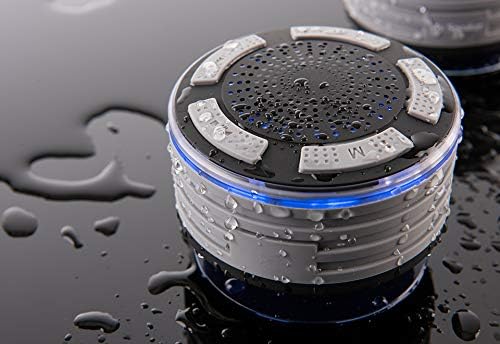
Immaġni: Close-up view of a single speaker, highlighting the control buttons for power, volume, and mode.
7. Manutenzjoni
7.1 Tindif
- Before cleaning, ensure the speakers are powered off and disconnected from any charging source.
- Wipe the exterior of the speakers with a soft, damp drapp.
- Tużax kimiċi ħarxa, solventi tat-tindif, jew deterġenti qawwija.
- Ensure the charging port is dry before reconnecting the charging cable.
7.2 Ħażna
- Aħżen l-ispikers f'post frisk u niexef 'il bogħod mix-xemx diretta u minn temperaturi estremi.
- If storing for an extended period, charge the speakers periodically to maintain battery health.
8 Issolvi l-problemi
| Problema | Kawża Possibbli | Soluzzjoni |
|---|---|---|
| Speakers do not power on. | Batterija baxxa. | Iċċarġja l-ispikers kompletament. |
| Cannot pair speakers together. | Speakers are too far apart or not in pairing mode. | Ensure both speakers are powered on and close to each other. Follow the stereo pairing instructions in Section 5.3. |
| Ma nistax nikkonnettja ma' apparat Bluetooth. | Bluetooth is off on your device; speakers are not in pairing mode; speakers are already connected to another device. | Ensure Bluetooth is enabled on your device. Make sure the primary speaker is in discoverable mode. Disconnect from other devices if necessary. |
| L-ebda ħoss jew kwalità tal-ħoss fqira. | Volume too low; device not connected; interference. | Increase volume on both speakers and your device. Reconnect Bluetooth. Move closer to the connected device. |
| Ir-riċeviment tar-radju FM huwa fqir. | Sinjal dgħajjef; interferenza ambjentali. | Reposition the speaker to improve reception. Note that FM performance can vary based on location. |
| Frequent "low battery" alerts. | Il-batterija hija kritikament baxxa. | This is an indication that the battery needs immediate recharging. The alerts are designed to be noticeable to prevent unexpected power loss. |
9. Speċifikazzjonijiet
- Ditta: Immaġni aktar qawwija
- Numru tal-Mudell: 206890
- Teknoloġija tal-Konnettività: Bluetooth
- Modalità tal-Ħruġ tal-Awdjo: Surround (Stereo when paired)
- Tip ta' Kelliem: Speaker Bluetooth portabbli
- Reżistenza għall-Ilma: IP67 Rated (Waterproof)
- Ħajja tal-batterija: Sa 8-il Siegħa
- Sors tal-Enerġija: Elettriku bil-fili (permezz ta' ċċarġjar USB)
- Tip ta 'Kontrollur: Play, Pause, Skip Tracks, Adjust Volume
- Karatteristiċi addizzjonali: Mikrofonu Inkorporat, Radju FM
- Materjal: Metall, plastik
- Piż tal-oġġett: 11.2 ounces (per speaker)
- Numru ta' Oġġetti: 2
- UPC/GTIN: 810022140352
10. Informazzjoni dwar Garanzija
This product may be covered by a standard manufacturer's warranty. For specific details regarding warranty coverage, terms, and conditions, please contact the manufacturer directly.
11. Appoġġ għall-Klijent
For technical assistance, troubleshooting not covered in this manual, or warranty inquiries, please contact Sharper Image customer support. Refer to the product packaging or the official Sharper Image webis-sit għall-aktar informazzjoni ta' kuntatt aġġornata.