
Introduzzjoni
This manual provides detailed instructions for the setup, operation, and maintenance of your CAMRY CR 1166 Weather Station. Please read this manual thoroughly before using the device to ensure proper function and longevity.
Istruzzjonijiet tas-Sigurtà
- Żomm l-apparat 'il bogħod mill-ilma u umdità għolja.
- Tesponix l-apparat għal temperaturi estremi jew dawl tax-xemx dirett għal perjodi twal.
- Uża biss l-adapter tal-enerġija jew il-batteriji speċifikati.
- Tippruvax tiżżarma jew issewwi l-apparat int stess. Ikkuntattja persunal tas-servizz kwalifikat.
- Żomm fejn ma jintlaħaqx mit-tfal.
Kontenut tal-Pakkett
Ivverifika li l-komponenti kollha huma preżenti fil-pakkett:
- CAMRY CR 1166 Weather Station (Main Unit)
- Sensor ta 'barra mill-bogħod
- Adapter tal-Qawwa AC
- Manwal ta' Istruzzjoni

Image: Main unit, remote sensor, and power adapter included in the package.
Setup
1. L-Ixgħel tal-Unità Prinċipali
- Bl-użu tal-Enerġija AC: Connect the provided AC power adapter to the main unit and plug it into a standard electrical outlet.
- Using Batteries (Optional): Open the battery compartment on the back of the main unit and insert the required batteries (not included), observing polarity.
2. Setting up the Remote Outdoor Sensor
- Open the battery compartment of the remote sensor and insert the required batteries (not included), observing polarity.
- Place the remote sensor in a sheltered outdoor location, away from direct sunlight and rain, to ensure accurate temperature and humidity readings. Ensure it is within range of the main unit (connectivity technology: 433 MHz, 868 MHz).
3. Sinkronizzazzjoni Inizjali
Once both the main unit and the remote sensor are powered, they should automatically synchronize. The outdoor temperature and humidity will appear on the main unit's display. If synchronization fails, refer to the Troubleshooting section.
Istruzzjonijiet Operattivi
Uri Fuqview
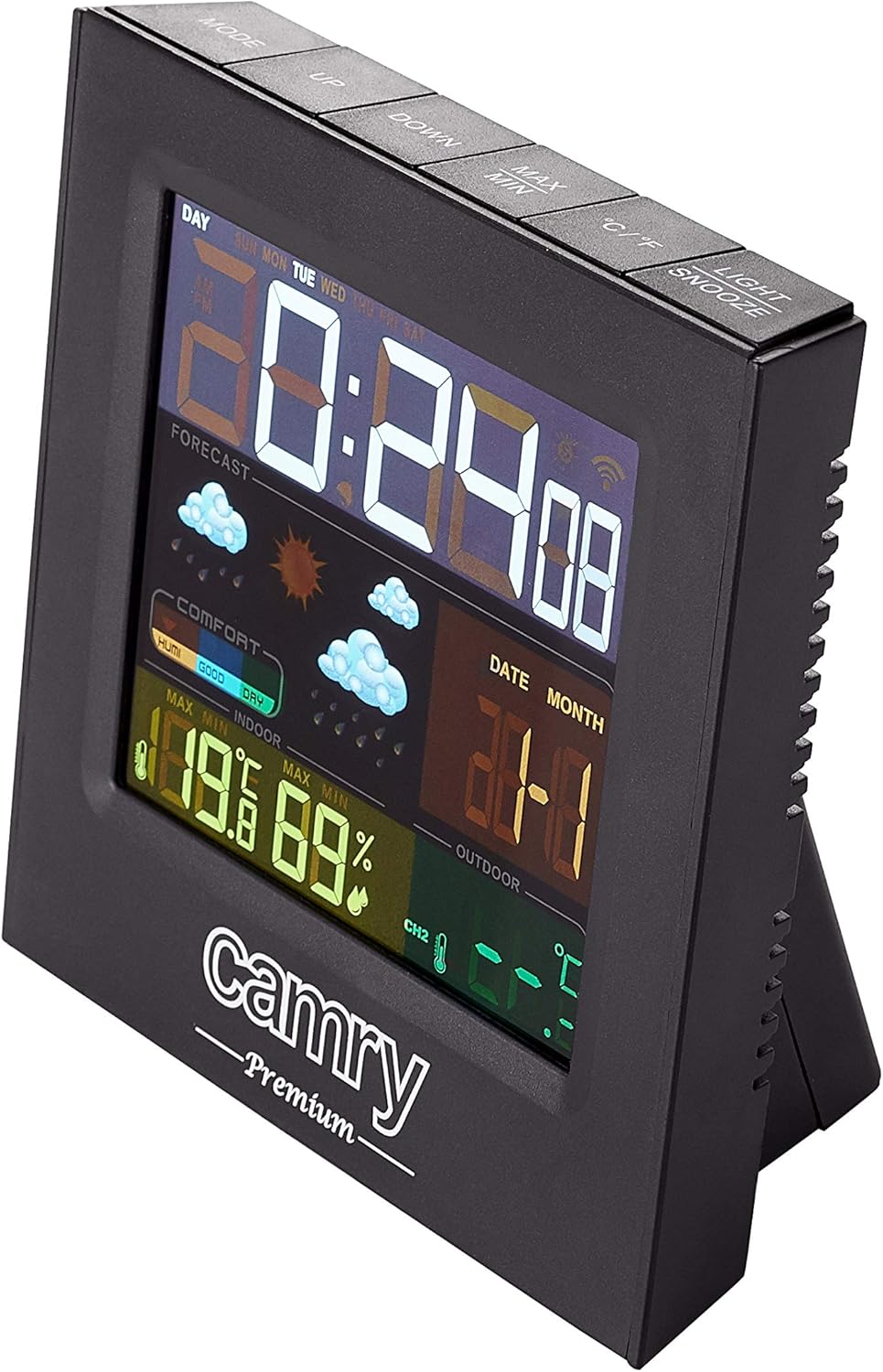
Immaġni: Dettaljata view of the weather station's multi-colored LCD display.
The multi-colored LCD display shows various information:
- Ħin u Data: Juri l-ħin u d-data kurrenti.
- Tbassir tat-Temp: Icons indicate predicted weather conditions (e.g., sunny, cloudy, rainy).
- Temperatura u Umdità ta' ġewwa: Current readings for the indoor environment.
- Temperatura u Umdità ta' Barra: Qari tal-kurrent mis-sensor remot.
- Indikatur tal-Livell ta' Kumdità: Shows indoor comfort based on temperature and humidity.
L-issettjar tal-Ħin u d-Data
Refer to the buttons on the top of the unit (e.g., MODE, UP, DOWN).
- Agħfas il- MODALITÀ buttuna biex tidħol fil-modalità tal-issettjar tal-ħin/data.
- Uża l- UP u 'L isfel buttuni biex jaġġustaw il-valuri.
- Agħfas MODALITÀ għal darb'oħra biex tikkonferma u tgħaddi għas-setting li jmiss.
Funzjoni ta' Allarm
The device includes an alarm clock function.
- Agħfas il- MODALITÀ Agħfas il-buttuna ripetutament sakemm jintwera l-ħin tal-allarm.
- Użu UP u 'L isfel biex tissettja l-ħin tal-allarm.
- Activate/deactivate the alarm using the designated button (e.g., ALARM ON/OFF or a long press of MODE).
Għażla tal-Unità tat-Temperatura (°C/°F)
Agħfas il- ° C / ° F buttuna biex taqleb bejn Celsius u Fahrenheit.
Manutenzjoni
- Tindif: Imsaħ l-apparat b'ċarruta ratba u niexfa. Tużax prodotti tat-tindif jew solventi li joborxu.
- Sostituzzjoni tal-batterija: Replace batteries in both the main unit and the remote sensor when the low battery indicator appears on the display.
- Tqegħid tas-Sensor: Periodically check the outdoor sensor's placement to ensure it remains protected from direct weather elements and is within effective range.
Issolvi l-problemi
| Problema | Kawża Possibbli | Soluzzjoni |
|---|---|---|
| L-ebda display fuq l-unità prinċipali. | Ebda enerġija jew batteriji mejta. | Check AC adapter connection or replace batteries. |
| Qari ta' barra mhux muri jew mhux preċiż. | Sensor out of range, dead sensor batteries, or interference. |
|
| Inaccurate indoor temperature/humidity. | Unit placed near heat/cold source or in high humidity. | Move the main unit to a location with stable ambient conditions. |
Speċifikazzjonijiet
| Mudell: | CR 1166 |
| Ditta: | CAMRY |
| Dimensjonijiet tal-Prodott (L x W x H): | 24 x 24 x 76 ċm |
| Piż: | 384 gramma |
| Materjal: | Plastik |
| Kulur: | Iswed |
| Tip ta' wiri: | LCD |
| Sors tal-Enerġija: | AC Adapter or Battery |
| Teknoloġija tal-Konnettività: | 433 MHz, 868 MHz |
| Preċiżjoni tat-Temperatura: | 1-2 °C |
| Komponenti Inklużi: | Outdoor sensor, remote-controlled sensor |
| Pajjiż ta' Oriġini: | Iċ-Ċina |
Garanzija u Appoġġ
For warranty information or technical support, please refer to the documentation provided with your purchase or contact CAMRY customer service.