
Introduzzjoni
Thank you for choosing the 70mai RC03 Rear Car Camera. This manual provides detailed instructions for the installation, operation, and maintenance of your device. Please read this manual thoroughly before using the product to ensure proper function and safety.
The 70mai RC03 is designed to enhance your driving safety by providing a clear view of the area behind your vehicle, with the flexibility for front installation as well.
Prodott Overview
Karatteristiċi Ewlenin
- Reversible Rear Camera: Can be installed at the rear or front of the vehicle for flexible monitoring.
- Dual Recording Capability: Supports recording in 720 HD resolution.
- Viżjoni Mtejba: Features night vision and a wide-angle lens for comprehensive coverage.
- Disinn Durabbli: IPX7 water resistance ensures reliable performance in various weather conditions.
Kontenut tal-Pakkett
The following items are included in your 70mai RC03 Rear Car Camera package:
- 1 x Xiaomi 70mai RC03 Rear Camera
- 1 x Cable tal-vidjo
- 2 x Installation Screws
Komponenti tal-Prodott
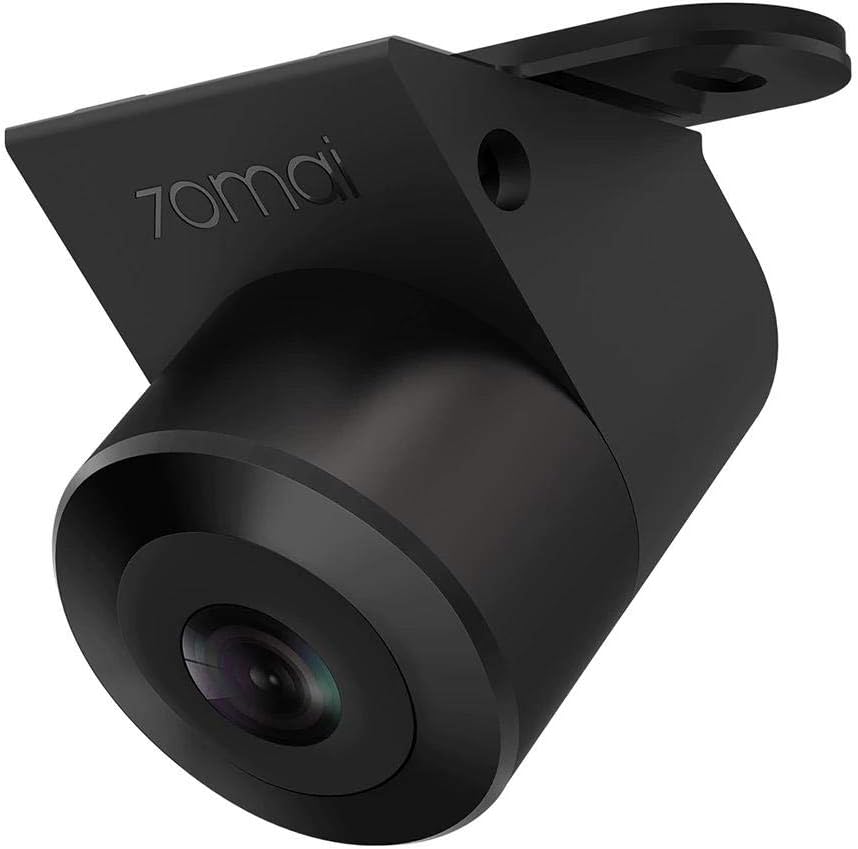
Figura 1: The 70mai RC03 Rear Car Camera unit. This image shows the compact design of the camera with its lens and mounting bracket.

Figura 2: The 70mai RC03 Rear Car Camera installed on the exterior of a vehicle, demonstrating its water-resistant design with water droplets visible on the casing. This illustrates a typical installation scenario.
Informazzjoni dwar is-Sigurtà
- Ensure all wiring is correctly connected and secured to prevent interference with vehicle operation.
- Tippruvax tiżżarma jew timmodifika l-kamera. Dan jista' jannulla l-garanzija u jikkawża ħsara.
- Żomm il-lenti tal-kamera nadifa għal prestazzjoni ottimali.
- Ikkonsulta professjonist għall-installazzjoni jekk m'intix ċert dwar xi passi.
Setup u Installazzjoni
The 70mai RC03 camera is designed for surface mounting and connects via an RCA connector. It can be installed as a rear or front camera.
- Agħżel Post ta' Installazzjoni: Decide whether to install the camera at the rear or front of your vehicle. Ensure the chosen spot provides a clear, unobstructed view and allows for secure mounting.
- Immonta l-Kamera: Use the provided installation screws to securely attach the camera to the chosen surface. Ensure the camera is oriented correctly for the desired viewangolu tal-ing.
- Qabbad il-Kejbil tal-Vidjo: Connect one end of the video cable to the camera's RCA port.
- Kejbil tar-Rotta: Carefully route the video cable through your vehicle's interior to the main recording unit or display. Ensure the cable is not pinched or exposed to moving parts.
- Qabbad mal-Unità Prinċipali: Connect the other end of the video cable (RCA connector) to the corresponding input on your main dash cam or display unit.
- Konnessjoni tal-Enerġija: Connect the camera's power cable (if separate) to a suitable power source in your vehicle, typically linked to the reverse light circuit for rear cameras or an accessory power source for front cameras.
- Funzjonalità tat-Test: After installation, power on your vehicle and the main recording unit to verify that the camera is functioning correctly and providing a clear image. Adjust the camera angle if necessary.
Istruzzjonijiet Operattivi
The 70mai RC03 camera operates in conjunction with a compatible main dash cam or display unit. Refer to your main unit's manual for specific instructions on viewing and recording footage.
- Power On/Off: The camera typically powers on and off automatically with your vehicle's ignition or when the main unit is activated.
- Reġistrazzjoni: When connected to a compatible 70mai dash cam, the RC03 will automatically begin recording in 720p resolution, providing dual recording capability.
- Viżjoni bil-lejl: The camera is equipped with night vision technology to provide clear images in low-light conditions.
- Angolu Wide View: The wide-angle lens captures a broad field of view, minimizing blind spots.
Manutenzjoni
- Tindif tal-Lenti: Naddaf il-lenti tal-kamera regolarment b'ċarruta ratba u damp drapp biex tiżgura kwalità ta' immaġni ċara. Evita prodotti tat-tindif li joborxu.
- Reżistenza għall-Ilma: The camera has an IPX7 water resistance rating, meaning it can withstand immersion in water up to 1 meter for 30 minutes. However, avoid prolonged submersion or high-pressure water jets.
- Spezzjoni tal-Cable: Periodically check all cables for wear, damage, or loose connections.
- Aġġornamenti tal-Firmware: If applicable, check the 70mai official website for any available firmware updates for your camera or main unit.
Issolvi l-problemi
If you encounter issues with your 70mai RC03 camera, refer to the following common problems and solutions:
- L-ebda Immaġni fuq il-Wiri:
- Check all cable connections, especially the RCA video cable and power supply.
- Ensure the main dash cam or display unit is powered on and correctly configured to receive input from the RC03.
- Verify the camera's power source is active (e.g., reverse light circuit).
- Immaġni Mċajpra jew Distorta:
- Naddaf il-lenti tal-kamera sewwa.
- Iċċekkja għal xi ostakli fil-kamp tal-kamera view.
- Ensure the video cable is not damaged or experiencing interference.
- Camera Not Recording:
- Confirm that the main dash cam is recording and properly configured for dual-channel recording.
- Check the storage capacity of your main dash cam's memory card.
Speċifikazzjonijiet
| Numru tal-Mudell | Midrive RC03 |
| Manifattur | Xiaomi |
| Brand | 70mai |
| Teknoloġija tas-Sensor Ottiku | CMOS |
| Effective Capture Resolution | 720 Pixels (720p) |
| Tip ta' Lenti | Angolu Wide |
| Attwali View Angolu | 138 grad |
| Qasam ta View | 146 Grad |
| Tip ta' Konnettur | RCA |
| Tip ta' Installazzjoni | Immonta fil-wiċċ |
| Reżistenza għall-Ilma | IPX7 |
| Display Technology (if applicable to main unit) | LCD |
| Screen Size (if applicable to main unit) | 3 Pulzier |
| Batteriji | 1 AA - included (likely for main unit, not camera itself) |
Garanzija u Appoġġ
For warranty information and customer support, please refer to the documentation provided with your main 70mai dash camera unit or visit the official 70mai website. Information regarding spare parts availability and software update guarantees is not available at this time.
For technical assistance or inquiries, please contact 70mai customer service through their official channels.