1. Introduzzjoni
This manual provides instructions for the Generic ERF2A60 remote control, designed for use with various Hisense television models. This remote utilizes infrared technology to communicate with your TV, offering essential functions for a seamless viewing experience. Please read this manual thoroughly before use.
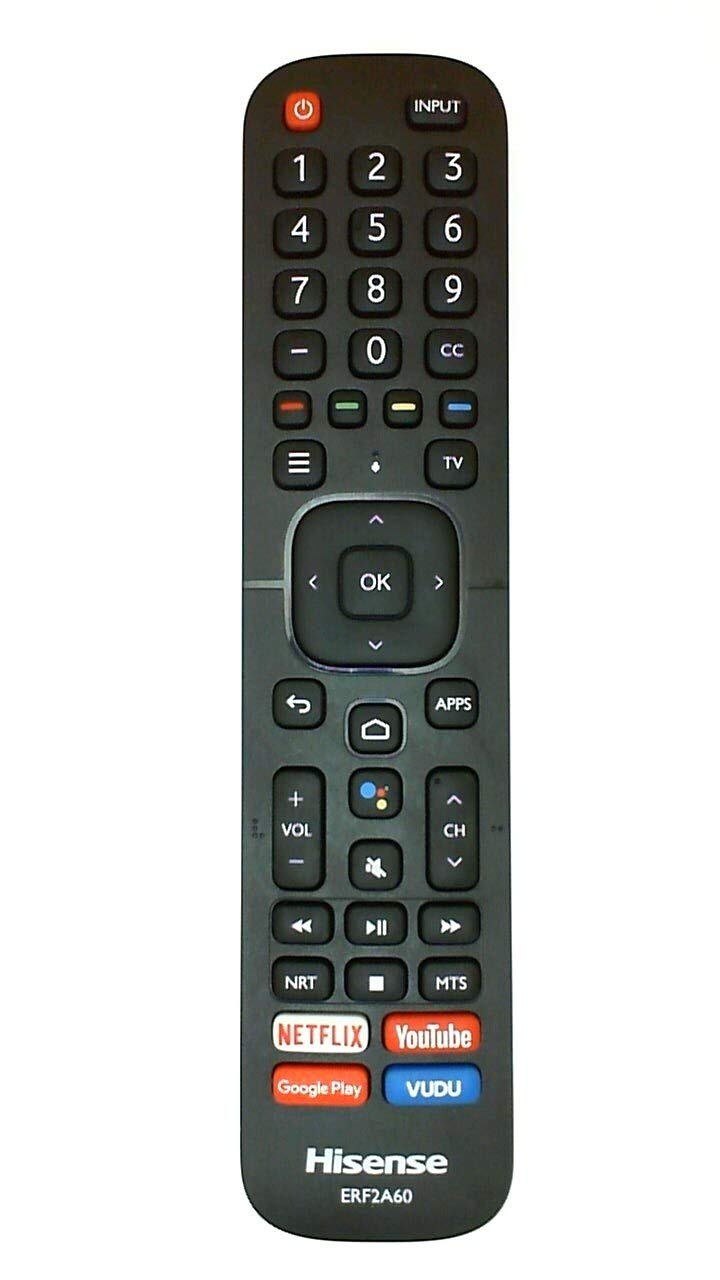
Figure 1: The Generic ERF2A60 Remote Control. This image displays the front view tal-kontroll remot, li jenfasizza d-disinn ergonomiku tiegħu u t-tqassim tal-buttuni.
2. Setup
2.1 Installazzjoni tal-batterija
- Sib l-għatu tal-kompartiment tal-batterija fuq wara tal-kontroll remot.
- Żerżaq l-għatu 'l isfel jew agħfas il-lukkett u erfa' biex tiftaħ.
- Daħħal żewġ batteriji AAA (mhux inklużi), waqt li tiżgura li t-terminali pożittivi (+) u negattivi (-) jaqblu mad-dijagrammi ġewwa l-kompartiment.
- Erġa' poġġi l-għatu tal-kompartiment tal-batterija, billi żżerżaqha lura f'postha sakemm tikklikkja sew.
2.2 Użu Inizjali
The ERF2A60 remote control typically does not require programming for compatible Hisense TVs. Once batteries are installed, point the remote directly at your television's infrared receiver and press the Qawwa buttuna biex tittestja l-funzjonalità.
3. Operazzjoni
This section outlines the primary functions of the buttons on your ERF2A60 remote control.
- Buttuna tal-Qawwa: Ixgħel jew jitfi t-televixin.
- Buttuna tad-Dħul/Sors: Cycles through available input sources (HDMI 1, HDMI 2, AV, etc.).
- Buttuni Volum 'il fuq /' l isfel: Jaġġusta l-livell tal-volum tat-televiżjoni.
- Buttuni tal-Kanal 'l fuq/'l isfel: Tibdel l-istazzjon televiżiv.
- Buttuna Mute: Silences or restores the television's audio.
- Buttuni tan-Navigazzjoni ('Il fuq, 'l isfel, Xellug, Lemin, OK/Enter): Used to navigate menus and select options on the screen.
- Back/Return Button: Jirritorna għall-menu jew l-iskrin preċedenti.
- Buttuna tad-dar: Accesses the TV's main smart TV interface or home screen.
- Buttuna tal-menu: Opens the TV's settings or options menu.
- Tastiera tan-Numri (0-9): Idaħħal direttament in-numri tal-kanali.
Note: Specific button functions may vary slightly depending on your Hisense TV model.
4. Manutenzjoni
4.1 Tindif
Biex tnaddaf il-kontroll remot tiegħek, imsaħ bil-mod b'ċarruta ratba u niexfa. Għal ħmieġ iebes, nixxef ftit.ampLaħlaħ id-drapp bl-ilma. Evita li tuża kimiċi ħarxa, prodotti tat-tindif li joborxu, jew umdità eċċessiva, għax dawn jistgħu jagħmlu ħsara lir-remote.
4.2 Sostituzzjoni tal-batterija
Replace batteries when the remote's response becomes sluggish or stops working. Always replace both batteries at the same time with new AAA batteries. Do not mix old and new batteries, or different types of batteries. Dispose of used batteries according to local regulations.
5 Issolvi l-problemi
| Problema | Kawża Possibbli | Soluzzjoni |
|---|---|---|
| Remote mhux jaħdem. | Batteriji mejta jew installati ħażin. Ostruzzjoni bejn ir-remote u t-TV. Ir-remote barra mill-firxa. | Ibdel il-batteriji, waqt li tiżgura l-polarità korretta. Neħħi kwalunkwe oġġett li jimblokka l-mogħdija tas-sinjal. Ersaq eqreb lejn it-TV. |
| Il-buttuni ma jirrispondux. | Low battery power. Dirt or debris under buttons. | Replace batteries. Clean the remote control (refer to Section 4.1). |
| Ir-remote jaħdem biss b'mod intermittenti. | Batteriji dgħajfa. Interferenza. | Ibdel il-batteriji. Kun żgur li l-ebda sors ta’ dawl qawwi (bħal dawl tax-xemx dirett) ma jkun qed jinterferixxi mas-sinjal IR. |
6. Speċifikazzjonijiet
- Mudell: ERF2A60
- Teknoloġija tal-Konnettività: Infra-aħmar (IR)
- Apparati Kompatibbli: Select Hisense Televisions
- Sors tal-Enerġija: 2 x Batteriji AAA (mhux inklużi)
- Karatteristika Speċjali: Disinn ergonomiku
- Kulur: Iswed
- Dimensjonijiet approssimattivi: 4 x 4 x 4 inches (Package Dimensions, actual remote dimensions may vary slightly)
- Piż approssimattiv: 1 pound (Package Weight, actual remote weight may vary slightly)
7. Informazzjoni dwar Garanzija
This Generic ERF2A60 remote control comes with a 30-day warranty from the date of purchase. This warranty covers manufacturing defects. It does not cover damage caused by misuse, accidents, unauthorized modifications, or normal wear and tear. Please retain your proof of purchase for warranty claims.
8. Appoġġ għall-Klijent
For further assistance or inquiries regarding your ERF2A60 remote control, please refer to the retailer where the product was purchased. You may also visit the official Hisense support website for information related to your specific television model, as remote control compatibility and advanced features can sometimes be found there.


