
1. Introduzzjoni
Grazzi tax-xiriasing the MUSE M-10 Red Radio Alarm Clock. This manual provides essential information for the safe and efficient operation of your device. Please read these instructions carefully before use and retain them for future reference.

Figure 1: MUSE M-10 Red Radio Alarm Clock. This image shows the front view of the red alarm clock with its digital LED display showing '12:00' and various control buttons on the top panel.
2. Istruzzjonijiet tas-Sigurtà
- Aqra l-istruzzjonijiet kollha qabel ma tħaddem l-apparat.
- Tesponix dan l-apparat għax-xita jew għall-umdità biex tevita perikli ta' nar jew xokk elettriku.
- Kun żgur li l-adapter tal-enerġija huwa faċilment aċċessibbli.
- Uża biss aċċessorji/aċċessorji speċifikati mill-manifattur.
- Tpoġġix il-prodott fid-dawl tax-xemx dirett jew ħdejn sorsi ta’ sħana.
- Avoid placing the product on surfaces that are unstable or subject to vibration.
- Tiftaħx is-casing; irreferi s-servizz kollu lil persunal kwalifikat.
- Armi l-batteriji użati b'mod responsabbli, skont ir-regolamenti lokali.
3. Prodott Aktarview
3.1 Il-Panel ta' Quddiem u l-Wiri
The front panel features a clear 0.6-inch white LED display for time and alarm indicators.
3.2 Kontrolli tal-Panel ta' Fuq
The top panel houses all control buttons for easy access:
- MEM: Memory button for saving and recalling radio presets.
- SET: Button for setting time and alarm parameters.
- AL1: Alarm 1 setting button.
- AL2: Alarm 2 setting button.
- << HR: Hour adjustment button (backward).
- MIN >>: Minute adjustment button (forward).
- SNOOZE: Activates the snooze function during an alarm.
- Rqad: Jattiva l-funzjoni tat-tajmer tal-irqad.
- DIMMER: Jaġġusta l-luminożità tal-wiri.

Figura 2: Aktarview of the MUSE M-10 Red Radio Alarm Clock's functions, including its 0.6-inch white LED display, PLL radio, 20 FM presets, dimmer, dual alarm, snooze, and sleep features.
4. Setup
4.1 Konnessjoni tal-Enerġija
Connect the provided AC adapter to the DC IN jack on the rear of the unit and then plug it into a standard wall outlet. The unit will power on and the display will light up.
4.2 Installazzjoni ta' Backup tal-Batterija
For time and alarm settings backup during a power outage, install 2 x AAA batteries (not included) into the battery compartment located on the bottom of the unit. Ensure correct polarity (+/-) when inserting batteries.
5. Istruzzjonijiet Operattivi
5.1 Issettjar tal-Ħin
- Agħfas u żomm il- SET Agħfas il-buttuna sakemm iċ-ċifri tas-sigħat jteptep.
- Uża l- << HR or MIN >> buttuni biex taġġusta s-siegħa.
- Agħfas SET għal darb'oħra, u ċ-ċifri tal-minuti jibdew jteptep.
- Uża l- << HR or MIN >> buttuni biex jaġġustaw il-minuti.
- Agħfas SET għal darb'oħra biex tikkonferma u toħroġ mill-modalità tal-issettjar tal-ħin.
5.2 Setting Alarms (Alarm 1 and Alarm 2)
L-unità għandha żewġ allarmi indipendenti.
- Agħfas u żomm il- AL1 (jew AL2) button until the alarm hour digits flash.
- Uża l- << HR or MIN >> buttuni biex tissettja s-siegħa tal-allarm mixtieqa.
- Agħfas AL1 (jew AL2) again, and the alarm minute digits will flash.
- Uża l- << HR or MIN >> buttuni biex tissettja l-minuti tal-allarm mixtieqa.
- Agħfas AL1 (jew AL2) again to select the alarm source: Buzzer or Radju.
- Agħfas AL1 (jew AL2) once more to confirm and activate the alarm. An alarm icon will appear on the display.
5.3 Tħaddim tar-Radju FM
The unit has a PLL FM radio with 20 preset stations.
- Irfinar: Agħfas il- << HR or MIN >> buttons to manually tune the radio frequency. Press and hold these buttons for automatic scanning to the next available station.
- Iffrankar ta' presets: Issettja l-istazzjon mixtieq tiegħek. Agħfas u żomm il-buttuna MEM button until 'P01' (or the next available preset number) flashes. Use << HR or MIN >> biex tagħżel numru preset, imbagħad agħfas MEM mill-ġdid biex issalva.
- Filwaqt li jfakkru l-Presets: Agħfas fil-qosor il- MEM buttuna biex tiċċaqlaq bejn l-istazzjonijiet issettjati minn qabel li jkunu ġew salvati.
5.4 Funzjoni Snooze
Meta tinstema' allarm, agħfas il-buttuna SNOOZE button to temporarily silence the alarm for approximately 9 minutes. The alarm will sound again after this period.
5.5 Funzjoni tat-Tajmer tal-Irqad
Agħfas il- L-IRQAD button repeatedly to set a sleep timer (e.g., 90, 60, 30, 15 minutes, or OFF). The radio will play for the selected duration and then automatically turn off.
5.6 Dimmer tal-Wiri
Agħfas il- DIMMER button repeatedly to cycle through display brightness levels: High, Low, or Off.

Figure 3: Key features of the MUSE M-10 Red Radio Alarm Clock, including snooze, radio or buzzer alarm, dimmable display, and FM PLL radio with 20 presets.
6. Manutenzjoni
- Tindif: Imsaħ l-unità b'ċarruta ratba u niexfa. Tużax prodotti tat-tindif jew solventi li joborxu.
- Sostituzzjoni tal-batterija: Replace backup batteries annually or when the display shows signs of dimming during power outages.
- Ħażna: If storing the unit for an extended period, remove the backup batteries to prevent leakage.
7 Issolvi l-problemi
| Problema | Kawża Possibbli | Soluzzjoni |
|---|---|---|
| Ebda enerġija/Wiri mitfi | L-adapter tal-enerġija mhux imqabbad jew difettuż. | Iċċekkja l-konnessjoni tal-adapter tal-enerġija. Ipprova sokit differenti. |
| L-allarm ma ħossx | L-allarm mhux attivat jew issettjat ħażin. | Ensure alarm icon is visible on display. Re-check alarm time and source settings. |
| Riċeviment ħażin tar-radju | FM antenna not extended or poor signal area. | Fully extend the FM wire antenna. Adjust its position for better reception. |
| Ħin/settings mitlufa wara li tintefa' l-elettrikutage | Batteriji ta' backup mhux installati jew eżawriti. | Install new AAA batteries for backup. |
8. Speċifikazzjonijiet
- Mudell: M-10 AĦMAR
- Ditta: MUSE
- Wiri: 0.6-inch White LED, Digital
- Radju: FM PLL Radio with 20 Presets
- Allarm: Allarm Doppju (Buzzer jew Radju)
- Karatteristiċi Speċjali: Snooze, Sleep Timer, Display Dimmer (High/Low/Off)
- Sors tal-Enerġija: AC Adapter (included), 2 x AAA batteries for backup (not included)
- Dimensjonijiet (L x W x H): 12 x 7 x 10.9 ċm (madwar 4.7 x 2.8 x 4.3 pulzieri)
- Piż: 200 gramma (madwar 0.44 libbra)
- Materjal: Plastik
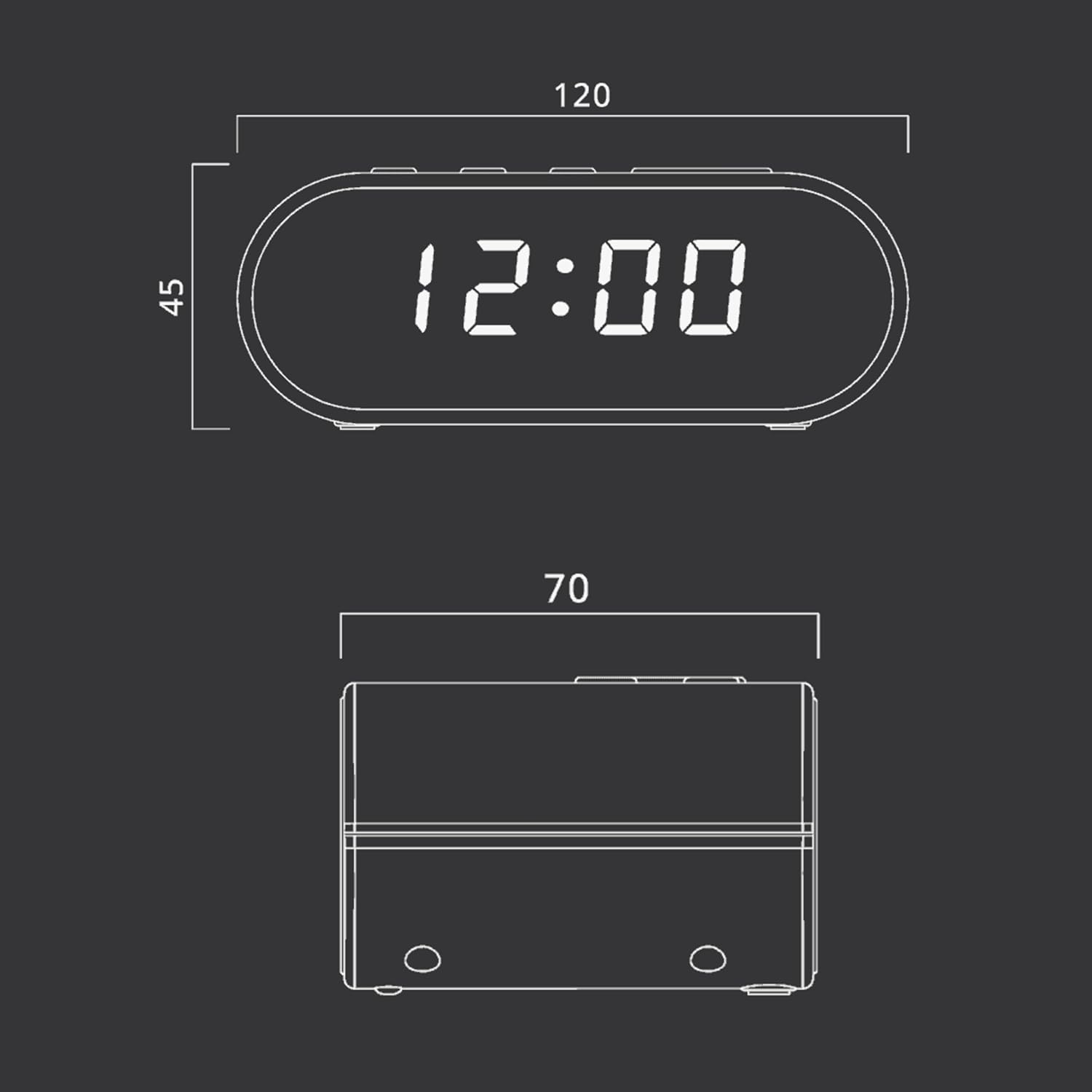
Figure 4: Dimensional drawing of the MUSE M-10 Red Radio Alarm Clock, showing its length (120mm), width (70mm), and height (45mm).
9. Garanzija u Appoġġ
For warranty information or technical support, please refer to the warranty card included with your product or contact your local MUSE distributor. Keep your purchase receipt as proof of purchase.