
1. Introduzzjoni u Fuqview
This manual provides essential information for the setup, operation, maintenance, and troubleshooting of your ASUS ROG Strix G Gaming Laptop, model GL531GU-WB53. The laptop features a streamlined design, integrating a 9th Gen Intel Core processor and NVIDIA GeForce graphics for gaming and multitasking. It includes a 120Hz Full HD display and a PCIe SSD.
Karatteristiċi ewlenin:
- NVIDIA GeForce GTX 1660 Ti 6GB GDDR6 Graphics
- Intel Core i5-9300H Quad-core Processor
- 120Hz 15.6” 1920x1080 IPS Type Display
- 8GB DDR4 2666MHz RAM and 512GB PCIe SSD
- Sistema Operattiva Windows 10 Home
- Gigabit Wave 2 Wi-Fi 5 (802.11ac 2x2)
- ROG Intelligent Cooling thermal system with dual 12V fans and anti-dust technology

Figura 1: Quddiem view of the ASUS ROG Strix G Gaming Laptop.
2. X'hemm fil-Kaxxa
Upon unboxing your ASUS ROG Strix G Gaming Laptop, please verify that all the following items are included:
- ASUS ROG Strix G GL531 Gaming Laptop
- Adapter tal-Enerġija & Kurdun
- Gwida għall-Utent
- Karta ta' Garanzija
3. Gwida ta' Setup
Follow these steps to set up your new ASUS ROG Strix G Gaming Laptop:
- Qabbad l-Enerġija: Ipplaggja l-adapter tal-enerġija fil-port tal-enerġija tal-laptop u mbagħad f'sokit tal-ħajt. Kun żgur li d-dawl tal-indikatur tal-enerġija jixgħel.
- L-Ibbutjar Inizjali: Open the laptop lid and press the power button. The laptop will begin its initial boot sequence.
- Konfigurazzjoni tas-Sistema Operattiva: Follow the on-screen prompts to complete the Windows 10 Home setup. This includes selecting your region, language, accepting terms, and creating a user account.
- Konnessjoni tan-Netwerk: Connect to a Wi-Fi network or use an Ethernet cable for internet access during setup and for updates.
- Installa Aġġornamenti: After initial setup, it is recommended to check for and install all available Windows updates and driver updates to ensure optimal performance and security.
- MyASUS Application: Utilize the pre-installed MyASUS application for system updates, diagnostics, and customization.
Video 1: MyASUS Product Video, demonstrating features for system management and customization.
4. Istruzzjonijiet Operattivi
Power On/Off:
- Qawwa Mixgħul: Agħfas il-buttuna tal-qawwa li tinsab fin-naħa ta’ fuq tal-lemin tat-tastiera.
- Itfi: Ikklikkja l-buttuna Start tal-Windows, imbagħad agħżel Power > Shut down.
- Modalità Sleep: Close the laptop lid or select Power > Sleep from the Start menu.
Tastiera u Touchpad:
- The laptop features an RGB backlit keyboard. Lighting can be customized via ASUS Aura Sync software.
- The touchpad supports multi-touch gestures for navigation. Refer to Windows settings for customization.

Figura 2: Minn fuq għal isfel view tat-tastiera u t-touchpad tal-laptop.
Konnessjoni Periferali:
Il-laptop joffri diversi portijiet għall-konnessjoni ta' apparati esterni:
- Portijiet USB: Connect USB devices such as mice, keyboards, and external storage.
- Port HDMI: Qabbad ma' displays jew projetturi esterni.
- Awdjo Jack: Qabbad headphones jew kelliema esterni.
- Port Ethernet: Għal konnessjonijiet tan-netwerk bil-fili.
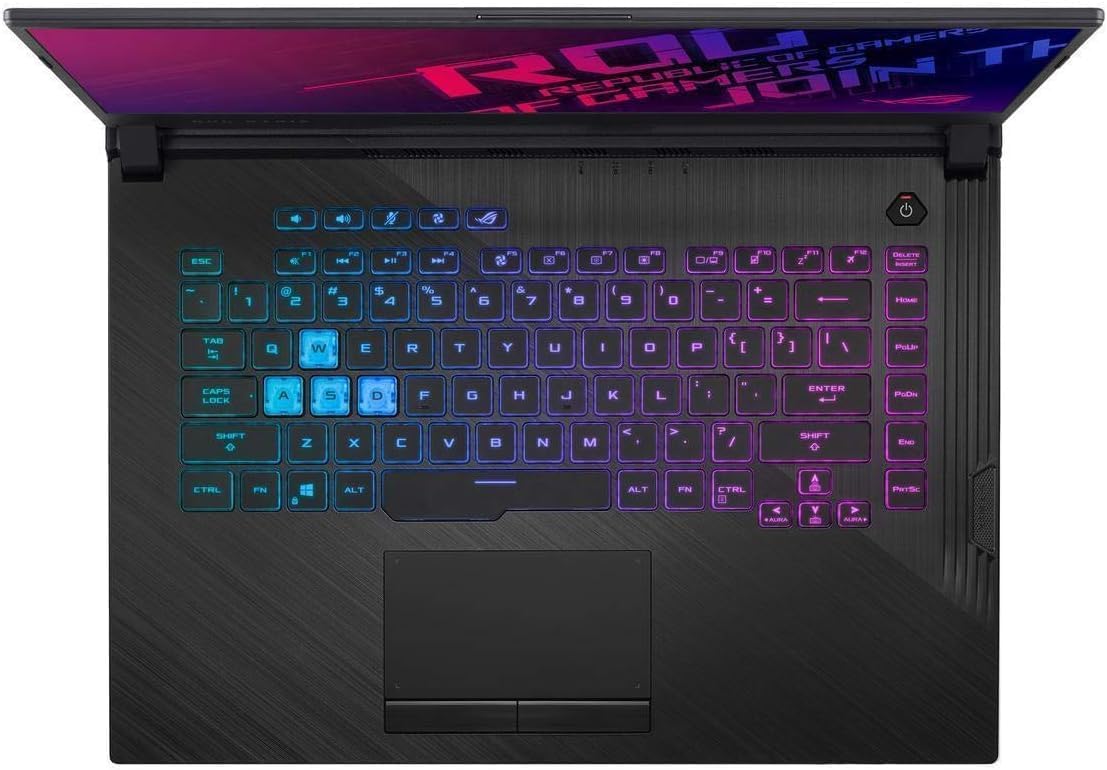
Figura 3: Ġenb view of the laptop, highlighting available ports.
5. Manutenzjoni
- Tindif: Uża drapp artab u mingħajr suf biex tnaddaf l-iskrin u x-chassis. Għal marki persistenti, dampNaddaf id-drapp ftit bl-ilma jew b'prodott tat-tindif tal-iskrin. Evita kimiċi ħarxa.
- Ventilazzjoni: Ensure the laptop's ventilation openings are clear of obstructions to prevent overheating. Regularly clean dust from the vents using compressed air.
- Kura tal-batterija: To prolong battery life, avoid consistently discharging the battery completely or keeping it at 100% charge for extended periods. MyASUS software offers battery health management features.
- Aġġornamenti tas-Software: Regularly update Windows and device drivers to maintain system stability, security, and performance.
6 Issolvi l-problemi
If you encounter issues with your laptop, consider the following common troubleshooting steps:
- Ebda Qawwa: Kun żgur li l-adapter tal-enerġija huwa konness sew kemm mal-laptop kif ukoll ma' sokit tal-enerġija li jaħdem. Iċċekkja d-dawl indikatur tal-enerġija.
- Kwistjonijiet tal-Wiri: If the screen is blank, try connecting an external monitor to verify if the issue is with the laptop's display or graphics output. Ensure display drivers are updated.
- Tnaqqis fil-Prestazzjoni: Close unnecessary applications, check for background processes, and ensure sufficient free storage space. Run system diagnostics via MyASUS.
- Konnettività tan-Netwerk: Verify Wi-Fi is enabled and connected to the correct network. Restart your router/modem. For wired connections, check the Ethernet cable.
- Is-sħana żejda: Ensure vents are clear. Adjust fan profiles using MyASUS or ROG Armoury Crate software. Avoid using the laptop on soft surfaces that block airflow.
For more advanced diagnostics and support, refer to the MyASUS application or the ASUS support websit.
7. Speċifikazzjonijiet
| Brand | ASUS |
| Isem tal-Mudell | ROG Strix G |
| Numru tal-Mudell | GL531GU-WB53 |
| Daqs tal-Iskrin | 15.6 Pulzier |
| Riżoluzzjoni tal-Wiri Massimu | 1920x1080 Pixel (Full HD) |
| Riffriskar Rata | 120 Hz |
| Mudell tas-CPU | Intel Core i5-9300H (Quad-core, up to 4.1 GHz) |
| Koproċessur tal-Grafika | NVIDIA GeForce GTX 1660Ti (6GB GDDR6) |
| Daqs tal-Memorja RAM Installata | 8 GB DDR4 (2666 MHz) |
| Daqs tal-Hard Disk | SSD PCIe NVMe ta' 512 GB |
| Sistema Operattiva | Windows 10 Home |
| Teknoloġija bla fili | Wi-Fi 5 (802.11ac 2x2), Bluetooth |
| Portijiet USB totali | 4 |
| Portijiet HDMI | 1 |
| Piż tal-oġġett | 5.3 Liri |
| Dimensjonijiet tal-oġġett (L x W x Ħxuna) | 14.2"T x 10.8"W x 1"Ħ |
8. Garanzija u Appoġġ
Informazzjoni dwar il-garanzija:
Your ASUS ROG Strix G Gaming Laptop comes with a 1-year International Warranty, 1-year Accidental Damage Protection (ADP) with 1-way free shipping, 30-Day Zero Bright Dot guarantee, 2-way FREE shipping for standard warranty repair, and 24/7 technical support. Please refer to the included Warranty Card for full terms and conditions.
Appoġġ għall-Klijent:
For technical assistance, product inquiries, or warranty claims, please visit the official ASUS support website or contact ASUS customer service. The MyASUS application on your laptop also provides direct access to support resources and diagnostic tools.