
Tesvor Tesvor X500Pro
Tesvor Robot Vacuum User Manual
Model: Tesvor X500Pro
Brand: Tesvor
1. Introduzzjoni
This manual provides essential information for the safe and efficient operation of your Tesvor Robot Vacuum. The Tesvor X500Pro is a versatile 2-in-1 robotic vacuum and mop cleaner designed to provide thorough cleaning on various floor types, from hard floors to low-pile carpets. It features strong suction, smart navigation, and convenient control options via Wi-Fi, app, and voice commands.
Jekk jogħġbok aqra dan il-manwal bir-reqqa qabel tuża l-prodott u żommu għal referenza futura.
2. Informazzjoni dwar is-Sigurtà
To reduce the risk of injury or damage, read these safety instructions carefully and keep them at hand when setting up, using, and maintaining your robot vacuum.
- Il-vacuum cleaner robot huwa għal użu fuq ġewwa biss. Tużahx barra jew fuq uċuħ kummerċjali.
- Do not use the robot vacuum in wet environments or on floors with standing water.
- Neħħi l-wajers tal-enerġija, oġġetti żgħar, u oġġetti fraġli mill-art qabel ma tnaddaf biex tevita li jitħabblu jew jagħmlu ħsara.
- Żomm ix-xagħar, il-ħwejjeġ maħlula, is-swaba’, u l-partijiet kollha tal-ġisem 'il bogħod mill-fetħiet u mill-partijiet li jiċċaqilqu.
- Tħaddimx il-vacuum cleaner robot ħdejn fjammi mikxufa jew materjali fjammabbli.
- Ensure the charging dock is placed against a wall on a level surface and is not easily moved.
- The robot vacuum is not suitable for high-pile carpets over 0.6 inches, dark-colored rugs, or carpets with black strips/edges, as these may interfere with sensors.
- Uża biss l-adapter tal-enerġija u d-dock tal-iċċarġjar oriġinali pprovduti mill-manifattur.
- Issorvelja t-tfal u l-annimali domestiċi meta l-vacuum cleaner robot ikun qed jaħdem.
3. Kontenut tal-Pakkett
Ivverifika li l-komponenti kollha huma preżenti u f'kundizzjoni tajba:
- Tesvor Robot Vacuum Unit
- Baċir tal-Iċċarġjar
- Adapter tal-Enerġija
- Xkupilji tal-ġenb (2 pari)
- Pinzell Prinċipali
- Trab tat-trab
- Tank tal-Ilma b'Ċarruta tal-Mopp
- Għodda tat-Tindif
- Kontroll mill-bogħod
4. Prodott Aktarview
Familiarize yourself with the main components of your Tesvor Robot Vacuum.

Image: The Tesvor Robot Vacuum main unit, showing its sleek white design, accompanied by its charging dock, a mop cloth, and the transparent water tank.

Image: The slim profile of the Tesvor Robot Vacuum, measuring 75mm in height, allowing it to easily clean under low-clearance furniture like sofas and cabinets.

Image: A close-up of the Tesvor Robot Vacuum's electronic water tank, highlighting its 350ml capacity and water distribution system for mopping.
5. Setup
5.1 Iċċarġjar inizjali
- Place the charging dock against a wall in an open, uncluttered area. Ensure there are no obstacles within 1 meter (3 feet) to the front and 0.5 meters (1.5 feet) to the sides of the dock.
- Qabbad l-adapter tal-enerġija mad-dock tal-iċċarġjar u daħħal it-tarf l-ieħor f'sokit tal-ħajt.
- Place the robot vacuum onto the charging dock. Ensure the charging contacts on the robot align with those on the dock. The indicator light on the robot will show charging status.
- Fully charge the robot before its first use (approximately 4-5 hours).
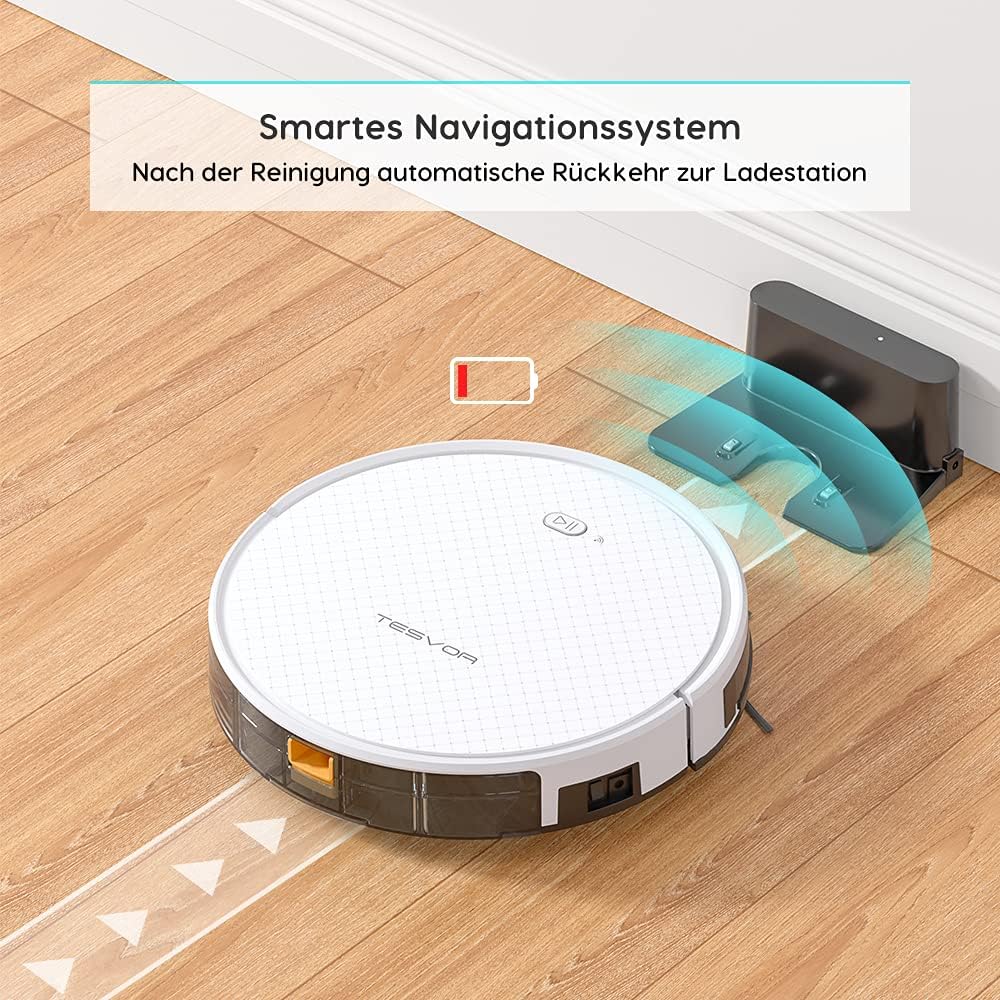
Image: The Tesvor Robot Vacuum intelligently navigating back to its charging station when its battery is low or cleaning is complete, indicated by a battery icon.
5.2 Installing Side Brushes and Dustbin/Water Tank
- Dawwar il-vacuum cleaner robot ta’ taħt fuq.
- Align the side brushes with the corresponding posts (L and R) and press them down until they click into place.
- For vacuuming, ensure the dustbin is securely inserted into the robot.
- For mopping, fill the water tank with clean water (and a small amount of cleaning fluid if desired, as per manufacturer's guidelines) and attach the mop cloth. Insert the water tank into the robot.
6. Istruzzjonijiet Operattivi
6.1 Modi tat-Tindif
The Tesvor X500Pro offers various cleaning modes:
- Tindif Awtomatiku: The robot intelligently navigates in an S-shape path to cover the entire area.
- Tindif tal-Post: Jiffoka fuq żona maħmuġa speċifika.
- Tindif tax-Xfer: Tnaddaf tul il-ħitan u t-truf tal-għamara.
- Tindif Skedat: Set a cleaning schedule via the app.

Image: The Tesvor Robot Vacuum demonstrating its systematic S-shaped cleaning path, ensuring comprehensive coverage of the floor area.
The robot provides intense 1800Pa suction, effective for dust, crumbs, and pet hair on hard floors and low-pile carpets.

Image: The Tesvor Robot Vacuum actively cleaning a wooden floor, demonstrating its strong suction power by collecting scattered debris.
6.2 Kontroll tal-App u tal-Vuċi
The Tesvor X500Pro can be controlled via the Tesvor Smart App or voice commands through Alexa and Google Assistant.
- Download the "Tesvor Smart" app from your mobile app store.
- Ensure your Wi-Fi network is set to 2.4GHz for connection.
- Follow the in-app instructions to connect your robot vacuum.
- Once connected, you can use the app for scheduling, changing cleaning modes, real-time monitoring of the cleaning path, and direction control.
- For voice control, enable the Tesvor skill in your Alexa or Google Home app and link your Tesvor account.

Image: A smartphone displaying the Tesvor app interface, showing a real-time map of the robot's cleaning progress and various control options, along with icons for 2.4G Wi-Fi, Amazon Alexa, and Google Home compatibility.
7. Manutenzjoni
Manutenzjoni regolari tiżgura prestazzjoni ottimali u testendi l-ħajja tal-vacuum cleaner robot tiegħek.
7.1 Tindif tal-Kontenitur tat-Trab u l-Filtru
- Agħfas il-buttuna tal-ftuħ tal-kontenitur tat-trab u iġbed il-kontenitur tat-trab 'il barra.
- Iftaħ l-għatu tal-landa taż-żibel u vojta l-kontenut tagħha ġo landa taż-żibel.
- Neħħi l-filtru HEPA u l-filtru tal-fowm. Tektekhom bil-mod biex tneħħi t-trab. Taħsilx il-filtru HEPA bl-ilma.
- Laħlaħ il-kontenitur tat-trab bl-ilma jekk meħtieġ, u kun żgur li jkun niexef għalkollox qabel ma terġa' ddaħħalh.
- Reassemble the filters and dustbin, then reinsert into the robot.
7.2 Tindif tal-Pinzell Prinċipali u l-Pinzell tal-Ġenb
- Dawwar il-vacuum cleaner robot ta’ taħt fuq.
- Neħħi l-għatu tal-pinzell prinċipali u erfa' l-pinzell prinċipali 'l barra. Uża l-għodda tat-tindif biex tneħħi x-xagħar u l-fdalijiet.
- Pull the side brushes upwards to remove them. Clean any hair or debris wrapped around them.
- Reinstall the main brush and side brushes.
7.3 Tindif tat-Tank tal-Ilma u d-Drapp tal-Mopp
- Neħħi t-tank tal-ilma mir-robot.
- Empty any remaining water and rinse the tank thoroughly.
- Remove the mop cloth and wash it by hand or machine. Allow it to air dry completely.
- Ensure the water tank is dry before storing or refilling.
8 Issolvi l-problemi
| Problema | Kawża Possibbli | Soluzzjoni |
|---|---|---|
| Robot ma jixgħelx. | Batterija baxxa; Mitfi l-iswiċċ tal-enerġija. | Iċċarġja r-robot; Ixgħel is-swiċċ prinċipali tal-enerġija. |
| Ir-robot jeħel spiss. | Obstacles (cords, small objects); High-pile carpet. | Clear the area; Avoid using on unsuitable carpets. |
| Prestazzjoni fqira tat-tindif. | Full dustbin; Clogged filter; Tangled brushes. | Vojta l-kontenitur tat-trab; Naddaf/ibdel il-filtru; Naddaf ix-xkupilji. |
| Ma nistax nikkonnettja mal-Wi-Fi/App. | Banda Wi-Fi mhux korretta (mhux 2.4GHz); Password mhux korretta. | Ensure 2.4GHz Wi-Fi; Re-enter password; Restart router/robot. |
| Robot ma jerġax lura għall-baċir tal-iċċarġjar. | Baċir ostakolat; Robot wisq 'il bogħod mill-baċir. | Clear area around dock; Manually place robot closer to dock. |
9. Speċifikazzjonijiet
| Karatteristika | Dettall |
|---|---|
| Brand | Tesvor |
| Numru tal-Mudell | Tesvor X500Pro |
| Qawwa tal-ġbid | 1800Pa |
| Ħajja tal-batterija | Sa 100 minuta |
| Kapaċità ta 'Dustbin | 0.6 Litri |
| Kapaċità tat-Tank tal-Ilma | 350ml |
| Metodu ta' Kontroll | App, Vuċi (Alexa, Assistent tal-Google) |
| Dimensjonijiet tal-Prodott | 19.69 x 19.69 x 11.02 pulzieri |
| Piż tal-oġġett | 11 liri |
| Karatteristiċi Speċjali | 2-in-1 Vacuum & Mop, Anti-Collision Sensors, Smart Navigation |
10. Garanzija u Appoġġ
For warranty information, technical support, or further assistance, please refer to the official Tesvor webis-sit jew ikkuntattja lis-servizz tal-klijenti tagħhom direttament.
Tista 'wkoll iżżur il- Tesvor Brand Store on Amazon għal aktar dettalji dwar il-prodott u riżorsi ta' appoġġ.
Ask a question about this manual
Ask about setup, troubleshooting, compatibility, parts, safety, or missing instructions. Manuals+ will review the question and use this page’s manual context to help answer it.