
LENCENT T25
LENCENT FM Transmitter User Manual
Mudell: T25
Introduzzjoni
This manual provides detailed instructions for the LENCENT FM Transmitter (Model T25), a versatile in-car device designed to enhance your driving experience. It allows for crystal clear music streaming via Bluetooth, USB flash drive, or microSD card, offers intelligent dual USB charging, and supports hands-free calling with CVC noise suppression. The device also features car battery voltage detection and a blue ambient light for convenience and safety.
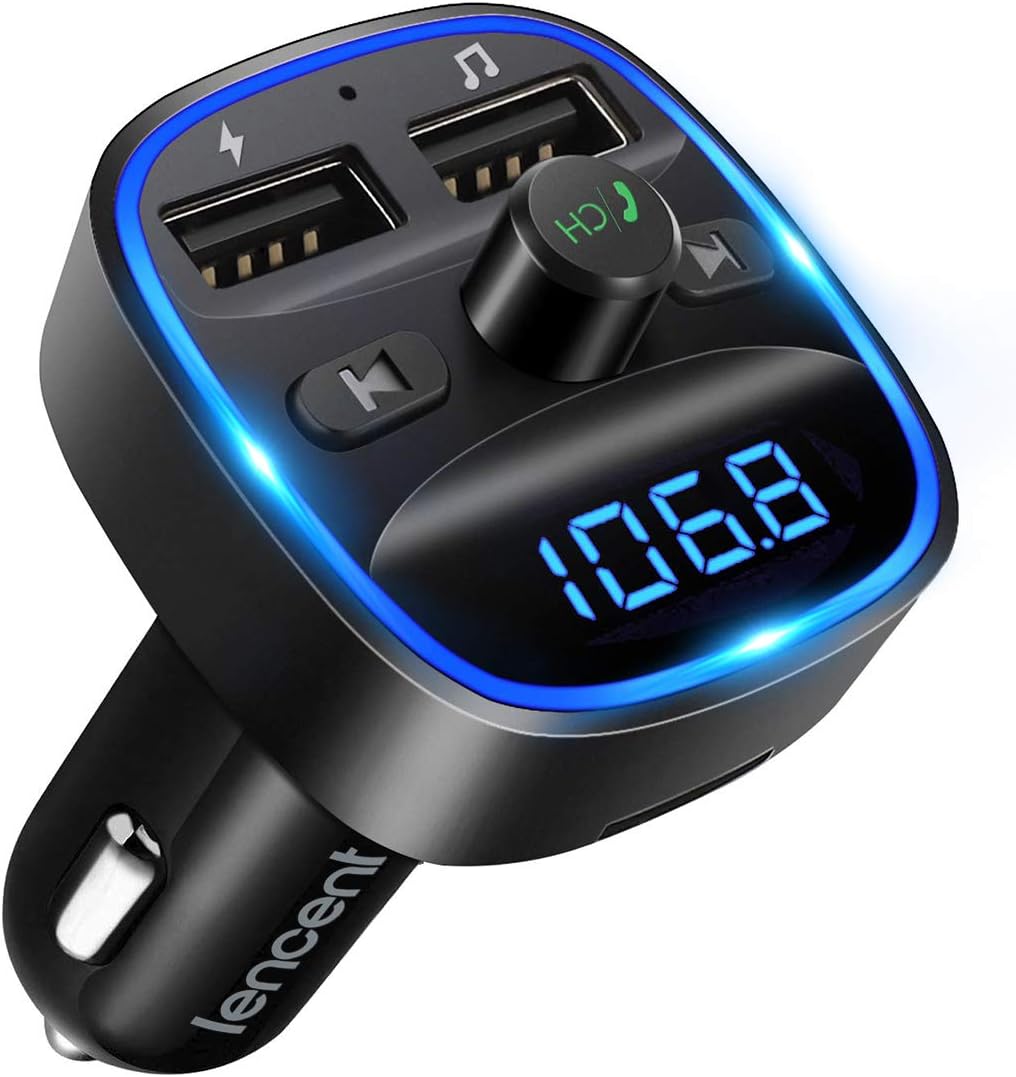
The LENCENT FM Transmitter, Model T25, featuring a digital display and dual USB ports.
Informazzjoni dwar is-Sigurtà
To avoid discharging the car battery, it is best to unplug the product after turning off the car.
Prodott Overview
Karatteristiċi Ewlenin
- Crystal Clear Music Streaming: Anti-static design with CVC technology for noise and wind suppression, ensuring full duplex sound quality. Supports Bluetooth, USB Flash Drive (up to 32GB), and microSD Card (up to 32GB). Compatible with WMA, MP3, WAV, APE, FLAC music formats.
- Intelligent Dual USB Ports & Safe Charging: Equipped with two USB ports (5V-2.4A and 5V-1A) for simultaneous device charging. Features built-in over-current, over-voltage, intelligent temperature control, and short circuit protection for safe charging.
- Hands-Free Calling & Voice Navigation: Stable Bluetooth connection with Noise Suppression (CVC) and echo-cancellation for clear hands-free calls. Provides clear voice navigation from your phone's app for safer driving.
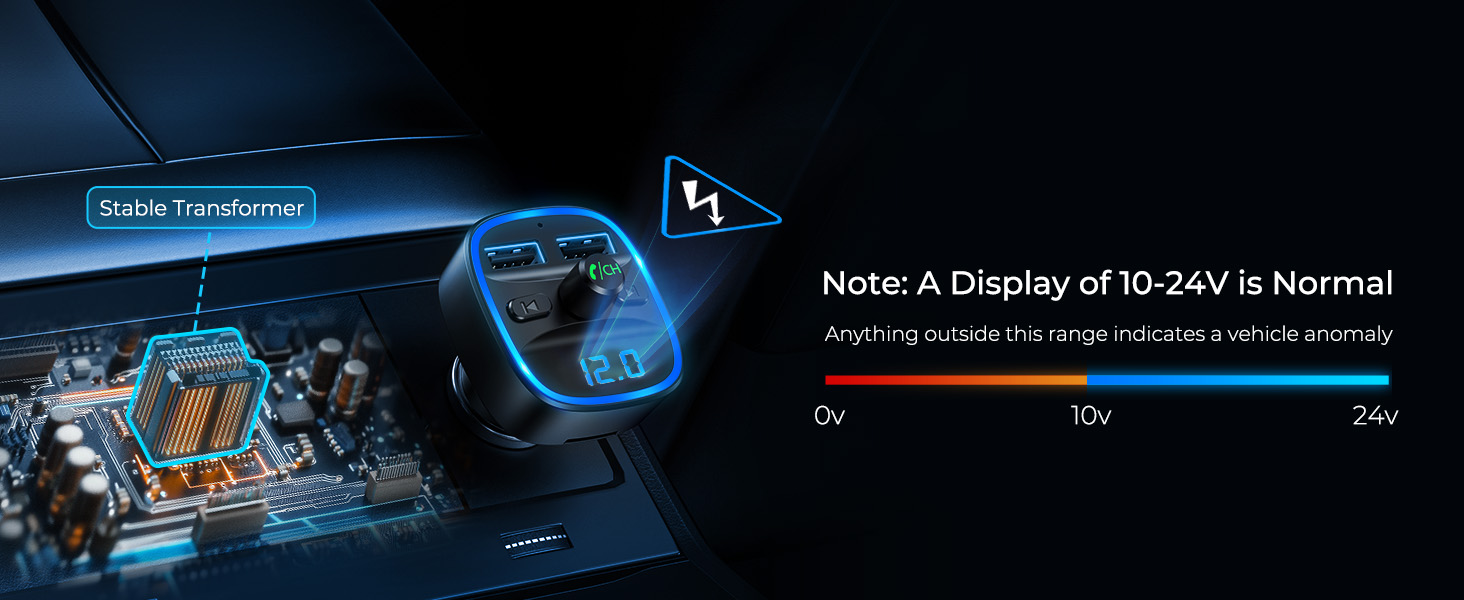
- Batterija tal-Karozza Voltage Detection & Blue Ambient Light: Displays car's voltage when plugged into the cigarette lighter, allowing you to monitor battery health. Features a blue backlight for simplified operation and safer driving.
- Wider Range & Compatibility: Compatible with most smartphones and Bluetooth-enabled devices. Automatically connects to memorized paired Bluetooth devices. Offers a wider FM range from 88.1MHz - 107.9 MHz for stable music experience.

Enjoy high-fidelity music streaming directly through your car's audio system.

The advanced smart Bluetooth chip ensures a stable and high-quality connection.

Multiple music playback options including Bluetooth, USB drive, and Micro SD card.

Charge up to two devices simultaneously with the dual USB ports.

Enjoy safe hands-free calling with CVC noise cancellation.

Monitor your car's battery voltage directly on the transmitter's display.
Setup
Follow these steps to set up your LENCENT FM Transmitter:
- Ipplaggja: Insert the LENCENT FM Transmitter into your car's cigarette lighter socket. The device will power on and display the current car battery voltage, then switch to an FM frequency.
- Sintonizza l-Frekwenza tal-FM: Tune your car radio to an empty FM frequency (one without a strong broadcast station). A common recommendation is 88.1 MHz, but any clear frequency between 88.1 MHz and 107.9 MHz will work.
- Frekwenzi tal-Logħbiet: On the LENCENT FM Transmitter, press and hold the CH button until the frequency display flashes. Use the previous/next track buttons (or rotate the knob if applicable) to adjust the transmitter's frequency to match the empty frequency on your car radio.
- Par Bluetooth: On your smartphone, enable Bluetooth and search for available devices. Select "T25" from the list to pair. Once connected, the device will confirm the connection.
- Ibda l-Istreaming: You can now play music from your phone, USB flash drive, or microSD card, and it will be transmitted through your car's speakers.
Visual guide for easy setup of the FM Transmitter.
Istruzzjonijiet Operattivi
Daqq tal-Mużika
- Streaming Bluetooth: Once paired, open your music app on your phone and start playing. The audio will transmit to your car stereo.
- USB Flash Drive/MicroSD Card: Insert a USB flash drive or microSD card (up to 32GB) containing WMA, MP3, WAV, APE, or FLAC audio files into the designated port/slot. The device will automatically detect and play the music.
- Kontroll tal-binarji: Use the 'Previous Song' and 'Next Song' buttons on the transmitter to navigate through tracks.
- Kontroll tal-Volum: Adjust the volume using the Multifunction Button (MFB) or your car's stereo volume control.
Sejħat Ħieles bl-Idejn
- Tweġiba/Tmiem Sejħa: Press the MFB once to answer an incoming call or end an ongoing call.
- Irrifjuta Sejħa: Press and hold the MFB to reject an incoming call.
- Ċempil mill-ġdid: Double-press the MFB to redial the last outgoing number.
- Switch Call Source: During a call, press and hold the MFB to switch the call between the transmitter and your phone.
Apparat tal-Iċċarġjar
Connect your devices to the USB charging ports (5V-2.4A and 5V-1A) using appropriate USB cables. The device will automatically begin charging.
Voltage Monitoraġġ
When the transmitter is plugged into the cigarette lighter, the LED display will show the car's battery voltage. This allows you to monitor the health of your car battery.
Official video demonstrating the LENCENT Bluetooth FM Transmitter's features and operation.
Manutenzjoni
To ensure the longevity and optimal performance of your LENCENT FM Transmitter, follow these maintenance guidelines:
- Tindif: Use a soft, dry cloth to wipe the device. Do not use liquid cleaners or aerosol sprays, as they may damage the product.
- Ħażna: When not in use for extended periods, unplug the device from the cigarette lighter and store it in a cool, dry place away from direct sunlight and extreme temperatures.
- Immaniġġja b'Kura: Evita li twaqqa' l-apparat jew li tissottomettih għal impatti qawwija, li jistgħu jagħmlu ħsara lill-komponenti interni.
- Evita l-umdità: Żomm l-apparat 'il bogħod mill-ilma u likwidi oħra.
Issolvi l-problemi
If you encounter issues with your LENCENT FM Transmitter, refer to the following common problems and solutions:
| Problema | Kawża Possibbli | Soluzzjoni |
|---|---|---|
| Static or Noise during Playback | FM frequency interference; weak signal. | Change to a different, clearer FM frequency on both the transmitter and car radio. Ensure no strong radio stations are broadcasting on the selected frequency. |
| Apparat Mhux Jixgħel | Loose connection; car cigarette lighter not providing power. | Ensure the transmitter is firmly plugged into the cigarette lighter. Check if the car's cigarette lighter fuse is intact. |
| Skonnettjar Bluetooth | Out of range; interference; phone Bluetooth issue. | Ensure your phone is within 10 meters of the transmitter. Restart Bluetooth on your phone and re-pair the device. |
| L-iċċarġjar huwa bil-mod jew mhux qed jaħdem | Cable issue; device drawing too much power; port malfunction. | Try a different USB cable. Ensure the device being charged is compatible with the output. Try a different USB port on the transmitter. |
| Hands-Free Call Quality is Poor | Storbju ambjentali; ostruzzjoni tal-mikrofonu. | Ensure the microphone on the transmitter is not obstructed. Reduce background noise in the car. |
Speċifikazzjonijiet
| Karatteristika | Dettall |
|---|---|
| Numru tal-Mudell | T25 |
| Dimensjonijiet tal-Prodott | 1.78 x 1.61 x 3.08 pulzieri |
| Piż tal-oġġett | 2.15 uqija |
| Brand | LENCENT |
| Teknoloġija tal-Konnettività | USB, Bluetooth |
| Sors tal-Enerġija | Battery Powered (via car cigarette lighter) |
| Materjal | Plastik |
| Medda ta' Frekwenzi FM | 88.1 MHz - 107.9 MHz |
| Output USB 1 | 5V-2.4A |
| Output USB 2 | 5V-1A (also USB Reading Port) |
| MicroSD/USB Disk Support | Sa 32GB |
| Formati Awdjo Appoġġjati | WMA, MP3, WAV, APE, FLAC |
Garanzija u Appoġġ
LENCENT products are designed and manufactured to the highest quality standards. For warranty information or technical support, please refer to the documentation included with your purchase or visit the official LENCENT website. You may also contact LENCENT customer service for assistance with product inquiries, troubleshooting, or warranty claims.
Ask a question about this manual
Ask about setup, troubleshooting, compatibility, parts, safety, or missing instructions. Manuals+ will review the question and use this page’s manual context to help answer it.