
1. Introduzzjoni
The CEM DT-9516 is a professional True RMS Digital Multimeter designed for safe, reliable, and accurate electrical measurements. This compact and easy-to-use instrument is ideal for identifying and resolving issues in various electrical and electronic systems. It features auto-ranging capabilities and a 6000-count display, making it suitable for both professional and hobbyist applications.
2. Informazzjoni dwar is-Sigurtà
Read all safety information and operating instructions before using this meter.
Dan l-apparat jikkonforma mal-istandards tas-sigurtà li ġejjin:
- EN61010-1 CAT IV 600V, CAT III 1000V
- 1000V input protection on all ranges
- 10A/1000V and 0.8A/1000V fuses protection on current ranges
Prekawzjonijiet Ġenerali tas-Sigurtà:
- Dejjem kun żgur li l-wajers tat-test ikunu f'kundizzjoni tajba u konnessi sew.
- Tippruvax tkejjel il-voltages jew kurrenti li jaqbżu l-limiti massimi speċifikati.
- Oqgħod attent meta taħdem ma' ċirkwiti ħajjin.
- Ibdel il-batteriji u l-fjusis biss bit-tipi u l-klassifikazzjonijiet speċifikati.
- Tħaddimx il-miter jekk jidher li għandu l-ħsara jew jekk il-kaxxa tkun miftuħa.
3. Twaqqif u Tħaddim Inizjali
3.1 Installazzjoni tal-batterija
The CEM DT-9516 requires three (3) AAA batteries for operation. These are typically included with the device.
- Sib l-għatu tal-kompartiment tal-batterija fuq wara tal-multimetru.
- Uża tornavit biex tiftaħ il-kompartiment tal-batterija.
- Daħħal tliet batteriji AAA, waqt li tosserva l-polarità korretta (+ u -) kif indikat ġewwa l-kompartiment.
- Ibdel l-għatu tal-kompartiment tal-batterija u waħħalha bil-kamin.

Figure 1: CEM DT-9516 Multimeter with test leads, AAA batteries, and a protective carrying case.
3.2 Konnessjoni tal-wajers tat-test
Before taking any measurements, ensure the test leads are correctly connected to the multimeter.
- Qabbad il- aħmar ċomb tat-test għall- VΩHz%CAP input jack (positive input).
- Qabbad il- iswed ċomb tat-test għall- COM input jack (common/negative input).
- For current measurements (mA, µA), connect the red lead to the mAµA jack tad-dħul.
- For high current measurements (up to 10A), connect the red lead to the 10A jack tad-dħul.

Figura 2: Dettaljat view of the multimeter's input jacks and function switch, indicating where to connect test leads for various measurements.
4. Istruzzjonijiet Operattivi
The DT-9516 features an intuitive interface with a large LCD display and a rotary function switch for selecting measurement modes.

Figura 3: Aktarview of the CEM DT-9516 Multimeter's controls and display elements.
4.1 Function Switch and Auto Ranging
Turn the rotary switch to the desired measurement function. The DT-9516 is an auto-ranging multimeter, meaning it automatically selects the appropriate measurement range for the input signal, simplifying operation.

Figure 4: The multimeter's auto-ranging feature allows for intuitive operation without manual range selection.
4.2 Funzjonijiet tal-Kejl
The DT-9516 offers a wide range of measurement capabilities:
- Voltage (AC/DC): Select the 'V' position on the rotary switch. The meter will automatically detect AC or DC voltage.
- Kurrent (AC/DC): Select the 'mAµA' or '10A' position. Ensure test leads are connected to the correct current input jacks.
- Reżistenza (Ω): Select the 'Ω' position.
- Kapaċità (CAP): Select the 'CAP' position.
- Frequency (Hz%): Select the 'Hz%' position.
- Test tad-Diode: Select the diode symbol position.
- Kontinwità: Select the continuity symbol position. An audible tone indicates continuity.
- Temperatura: Select the temperature symbol position. This function typically requires a K-type thermocouple (sold separately).
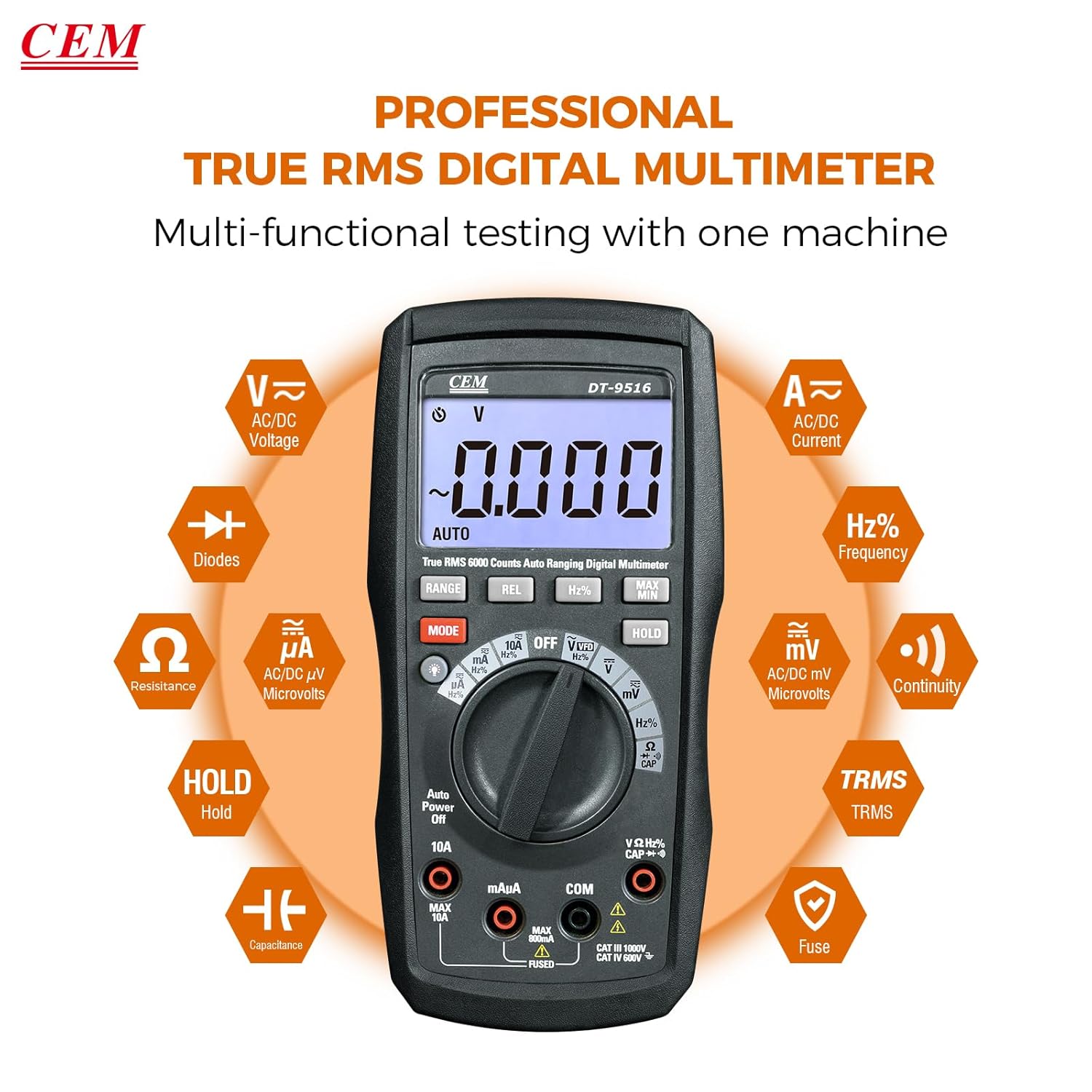
Figure 5: The multimeter's multi-functional testing capabilities are clearly illustrated.

Figure 6: The 6000-count display provides higher resolution and more accurate readings.
4.3 Funzjonijiet Speċjali
- Funzjoni VFD: The Variable Frequency Drive (VFD) function utilizes a low-pass filter for accurate measurement of VFD signals. Select the 'VFD' position on the rotary switch.
- Żamma tad-Data (HOLD): Agħfas il- ŻOMM button to freeze the current measurement on the display. Press again to release. This is useful for recording readings in difficult-to-view postijiet.
- MAX / MIN: Agħfas il- MAX/MIN button to record the maximum and minimum values during a measurement session.
- REL (Kejl Relattiv): Agħfas il- REL button to store the current reading as a reference value. Subsequent measurements will be displayed as a deviation from this reference.
- Dawl ta' wara: Press the backlight button (often integrated with another function or a dedicated button) to illuminate the display for better visibility in low-light conditions.

Figure 7: The VFD function enables precise measurement of variable frequency drive signals.

Figure 8: The Data Hold function allows users to lock and record measurement values with a single button press.

Figure 9: The high-definition LCD display ensures clear digital readings at a glance, even with multiple indicators.
5. Manutenzjoni
5.1 Tindif
Imsaħ il-każ bl-adamp drapp u deterġent ħafif. Tużax abrażivi jew solventi. Żomm it-terminals tad-dħul ħielsa mill-ħmieġ u l-umdità.
5.2 Sostituzzjoni tal-batterija
When the battery indicator appears on the display, replace the batteries as described in Section 3.1. Always use three new AAA batteries.
5.3 Sostituzzjoni tal-Fjus
If the current measurement functions cease to operate, the internal fuses may need replacement. Refer to the safety section for fuse specifications (10A/1000V and 0.8A/1000V). Fuse replacement should only be performed by qualified personnel.
Warning: Disconnect all test leads from the meter and any circuit before opening the case for battery or fuse replacement.
6 Issolvi l-problemi
- Ebda Display: Iċċekkja l-installazzjoni u l-iċċarġjar tal-batterija. Ibdel il-batteriji jekk meħtieġ.
- Qari Skorrett:
- Ensure test leads are properly connected to the correct input jacks for the selected function.
- Verify the function switch is set to the appropriate measurement type.
- Iċċekkja jekk hemmx wajers tat-test bil-ħsara.
- For current measurements, check the internal fuses.
- "OL" or "OVERLOAD" on Display: The measured value exceeds the selected range. The auto-ranging feature should typically prevent this, but if it occurs, ensure the meter is capable of measuring the expected value.
7. Speċifikazzjonijiet
| Karatteristika | Dettall |
|---|---|
| Numru tal-Mudell | DT-9516 |
| Wiri | LCD ta' 6000 Għadd |
| Kategorija tas-Sigurtà | CAT IV 600V, CAT III 1000V |
| Voltage Kejl | AC/DC sa 1000V |
| Kejl Kurrenti | AC/DC up to 10A |
| Kejl tar-Reżistenza | Sa 60 MΩ |
| Kejl tal-Kapaċitanza | Sa 6000µF |
| Kejl tal-Frekwenza | Sa 10MHz |
| Test tad-Diode | Iva |
| Test ta' Kontinwità | Yes (with audible indicator) |
| Karatteristiċi Speċjali | True RMS, Auto Ranging, VFD Function, Data Hold, MAX/MIN, Relative Measurement, Backlight |
| Batteriji | 3 x AAA (inklużi) |
| Dimensjonijiet tal-Pakkett | 20.6 x 13 x 7.9 ċm |
| Piż | 654 g |
| Manifattur | Shenzhen Everbest Machinery Industry Co.,Ltd. |
| UPC | 887327951600 |
8. Garanzija u Appoġġ
CEM products are manufactured to high-quality standards. For specific warranty terms and conditions, please refer to the warranty card included with your product or contact CEM customer support.
For technical assistance, troubleshooting, or service inquiries, please contact your local CEM distributor or visit the official CEM websit għal riżorsi ta' appoġġ.