
1. Introduzzjoni
Thank you for choosing the PureMounts PM-SOM-081 Soundbar TV Mounting Bracket. This bracket is designed to securely attach your soundbar, such as the Sonos Beam, directly to your television's VESA mounting points. This ensures the soundbar moves with the TV, maintaining optimal audio alignment. The PM-SOM-081 features a robust steel and ABS construction, a maximum load capacity of 5 kg, and integrated cable management. This manual provides comprehensive instructions for safe and correct installation and use.
2. Informazzjoni dwar is-Sigurtà
- Read all instructions carefully before installation. Failure to do so may result in personal injury or property damage.
- Ensure the mounting surface (TV VESA holes) can safely support the combined weight of the bracket, soundbar, and any attached cables. The maximum load capacity for this bracket is 5 kg.
- Taqbiżx il-kapaċità massima tat-tagħbija.
- Use appropriate tools and follow all assembly steps in the correct order.
- Jekk m'intix ċert dwar xi parti tal-proċess tal-installazzjoni, fittex għajnuna professjonali.
- Żomm it-tfal u l-annimali domestiċi 'l bogħod waqt l-installazzjoni.
- Periodically check that the bracket and soundbar are securely fastened.
3. Kontenut tal-Pakkett
Jekk jogħġbok ivverifika li l-komponenti kollha huma preżenti u mhux imħassra qabel ma tipproċedi bl-installazzjoni.
- 1x PureMounts PM-SOM-081 Soundbar Mounting Bracket
- 1x Screw Set (complete mounting material)
- 1x Installation Manual (this document)
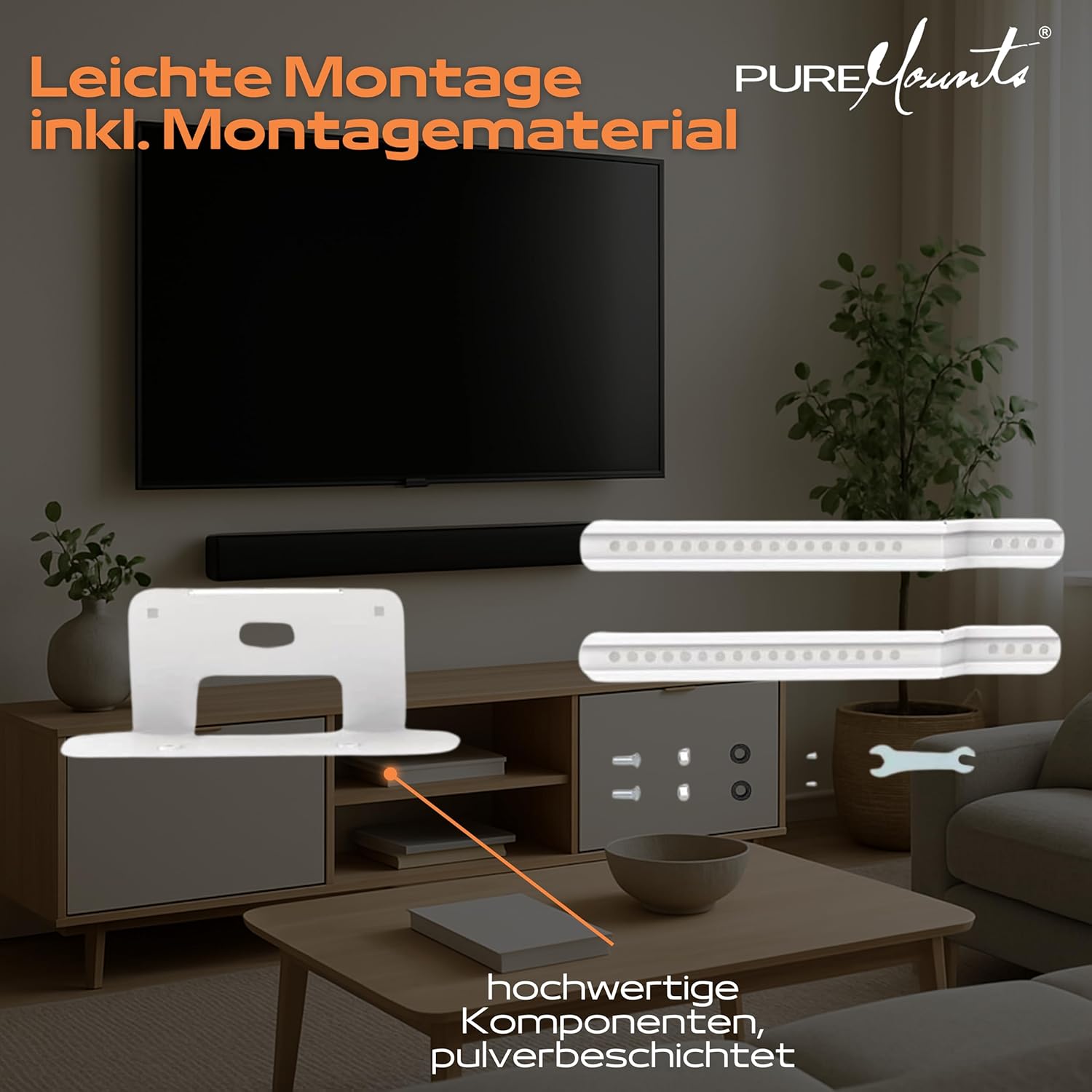
Figura 1: Included components and mounting hardware. The image shows the main bracket, two adjustable arms, and various screws and tools for assembly.
4. Setup u Installazzjoni
This bracket is designed for direct mounting to the VESA holes on the back of your television. It is compatible with VESA patterns from 200mm to 600mm.
4.1. Għodod Meħtieġa (Mhux Inklużi)
- Tornavit tar-ras Phillips
- Wrench (if using specific bolt types)
- Tejp tal-kejl
- Livell
4.2. Passi ta 'installazzjoni
- Ipprepara t-TV: If your TV is already mounted, carefully remove it from its wall mount or stand and place it face down on a soft, clean surface to prevent scratches. Identify the VESA mounting holes on the back of your TV.
- Assemble the Bracket: Attach the two adjustable arms to the main base of the PM-SOM-081 bracket using the provided screws. Ensure they are securely fastened but allow for adjustment if needed later.

Figura 2: The assembled bracket shown attached to the lower VESA mounting points of a television.
- Attach to TV VESA Holes: Align the bracket's arms with the lower VESA mounting holes on the back of your TV. Use the appropriate screws from the included screw set to secure the bracket to the TV. Ensure the screws are tightened firmly but do not overtighten. The bracket is designed to connect to the lower VESA recordings of the TV.

Figura 3: The bracket mounted on a TV, illustrating its compatibility with VESA dimensions from 200mm to 600mm and its flexible, unobtrusive design.
- Mount the Soundbar: Place your soundbar (e.g., Sonos Beam) onto the platform of the PM-SOM-081 bracket. Secure the soundbar to the bracket using any provided soundbar-specific mounting hardware or straps (not included with this bracket, typically supplied with the soundbar).
- Ġestjoni tal-Kejbil: Utilize the integrated cable management system to route your soundbar's power and audio cables neatly. This helps maintain a clean appearance and prevents cable damage.
- Re-mount TV (if applicable): If you removed your TV from a wall mount, carefully re-mount it, ensuring the soundbar and bracket do not interfere with the TV's movement or wall mount.
5. Istruzzjonijiet Operattivi
Once installed, the PureMounts PM-SOM-081 bracket requires no specific operation. The soundbar will move in conjunction with your television, maintaining its position relative to the screen. Ensure that no cables are pinched or strained when adjusting the TV's position (if using a full-motion TV mount).
6. Manutenzjoni
- Tindif: Wipe the bracket with a soft, dry cloth. Do not use abrasive cleaners or solvents, as these may damage the powder-coated finish.
- Spezzjoni: Iċċekkja l-viti u l-konnessjonijiet kollha perjodikament biex tiżgura li jibqgħu ssikkati u siguri. Maż-żmien, il-vibrazzjonijiet jew l-aġġustamenti jistgħu jikkawżaw li l-qafliet jinħallu.
- Ħsara: If any part of the bracket appears damaged or worn, discontinue use and contact customer support for assistance.
7 Issolvi l-problemi
| Problema | Kawża Possibbli | Soluzzjoni |
|---|---|---|
| Bracket feels unstable after installation. | Screws are not tightened sufficiently. Incorrect screw size used. | Ensure all screws connecting the bracket to the TV are firmly tightened. Verify that the correct screw lengths and diameters were used for your TV's VESA holes. |
| Soundbar does not fit on the bracket. | Soundbar dimensions exceed bracket capacity. | Verify your soundbar's dimensions against the bracket's specifications (142 x 345 x 518 mm). This bracket is specifically designed for Sonos Beam and similar sized soundbars. |
| Cables are visible or messy. | Cable management not utilized or insufficient. | Reroute cables through the integrated cable management system. Use cable ties (not included) for additional neatness. |
| Bracket interferes with TV wall mount. | Bracket's depth causes conflict with wall mount. | Ensure sufficient clearance between the TV's wall mount and the soundbar bracket. Some wall mounts may require specific spacers or adjustments. The bracket is designed to attach to the lower VESA points, which should minimize interference. |
8. Speċifikazzjonijiet
| Mudell | PM-SOM-081 |
| Brand | PureMounts |
| Apparati Kompatibbli | Soundbars (e.g., Sonos Beam) |
| Tip ta 'Immuntar | Direct TV VESA Mounting (Full Motion compatible) |
| Kompatibilità VESA | Min 200 mm, Max 600 mm |
| Kapaċità massima tat-Tagħbija | 5 kg (11 lbs) |
| Dimensjonijiet tal-Prodott (L x W x H) | 17.13 x 5.71 x 5.31 pulzieri (435 x 145 x 135 mm) |
| Piż tal-oġġett | 4.42 liri (2.0 kg) |
| Materjal | Alloy Steel, ABS |
| Kulur | White (Powder-coated) |
| Karatteristiċi | Ġestjoni Integrata tal-Kejbils |

Figura 4: Technical drawing showing the dimensions of the PM-SOM-081 bracket, including VESA compatibility range and specific measurements.
9. Garanzija u Appoġġ
For warranty information and customer support, please refer to the PureMounts official webis-sit jew ikkuntattja lill-bejjiegħ tiegħek. Żomm l-irċevuta tax-xiri tiegħek bħala prova tax-xiri.
Manufacturer: PureLink GmbH