
GDSTIME GDT12025B12V0.45A+3-12VT
GDSTIME 120mm Computer Fan User Manual
Brand: GDSTIME | Model: 1225 w/ Speed Controller (GDT12025B12V0.45A+3-12VT)
Prodott Overview
The GDSTIME 120mm Computer Fan with AC Plug is designed to provide efficient cooling for a wide range of electronic devices and enclosures. Featuring an AC-powered variable speed controller, this fan allows users to adjust airflow and noise levels to suit specific needs, from quiet operation for sensitive environments to maximum cooling for demanding applications. It is an ideal solution for maintaining optimal temperatures in home theater receivers, amplifiers, DVRs, gaming consoles (Playstation, Xbox), PC components, biltong boxes, grow tents, reptile cages, routers, terrariums, and electronic cabinets.

Image: GDSTIME 120mm Computer Fan with AC Plug, variable speed controller, metal grilles, screws, and rubber feet.
X'hemm fil-Kaxxa
Your GDSTIME 120mm Computer Fan package includes all necessary components for immediate setup and operation:
- 1x 120mm DC Fan (Model: 1225)
- 1x Variable Speed Controller (AC/DC adapter)
- 2x Metal Grilles (12cm) for finger protection
- 4x Screws and Nuts for mounting
- 4x Rubber Feet and Sponge Mats for vibration minimization

Image: All components included in the package: 120mm fan, speed controller, metal grilles, screws, and rubber feet.
Karatteristiċi Ewlenin
- Versatile Cooling Solution: Suitable for a wide range of applications including home theater receivers, biltong boxes, grow tents, reptile cages, routers, terrariums, electronic cabinets, and PC cooling.
- Kontroll tal-veloċità mingħajr pass: The included power adapter features a fine-tuning knob, allowing for continuous adjustment of fan speed to achieve the desired balance between airflow and noise levels.
- AC-Powered Simplicity: Plugs directly into standard AC outlets (100-240V global voltage) with a 1.5m adapter, offering easy power access.
- Optimized Noise and Airflow: Vol t'isfeltage settings (4V-12V) reduce noise, making it suitable for quiet environments like bedrooms or offices, while higher settings provide maximum airflow for heavy cooling tasks.
- Durable Dual Ball Bearings: Equipped with premium dual-ball bearings and a brushless motor, ensuring a long lifespan of up to 50,000 hours and allowing for both horizontal and vertical mounting.
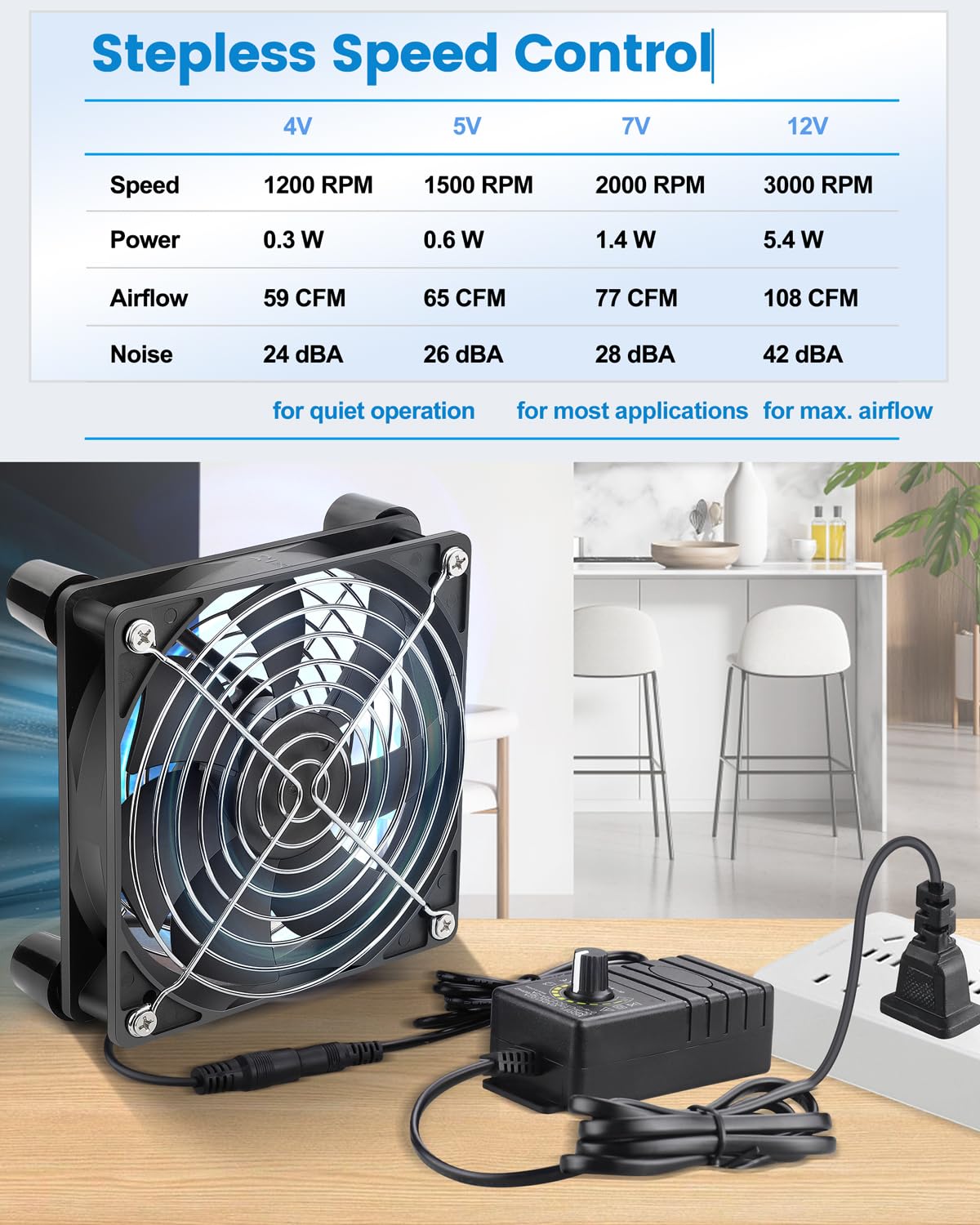
Image: Table detailing fan speed, power, airflow, and noise levels at different voltage settings (4V, 5V, 7V, 12V).
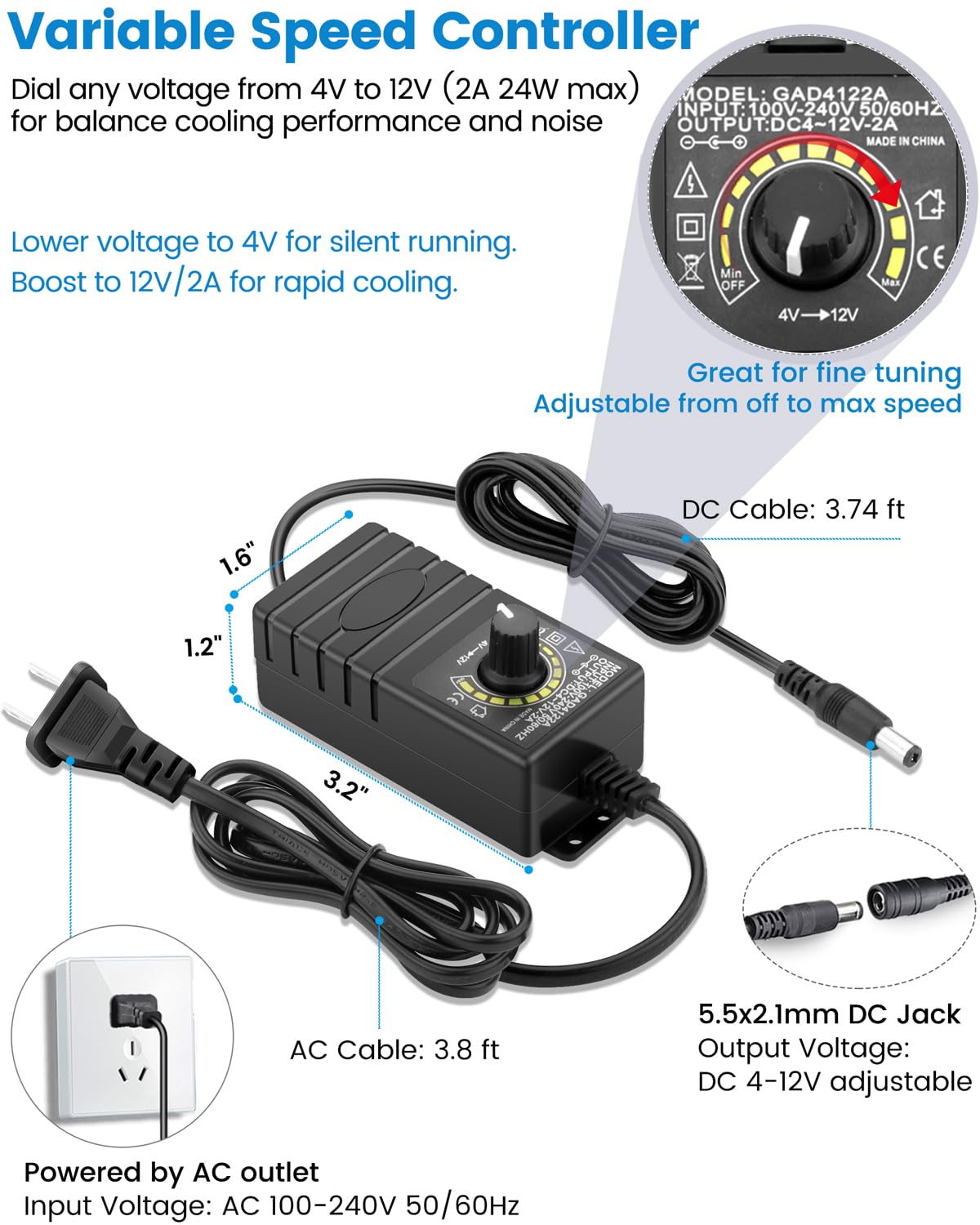
Image: Diagram showing the variable speed controller, its dimensions, input/output voltage, and AC plug connection.

Image: Illustration highlighting the dual ball bearings and brushless motor, emphasizing the 50,000-hour lifespan.

Image: Various application scenarios including cooling receivers, routers, small grow tents, reptile cages, biltong drying boxes, large cigar humidors, and RV refrigerators.
Setup u Installazzjoni
The GDSTIME 120mm fan is designed for easy installation. Follow these steps to set up your fan:
- Ħoll il-Komponenti: Carefully remove all items from the packaging and verify that all parts listed in the "What's in the Box" section are present.
- Attach Metal Grilles: For safety and protection, attach the two metal grilles to both sides of the fan using the provided screws and nuts. This prevents accidental contact with the fan blades.
- Immuntar (Mhux obbligatorju):
- If mounting the fan, use the provided screws and rubber feet. The rubber feet help minimize vibration and noise.
- The fan can be mounted horizontally or vertically depending on your application. Ensure proper airflow direction for optimal cooling.
- Connect Speed Controller: Plug the fan's DC connector into the output jack of the variable speed controller.
- Qabbad mal-Enerġija: Plug the AC adapter of the speed controller into a standard AC outlet (100-240V).
- Pożizzjonament: Place the fan in a location where it can effectively draw hot air away from or blow cool air towards the components requiring cooling. Consider the natural flow of heat (hot air rises) when positioning.
Istruzzjonijiet Operattivi
The GDSTIME 120mm fan features a simple variable speed control for customized operation:
- Qawwa Mixgħul: Once connected to an AC outlet, the fan will power on.
- Aġġusta Veloċità: Use the knob on the variable speed controller to adjust the fan's rotational speed.
- Turn the knob towards the "Min" setting for lower fan speed, resulting in quieter operation and reduced airflow. This is ideal for situations where minimal noise is desired, such as during nighttime or in quiet office environments.
- Turn the knob towards the "Max" setting for higher fan speed, providing maximum airflow for more intensive cooling requirements. This setting will generate more noise but offers superior heat dissipation.
- Balance Airflow and Noise: Experiment with different speed settings to find the optimal balance between cooling performance and noise level for your specific application.
Manutenzjoni
Regular maintenance helps ensure the longevity and optimal performance of your GDSTIME fan:
- Tindif: Periodically clean the fan blades and grilles to prevent dust buildup, which can impede airflow and reduce efficiency. Use a soft brush or compressed air. Ensure the fan is unplugged before cleaning.
- Spezzjona Kejbils: Check the power cable and fan connection regularly for any signs of wear, damage, or loose connections.
- Ambjent Operattiv: Ensure the fan is operated in a dry environment, away from excessive moisture or extreme temperatures, to prevent damage to electronic components.
Issolvi l-problemi
If you encounter issues with your GDSTIME fan, refer to the following common troubleshooting steps:
| Problema | Kawża Possibbli | Soluzzjoni |
|---|---|---|
| Fann mhux għażil | No power; Loose connection; Speed controller set to minimum. |
|
| Il-fann huwa storbjuż wisq | Fan speed too high; Obstruction; Vibration. |
|
| Fluss ta 'arja insuffiċjenti | Fan speed too low; Dust buildup; Incorrect positioning. |
|
Speċifikazzjonijiet
| Attribut | Dettall |
|---|---|
| Dimensjonijiet tal-Prodott | 4.72"T x 4.72"W x 0.98"Għ (120 x 120 x 25 mm) |
| Numru tal-Mudell tal-Oġġett | GDT12025B12V0.45A+3-12VT |
| Brand | GDSTIME |
| Tip ta 'Konnettur tal-Enerġija | 2-Pin |
| Voltage | 12 Volts DC (Adjustable 4V-12V via controller) |
| Wattage | 5.4 watt (Massimu) |
| Metodu tat-tkessiħ | Arja |
| Apparati Kompatibbli | Desktop, Switch, Router, Refrigerator, Amplifier, DVR, Playstation, Xbox, Biltong Box, Grow Tent, Reptile Cage, Terrarium, Electronic Cabinet |
| Livell ta' Storbju | Up to 42 dB (Adjustable) |
| Materjal | Plastik |
| Veloċità ta' Rotazzjoni Massima | 3000 RPM |
| Berings | Ballun Doppju |
| It-Tistennija tal-Ħajja | 50,000 Sigħat |

Image: Technical diagram showing fan dimensions, rotation direction, connector type, and key performance metrics.
Garanzija u Appoġġ
GDSTIME products are manufactured with quality and reliability in mind. For specific warranty details and customer support, please refer to the documentation included with your purchase or visit the official GDSTIME store on Amazon:
For technical assistance or inquiries, please contact GDSTIME customer service through the Amazon platform or their official websit.
Dokumenti Relatati - GDT12025B12V0.45A+3-12VT
 |
Gdstime Cooling Fan Product Manual - Safety and Usage Instructions Official product manual for the Gdstime Cooling Fan, covering safety warnings, compliance information, and instructions for use. Learn how to safely operate and maintain your cooling fan. |
 |
Gdstime Cooling Fan Product Manual - Safety and Usage Guide Comprehensive product manual for the Gdstime Cooling Fan. Details include manufacturer information, compliance standards (CE, FCC, RoHS, WEEE), critical safety warnings, and step-by-step instructions for installation and operation. |
 |
GATETOP GU10 LED Bulb Instruction Manual Instruction manual for the GATETOP GU10 LED Bulb, covering voltage selection, safety warnings, installation, maintenance, and recycling information. Features technical specifications like voltage, power, and protection level. |
 |
Manwal tal-Utent tal-Adapter tat-Tastiera u l-Maws AIMZENIX BLADER Manwal tal-utent għall-AIMZENIX BLADER, adapter tat-tastiera u l-maws għal consoles tal-logħob inklużi Nintendo Switch, PlayStation 4, PlayStation 3, Xbox One, Xbox Series X/S, u Xbox 360. Jagħti dettalji dwar il-metodi ta' konnessjoni, l-immappjar taċ-ċwievet, l-aġġustamenti tas-sensittività, u s-settings tal-konfigurazzjoni. |