
ASUS XG49VQ
ASUS ROG Strix XG49VQ 49-inch Curved Gaming Monitor User Manual
1. Introduzzjoni
The ASUS ROG Strix XG49VQ is a super ultra-wide 49-inch Dual Full HD (3840 x 1080) 1800R curved gaming monitor designed to provide an immersive and smooth gaming experience. It features a 144Hz refresh rate, Radeon FreeSync 2 HDR technology, DCI-P3 90% professional color gamut coverage, and DisplayHDR 400 certification. This manual provides essential information for setting up, operating, maintaining, and troubleshooting your monitor.
2. X'hemm fil-Kaxxa
Iċċekkja li l-oġġetti kollha li ġejjin huma inklużi fil-pakkett tiegħek:
- ASUS ROG Strix XG49VQ Monitor
- Cable DisplayPort
- Cable HDMI
- Adapter tal-enerġija
- Gwida tal-bidu ta 'malajr
- Kit ta' muntatura VESA
3. Setup
3.1 Assemblaġġ tal-Monitor
Carefully remove the monitor and its components from the packaging. Attach the stand base to the monitor arm, then secure the assembled stand to the monitor. Ensure all connections are firm.
3.2 Kejbils tal-Konnessjoni
Connect the power adapter to the monitor and a power outlet. Use the provided DisplayPort or HDMI cable to connect your computer or gaming console to the monitor. The monitor features multiple input ports for versatile connectivity.
Immaġni: Wara view of the monitor highlighting accessible I/O ports and smart cable management for a tidy setup.
3.3 Aġġustamenti Fiżiċi
Il-monitor joffri aġġustamenti ergonomiċi għall-aħjar viewkumdità:
- Mejjel: Aġġusta l-angolu tal-iskrin minn +20° sa -5°.
- Dawwar: Dawwar l-iskrin orizzontalment minn +16° sa -16°.
- Aġġustament Għoli: Aġġusta l-għoli tal-iskrin sa 120mm.

Immaġni: Il-monitor juriasing its ergonomic design with arrows indicating available tilt, swivel, and height adjustment ranges.
4. It-tħaddim tal-Monitor
4.1 Power On/Off
Agħfas il-buttuna tal-qawwa li tinsab fuq il-monitor biex tixgħelu jew titfih.
4.2 Karatteristiċi tal-Wiri
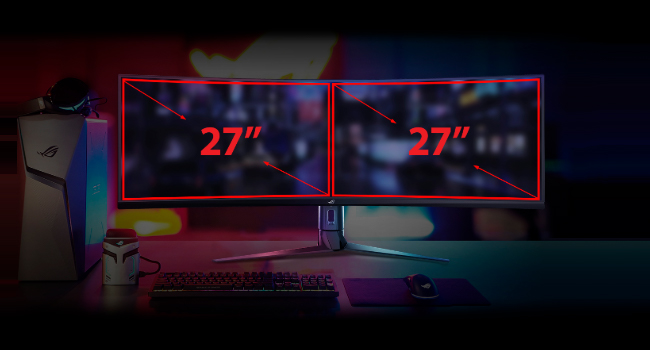
- Super Ultra-wide Display: The 49-inch curved screen provides an expansive view, equivalent to two 27-inch monitors side-by-side.
- Rata ta' Aġġornar ta' 144Hz: Experience smooth, lag-free visuals, crucial for fast-paced gaming.
- Radeon FreeSync 2 HDR: Synchronizes the monitor's refresh rate with your GPU's frame rate to eliminate screen tearing and stuttering, especially with HDR content.
- DisplayHDR 400 & DCI-P3 90%: Ensures high color contrast and cinematic color performance for vibrant and realistic visuals.

Image: Visual representation of the 49-inch super ultra-wide display, showing its equivalence to two 27-inch monitors for an expansive workspace.

Image: A split-screen comparison demonstrating the enhanced visual quality with High Dynamic Range (HDR) enabled, highlighting DCI-P3 90% and DisplayHDR 400 certification.

Image: A split-screen comparison illustrating the difference in gameplay smoothness with Radeon FreeSync 2 HDR turned 'On' versus 'Off'.
4.3 ASUS Eye Care Technology
ASUS Eye Care technology is integrated to minimize eye fatigue during extended use. This includes flicker-free backlighting and blue light filters, certified by TÜV Rheinland, to protect your eyes.
4.4 GamePlus and GameVisual
Utilize exclusive GamePlus and GameVisual overlays and color modes to optimize your gaming experience. These features provide in-game enhancements and display adjustments tailored for various game genres.
4.5 Picture-by-Picture (PBP) Functionality
The ultra-wide display supports Picture-by-Picture (PBP) mode, allowing you to view content from multiple input sources simultaneously, effectively acting as multiple monitors on a single screen.
Video: Official ASUS ROG Strix XG49VQ product overview, demonstrating key features like the ultra-wide display, high refresh rate, HDR, and various gaming enhancements.
Video: A merchant's overview of the ASUS ROG Strix XG49VQ, highlighting its curved design, FreeSync technology, and eye care features.
5. Manutenzjoni
5.1 Tindif tal-Monitor
Biex tnaddaf l-iskrin tal-monitor, imsaħ bil-mod b'ċarruta ratba u mingħajr suf. Għal marki persistenti, imsaħ bil-modampNaddaf id-drapp bl-ilma jew b'deterġent ħafif u mhux abrażiv għall-iskrin. Evita li tuża kimiċi ħarxa jew materjali abrażivi li jistgħu jagħmlu ħsara lill-wiċċ tal-iskrin.
5.2 Kura Ġenerali
Keep the monitor in a well-ventilated area. Avoid exposing it to direct sunlight, high humidity, or extreme temperatures. Do not block the ventilation openings on the monitor casing.
6 Issolvi l-problemi
6.1 No Display / Black Screen
- Kun żgur li l-kejbil tal-enerġija huwa konness sew kemm mal-monitor kif ukoll mas-sokit tal-enerġija.
- Verify that the video cable (DisplayPort/HDMI) is firmly connected to both the monitor and your computer/console.
- Check if the correct input source is selected on the monitor's OSD (On-Screen Display) menu.
6.2 Image Quality Issues (e.g., Washed Out, Red Dot)
- If the display appears washed out or has unusual artifacts (like a red dot), try performing a "Reset All" from the monitor's OSD menu.
- Consider disabling HDR in your operating system or monitor settings if you experience poor image quality, as some content or system configurations may not fully support HDR effectively.
- Adjust brightness, contrast, and color settings via the OSD menu to suit your preferences.
6.3 Flickering or Stuttering
- Kun żgur li s-sewwieqa tal-karta grafika tiegħek huma aġġornati.
- Verify that Radeon FreeSync 2 HDR is enabled in both your monitor settings and graphics card control panel.
- Iċċekkja l-kejbil tal-vidjo għal ħsara jew konnessjonijiet maħlula.
7. Speċifikazzjonijiet
| Karatteristika | Speċifikazzjoni |
|---|---|
| Daqs tal-Wiri tal-Iskrin Permanenti | 49 Pulzier |
| Riżoluzzjoni tal-Iskrin | 3840x1080 |
| Riżoluzzjoni Massima tal-Iskrin | 3840 x 1080 Pixels |
| Brand | ASUS |
| Serje | XG49VQ |
| Numru tal-Mudell tal-Oġġett | XG49VQ |
| Piż tal-oġġett | 21.4 liri |
| Dimensjonijiet tal-Prodott | 46.98 x 20.83 x 13.57 pulzieri |
| Kulur | Iswed |
| Voltage | 100-240 volt |
| Numru ta 'USB 2.0 Ports | 1 |
| Numru ta 'USB 3.0 Ports | 2 |
| Proporzjon ta' l-aspett | 32:9 |
| Deskrizzjoni tal-wiċċ tal-iskrin | Matte |
8. Garanzija u Appoġġ
Għal informazzjoni dettaljata dwar il-garanzija u appoġġ tekniku, jekk jogħġbok irreferi għall-websajt uffiċjali tal-ASUS website or the warranty card included with your product. Keep your purchase receipt for warranty claims.
Dokumenti Relatati - XG49VQ
 |
Manwal tal-Monitor tal-Logħob ASUS ROG Strix XG49VQ Super Ultra-Wide Manwal tal-utent għall-ASUS ROG Strix XG49VQ, monitor tal-logħob super ultra-wiesa'. Din il-gwida tkopri s-setup, l-ispeċifikazzjonijiet, is-soluzzjoni tal-problemi, u karatteristiċi bħal GameVisual u GamePlus. |
 |
Monitor tal-logħob ASUS ROG Strix XG43UQ Benutzerhandbuch Benutzerhandbuch für den ASUS ROG Strix XG43UQ 43-Zoll 4K Gaming-Monitor. Bietet detaillierte Anleitungen zu Einrichtung, OSD-Menüführung, Funktionen wie Aura Sync u GameVisual, Fehlerbehebung und technischen Spezifikationen. |
 |
Manwal tal-Utent tal-Monitor tal-Logħob Kurvat ASUS ROG Strix XG32VC Manwal komprensiv għall-utent għall-ASUS ROG Strix XG32VC Monitor tal-Logħob Mgħawweġ ta' 31.5 pulzieri, li jkopri s-setup, il-karatteristiċi, il-funzjonijiet tal-OSD, l-ispeċifikazzjonijiet, is-soluzzjoni tal-problemi, u informazzjoni dwar is-sigurtà. |
 |
ASUS ROG Swift OLED PG49WCD User Guide Comprehensive user guide for the ASUS ROG Swift OLED PG49WCD 49-inch OLED gaming monitor. Covers setup, OSD menu, features like GamePlus and GameVisual, specifications, troubleshooting, and safety information. |
 |
Gwida għall-Utent tal-Monitor tal-Logħob ASUS ROG Strix XG27ACG Gwida komprensiva għall-utent għall-monitor tal-logħob ASUS ROG Strix XG27ACG, li tkopri s-setup, il-karatteristiċi, in-navigazzjoni tal-menu OSD, l-ispeċifikazzjonijiet tekniċi, u s-soluzzjoni tal-problemi. |
 |
Gwida għall-Utent tal-ASUS ROG Swift OLED PG49WCD - Konfigurazzjoni, Karatteristiċi, u Speċifikazzjonijiet Manwal komprensiv għall-utent għall-monitor tal-logħob ASUS ROG Swift OLED PG49WCD. Tgħallem dwar is-setup, il-funzjonijiet tal-OSD, l-ispeċifikazzjonijiet tekniċi, is-soluzzjoni tal-problemi, u aktar. |
Ask a question about this manual
Ask about setup, troubleshooting, compatibility, parts, safety, or missing instructions. Manuals+ will review the question and use this page’s manual context to help answer it.