
1. Introduzzjoni
The Lenovo ThinkPad X1 Yoga G2 is a versatile 2-in-1 laptop designed for productivity and flexibility. It features a 14-inch Full HD touchscreen display and can transform into multiple modes, including laptop, tablet, stand, and tent. This manual provides essential information to help you get started and make the most of your device.
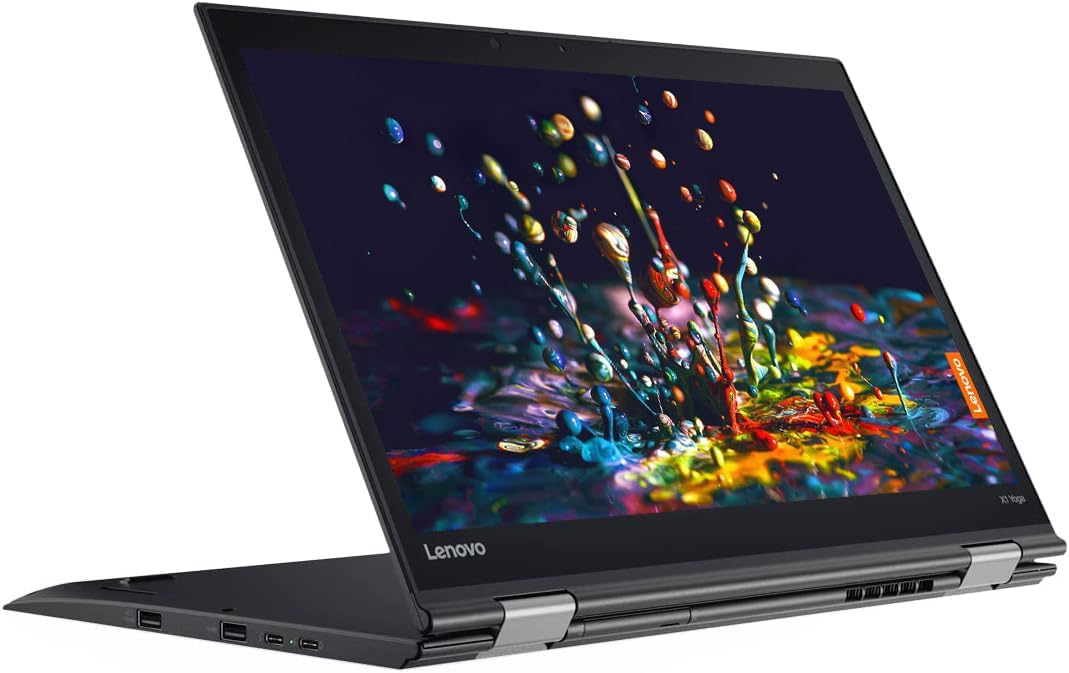
Image: The Lenovo ThinkPad X1 Yoga G2 in its standard laptop configuration.
2. X'hemm fil-Kaxxa
Upon unboxing your Lenovo ThinkPad X1 Yoga G2, please verify that all the following components are present:
- Lenovo ThinkPad X1 Yoga G2 Laptop
- AC adapter/power supply
- Batterija (integrata)
- Dokumentazzjoni (Gwida ta' Bidu Mgħaġġel, Informazzjoni dwar is-Sigurtà)
3. Setup
3.1 L-Ewwel Tixgħel u l-Iċċarġjar
- Connect the AC adapter to the power connector on your laptop and then to a power outlet.
- Open the laptop lid. The system may power on automatically, or you may need to press the power button located on the side.
- Segwi l-istruzzjonijiet fuq l-iskrin biex tlesti s-setup inizjali tal-Windows 10 Pro, inkluż il-lingwa, ir-reġjun, il-konnessjoni tan-netwerk, u l-ħolqien tal-kont tal-utent.

Image: Left side of the laptop, illustrating port locations for power and peripherals.
3.2 Konnessjoni tal-Periferali
Your ThinkPad X1 Yoga G2 offers various ports for connecting external devices:
- Portijiet USB: Connect USB devices such as external drives, mice, or keyboards.
- Port HDMI: Qabbad monitor jew proġettazzjoni esterna.
- Awdjo Jack: Qabbad headphones jew kelliema esterni.

Image: Right side of the laptop, showing additional ports and the integrated stylus slot.
4. Istruzzjonijiet Operattivi
4.1 Ġestjoni tal-Enerġija
- Qawwa Mixgħul: Agħfas il-buttuna tal-qawwa.
- Modalità Sleep: Agħlaq l-għatu jew agħfas il-buttuna tal-qawwa fil-qosor.
- Itfi: Mur fuq Start > Power > Shut down fil-Windows.
4.2 Using the Keyboard and TrackPoint/Touchpad

Immaġni: Dettaljata view of the keyboard, TrackPoint, and touchpad for navigation and input.
- The keyboard provides a comfortable typing experience.
- The TrackPoint (red dot in the center of the keyboard) allows for precise cursor control.
- The touchpad below the keyboard supports multi-touch gestures for navigation.
4.3 Modi Konvertibbli
The ThinkPad X1 Yoga G2 can be used in four primary modes:
- Modalità tal-Laptop: Standard laptop configuration for typing and traditional use.
- Modalità Stand: Fold the keyboard back to use the screen for presentations or media viewing.

Image: The laptop configured in stand mode, ideal for viewkontenut.
- Modalità Tinda: Position the laptop like a tent for stable touch interaction or media consumption in confined spaces.

Image: The laptop in tent mode, providing a stable base for touch input.
- Modalità Pillola: Fold the screen completely back against the base for a full tablet experience, ideal for touch and stylus input.

Image: The laptop fully converted to tablet mode, demonstrating stylus usage.
4.4 Konnettività bla fili
- Wi-Fi: To connect to a wireless network, click the Wi-Fi icon in the taskbar, select your network, and enter the password if required.
- Bluetooth: Enable Bluetooth in Windows settings to pair with Bluetooth devices like headphones or mice.
5. Manutenzjoni
5.1 Tindif tal-Apparat Tiegħek
- Skrin: Uża ċarruta ratba u mingħajr ħelu dampLaħlaħ bl-ilma jew b'soluzzjoni għat-tindif tal-iskrin. Evita kimiċi ħarxa.
- Tastiera u Chassis: Uża drapp artab u niexef. Għal ħmieġ iebes, neħħi ftit drapp.amp Jista' jintuża drapp, waqt li jiġi żgurat li l-ebda likwidu ma jidħol fil-fetħiet.
5.2 Kura tal-Batterija
- Biex ittawwal il-ħajja tal-batterija, evita temperaturi estremi.
- Periodically allow the battery to discharge partially before recharging.
5.3 Aġġornamenti tas-Software
Iċċekkja u installa regolarment aġġornamenti tal-Windows u aġġornamenti tas-sewwieqa Lenovo biex tiżgura prestazzjoni u sigurtà ottimali.
6 Issolvi l-problemi
If you encounter issues with your ThinkPad X1 Yoga G2, try the following basic troubleshooting steps:
- Ebda Qawwa: Kun żgur li l-adapter tal-AC huwa konness sew u li s-sokit tal-enerġija jaħdem. Ipprova sokit ieħor.
- Kwistjonijiet tal-Wiri: Jekk l-iskrin ikun vojt, ipprova qabbad monitor estern biex tiċċekkja jekk l-output tad-displej hux qed jaħdem. Aġġusta s-settings tal-luminożità.
- Konnettività Wi-Fi: Restart your router and the laptop. Check network settings in Windows.
- Prestazzjoni bil-mod: Agħlaq l-applikazzjonijiet mhux meħtieġa. Iċċekkja għal malware. Kun żgur li hemm biżżejjed spazju għall-ħażna ħieles.
Għal kwistjonijiet aktar kumplessi, irreferi għall-appoġġ ta' Lenovo websit jew ikkuntattja l-appoġġ tekniku.
7. Speċifikazzjonijiet
Key technical specifications for the Lenovo ThinkPad X1 Yoga G2:
| Karatteristika | Speċifikazzjoni |
|---|---|
| Proċessur | Intel Core i7-7600U (2.8 GHz) |
| RAM | 8 GB DDR4 |
| Ħażna | 256 GB SSD |
| Wiri | 14 inch Full HD (1920 x 1080) Touchscreen LCD |
| Sistema Operattiva | Windows 10 Pro |
| Grafika | Grafika Intel integrata |
| Konnettività bla fili | 802.11abg, Bluetooth |
| Ħajja Medja tal-Batterija | Sa 11-il Siegħa |
| Dimensjonijiet (LxWxH) | 13.1 x 9 x 0.7 pulzieri |
| Piż tal-oġġett | 3.13 liri |
8. Garanzija u Appoġġ
This product is offered as an Amazon Renewed item. Amazon Renewed products are professionally inspected and tested to work and look like new. They are eligible for replacement or refund under the Garanzija Mġedda tal-Amazon jekk m'intix sodisfatt bix-xiri tiegħek.
For technical assistance or further support regarding your Lenovo ThinkPad X1 Yoga G2, please visit the official Lenovo support websit jew ikkuntattja lis-servizz tal-konsumatur tagħhom.