
Samtec IMS5-06-02
User Manual for IPBT-105-H1-T-D-K.165" Power Mate Isolated Power Terminal Strip
Model: IMS5-06-02
Brand: Samtec
Introduzzjoni
This manual provides comprehensive instructions for the safe and effective use of the Samtec IPBT-105-H1-T-D-K.165" Power Mate Isolated Power Terminal Strip, Model IMS5-06-02. Please read this manual thoroughly before installation and operation to ensure proper functionality and to prevent damage or injury.
Prodott Overview
The Samtec IPBT-105-H1-T-D-K.165" Power Mate Isolated Power Terminal Strip is a robust component designed for reliable power distribution and isolation in various industrial and scientific applications. It facilitates secure and organized electrical connections.
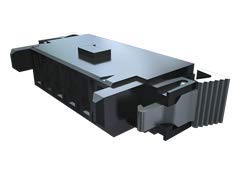
Figure 1: Samtec IPBT-105-H1-T-D-K.165 Power Mate Isolated Power Terminal Strip. The image displays the terminal strip, showing its compact, rectangular form factor with connection points visible. It is typically black or dark gray.
Informazzjoni dwar is-Sigurtà
- Always disconnect power before installing, servicing, or cleaning the terminal strip.
- L-installazzjoni għandha titwettaq minn persunal kwalifikat skont il-kodiċijiet elettriċi lokali u nazzjonali kollha.
- Kun żgur li l-konnessjonijiet kollha huma siguri u iżolati sew biex tevita short circuits jew perikli elettriċi.
- Taqbiżx il-vol speċifikattage and current ratings of the terminal strip.
- Avoid exposing the device to moisture, extreme temperatures, or corrosive environments.
Setup u Installazzjoni
Proper installation is crucial for the performance and safety of the terminal strip.
Għodod Meħtieġa:
- Screwdriver (appropriate size for screw terminals)
- prodotti għat-tqaxxir tal-wajer
- Multimeter (for verification)
- Ħardwer tal-immuntar (jekk applikabbli)
Passi ta' Installazzjoni:
- Skonnettjar tal-Enerġija: Ensure all power to the circuit is completely disconnected and verified with a multimeter before beginning installation.
- Immuntar: Securely mount the terminal strip in the desired location using appropriate mounting hardware. Ensure it is stable and free from vibration.
- Preparazzjoni tal-Wajer: Strip the insulation from the ends of the wires to be connected, exposing only the necessary length of conductor. Avoid over-stripping.
- Konnessjoni tal-Wajer: Insert the prepared wire ends into the designated screw terminals. Tighten the screws firmly to ensure a secure electrical connection. Do not overtighten.
- Verifika: After all connections are made, visually inspect them for proper seating and tightness. Use a multimeter to check for continuity and absence of short circuits before restoring power.
- Restawr tal-Enerġija: Carefully restore power to the circuit and verify the functionality of the connected components.
Operazzjoni
The Samtec Power Mate Isolated Power Terminal Strip operates passively by providing secure and isolated connection points for electrical wiring. Once installed and wired correctly, its primary function is to maintain stable electrical pathways.
- Kun żgur li l-apparati kollha konnessi jaħdmu fil-volum speċifikattage and current limits of the terminal strip.
- Regularly check for any signs of loose connections or overheating, especially during initial operation or after modifications.
Manutenzjoni
Minimal maintenance is required for the terminal strip, but periodic checks can extend its lifespan and ensure continued safe operation.
- Spezzjoni Perjodika: Annually, or more frequently in harsh environments, inspect the terminal strip for any signs of physical damage, corrosion, or discoloration.
- Kontroll tal-Konnessjoni: With power disconnected, gently check the tightness of all screw terminals. Connections can loosen over time due to vibration or thermal cycling.
- Tindif: If necessary, clean the exterior of the terminal strip with a dry, lint-free cloth. Do not use liquid cleaners or solvents. Ensure power is disconnected before cleaning.
Issolvi l-problemi
If you encounter issues with the terminal strip, consider the following common troubleshooting steps:
| Problema | Kawża Possibbli | Soluzzjoni |
|---|---|---|
| Ebda enerġija għall-apparat konness | Loose wire connection; Power source issue; Incorrect wiring | Check and tighten all terminal screws; Verify power supply to the strip; Review dijagramma tal-wajers u konnessjonijiet korretti. |
| Overheating of terminal strip | Overcurrent; Loose connections; Damaged insulation | Ensure current draw is within specifications; Tighten connections; Inspect for damaged wires or insulation and replace if necessary. |
| Konnessjoni intermittenti | Loose wire; Vibration | Re-tighten all connections; Ensure the terminal strip is securely mounted to minimize vibration. |
If issues persist after attempting these steps, contact a qualified electrician or the manufacturer for further assistance.
Speċifikazzjonijiet
| Numru tal-Mudell | IMS5-06-02 |
| Brand | Samtec |
| Manifattur | Samtec |
| Tip ta' Konnettur | Invita |
| ASIN | B07PPBKH68 |
| Data L-Ewwel Disponibbli | 9 ta’ Jannar, 2020 |
Garanzija u Appoġġ
For specific warranty information regarding your Samtec IPBT-105-H1-T-D-K.165" Power Mate Isolated Power Terminal Strip, please refer to the documentation provided at the time of purchase or contact Samtec directly. Warranty terms may vary based on region and distributor.
For technical support or inquiries, please contact the vendor from whom you purchased the product or visit the official Samtec website for their support resources.
Ask a question about this manual
Ask about setup, troubleshooting, compatibility, parts, safety, or missing instructions. Manuals+ will review the question and use this page’s manual context to help answer it.