
1. Introduzzjoni
This manual provides essential information for the safe and efficient use of your Lenovo ThinkPad T590 laptop. Please read this manual thoroughly before operating your device to ensure proper setup, operation, and maintenance. Keep this manual for future reference.
2. Prodott Aktarview
The Lenovo ThinkPad T590 is a high-performance laptop designed for productivity. It features a 15.6-inch Full HD IPS display, an Intel Core i5-8265U processor, 8GB of RAM, and a 256GB SSD, running on Windows 10 Pro.
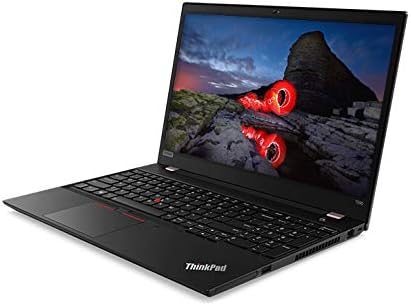
Figura 2.1: Angolat view of the Lenovo ThinkPad T590 laptop, showcasing its sleek design and full-size keyboard.
Komponenti Ewlenin:
- Wiri: 15.6-inch Full HD (1920x1080) IPS anti-glare screen.
- Proċessur: Intel Core i5-8265U Quad-Core (1.60GHz).
- Memorja: 8GB DDR4 RAM.
- Ħażna: 256GB PCIe NVMe Solid State Drive (SSD).
- Sistema Operattiva: Windows 10 Pro 64-bit.
- Grafika: Grafika Intel UHD 620 integrata.
- Konnettività: Intel 9560ac Wi-Fi and Bluetooth 5.0.
- Webcam: Integrated 720p HD camera with microphone and ThinkShutter privacy cover.
- Portijiet: Includes USB 3.0 ports.
- Batterija: 3-cell Li-Polymer battery.
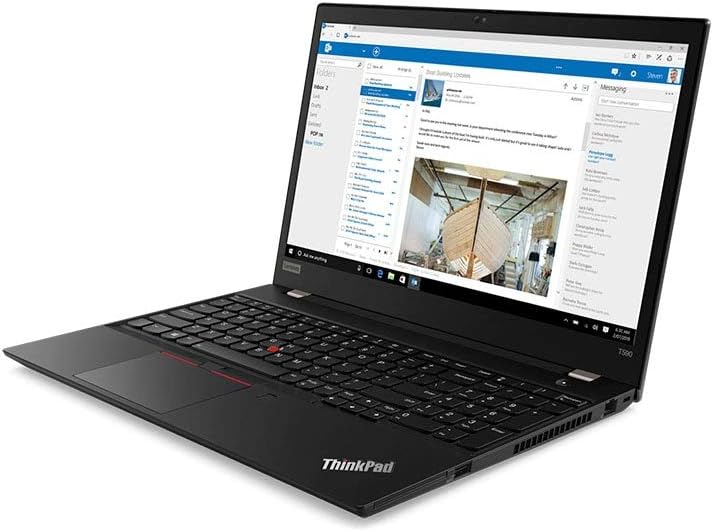
Figura 2.2: The laptop screen displaying an email application, demonstrating its capability for professional use.

Figura 2.3: The laptop screen displaying a video conference call, highlighting its integrated webcam and microphone for communication.

Figura 2.4: Wara view of the Lenovo ThinkPad T590 laptop, showing the hinge and ventilation design.
3. Setup
3.1 Disimballaġġ
Neħħi l-laptop u l-aċċessorji kollha mill-imballaġġ bir-reqqa. Kun żgur li l-oġġetti li ġejjin huma preżenti:
- Laptop Lenovo ThinkPad T590
- Adapter AC
- Korda tal-Enerġija
- Dokumentazzjoni (inkluż dan il-manwal)
3.2 Konnessjoni tal-Adapter tal-Enerġija
- Qabbad il-korda tad-dawl mal-AC adapter.
- Plug the AC adapter into a suitable electrical outlet.
- Connect the AC adapter's output plug to the power input port on your ThinkPad T590.
- Ħalli l-batterija tiċċarġja għal mill-inqas 30 minuta qabel l-ewwel użu, jew sakemm l-indikatur tal-batterija juri ċarġ suffiċjenti.
3.3 Qawwa Inizjali
Press the power button located on the laptop to turn it on. Follow the on-screen instructions to complete the initial setup of Windows 10 Pro, including language selection, network connection, and user account creation.
4. Joperaw
4.1 Using the Keyboard and TrackPoint/Touchpad
Your ThinkPad T590 features a full-size keyboard, a TrackPoint pointing device, and a multi-touch touchpad. Refer to the on-screen tutorials in Windows for detailed gestures and customization options.
4.2 Konnessjoni ma' Netwerk
Biex tikkonnettja ma' netwerk Wi-Fi:
- Ikklikkja l-ikona tal-Wi-Fi fit-tray tas-sistema (fil-kantuniera t'isfel tal-lemin tal-iskrin).
- Agħżel in-netwerk mixtieq tiegħek mil-lista.
- Daħħal iċ-ċavetta tas-sigurtà tan-netwerk (password) jekk tintalab.
- Ikklikkja "Qabbad".
For wired connections, connect an Ethernet cable to the laptop's Ethernet port (if available or via an adapter).
4.3 L-Użu ta' Apparati Esterni
Connect USB devices such as external hard drives, mice, or keyboards to the available USB 3.0 ports. For display output, use the appropriate video output ports (e.g., HDMI, USB-C with display capabilities) to connect to external monitors or projectors.
5. Manutenzjoni
5.1 Tindif tal-Laptop
- Skrin: Uża ċarruta ratba u mingħajr ħelu dampLaħlaħ bl-ilma jew b'tindif tal-iskrin. Tisprejjax likwidu direttament fuq l-iskrin.
- Tastiera u Ċasing: Uża drapp artab u niexef. Għal ħmieġ iebes, neħħi ftit drapp.amp Jista' jintuża drapp b'soluzzjoni ta' sapun ħafif, biex tiżgura li l-ebda likwidu ma jidħol fil-fetħiet.
- Ventilazzjoni: Iċċekkja u naddaf il-fetħiet tal-ventilazzjoni perjodikament biex tevita l-akkumulazzjoni tat-trab, li jista' jaffettwa l-prestazzjoni tat-tkessiħ. Uża arja kkompressata jekk meħtieġ.
5.2 Kura tal-Batterija
Biex timmassimizza l-ħajja tal-batterija:
- Evita temperaturi estremi.
- Tneħħix il-batterija kompletament ta' spiss.
- Jekk se taħżen il-laptop għal perjodu estiż, kun żgur li l-batterija tkun iċċarġjata għal madwar 50-60%.
5.3 Aġġornamenti tas-Software
Regularly update your Windows operating system and Lenovo drivers to ensure optimal performance, security, and compatibility. Windows updates can be managed through the Settings app, and Lenovo updates can be found on the official Lenovo support websit.
6 Issolvi l-problemi
Din it-taqsima tindirizza kwistjonijiet komuni li tista' tiltaqa' magħhom bit-ThinkPad T590 tiegħek.
6.1 Il-Laptop Ma Jixgħelx
- Kun żgur li l-adapter tal-AC huwa konness sew kemm mal-laptop kif ukoll ma' sokit tal-enerġija li jaħdem.
- Ivverifika li s-sokit tal-enerġija jaħdem billi tqabbad apparat ieħor.
- Jekk il-batterija tkun ixxotta kompletament, jista' jieħu ftit minuti ta' ċċarġjar qabel ma l-laptop ikun jista' jixgħel.
6.2 Screen Remains Black or Goes to Sleep Mode Unexpectedly
- Press any key or move the mouse/TrackPoint to wake the system.
- Check power settings in Windows to ensure display sleep timers are set appropriately.
- If the issue persists, try connecting an external monitor to determine if the laptop's display is faulty.
- Perform a hard reset by holding the power button for 10-15 seconds until the laptop powers off, then restart.
6.3 Kwistjonijiet ta' Konnettività tal-Wi-Fi
- Kun żgur li l-Wi-Fi huwa attivat fis-settings tal-Windows.
- Erġa' ibda r-router u l-modem tiegħek.
- Forget the network and reconnect, re-entering the password.
- Update your wireless adapter drivers from the Lenovo support websit.
- If experiencing issues with 5GHz networks, try connecting to a 2.4GHz network if available, or ensure your router's 5GHz channel is not congested.
6.4 BIOS Password Set Out of the Box
If you encounter a BIOS password prompt upon initial setup, this indicates an unusual configuration. Contact Lenovo support immediately for assistance. Do not attempt to guess or bypass the password, as this may lead to data loss or system lockout.
7. Speċifikazzjonijiet
| Karatteristika | Speċifikazzjoni |
|---|---|
| Isem tal-Mudell | ThinkPad T590 |
| Numru tal-Mudell tal-Oġġett | 20N4001NUS |
| Proċessur | Intel Core i5-8265U (1.6 GHz, Quad-Core) |
| RAM | 8 GB DDR4 |
| Ħażna | SSD ta' 256 GB (PCIe) |
| Wiri | 15.6 Inches, Full HD (1920 x 1080) IPS |
| Grafika | Grafika Intel UHD 620 (Integrata) |
| Sistema Operattiva | Windows 10 Pro |
| Tip bla fili | Bluetooth, Intel 9560ac Wi-Fi |
| Portijiet USB | 2 x Portijiet USB 3.0 |
| Piż tal-oġġett | 6.1 liri (madwar 2.77 kg) |
| Dimensjonijiet tal-Prodott (LxWxH) | 20 x 12 x 3 pulzieri (madwar 50.8 x 30.5 x 7.6 ċm) |
| Batterija | 1 Lithium Ion battery (3-cell Li-Polymer) |
| Kulur | Iswed |
| Karatteristika Speċjali | Qarrej tal-marki tas-swaba' |
8. Garanzija u Appoġġ
8.1 Garanzija tal-Prodott
Your Lenovo ThinkPad T590 laptop typically comes with a 3-Year Depot Warranty. This warranty covers manufacturing defects and hardware failures under normal use conditions. For specific terms and conditions, please refer to the warranty documentation included with your product or visit the official Lenovo support websit.
Extended protection plans may also be available for purchase separately, offering additional coverage beyond the standard warranty period.
8.2 Appoġġ Tekniku
Għal assistenza teknika, downloads ta' sewwieqa, jew talbiet għal servizz, jekk jogħġbok żur is-sit uffiċjali tal-Appoġġ Lenovo website. You will need your product's serial number (usually found on a label on the bottom of the laptop or in the BIOS settings) to access specific support resources.
Appoġġ Lenovo Websit: support.lenovo.com
When contacting support, be prepared to provide your model number (20N4001NUS) and a detailed description of the issue.