
Introduzzjoni
Thank you for choosing the EZQuest USB C Hub Docking Station 8-in-1. This manual provides detailed instructions for setting up, operating, and maintaining your device. Please read this manual thoroughly before use to ensure optimal performance and longevity of your product.
Prodott Overview
The EZQuest USB C Hub Docking Station 8-in-1 is designed to expand the connectivity of your USB-C enabled devices, offering a comprehensive solution for various peripherals and display needs. It features multiple ports for data transfer, video output, network connection, and power delivery.
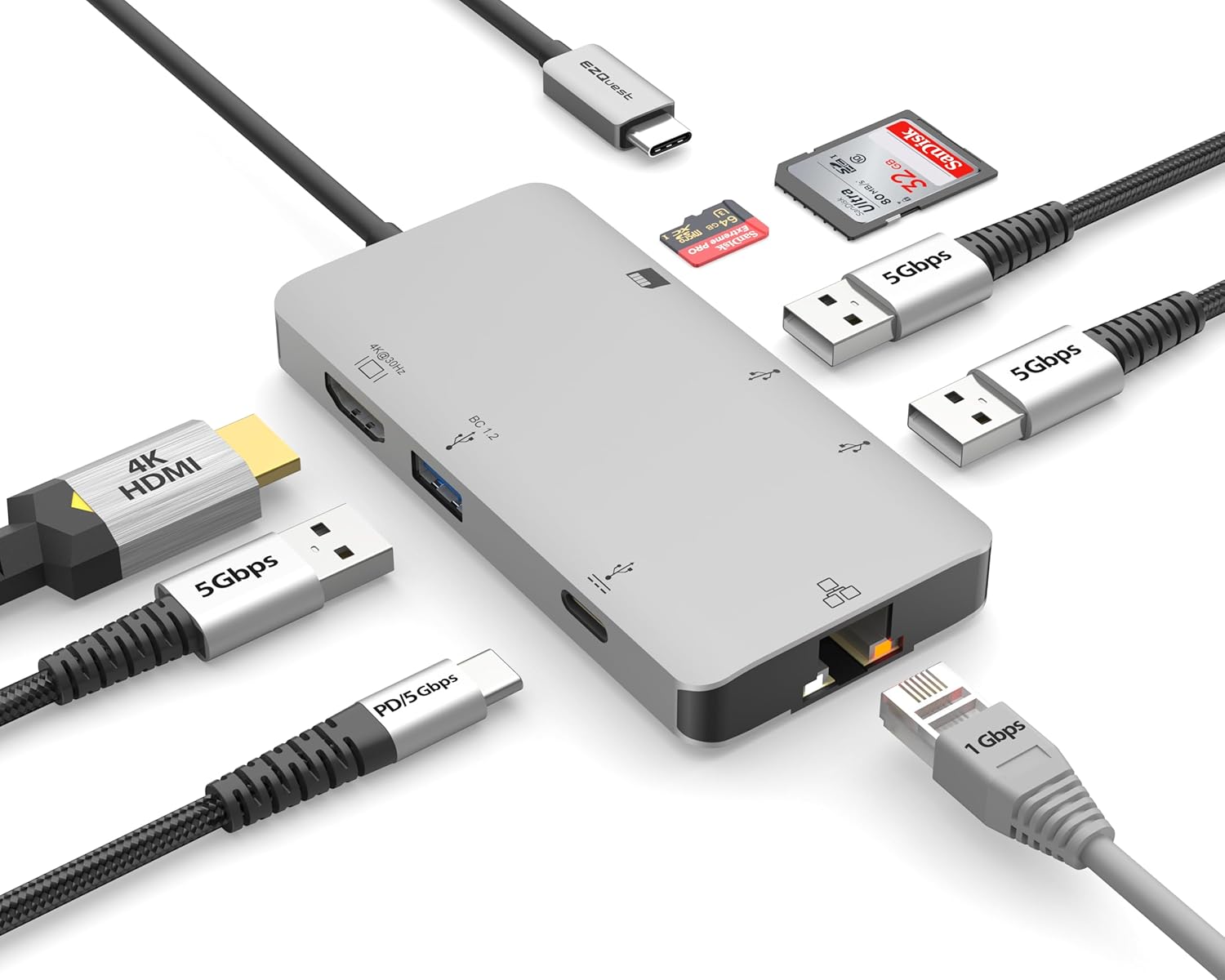
Image: The EZQuest USB C Hub Docking Station 8-in-1, showcasing id-disinn kompatt tiegħu u l-kejbil USB-C integrat.

Image: A diagram illustrating the 8-in-1 expansion capabilities of the hub, including HDMI, USB-C PD, USB 3.0, Ethernet, and card readers.
Setup Istruzzjonijiet
- Qabbad mat-Tagħmir Ospitanti: Plug the integrated USB-C cable of the EZQuest hub into an available USB-C/Thunderbolt 3/4 port on your laptop, tablet, or smartphone.
- Kunsinna tal-Enerġija (Mhux obbligatorja): For charging your host device, connect your USB-C power adapter to the USB-C Power Delivery port on the hub. The hub supports up to 100W input with 85W pass-through charging.
- Wiri HDMI: Connect an HDMI cable from your monitor to the HDMI port on the hub for 4K 30Hz video output.
- Konnessjoni Ethernet: For a stable wired network, connect an Ethernet cable to the Gigabit Ethernet port on the hub.
- Periferali tal-USB: Connect your USB-A devices (e.g., mouse, keyboard, external hard drive) to the three USB-A 3.0 ports.
- SD/Micro SD Cards: Insert your SD or Micro SD cards into the respective slots for data transfer.

Image: A user connecting the EZQuest USB C Hub to a laptop's USB-C port.

Image: Illustrates connecting a power adapter to the hub for pass-through charging of a laptop.
Istruzzjonijiet Operattivi
Output tal-Wiri (HDMI)
The HDMI port supports 4K resolution at 30Hz. Connect an HDMI-enabled display to extend or mirror your desktop for enhanced productivity or multimedia viewing. Ensure your display and device support 4K 30Hz for optimal performance. Note that the USB-C ports on the hub are for data and power delivery, not for connecting a monitor.
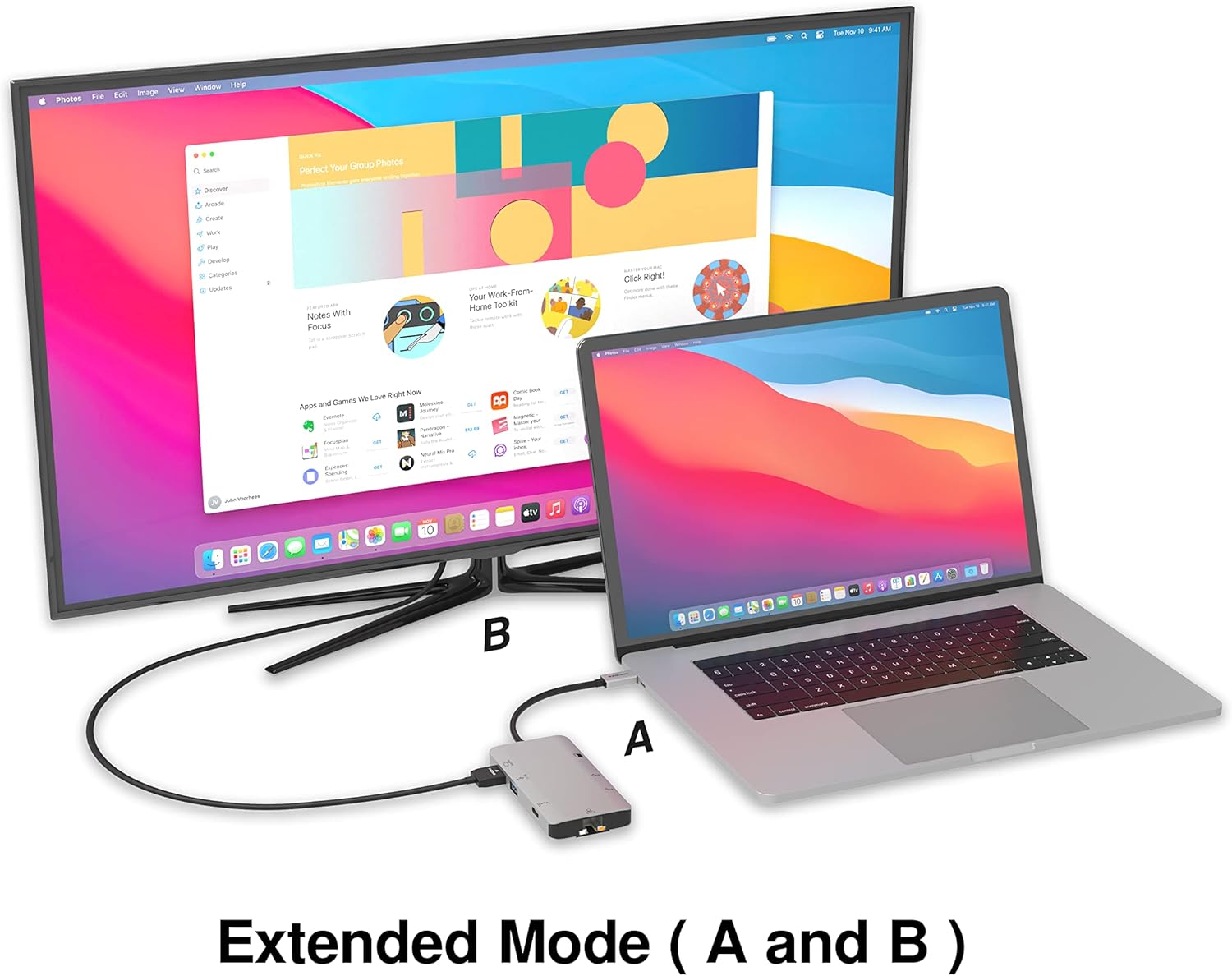
Image: A laptop connected to an external monitor via the hub, demonstrating extended display mode.
Data Transfer (USB-A & SD/Micro SD)
The three USB-A 3.0 ports offer data transfer speeds up to 5Gbps. The SD and Micro SD card slots allow for simultaneous read and write operations, facilitating quick file transfers from memory cards.

Image: Various devices like USB drives, SD cards, and an Ethernet cable connected to the EZQuest hub.
Network Connection (Gigabit Ethernet)
The Gigabit Ethernet port provides a stable and high-speed wired internet connection, ideal for large downloads, uploads, or streaming where Wi-Fi might be unreliable. An LED indicator confirms network activity.
Distribuzzjoni tal-Enerġija
The USB-A ports distribute power efficiently. One USB-A port with BC1.2 outputs 5V/1.5A (7.5W), while the other two USB-A ports deliver 5V/0.9A (4.5W) each. The total shared power when all ports are in use is 10 watts.

Image: A diagram detailing the power output and data transfer speeds of the USB-A ports on the hub.
Karatteristiċi u Portijiet
| Tip ta 'port | Kwantità | Funzjonalità |
|---|---|---|
| HDMI | 1 | 4K @ 30Hz Video Output (Extended/Mirror Mode) |
| USB-C Power Delivery/Data | 1 | Up to 100W Power Input (85W Pass-Through), 5Gbps Data Transfer |
| USB-A 3.0 | 3 | 5Gbps Data Transfer (One port BC1.2 5V/1.5A, two ports 5V/0.9A) |
| Gigabit Ethernet | 1 | 10/100/1000 Mbps Wired Network Connection with LED Indicator |
| SD Card Reader | 1 | SDHC/SDXC Read/Write |
| Mikro SD Card Reader | 1 | Micro SDHC/SDXC Read/Write |
Kompatibilità
This USB C Hub is compatible with a wide range of devices:
- Computers featuring USB-C, USB 4, Thunderbolt 4, or Thunderbolt 3 ports.
- USB-C smartphones and tablets equipped with OTG (On-The-Go) support.
Unsupported Device:
- The USB-A ports on this docking station do not support Apple SuperDrive. For connecting an Apple SuperDrive, an alternative adapter (e.g., EZQuest X40100 USB-C to USB-A Female Mini Adapter) directly to your Mac is recommended.
Issolvi l-problemi
- L-ebda Output tal-Wiri:
- Kun żgur li l-port USB-C tat-tagħmir ospitanti tiegħek jappoġġja l-output tal-vidjo (DisplayPort Alternate Mode).
- Check all cable connections (USB-C from hub to device, HDMI from hub to monitor).
- Verify your monitor input source is set correctly to HDMI.
- Ipprova kejbil HDMI jew monitor differenti jekk disponibbli.
- Kwistjonijiet ta' Iċċarġjar:
- Ensure your USB-C power adapter is connected to the hub's USB-C PD port.
- Ivverifika li l-adapter tal-enerġija tiegħek jipprovdi biżżejjed wattage (up to 100W recommended for laptops).
- Check if the host device's USB-C port supports Power Delivery.
- Trasferiment tad-Data bil-mod:
- Kun żgur li qed tuża apparati u kejbils kompatibbli mal-USB 3.0 għal veloċitajiet ottimali.
- The total shared power for USB-A ports is 10W; excessive power draw from multiple devices may affect performance.
- L-Ethernet Mhux Taħdem:
- Iċċekkja l-konnessjoni tal-kejbil Ethernet kemm mal-hub kif ukoll mar-router/modem tiegħek.
- Ivverifika s-settings tan-netwerk fuq l-apparat ospitanti tiegħek.
- Ensure the LED indicator on the Ethernet port is active.
- SD/Micro SD Card Not Recognized:
- Kun żgur li l-kard hija mdaħħla kompletament fl-islott korrett.
- Ipprova daħħal il-kard mill-ġdid jew uża kard differenti.
- Iċċekkja jekk il-karta hijiex bil-ħsara jew korrotta.
Speċifikazzjonijiet
| Karatteristika | Dettall |
|---|---|
| Numru tal-Mudell | X40030 |
| Dimensjonijiet tal-Prodott | 0.81 x 1.63 x 0.2 pulzieri |
| Piż tal-oġġett | 1.6 uqija |
| Interface tal-Ħardwer | USB Tip Ċ |
| Ħruġ HDMI | 4K@30Hz |
| Input USB-C PD | Sa 100W |
| Output USB-C PD | Sa 85W |
| USB-A 3.0 Data Speed | 5Gbps |
| Veloċità Ethernet | 1 Gigabit (10/100/1000 Mbps) |
| Card Reader Support | SDHC, SDXC, Micro SDHC, Micro SDXC |
| Materjal | Anodized Aluminum Housing |
Manutenzjoni
- Tindif: Uża drapp artab u niexef biex tnaddaf il-hub. Evita prodotti tat-tindif likwidi jew aerosols.
- Ħażna: Aħżen il-hub f'post frisk u niexef 'il bogħod mix-xemx diretta u minn temperaturi estremi.
- Immaniġġjar: Evita li twaqqa' l-apparat jew li tissottomettih għal impatti qawwija. Tippruvax tiżżarma l-hub.
Garanzija u Appoġġ
The EZQuest USB C Hub Docking Station 8-in-1 comes with a Garanzija ta' Sena mingħajr Inkwiet. This warranty covers manufacturing defects and ensures peace of mind regarding your investment.
For technical support, warranty claims, or any product-related inquiries, please visit the official EZQuest website or contact their customer service team through the contact information provided with your product packaging.