
Introduzzjoni
This manual provides detailed instructions for the installation, operation, and maintenance of your Dakota Micro AgCam 92° AHD Camera (DMAC-CK1). Please read this manual thoroughly before using the product to ensure proper function and longevity. The AgCam is designed for robust performance in demanding environments, offering clear visibility for various applications.
Karatteristiċi tal-Prodott
The AgCam DMAC-CK1 camera is engineered with several key features to provide reliable performance:
- Solid Aluminum Anodized Housing: Provides durability and protection against environmental factors.
- 100% Waterproof Triple O-ring Sealed Housing: Ensures complete water resistance for use in wet conditions.
- Auto Shading, Triple Hardened Glass Lens: Delivers clear images and resists scratches and impacts.
- Automatic Infrared Illuminators: Enables clear vision in low-light or no-light conditions.
- High Strength Magnetic Mount: Allows for flexible and secure placement on various surfaces.

Image: AgCam 92 degree AHD Camera highlighting its key features including solid aluminum housing, waterproof sealing, hardened glass lens, infrared illuminators, and magnetic mount.
Informazzjoni dwar is-Sigurtà
Jekk jogħġbok osserva l-prekawzjonijiet tas-sigurtà li ġejjin:
- Ensure all connections are secure before operating the camera.
- Tippruvax tiżżarma jew timmodifika l-kamera, għax dan jannulla l-garanzija u jista' jikkawża ħsara.
- Keep cables clear of moving parts and high-temperature areas to prevent damage.
- Mount the camera securely to prevent it from falling during operation, especially in moving vehicles or machinery.
- Use only the provided cables and accessories to ensure compatibility and optimal performance.
Kontenut tal-Pakkett
Your AgCam DMAC-CK1 package includes:
- 1x AgCam 92° AHD Camera
- 1x 60-foot Camera Cable
- 1x 20-foot Camera Cable
Setup u Installazzjoni
1. Immuntar tal-Kamera
The AgCam features a high-strength magnetic mount for easy and secure attachment. Choose a mounting location that provides the desired field of view and is free from obstructions. Ensure the surface is clean and flat for optimal magnetic adhesion. The camera can also be permanently mounted using screws through the base if preferred.
2. Konnessjoni tal-Kejbils
Connect the camera to your monitor or recording device using the provided cables. The camera uses a secure, threaded connector. Align the connector pins carefully and twist the locking collar until it is hand-tight to ensure a waterproof and reliable connection.
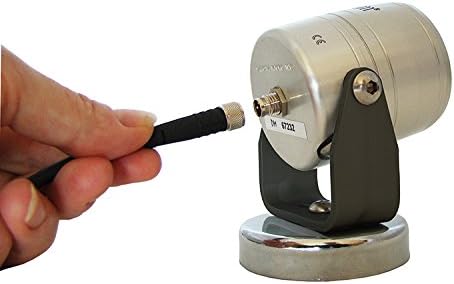
Image: A hand connecting the cable to the rear port of the AgCam camera, showing the threaded connection mechanism.

Immaġni: Close-up view of the robust, multi-pin connectors used for the AgCam camera cables, designed for secure and waterproof connections.
Use either the 20-foot or 60-foot cable depending on the required distance. Route the cables carefully to avoid pinching, abrasion, or interference with moving parts. Secure the cables with cable ties or clips as needed.
3. Tixgħel
Once all connections are made, power on your monitor or recording device. The camera will automatically activate and begin transmitting video. Refer to your monitor's manual for specific instructions on selecting the correct input.
Istruzzjonijiet Operattivi
The AgCam DMAC-CK1 is designed for straightforward operation:
- Operazzjoni Awtomatika: The camera automatically adjusts to lighting conditions. Its auto shading feature and automatic infrared illuminators ensure optimal image quality day or night.
- Qasam ta View: Il-qasam 92° ta view provides a wide perspective, suitable for monitoring large areas or for backup assistance.
- Wireless Communication (Wi-Fi): While the camera itself is wired for video transmission, some compatible monitors or systems may offer Wi-Fi connectivity for additional features or remote viewing. Consult your monitor's documentation for details on Wi-Fi integration.
Manutenzjoni
To ensure the longevity and optimal performance of your AgCam camera:
- Tindif: Imsaħ bil-mod il-lenti u l-kaxxa tal-kamera b'ċarruta ratba u damp drapp. Evita prodotti tat-tindif jew solventi li joborxu li jistgħu jagħmlu ħsara lill-lenti jew lill-finitura.
- Spezzjoni tal-Cable: Periodically inspect cables for any signs of wear, cuts, or damage. Replace damaged cables immediately to prevent system failure or water ingress.
- Kontroll tal-Konnessjoni: Ensure all cable connections remain tight and secure, especially after prolonged use or exposure to vibrations.
- Ħażna: When not in use for extended periods, store the camera in a clean, dry environment.
Issolvi l-problemi
| Problema | Kawża Possibbli | Soluzzjoni |
|---|---|---|
| L-ebda immaġni fuq il-monitor | Konnessjoni tal-kejbil maħlula No power to monitor/camera Incorrect monitor input selected | Check all cable connections, ensure they are tight. Verify power supply to both camera and monitor. Select the correct video input on your monitor. |
| Immaġni li teptep jew mgħawġa | Cable bil-ħsara Konnessjoni fqira Interferenza elettrika | Spezzjona l-kejbils għal ħsara; ibdelhom jekk meħtieġ. Kun żgur li l-konnessjonijiet huma siguri. Relocate cables away from power sources or other electronics. |
| Kwalità fqira tal-immaġni bil-lejl | Infrared illuminators obstructed Lenti maħmuġa | Ensure nothing is blocking the front of the camera. Naddaf il-lenti tal-kamera bil-mod. |
| Camera not mounting securely | Mounting surface is not magnetic or uneven Debris on magnetic base | Ensure the surface is ferrous metal and flat. Clean the magnetic base and mounting surface. |
Speċifikazzjonijiet
- Mudell: DMAC-CK1
- Qasam ta View: 92 grad
- Lenti: 3.6mm
- Djar: Solid Aluminum, Anodized, Triple O-ring Sealed
- Livell ta' Reżistenza għall-Ilma: Waterproof
- Illuminazzjoni: Automatic Infrared Illuminators
- Immuntar: High Strength Magnetic Mount
- Apparati Kompatibbli: Monitor
- Teknoloġija tal-Komunikazzjoni mingħajr Fili: Wi-Fi (for compatible systems/monitors)
- Manifattur: Dakota Micro, Inc.
- UPC: 817436013449
Garanzija u Appoġġ
The Dakota Micro AgCam DMAC-CK1 camera comes with a Garanzija tal-fabbrika ta '3 snin. For warranty claims or technical support, please contact Dakota Micro directly. Keep your purchase receipt as proof of purchase.
For further assistance, visit the official Dakota Micro websit jew ikkuntattja lit-tim tal-appoġġ tal-klijenti tagħhom.