
1. Introduzzjoni
The OWON B41T+ is a high-precision 4 1/2 digit (21999 counts) True RMS digital multimeter designed for accurate electrical measurements. It features Bluetooth connectivity, allowing seamless integration with Android (4.3+) and iOS (7.0+) smartphones and tablets. This device supports various measurement functions including voltage, current, resistance, capacitance, frequency, duty cycle, and temperature. Advanced features include standalone data logging, graphical display of measurements on connected smart devices, and Japanese voice output for readings.
2. Informazzjoni dwar is-Sigurtà
Please read and understand all safety instructions before operating the OWON B41T+ Digital Multimeter. Failure to follow these instructions may result in electric shock, fire, or damage to the device.
- Dejjem kun żgur li l-multimetru jkun fil-modalità ta' funzjoni korretta qabel ma tqabbad il-wajers tat-test ma' ċirkwit.
- Do not exceed the maximum input limits for any measurement range.
- Inspect test leads for damage before each use. Replace damaged leads immediately.
- Avoid using the multimeter in wet environments or during electrical storms.
- Dejjem skonnettja l-enerġija għaċ-ċirkwit li qed jiġi ttestjat qabel ma tkejjel ir-reżistenza, il-kapaċitanza, jew il-kontinwità.
- Oqgħod attent meta taħdem bil-voltages 'il fuq minn 30V AC RMS, 42V peak, jew 60V DC, għax dawn joħolqu periklu ta' xokk elettriku.
3. Prodott Aktarview u Komponenti
The OWON B41T+ Digital Multimeter is designed for ease of use and durability. Below are the main components and included accessories.
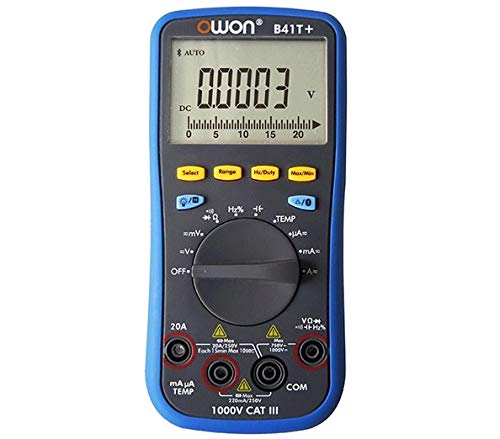
Figura 3.1: Quddiem u ġenb view of the OWON B41T+ Digital Multimeter, showing the display, function dial, and input jacks.
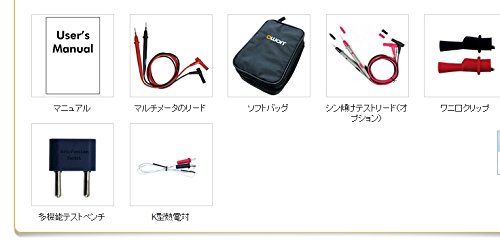
Figura 3.2: Included accessories: User's Manual, Multimeter test leads, Soft bag, K-type thermocouple (temperature probe), and a multi-function test bench adapter.
4. Setup
4.1 Installazzjoni tal-batterija
The OWON B41T+ is powered by batteries. To install or replace batteries:
- Kun żgur li l-multimetru huwa MITFI.
- Sib l-għatu tal-kompartiment tal-batterija fuq wara tal-apparat.
- Uża tornavit biex tiftaħ il-kompartiment tal-batterija.
- Daħħal il-batteriji meħtieġa, waqt li tosserva l-polarità korretta.
- Agħlaq sewwa l-għatu tal-kompartiment tal-batterija.
4.2 Installazzjoni tal-App u Tqabbil tal-Bluetooth
To utilize the smart device connectivity features, download the OWON multimeter application from your device's app store (compatible with Android 4.3+ and iOS 7.0+).
- Download and install the official OWON multimeter app on your smartphone or tablet.
- Turn on the OWON B41T+ multimeter.
- Jippermetti Bluetooth fuq it-tagħmir intelliġenti tiegħek.
- Open the OWON app and follow the on-screen instructions to search for and pair with your B41T+ device. The Bluetooth icon on the multimeter display will indicate a successful connection.
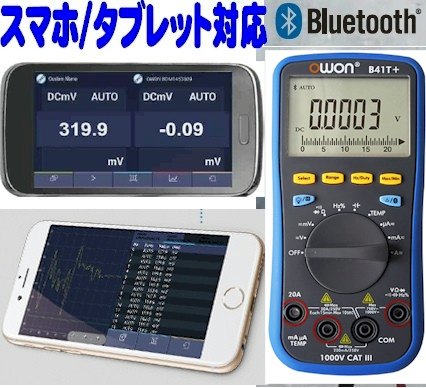
Figura 4.1: The OWON B41T+ multimeter displaying a measurement, with a smartphone screen showing the corresponding app interface.
5. Istruzzjonijiet Operattivi
The OWON B41T+ offers a wide range of measurement functions. Use the central rotary dial to select the desired measurement mode.
5.1 Kejl Bażiku
Biex twettaq kejl bażiku:
- Select the appropriate function (e.g., V for voltage, A for current, Ω for resistance) using the rotary dial.
- Connect the test leads to the correct input jacks on the multimeter (e.g., COM and VΩmA for voltage/resistance, COM and 20A or mAμA for current).
- Connect the test leads to the circuit or component under test.
- Read the measurement value on the multimeter's display.
5.2 Advanced Features with Bluetooth Connectivity
When connected to a smartphone or tablet via Bluetooth, the OWON B41T+ provides enhanced functionality:
- Logging tad-Data: Record measurement data over time directly to your smart device.
- Wirja Grafika: View real-time measurement trends and historical data in graphical format.
- Voice Output: The device can announce measurement readings in Japanese, allowing for hands-free operation.
- Ġestjoni tad-Data: Save, store, print, and email measurement data (CSV format) directly from the app.
- Konnessjoni b'ħafna Apparat: Connect two OWON B41T+ units simultaneously to your smart device to monitor two different parameters (e.g., voltage and current, or voltage and resistance) on a dual-screen display.
- Operazzjoni mill-bogħod: Utilize remote desktop applications like TeamViewer to control the connected smartphone/tablet from anywhere, enabling remote monitoring and operation of the multimeter.

Figura 5.1: Illustration of advanced features including simultaneous measurement with two multimeters, data logging, graphical display, and voice output.
6. Speċifikazzjonijiet
The following table details the technical specifications of the OWON B41T+ Digital Multimeter.

Figura 6.1: Detailed specifications including measurement ranges, resolution, and accuracy.
| Parametru | Firxa | Riżoluzzjoni | Eżattezza |
|---|---|---|---|
| DC Voltage (V) | 220mV, 2.2V, 22V, 220V, 1000V | 0.01mV, 0.1mV, 1mV, 10mV, 0.1V | ±(0.05%+10dig) to ±(0.8%+25dig) |
| AC Voltage (V) | 220mV, 2.2V, 22V, 220V, 750V | 0.01mV, 0.1mV, 1mV, 10mV, 0.1V | ± (1.0% + 25 ħaffer) |
| Kurrent DC (A) | 220μA, 2200μA, 22mA, 220mA, 20A | 0.01μA, 0.1μA, 1μA, 10μA, 1mA | ±(0.8%+10dig) to ±(2.0%+25dig) |
| Kurrent AC (A) | 220μA, 2200μA, 22mA, 220mA, 20A | 0.01μA, 0.1μA, 1μA, 10μA, 1mA | ±(1.5%+25dig) to ±(2.5%+35dig) |
| Reżistenza (Ω) | 220Ω, 2.2kΩ, 22kΩ, 220kΩ, 2.2MΩ, 22MΩ, 220MΩ | 0.01Ω, 0.1Ω, 1Ω, 10Ω, 100Ω, 1kΩ, 10kΩ | ±(0.4%+5dig) to ±(5%+10dig) |
| Kapaċità (F) | 2.2nF, 22nF, 220nF, 2.2μF, 22μF, 220μF, 2.2mF, 22mF | 1pF, 10pF, 100pF, 1nF, 10nF, 100nF, 1μF, 10μF | ± (2.5% + 15 ħaffer) |
| Frekwenza (Hz) | 220Hz, 2.2kHz, 22kHz, 220kHz, 2.2MHz, 22MHz | 0.01Hz, 0.1Hz, 1Hz, 10Hz, 100Hz, 1kHz | ± (0.1% + 4 ħaffer) |
| Iċ-Ċiklu tax-Xogħol | 0.1% - 99.9% (>1kHz) | 0.1% | ± (1.2% + 3 ħaffer) |
| Temperatura (°C / °F) | -50°C sa 400°C, -58°F sa 752°F | 0.1°C, 0.1°F | ±(2.5%+3dig) to ±(1.2%+8dig) |
| Max Count | 21999 | ||
| Uri Samplipp | 3 darba / sekonda | ||
| Firxa Auto | Iva | ||
| Data Logger | 10 hours, 10,000 points | ||
| RMS Veru | Iva | ||
| Dawl ta' wara | Iva | ||
| Test tad-Diode | Iva | ||
| Test ta' Kontinwità | Iva | ||
| Protezzjoni ta 'kurrent żejjed | CAT III 1000V, CAT IV 600V | ||
| Sors tal-Enerġija | 3V (1.5V x 2) AA Alkaline Batteries | ||
| Bluetooth | Android 4.3+, iOS 7.0+ | ||
| Dimensjonijiet | 85mm x 185mm x 30mm | ||
| Piż | Appross. 320g | ||
7. Manutenzjoni
Proper maintenance ensures the longevity and accuracy of your OWON B41T+ Digital Multimeter.
- Tindif: Imsaħ l-apparat b'ċarruta niexfa u ratba. Tużax prodotti tat-tindif jew solventi li joborxu.
- Sostituzzjoni tal-batterija: Replace batteries promptly when the low battery indicator appears on the display. Refer to Section 4.1 for battery installation instructions.
- Ħażna: Store the multimeter in a cool, dry place away from direct sunlight and extreme temperatures. If storing for extended periods, remove the batteries to prevent leakage.
- Test Leads: Regularly inspect test leads for any signs of wear, cuts, or damage. Replace them if necessary to ensure safe and accurate measurements.
8 Issolvi l-problemi
If you encounter issues with your OWON B41T+ Digital Multimeter, refer to the following common problems and solutions:
| Problema | Kawża Possibbli | Soluzzjoni |
|---|---|---|
| L-apparat ma jixgħelx. | Batteriji mejta jew installati ħażin. | Ibdel il-batteriji, waqt li tiżgura l-polarità korretta. |
| L-ebda qari jew murija 'OL' (Overload). | Funzjoni magħżula ħażina, ċirkwit miftuħ, jew il-kejl jaqbeż il-medda. | Select the correct function. Check for proper circuit connection. Switch to a higher range if available. |
| Il-konnessjoni Bluetooth tfalli. | Bluetooth not enabled, app not running, or device out of range. | Ensure Bluetooth is on for both devices. Restart the app. Move devices closer. Check app compatibility with OS version. |
| Qari mhux preċiż. | Damaged test leads, environmental interference, or incorrect measurement technique. | Inspect and replace test leads if damaged. Ensure proper connection. Avoid strong electromagnetic fields. |
9. Garanzija u Appoġġ
For warranty information and technical support, please refer to the documentation included with your purchase or visit the official OWON website. If you require further assistance, contact OWON customer service through their designated support channels.