
1. Introduzzjoni
Thank you for choosing the XTUGA EW240 UHF 4-Channel Wireless Microphone System. This professional wireless microphone system is designed to deliver clear and powerful audio performance for various applications, including family parties, stages, churches, and karaoke. This manual provides detailed instructions for setup, operation, maintenance, and troubleshooting to ensure optimal performance and longevity of your system.
2. Informazzjoni Importanti dwar is-Sigurtà
- Aqra sew l-istruzzjonijiet kollha qabel tuża l-prodott.
- Żomm dan il-manwal għal referenza futura.
- Tesponix l-unità għax-xita jew għall-umdità biex tevita nar jew xokk elettriku.
- Aċċerta ruħek li jkun hemm ventilazzjoni xierqa u timblokkax l-ebda fetħiet tal-ventilazzjoni.
- Uża biss l-adapter tal-enerġija fornut mal-unità.
- Tippruvax tiżżarma jew timmodifika l-unità. Irreferi kull servizz lil persunal kwalifikat.
- Armi l-batteriji skont ir-regolamenti lokali.
3. Kontenut tal-Pakkett
Jekk jogħġbok iċċekkja l-pakkett biex tiżgura li l-oġġetti kollha huma preżenti:
- 1 x 4-Channel Receiver
- 1 x Manwal għall-Utent
- 4 x Trasmettituri Bodypack
- 4 x Mikrofoni Lavalier
- 4 x Headset Microphones
- 1 x 110V/220V Power Adapter
4. Prodott Aktarview
4.1 Unità Riċevitur
The receiver is the central unit of the wireless microphone system, featuring a durable metal design and individual volume controls for each of its four channels. It includes four receiving antennas for stable signal reception and an LCD display for monitoring operating status.


4.2 Trasmettituri Bodypack
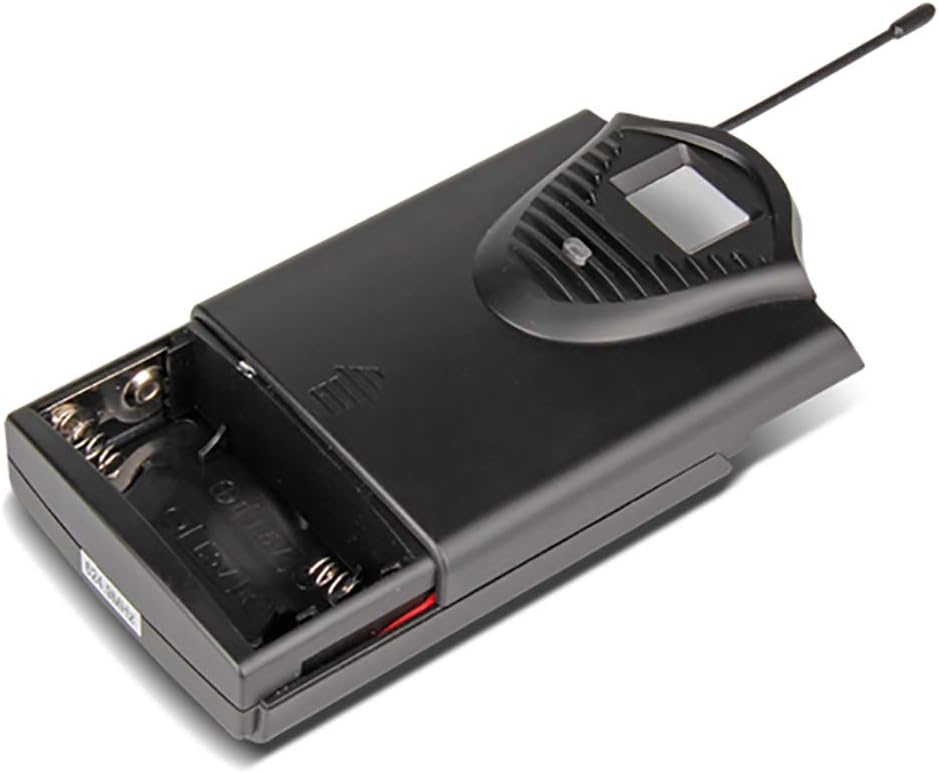
The system includes four bodypack transmitters, each designed for use with either a lavalier or headset microphone. These transmitters are compact, feature an LCD display for battery and operating status, and are powered by two 1.5V batteries, offering up to 8 hours of continuous use.



5. Istruzzjonijiet ta' Setup
5.1 Setup tar-Riċevitur
- Pjazzament: Place the receiver on a stable, flat surface, away from potential sources of interference (e.g., computers, Wi-Fi routers). Ensure adequate ventilation around the unit.
- Konnessjoni tal-antenna: Screw the four included antennas onto the ANT A, ANT B, ANT C, and ANT D connectors on the rear panel of the receiver. Position them vertically for optimal signal reception.
- Konnessjoni tal-Enerġija: Connect the supplied power adapter to the DC 16V, 400mA input on the rear of the receiver, then plug it into a suitable power outlet.
- Output Awdjo: Qabbad ir-riċevitur mal-mixer tiegħek, amplifier, or sound system using either the 6.3cm (1/4 inch) mixed output or the individual 6.3cm (1/4 inch) outputs for each channel (OUT A, OUT B, OUT C, OUT D).


5.2 Setup tat-Trasmettitur
- Installazzjoni tal-batterija: Open the battery compartment of each bodypack transmitter. Insert two 1.5V AA batteries, ensuring correct polarity. Close the compartment securely.
- Konnessjoni tal-mikrofonu: Plug the lavalier or headset microphone into the input jack on the bodypack transmitter.
- Qawwa Mixgħul: Turn on the power switch on the bodypack transmitter. The LCD display will illuminate, showing the channel and battery status.
6. Istruzzjonijiet Operattivi
- Tixgħel is-Sistema: First, power on the receiver. Then, power on each bodypack transmitter.
- Aġġustament tal-Volum: Use the individual volume control knobs on the receiver for each channel (CH 01, CH 02, CH 03, CH 04) to adjust the microphone levels. Start with the volume low and gradually increase it to avoid feedback.
- Indikaturi tas-Sinjali: The receiver's LCD display will show the active channel frequencies. The RF (Radio Frequency) and AF (Audio Frequency) indicators will light up when a signal is being received and audio is present, respectively.
- Użu: Position the lavalier microphone approximately 6-8 inches from your mouth, or wear the headset microphone comfortably. Speak clearly into the microphone.
- Itfi: When finished, first turn off the bodypack transmitters, then power off the receiver. This helps prevent pops or thumps through your sound system.
7. Manutenzjoni
- Tindif: Use a soft, dry cloth to clean the receiver and transmitters. Do not use liquid cleaners or solvents.
- Sostituzzjoni tal-batterija: Replace batteries in the bodypack transmitters when the low battery indicator appears on the LCD display. Always use fresh, high-quality 1.5V AA batteries.
- Ħażna: Store the system in a cool, dry place when not in use. Remove batteries from transmitters if storing for extended periods to prevent leakage.
- Kura tal-antenna: Handle antennas carefully. Avoid bending them excessively.
8 Issolvi l-problemi
| Problema | Kawża Possibbli | Soluzzjoni |
|---|---|---|
| L-ebda ħoss mill-mikrofonu | Transmitter or receiver not powered on; low batteries; microphone not connected; receiver output not connected to sound system; volume too low. | Ensure all units are powered on. Replace batteries. Check microphone connection to transmitter. Verify receiver output is connected and sound system is on. Increase receiver and sound system volume. |
| Kwalità tal-ħoss fqira/Interferenza | Interference from other wireless devices; transmitter too far from receiver; antennas not positioned correctly; low batteries. | Move away from other wireless devices. Ensure line of sight between transmitter and receiver. Position antennas vertically. Replace batteries. |
| Firxa operattiva qasira | Obstructions between transmitter and receiver; antennas not positioned correctly; environmental interference. | Ensure clear line of sight. Position antennas vertically. Avoid using in areas with high RF interference. |
| Receiver LCD not displaying | Receiver not powered on; power adapter faulty. | Check power connection and ensure receiver is switched on. Try a different power outlet. |
9. Speċifikazzjonijiet
9.1 General System
- Numru ta' kanali: 4 kanali
- Stabbiltà: ± 0.006%
- Normal Deviation: ± 22 kHz
- Proporzjon S/N: <120 dB
- THD: <0.6 %
- Rispons tal-Frekwenza: 50 Hz - 15 kHz
- Firxa: 65-il metru
9.2 Riċevitur
- Sensittività: > 80 dB
- Output Awdjo: Balanced and Unbalanced (6.3cm mixed output, four 6.3cm individual outputs)
- Rekwiżiti tal-Enerġija: AC 16 V, 400 mA
- Dimensjonijiet: 440 x 210 x 40 mm
- Piż: Madwar 1.3 kg
- Materjal: Metall
9.3 Wireless Microphone (Transmitter)
- Tip ta 'Skartoċċ: Dinamika
- Output RF: <10 mW
- Normal Deviation: ± 22 kHz
- Devjazzjoni massima: ± 80 kHz
- Batterija: 2 x 1.5 V batteriji AA
- Ħajja tal-batterija: 8 sigħat
10. Garanzija u Appoġġ
XTUGA products are designed for reliability and performance. For warranty information and technical support, please refer to the contact details provided with your purchase or visit the official XTUGA websit. Żomm l-irċevuta tax-xiri tiegħek bħala prova tax-xiri għal kwalunkwe talba ta' garanzija.