
Introduzzjoni
This manual provides essential information for the safe and efficient use of your ASUS ZenBook UX333FA-DH51 laptop. Please read this guide thoroughly before operating your device to ensure proper setup, operation, and maintenance.

Image: The ASUS ZenBook UX333FA-DH51 laptop in its royal blue finish, showcasing its sleek, closed design.
X'hemm fil-Kaxxa
Verify that all items are present in your product packaging. If any item is missing or damaged, contact your retailer or ASUS support.
- ASUS ZenBook UX333FA-DH51 Notebook
- Adapter tal-Enerġija
- Korda tal-Enerġija
- Dokumentazzjoni (Gwida ta' Bidu Mgħaġġel, Karta tal-Garanzija)
Setup
1. Konnessjoni tal-Adapter tal-Enerġija
Before first use, or if the battery is low, connect the power adapter to the laptop and a power outlet.
- Plug the AC adapter into the power connector on the side of your ZenBook.
- Ipplaggja l-korda tal-enerġija fl-adapter tal-AC.
- Plug the other end of the power cord into a wall power outlet.

Immaġni: Ġenb view of the laptop, highlighting the various ports including the power input, USB ports, and HDMI.
2. L-Ewwel Tixgħil u s-Setup tal-Windows
Once connected to power, open the laptop lid and press the power button. Follow the on-screen instructions to complete the Windows 10 setup process. This includes selecting your region, language, accepting terms, and setting up user accounts.
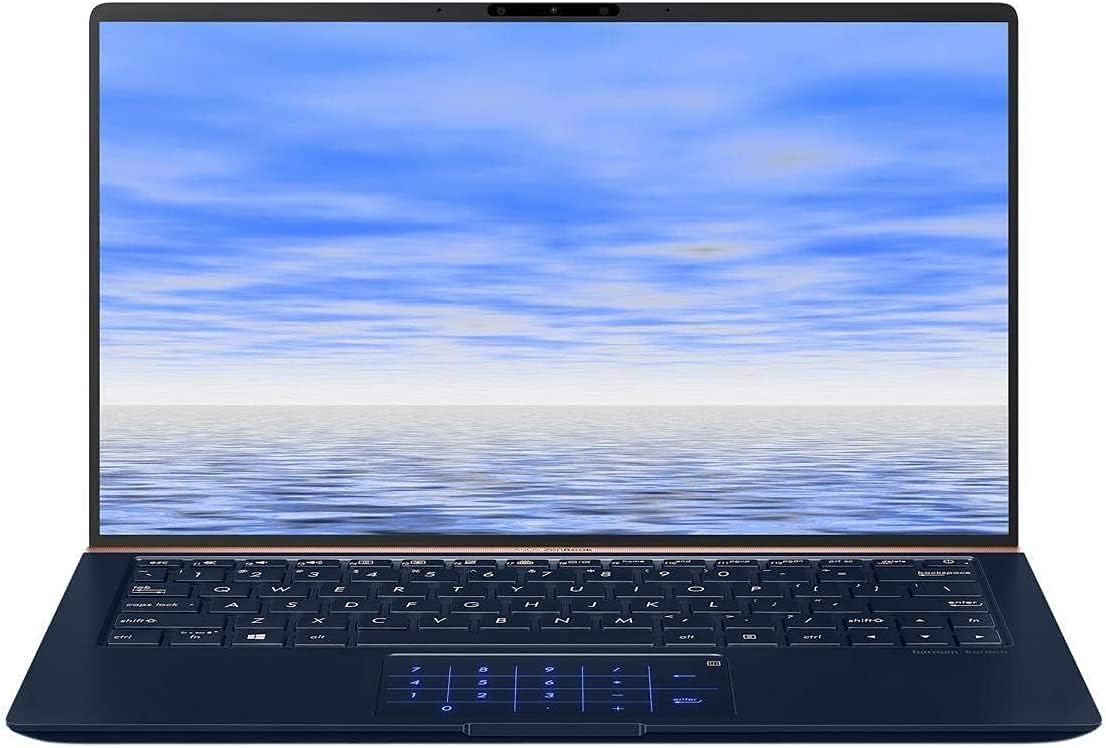
Image: The ASUS ZenBook UX333FA-DH51 with its display open, ready for initial setup or use.
Tħaddim tal-Laptop
Tastiera u Touchpad
Your ZenBook features a full-sized keyboard and a precision touchpad. The unique ErgoLift hinge automatically tilts the keyboard for a more comfortable typing experience when the lid is opened.

Immaġni: Close-up view of the laptop's keyboard and the innovative NumberPad integrated into the touchpad.
- Ċwievet tal-Funzjoni: Uża l- Fn key in combination with the F1-F12 keys for quick access to system functions like volume control, brightness adjustment, and Wi-Fi toggle.
- Tastiera tan-Numri: The touchpad can transform into an LED-illuminated numeric keypad for data entry. Refer to the on-screen instructions or the ASUS utility for activation and usage.
Karatteristiċi tal-Wiri
The ZenBook UX333FA-DH51 features a 13.3-inch Full HD (1920x1080) NanoEdge display with ultra-slim bezels, providing an immersive visual experience.

Image: The laptop open, emphasizing the expansive, near-borderless NanoEdge display.
Ġestjoni tal-Enerġija
Manage your laptop's power settings through Windows 10 to optimize battery life or performance.
- Modalità Sleep: Agħlaq l-għatu jew agħfas il-buttuna tal-qawwa fil-qosor biex tidħol fil-modalità sleep.
- Itfi: Mur fuq Ibda > Enerġija > Itfi to completely turn off the laptop.
- Ibda mill-ġdid: Mur fuq Start > Power > Restart biex terġa 'tibda s-sistema.
Manutenzjoni
Tindif tal-Laptop Tiegħek
- Uża drapp ratba u mingħajr ħelu dampMaħsul bl-ilma jew b'tindif tal-iskrin speċjalizzat għall-wiri.
- Għat-tastiera u x-chassis, uża drapp artab u niexef. Evita kimiċi ħarxa jew materjali li joborxu.
- Kun żgur li l-laptop ikun mitfi u skonnettjat qabel ma tnaddaf.
Kura tal-batterija
- Evita li tiċċarġja l-batterija kompletament ta' spiss.
- Aħżen il-laptop f'post frisk u niexef jekk ma tużahx għal perjodi twal.
- Ikkalibra l-batterija perjodikament billi tiċċarġjaha u terġa' tiċċarġjaha kompletament.
Aġġornamenti tas-Software
Regularly update your Windows operating system and ASUS drivers to ensure optimal performance and security.
- Aġġornamenti tal-Windows: Mur fuq Settings > Aġġornament u Sigurtà > Aġġornament tal-Windows.
- ASUS Driver Updates: Żur l-appoġġ uffiċjali tal-ASUS websit għall-mudell tiegħek biex tniżżel l-aħħar sewwieqa u utilitajiet.
Issolvi l-problemi
Din it-taqsima tindirizza kwistjonijiet komuni li tista' tiltaqa' magħhom. Għal problemi aktar kumplessi, irreferi għas-servizz ta' appoġġ tal-ASUS. websit jew ikkuntattja lis-servizz tal-konsumatur.
| Problema | Soluzzjoni Possibbli |
|---|---|
| Il-laptop ma jixgħelx. |
|
| L-iskrin huwa vojt jew iswed. |
|
| It-touchpad ma jirrispondix jew huwa irregolari. |
|
| Il-batterija tiskula malajr. |
|
Speċifikazzjonijiet
Key technical specifications for the ASUS ZenBook UX333FA-DH51.
| Karatteristika | Dettall |
|---|---|
| Isem tal-Mudell | ZenBook UX333FA-DH51 |
| Wiri | 13.3 pulzieri Full HD (1920x1080) |
| Proċessur | Intel Core i5-8265U (1.6GHz, Turbo up to 3.9GHz) |
| RAM | 8GB LPDDR3 (On Board) |
| Ħażna | 256GB PCIe G3x2 SSD + TPM |
| Grafika | Grafika Intel HD (Integrata) |
| Sistema Operattiva | Windows 10 (64bit) |
| Konnettività bla fili | 802.11g |
| Portijiet USB | 1x USB 2.0, 1x USB 3.0 (Note: Specific port types may vary, refer to physical device) |
| Piż tal-oġġett | 2.6 liri |
| Dimensjonijiet (LxWxH) | 15 x 1 x 10 pulzieri |
| Kulur | Blu Rjali |
Informazzjoni dwar Garanzija
Your ASUS ZenBook UX333FA-DH51 comes with a limited manufacturer's warranty. The specific terms and duration of the warranty may vary by region and retailer. Please refer to the warranty card included in your product packaging or visit the official ASUS websit għal informazzjoni dettaljata dwar il-garanzija. Żomm il-prova tax-xiri tiegħek għal talbiet ta' garanzija.
Appoġġ
For technical assistance, driver downloads, or further information regarding your ASUS ZenBook UX333FA-DH51, please visit the official ASUS support websit:
Appoġġ Uffiċjali tal-ASUS Websit
You may also find helpful resources and contact information for customer service on the websit.