Introduzzjoni
This manual provides instructions for the setup, operation, and maintenance of your Zelotes T20 Ergonomic Vertical Mouse. Please read this manual thoroughly before using the product to ensure proper function and longevity.
Prodott Overview
The Zelotes T20 is an ergonomic vertical mouse designed to promote a natural hand and wrist posture, reducing strain during extended use. It features adjustable DPI settings and multiple programmable buttons for enhanced control.

Figure 1: Zelotes T20 Ergonomic Vertical Mouse. This image displays the overall design of the mouse, highlighting its vertical orientation and LED lighting.
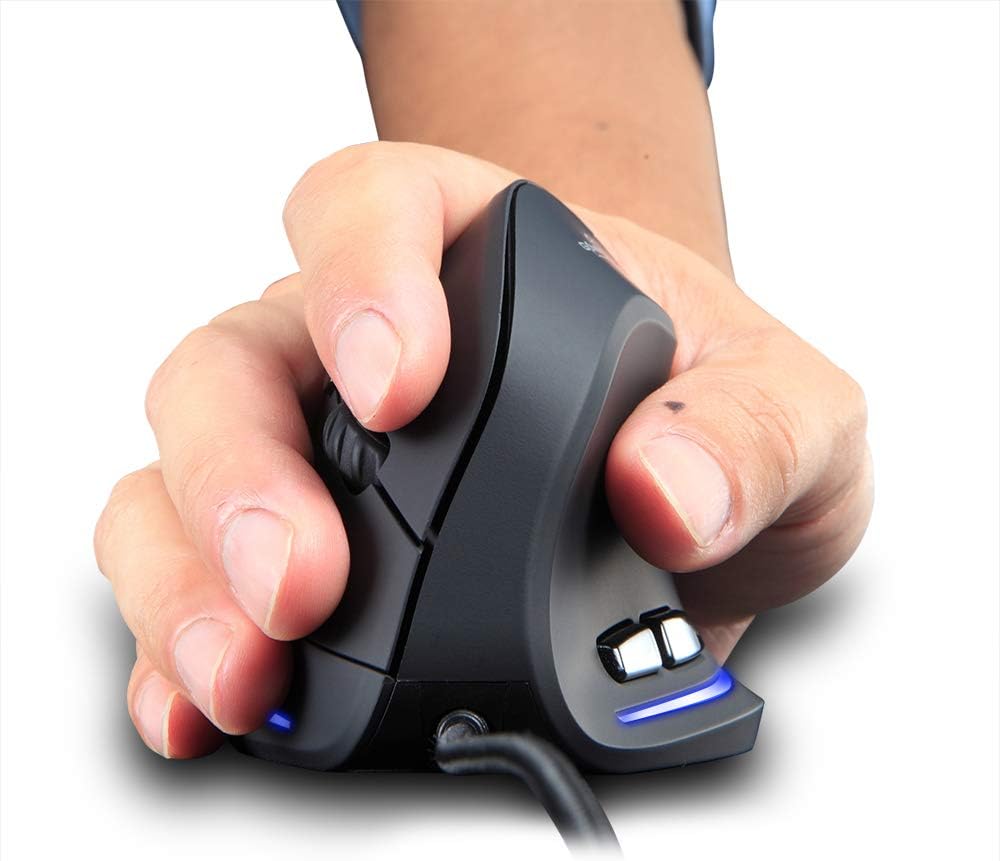
Figure 2: Proper hand placement on the Zelotes T20 mouse. This image illustrates how the vertical design allows for a natural handshake grip, intended to reduce wrist strain.

Figure 3: Ergonomic comparison. This diagram contrasts the natural wrist posture with a vertical mouse against the twisted posture often associated with traditional horizontal mice, emphasizing fatigue reduction.
Kontenut tal-Pakkett
Ivverifika li l-oġġetti kollha huma preżenti fil-pakkett:
- 1 x Zelotes Ergonomic Vertical Mouse
- 1 x Manwal tal-Istruzzjonijiet (dan id-dokument)
Setup
- Qabbad il-Maws: Plug the USB cable of the Zelotes T20 mouse into an available USB port on your computer.
- Installazzjoni tas-sewwieq: The mouse is plug-and-play. Your operating system should automatically detect and install the necessary drivers. No additional software installation is typically required.
- Neħħi Film Protettiv: Before use, locate and remove the protective film from the "Bigfoot pads" on the underside of the mouse for optimal gliding performance.

Figure 4: Underside of the mouse. This image shows the Teflon material pads and indicates the location of the protective film that should be removed before initial use.
Istruzzjonijiet Operattivi
Funzjonijiet tal-buttuna
The Zelotes T20 mouse features 6 buttons for various functions:
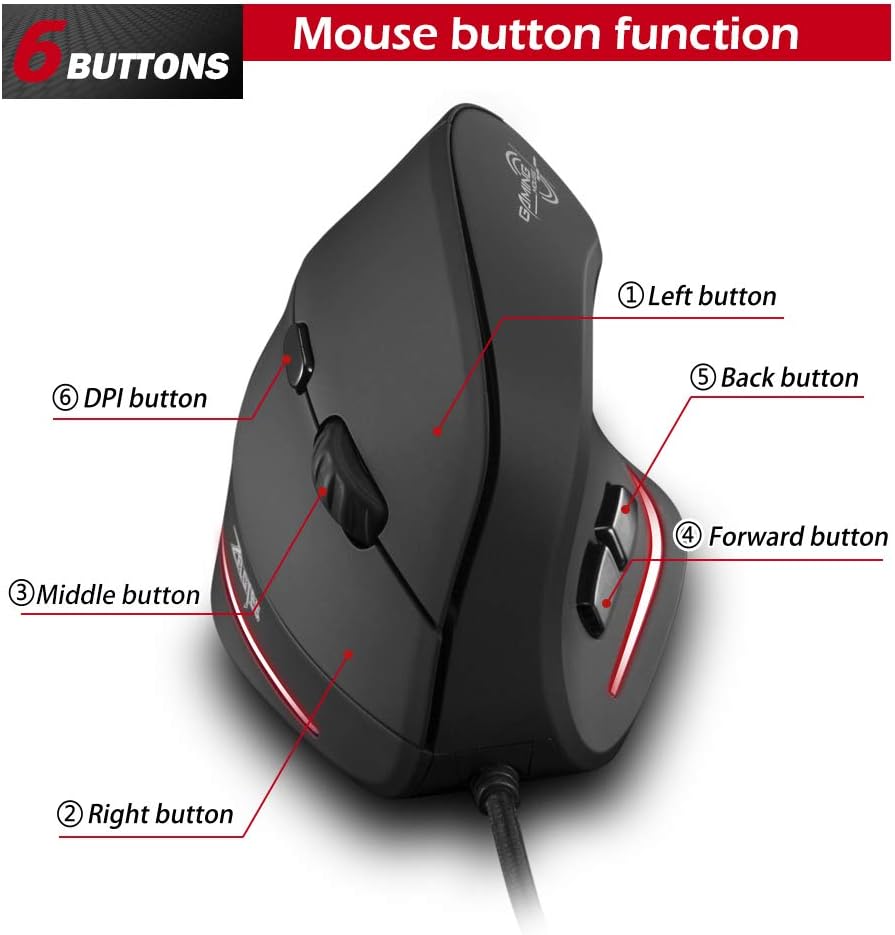
Figure 5: Mouse button layout. This diagram labels each of the six buttons: Left, Right, Middle (scroll wheel click), Forward, Back, and DPI adjustment button.
- Buttuna tax-Xellug: Funzjoni standard tal-ikklikkjar tax-xellug.
- Buttuna tal-lemin: Funzjoni standard tal-ikklikkjar tal-lemin.
- Middle Button (Scroll Wheel): Clickable scroll wheel for middle-click functions.
- Buttuna 'l quddiem: Jinnaviga 'l quddiem ġewwa web browsers jew file esploraturi.
- Buttuna Lura: Jinnaviga lura ġewwa web browsers jew file esploraturi.
- Buttuna DPI: Jaġġusta s-sensittività tal-maws (DPI).
Aġġustament tad-DPI (Sensittività)
The mouse offers four adjustable DPI settings to suit different tasks and preferences. Press the DPI button (Button 6 in Figure 5) to cycle through the settings. Each DPI level is indicated by a specific LED light color:
- 1200 DPI: Blue light hint
- 1600 DPI: Dark purple light hint
- 2400 DPI: Red light hint
- 3200 DPI: Light purple light hint
The light will stay on for approximately 3 seconds when switching DPI settings to indicate the current level.

Figure 6: DPI adjustment and LED indicators. This image illustrates the DPI button and the color coding for each of the four sensitivity settings.
Using Forward/Back Keys
The dedicated Forward and Back buttons (Buttons 4 and 5 in Figure 5) provide quick navigation. These buttons are designed to streamline browsing through web pages or folders, reducing the need for on-screen clicks.

Figure 7: Forward and Back navigation buttons. This image highlights the placement of the forward and back buttons, designed for convenient web u file navigazzjoni.
Manutenzjoni
- Tindif: Use a soft, dry cloth to clean the surface of the mouse. For stubborn dirt, a slightly damp Jista' jintuża drapp, u jiżgura li ma jidħol l-ebda likwidu fil-maws.
- Manutenzjoni tas-Sensor: Żomm is-senser ottiku fuq in-naħa ta' taħt tal-maws nadif u ħieles mit-trab jew mill-fdalijiet biex tiżgura traċċar preċiż.
- Kura tal-Cable: Evita liwjiet qawwija jew ġbid eċċessiv tal-kejbil USB biex tevita l-ħsara.

Figure 8: Mouse surface texture. This image provides a close-up view of the mouse's surface, described as smooth for comfortable handling.
Issolvi l-problemi
- Il-Maws Mhux Jirrispondi:
- Kun żgur li l-kejbil tal-USB huwa mdaħħal sew f'port USB li jaħdem fuq il-kompjuter tiegħek.
- Ipprova qabbad il-maws ma' port USB differenti.
- Ibda mill-ġdid il-kompjuter tiegħek.
- Traċċar Mhux Preċiż:
- Naddaf is-senser ottiku fuq in-naħa ta' taħt tal-maws.
- Ensure you are using the mouse on a suitable surface (e.g., a mouse pad). Highly reflective or transparent surfaces may cause issues.
- Aġġusta s-setting tad-DPI billi tuża l-buttuna DPI.
- Buttuni Mhux Jaħdmu Sewwa:
- Ivverifika li l-maws huwa konness sew.
- Test the mouse on another computer to determine if the issue is with the mouse or the computer's settings.
Speċifikazzjonijiet
| Karatteristika | Dettall |
|---|---|
| Mudell | T20 |
| Numru tal-buttuna | 6 buttuni |
| Sistema ta' Traċċar | Ottiċi |
| Tul tal-Cable USB | 1.8m |
| Ħidma Voltage / Kurrenti | 5V/100mA |
| Button Life | 5 miljun darba |
| Ħajja tar-Roller | 1.2 million turns |
| Dimensjonijiet tal-Prodott (L x W x H) | 110 x 72 x 75 mm (4.33 x 2.83 x 2.95 pulzieri) |
| Piż tal-Prodott | 160 ± 5g (5.6 ounces) |
| Riżoluzzjoni (DPI) | 1200-1600-2400-3200 |
| Rata ta' Ritorn (Rata tal-Votazzjoni) | 125Hz |
| Kompatibilità | Windows 2000/ME/XP (x64)/Vista/7/8/10, Mac OS X (over V10.4), Linux |

Figure 9: Product dimensions. This image provides detailed measurements of the mouse from various angles.
Garanzija u Appoġġ
Għal informazzjoni dwar il-garanzija jew appoġġ tekniku, jekk jogħġbok irreferi għall-indirizz uffiċjali tal-manifattur. webis-sit jew ikkuntattja lid-dipartiment tas-servizz tal-konsumatur tagħhom. Żomm l-irċevuta tax-xiri tiegħek bħala prova tax-xiri.