
1. Introduzzjoni
About the Deco M4 System
The TP-Link Deco M4 is a Whole Home Mesh Wi-Fi System designed to provide seamless wireless coverage throughout your home. It eliminates Wi-Fi dead zones by using multiple units that work together to form a unified network. This system ensures a stable and fast internet connection for all your devices.
Key features of the Deco M4 system include:
- Wi-Fi Dead-zone Killer: Units work together to provide comprehensive Wi-Fi coverage.
- Roaming bla xkiel: Devices automatically connect to the fastest Deco unit as you move, maintaining an uninterrupted connection.
- High-Speed AC1200: Jipprovdi konnessjonijiet veloċi u stabbli sa 1167 Mbps.
- Connects up to 100 Devices: Capable of handling traffic from numerous devices without lag.
- Setup faċli: Guided setup process via the Deco app.
- Kontrolli tal-Ġenituri: Manage online time and block inappropriate websiti.
- Multifunzjonali: Can operate as a router, access point, or range extender.
- Kompatibbli ma' Alexa: Control your Deco M4 with voice commands.

Image: Two TP-Link Deco M4 mesh Wi-Fi units, illustrating the product design and available ports.
2. Gwida ta' Setup
X'hemm fil-Kaxxa
The TP-Link Deco M4 (2-pack) package typically includes the following items:
- 2 Deco M4 Units
- 2 Adapters tal-Enerġija
- 1 Cable Ethernet RJ45

Image: The retail packaging for the TP-Link Deco M4 system, indicating a 2-pack.
Passi ta 'installazzjoni
Setting up your Deco M4 system is primarily done through the Deco mobile application. Follow these general steps:
- Niżżel l-App Deco: Fittex għal 'TP-Link Deco' in your device's app store (iOS or Android) and install it.
- Sign Up or Log In: Open the Deco app and either create a new TP-Link ID or log in with an existing one.
- Connect the Main Deco: Power off your modem. Connect one Deco unit to your modem using the provided Ethernet cable. Power on your modem, then power on the Deco unit.
- Segwi l-Istruzzjonijiet fl-App: The Deco app will guide you through configuring the main Deco unit, including setting up your Wi-Fi network name and password.
- Żid Unitajiet Deko Addizzjonali: Once the main Deco is set up, the app will prompt you to add other Deco units. Place them in desired locations within your home and power them on. The app will automatically detect and integrate them into your mesh network.
- Poġġiment ottimali: For best coverage, place Deco units strategically to cover your entire home, avoiding obstructions and sources of interference.
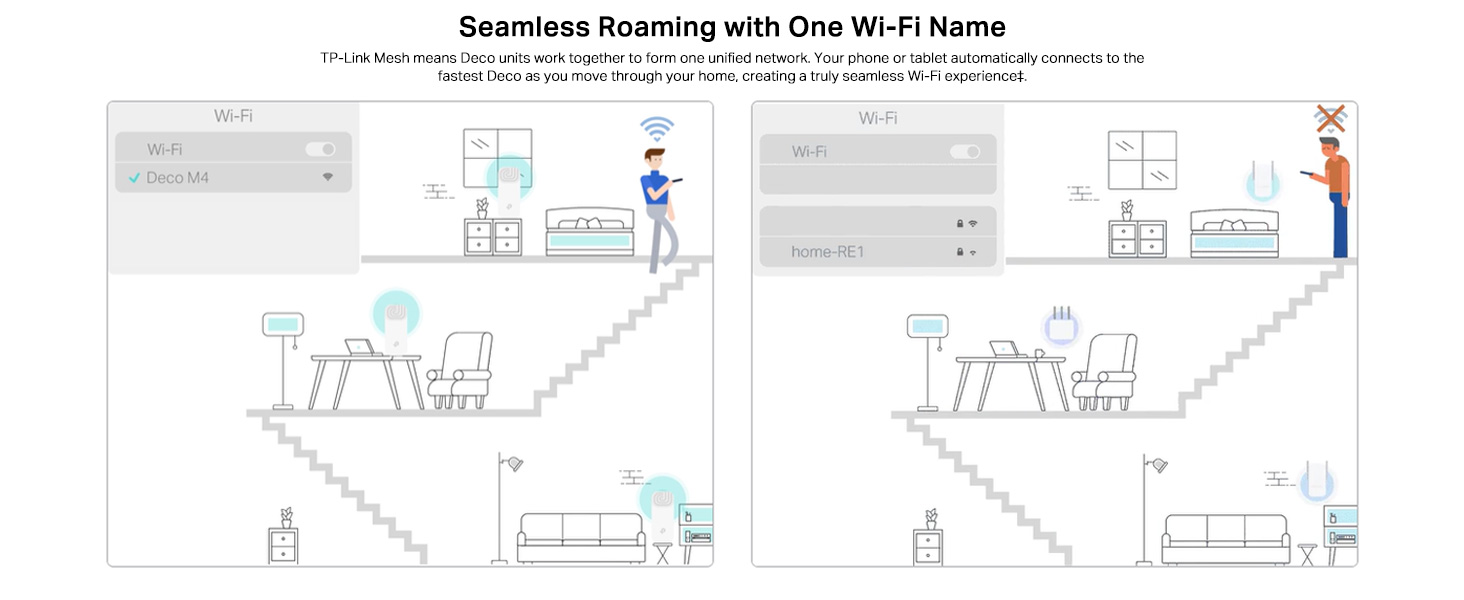
Image: A visual representation of the app-based setup process, management features, and voice control compatibility.
3. Operating Your Deco M4 System
Roaming bla xkiel
The Deco M4 system creates a single, unified Wi-Fi network with one network name (SSID). As you move through your home, your devices (phones, laptops, tablets) will automatically switch to the Deco unit with the strongest signal, ensuring a continuous and stable connection without manual intervention.
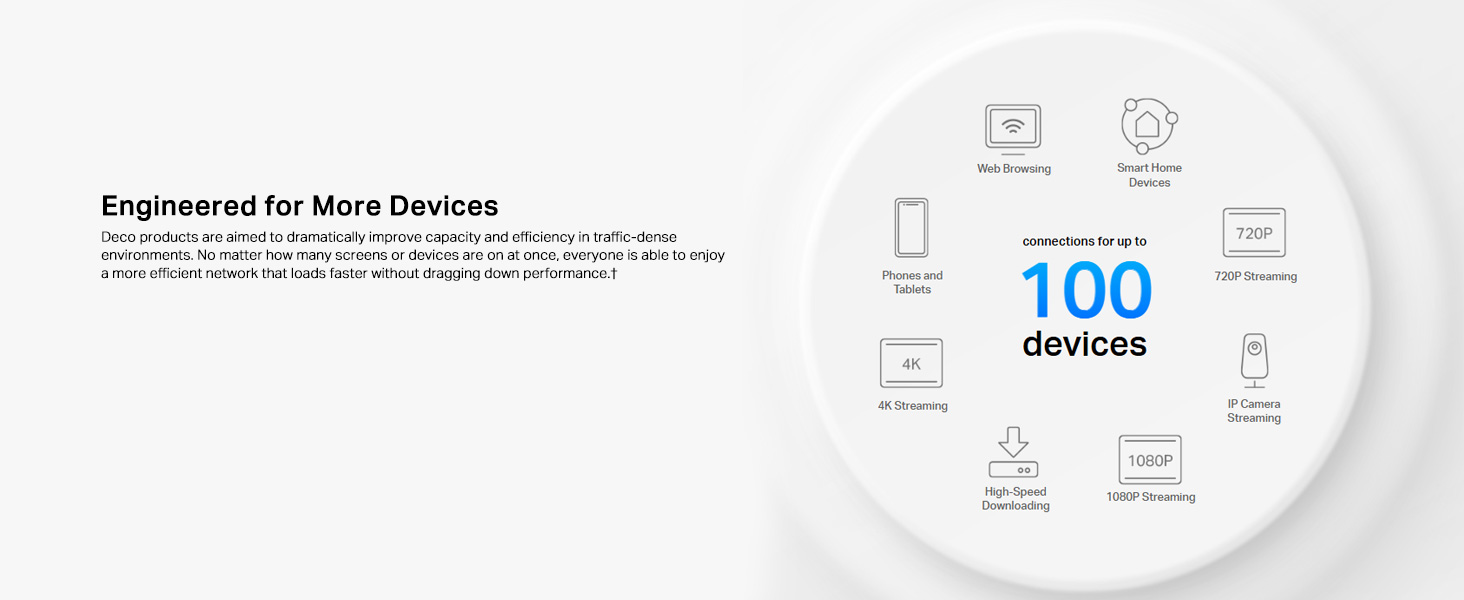
Image: Illustration of seamless roaming, where a device maintains connection by automatically switching between Deco units.
Kontrolli tal-Ġenituri
The Deco app provides robust parental control features to manage internet access for family members. You can create individual profiles, set time limits for internet usage, filter website content, and pause internet access for specific devices or profiles.
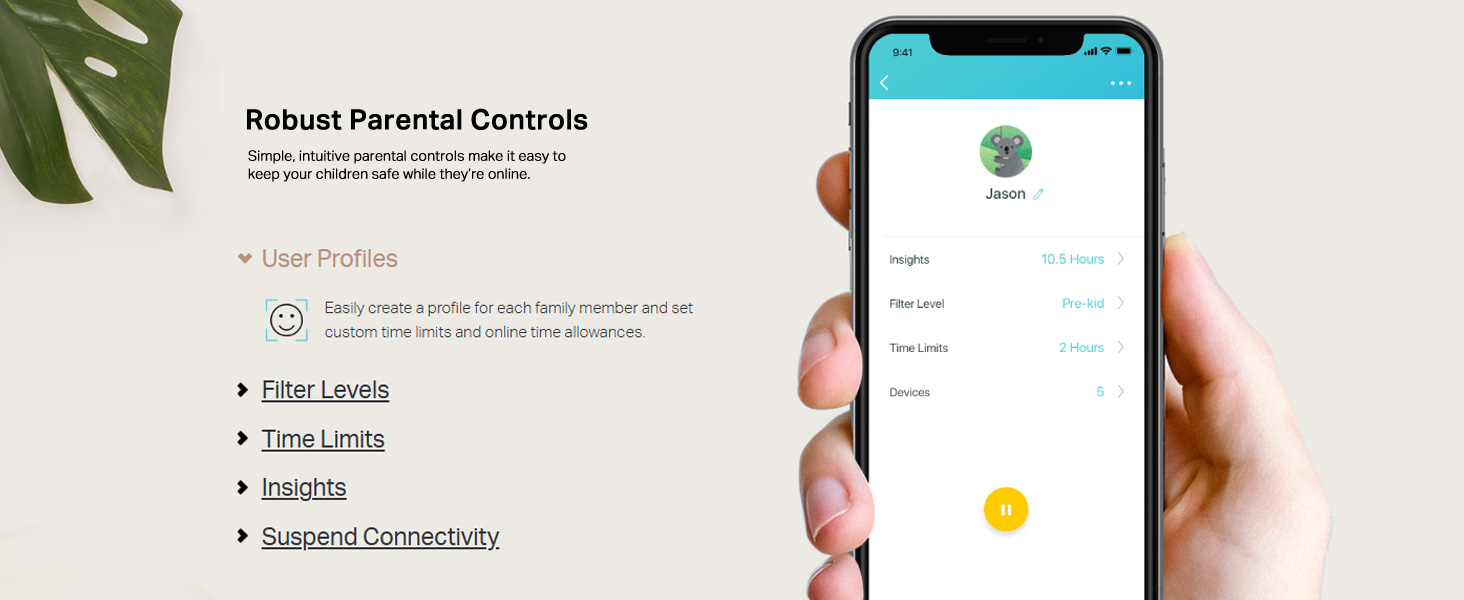
Image: A mobile phone screen displaying the parental control interface within the Deco app, showing user profiles u settings.
App Control and Voice Control
Manage your Deco M4 system conveniently through the Deco app. This includes viewing connected devices, prioritizing bandwidth for certain devices, setting up a guest network, and monitoring network status. The Deco M4 is also compatible with Amazon Alexa, allowing you to control certain functions using simple voice commands.

Image: A Deco M4 unit discreetly placed on a table, demonstrating its compact design in a home environment.
Router and Access Point Modes
The Deco M4 offers flexible operating modes to suit your network needs:
- Router Mode (Default): In this mode, the Deco system acts as your primary router, creating a new private wireless network and managing all connected devices.
- Mod ta 'Punt ta' Aċċess: If you already have a router, you can set the Deco M4 to Access Point mode. It will extend your existing wired network's Wi-Fi coverage without creating a separate network.

Image: A diagram illustrating the two operational modes: Router mode (creating a new network) and Access Point mode (extending an existing network).
4. Manutenzjoni
To ensure optimal performance and longevity of your TP-Link Deco M4 system, consider the following maintenance practices:
- Aġġornamenti tal-Firmware: Iċċekkja u installa regolarment aġġornamenti tal-firmware permezz tal-app Deco. L-aġġornamenti spiss jinkludu titjib fil-prestazzjoni, irqajja tas-sigurtà, u karatteristiċi ġodda.
- Tindif Fiżiku: Keep the Deco units clean and free from dust. Use a soft, dry cloth to wipe the exterior. Ensure ventilation holes are not obstructed to prevent overheating.
- Poġġiment ottimali: Perjodikament mill-ġdidview the placement of your Deco units. Ensure they are in open areas, away from large metal objects, thick walls, and other electronic devices that could cause interference.
- Rebooting: If you experience minor network issues, a simple reboot of your Deco units (and modem) can often resolve them. Unplug the power, wait 10 seconds, then plug them back in.
5 Issolvi l-problemi
If you encounter issues with your Deco M4 system, refer to the following common troubleshooting steps:
- Ebda Konnessjoni tal-Internet:
- Iċċekkja jekk il-modem tiegħek hux qed jaħdem sew.
- Ensure the Ethernet cable connecting the main Deco to the modem is securely plugged in.
- Reboot your modem and all Deco units.
- Ivverifika l-istatus tal-konnessjoni tal-fornitur tas-servizz tal-internet (ISP) tiegħek.
- Sinjal Wi-Fi Dgħajjef jew Żoni Mejta:
- Reposition Deco units closer to each other or to areas with weak signals.
- Ensure Deco units are not placed near large metal objects, concrete walls, or appliances like microwaves and cordless phones that can cause interference.
- Check the Deco app for signal strength indicators between units.
- Device Cannot Connect to Wi-Fi:
- Ivverifika li qed iddaħħal il-password korretta tal-Wi-Fi.
- Erġa' ibda l-apparat li qed jipprova jikkonnettja.
- Check parental control settings in the Deco app to ensure the device is not blocked or paused.
- Ensure the device's Wi-Fi adapter is enabled and functioning.
- Deco App Not Working:
- Ensure your smartphone has an active internet connection (either via mobile data or another Wi-Fi network).
- Update the Deco app to the latest version.
- Ibda mill-ġdid l-ismartphone tiegħek.
6. Speċifikazzjonijiet Tekniċi
| Karatteristika | Speċifikazzjoni |
|---|---|
| Brand | TP-Link |
| Isem tal-Mudell | Deco M4 |
| Rata ta' Trasferiment tad-Data | 1200 Megabit Kull Sekonda (Mbps) |
| Klassi ta' Banda ta' Frekwenza | Faxxa doppja (2.4 GHz u 5 GHz) |
| Komunikazzjoni mingħajr fili Standard | 802.11ac, 802.11g, 802.11n |
| Ġenerazzjoni Wi-Fi | Wi-Fi 5 |
| Numru ta' Portijiet | 4 (2 per Deco unit) |
| Kopertura | Up to 3,800 square feet (for 2-pack) |
| Protokoll ta 'Sigurtà | WPA-PSK/WPA2-PSK |
| Apparati Kompatibbli | Alexa, Amazon Echo |
| Tip ta' Antenna | Intern |
| Metodu ta' Kontroll | Vuċi, App |
| Piż tal-oġġett | 699 Gramm |
| Dimensjonijiet tal-oġġett (L x W x H) | 10T x 9.1W x 10H Ċentimetri |
| Kulur | Abjad |
7. Informazzjoni dwar Garanzija
The TP-Link Deco M4 Whole Home Mesh Wi-Fi System comes with a garanzija ta 'sena from the date of purchase. Please retain your proof of purchase for warranty claims. For detailed terms and conditions, refer to the official TP-Link websit jew ikkuntattja l-appoġġ tal-klijent.
8. Appoġġ għall-Klijent
For technical assistance, product inquiries, or warranty support, please contact TP-Link customer service:
- Numru bla ħlas: 1800-209-4168
- Appoġġ bl-Email: support.in@tp-link.com
- Indirizz tal-Manifattur: TP-Link Systems Inc. 10 Mauchly, Irvine, CA 92618, USA or TP-Link India Private Limited Office No.1, Tower 2, Level 2, Raiaskaran Tech Park, Andheri Kurla Road, M.V Road, Andheri East-400072
Additional resources and FAQs can be found on the official TP-Link websit.