
Fosmon C-10749US
Fosmon 24 Hour Programmable Digital Timer Outlet User Manual
Model: C-10749US
Introduzzjoni
The Fosmon 24 Hour Programmable Digital Timer Outlet is designed to automate the on/off cycles of your electrical devices. This timer allows you to set a single daily program that repeats every 24 hours, providing convenience and energy savings. It features an easy-to-read LCD display and user-friendly buttons for simple operation. The compact design ensures it won't block adjacent outlets.
This product is ideal for controlling seasonal lights, lamps, heaters, portable fans, and aquarium equipment, helping you manage your energy consumption efficiently.
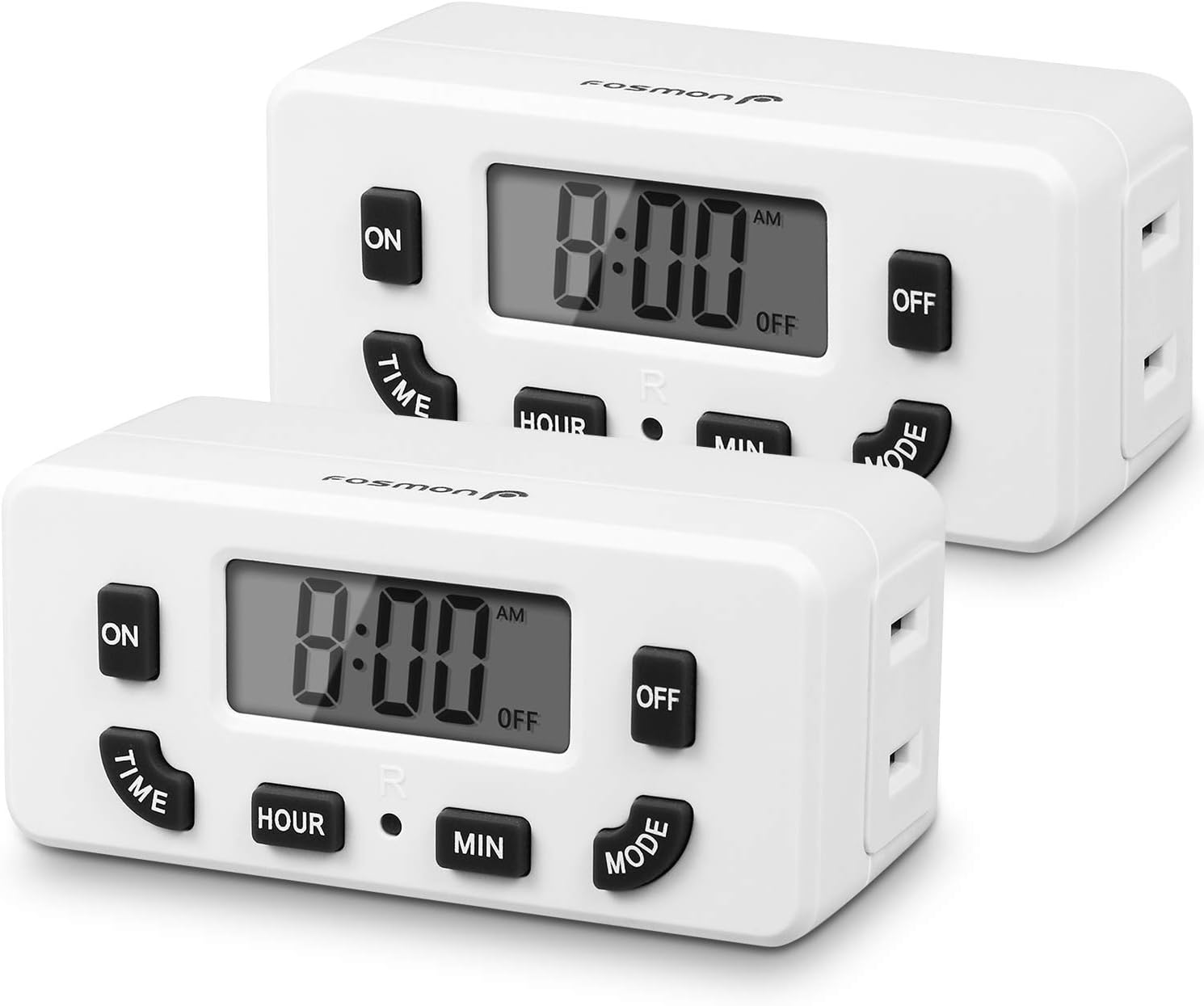
Image: Two Fosmon 24 Hour Programmable Digital Timer Outlets, showing their front panels with LCD displays and control buttons.
Informazzjoni dwar is-Sigurtà
Jekk jogħġbok aqra u ifhem l-istruzzjonijiet kollha tas-sigurtà qabel ma tuża dan il-prodott. Jekk ma ssegwix dawn l-istruzzjonijiet, dan jista' jirriżulta f'xokk elettriku, nar, jew korriment serju.
- Tgħaddix it-tajmer fl-ilma jew f'xi likwidu ieħor.
- Do not connect any appliance that exceeds the timer's maximum load rating (125V/15A, 1875W).
- Always ensure the timer is securely plugged into a grounded outlet. The polarized 2-prong outlet design helps reduce the risk of electrical shock.
- Do not disassemble or attempt to repair the timer. Refer all servicing to qualified personnel.
- Żomm fejn ma jintlaħaqx mit-tfal.
- This timer is certified by ETL, FCC, and RoHS, ensuring it meets safety and environmental standards.

Immaġni: Close-up view of the back of the Fosmon Digital Timer Outlet, highlighting the ETL certification mark and electrical specifications (125VAC, 60Hz, 15A, 1875W).
Karatteristiċi tal-Prodott
- 24-Hour Programmable: Set one ON/OFF program that repeats daily.
- Override manwali: Easily switch the outlet ON or OFF manually using the MODE button.
- Display LCD: Large, easy-to-read digital display for clear time and program settings.
- Batterija tal-Backup: Internal NiMH 1.2V battery maintains settings for over 100 hours during power outages jew meta jkun skonnettjat.
- Disinn li jiffranka l-ispazju: Compact size allows for use in duplex outlets without blocking the second receptacle.
- Kompatibilità Wiesgħa: Suitable for incandescent, CFL, and LED lights, as well as various appliances within specified wattage.
- Sigurtà Ċertifikata: ETL, FCC, and RoHS certified for reliable and safe operation.
Setup
1. L-Inizjali Tixgħel
- Plug the Fosmon Digital Timer Outlet into a standard 125V AC wall outlet.
- The LCD display will light up, and the internal backup battery will begin charging.
2. Issettjar tal-Ħin Attwali
- Agħfas u żomm il- ĦIN buttuna.
- Waqt li żżomm ĦIN, agħfas il- SIEGĦA button to adjust the current hour. The time will cycle through AM/PM.
- Waqt li żżomm ĦIN, agħfas il- MIN button to adjust the current minute.
- Irrilaxxa l- ĦIN button once the correct time is set.

Image: A hand interacting with the Fosmon Digital Timer Outlet, demonstrating its user-friendly design with large, easy-to-read buttons and display.
Istruzzjonijiet Operattivi
1. Programming ON/OFF Times (Daily Repeat)
This timer allows for one ON/OFF program setting that repeats every 24 hours.
- Issettja l-Ħin ON:
- Agħfas u żomm il- ON buttuna.
- Waqt li żżomm ON, agħfas il- SIEGĦA buttuna biex tissettja s-siegħa ON mixtieqa.
- Waqt li żżomm ON, agħfas il- MIN buttuna biex tissettja l-minuta ON mixtieqa.
- Irrilaxxa l- ON button. The ON time is now set.
- Issettja l-Ħin MITFI:
- Agħfas u żomm il- OFF buttuna.
- Waqt li żżomm OFF, agħfas il- SIEGĦA button to set the desired OFF hour.
- Waqt li żżomm OFF, agħfas il- MIN button to set the desired OFF minute.
- Irrilaxxa l- OFF button. The OFF time is now set.
- Once both ON and OFF times are set, the timer will automatically begin its programmed cycle. The display will show "ON" when the outlet is active and "OFF" when it is inactive, according to your schedule.

Image: A visual guide illustrating the steps to set the ON and OFF times for the timer, indicating which buttons to press for hour and minute adjustments.
2. Manual ON/OFF Override
To manually turn the connected device ON or OFF, press the MODALITÀ button. Each press will toggle the outlet's state between ON and OFF, overriding the current program until the next programmed event.

Image: The Fosmon Digital Timer Outlet positioned in a home environment, illustrating its role in automating devices and contributing to energy savings.
Manutenzjoni
- Tindif: Wipe the timer with a dry, soft cloth. Do not use abrasive cleaners or solvents.
- Backup tal-batterija: The internal NiMH battery is designed to retain settings for over 100 hours when the unit is unplugged or during a power outage. No user maintenance is required for this battery.
- Ħażna: If storing the timer for an extended period, ensure it is unplugged and kept in a cool, dry place.
Issolvi l-problemi
| Problema | Kawża Possibbli | Soluzzjoni |
|---|---|---|
| Display is blank or numbers are missing. | No power to the unit, or internal battery is fully discharged. | Ensure the timer is securely plugged into a live outlet. Allow the unit to charge for a few hours to replenish the internal battery. If the issue persists, the unit may be faulty. |
| Programmed times are not activating the outlet. | Incorrect program setting, or manual override is active. | Review the ON/OFF programming steps carefully. Ensure the current time is set correctly. Press the MODALITÀ button to ensure the timer is not in manual override mode. |
| Outlet is always ON or always OFF. | Program not set, or stuck in manual mode. | Verify that both ON and OFF times have been set. Press the MODALITÀ button to cycle through modes and ensure it's in programmed mode. |
Speċifikazzjonijiet
- Numru tal-Mudell: C-10749US
- Qawwa: AC 125V/15A, 60Hz
- Wattage: 1875W (Mass)
- Batterija Interna: NiMH 1.2V (> 100 Hours backup)
- Settings tal-Programm: 1 ON/OFF Program (Daily Repeat)
- Dimensjonijiet: Madwar 3.84 x 8.38 x 3.99 ċm
- Piż: Madwar 204 g
- Ċertifikazzjonijiet: ETL, FCC, RoHS
- Tip ta' żbokk: Single Polarized Outlet
Garanzija u Appoġġ
Fosmon products come with a limited lifetime warranty. This warranty covers defects in materials and workmanship under normal use. For warranty claims or technical support, please contact Fosmon customer service.
Fosmon provides dedicated USA-based customer service to assist you with any questions or issues you may encounter.
For the most up-to-date contact information, please visit the official Fosmon webis-sit jew irreferi għall-imballaġġ tal-prodott tiegħek.
Ask a question about this manual
Ask about setup, troubleshooting, compatibility, parts, safety, or missing instructions. Manuals+ will review the question and use this page’s manual context to help answer it.