
1. Introduzzjoni
This manual provides detailed instructions for the proper setup, operation, and maintenance of your SUNLUX XL5500 CCD USB Barcode Reader. Please read this manual thoroughly before using the device to ensure optimal performance and longevity.
2. Informazzjoni dwar is-Sigurtà
Osserva l-prekawzjonijiet ta' sigurtà li ġejjin biex tevita ħsara lill-apparat jew korriment lilek innifsek:
- Tesponix l-apparat għal temperaturi estremi, umdità, jew dawl tax-xemx dirett.
- Evita li twaqqa 'l-apparat jew suġġett għal impatti qawwija.
- Do not attempt to disassemble or modify the barcode reader. This will void the warranty.
- Żomm it-tieqa tal-iskannjar nadifa biex tiżgura qari preċiż tal-barcode.
- Uża biss il-kejbil USB provdut għall-konnessjoni.
3. Kontenut tal-Pakkett
Ivverifika li l-oġġetti kollha huma preżenti fil-pakkett:
- SUNLUX XL5500 CCD USB Barcode Reader
- Kejbil tal-Konnessjoni USB
- Manwal għall-Utent (dan id-dokument)
4. Prodott Aktarview
The SUNLUX XL5500 is a handheld CCD barcode reader designed for efficient and reliable scanning of various 1D barcodes. Its ergonomic design ensures comfortable use during extended periods.
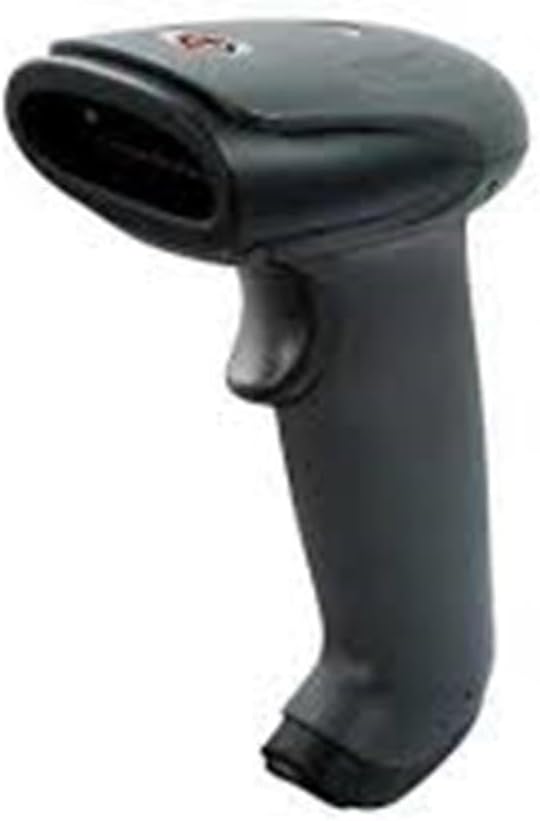
An image showing the SUNLUX XL5500 handheld barcode reader. It features a dark gray ergonomic handle, a trigger button on the top, and a scanning window at the front.
5. Setup
Follow these steps to set up your barcode reader:
- Qabbad il-Cable USB: Insert the smaller end of the USB cable into the port at the base of the barcode reader.
- Qabbad mal-Kompjuter: Ipplaggja t-tarf ikbar tal-kejbil USB f'port USB disponibbli fuq il-kompjuter tiegħek.
- Installazzjoni tas-sewwieq: The barcode reader is typically plug-and-play. Your operating system should automatically detect and install the necessary drivers. Wait for the installation to complete (usually indicated by a notification).
- Konnessjoni tat-Test: Open a text editor (e.g., Notepad, Word) or any application that accepts keyboard input. The device is ready for use when it is recognized by the system.
6. Istruzzjonijiet Operattivi
To operate the SUNLUX XL5500 barcode reader:
- Qawwa Mixgħul: The device powers on automatically when connected to a USB port.
- Immira u Skennja: Point the scanning window of the reader at the barcode you wish to scan. Ensure the entire barcode is within the scanning area.
- Press Trigger: Press the trigger button located on the handle. A red scanning line will emit from the window.
- Konferma: A successful scan is typically indicated by an audible beep and/or a visual LED indicator. The scanned data will appear in the active application on your computer.
Supported Barcode Types:
- EAN-8, EAN-13, UPC-A, UPC-E
- Code 39, Code 93, Code 128
- Codabar, Interleaved 2 of 5, Industrial 2 of 5
- Matrix 2 of 5, MSI, China Post
7. Manutenzjoni
Proper maintenance ensures the longevity and performance of your barcode reader:
- Tindif tat-Tieqa tal-Iskennjar: Uża drapp artab u mingħajr suf, ftit imxarrabampened with water or a mild, non-abrasive cleaner, to gently wipe the scanning window. Do not use harsh chemicals or abrasive materials.
- Tindif ta' barra: Imsaħ il-parti ta’ barra tal-apparat b’ċarruta ratba u niexfa.
- Ħażna: When not in use, store the barcode reader in a clean, dry environment, away from direct sunlight and extreme temperatures.
8 Issolvi l-problemi
If you encounter issues with your barcode reader, refer to the following table:
| Problema | Kawża Possibbli | Soluzzjoni |
|---|---|---|
| Il-qarrej ma jixgħelx. | Il-kejbil USB mhux imqabbad sew jew il-port USB huwa difettuż. | Ensure the USB cable is securely connected to both the reader and the computer. Try a different USB port. |
| Il-barcode mhux qed jiskennja. | Barcode damaged, scanning window dirty, or incorrect aiming. | Clean the scanning window. Ensure the barcode is not damaged. Aim the scanning line directly across the entire barcode. |
| Id-dejta skennjata tidher ħażin. | Keyboard language settings mismatch or corrupted data. | Verify your computer's keyboard language settings. Rescan the barcode. |
| No beep sound after scanning. | Beeper disabled or faulty. | Refer to advanced configuration options (if available) to enable the beeper. If not, the scan may still be successful if data appears. |
9. Speċifikazzjonijiet Tekniċi
| Karatteristika | Speċifikazzjoni |
|---|---|
| Mudell | XL5500 |
| Kategorija | CCD Reader |
| Brand | Sunlux |
| Teknoloġija tal-Konnettività | Cable USB |
| Sors tal-Enerġija | Elettriku bil-fili |
| Dimensjonijiet tal-Prodott | 20 x 15 x 10 ċm |
| Piż | 500 gramma |
| Numru tal-Parti | 2053871 |
10. Garanzija u Appoġġ
Informazzjoni dwar il-garanzija:
The SUNLUX XL5500 CCD USB Barcode Reader comes with a standard manufacturer's warranty. Please refer to your purchase documentation or contact your retailer for specific warranty terms and conditions.
Appoġġ għall-Klijent:
For technical assistance, troubleshooting beyond this manual, or warranty claims, please contact your point of purchase or the official SUNLUX customer support channels. Have your product model and serial number ready when contacting support.