
Kaadas K7-5
Kaadas K7-5 Push-Pull Keyless Smart Lock User Manual
Introduzzjoni
This manual provides comprehensive instructions for the installation, operation, and maintenance of your Kaadas K7-5 Push-Pull Keyless Smart Lock. Please read this manual thoroughly before using the product to ensure proper function and safety. Keep this manual for future reference.
Prodott Overview u Karatteristiċi
The Kaadas K7-5 is an advanced keyless smart lock designed for convenience and security. It offers multiple access methods and intelligent features.
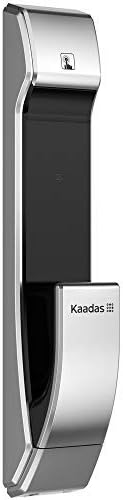
Immaġni: Ġenb view of the Kaadas K7-5 Smart Lock, showcasing id-disinn eleganti tiegħu.
Karatteristiċi ewlenin:
- Push-Pull Operation: One-step intuitive door opening experience.
- Qfil awtomatiku: Ensures the door is locked automatically after closing.
- Metodi ta' Aċċess Multipli: Fingerprint, Password, RFID Card, and Mechanical Key.
- Sweden FPC Fingerprint Sensor: Provides accurate and swift recognition (less than 1 second).
- Fake PIN Code Feature: Allows adding random numbers before and after the real password to prevent exposure.
- Awtentikazzjoni Doppja: Strengthens security by requiring two authentication methods (e.g., password + fingerprint/card).
- In-Home Security (Double-locking): Prevents unexpected unlocking attempts from outside when activated.
- Safe Handle Function: Locks the indoor handle to prevent unauthorized opening from inside, useful for child safety or peephole security.
- Unlock Records Query: Allows checking who unlocked the door and when.
- Backup tal-Enerġija ta' Emerġenza: Use a 5V power bank via Micro USB in case of battery discharge.
- Twissija ta' Batterija Baxxa: Voice sound and LED light alert for battery replacement.
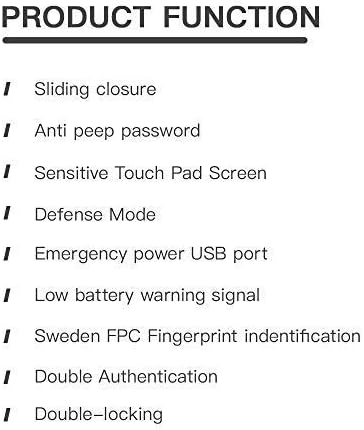
Image: A list detailing key product functions such as sliding closure, anti-peep password, sensitive touch pad, defense mode, emergency power USB port, low battery warning, Sweden FPC fingerprint identification, double authentication, and double-locking.
Setup u Installazzjoni
The Kaadas K7-5 smart lock requires precise installation for optimal performance and security. It is highly recommended to have this lock installed by a qualified professional.
Konsiderazzjonijiet Ġenerali dwar l-Installazzjoni:
- Ensure your door thickness is compatible (typically 38-60mm).
- The lock is designed for universal installation, suitable for various door opening directions.
- Refer to the detailed installation template and hardware provided with your lock.

Image: An exploded diagram showing all components of the Kaadas K7-5 Smart Lock, including the front and back panels, mortise, and various screws and pins for assembly.
Istruzzjonijiet Operattivi
The Kaadas K7-5 offers multiple ways to unlock your door. Ensure the lock is properly powered with 8 AA alkaline batteries (DC 6V).
1. Il-ftuħ bil-marka tas-swaba'
Place your registered finger on the FPC fingerprint sensor. The lock will recognize your fingerprint in less than 1 second and unlock.
2. Unlocking with Password
Enter your registered password on the touch pad. The lock supports 6-12 digit passwords. Press the confirmation key to unlock.
- Fake PIN Code: Biex tevita li oħrajn jaħsbu l-password tiegħek, tista' ddaħħal numri każwali qabel jew wara l-password attwali tiegħek. Pereżempjuample, if your password is "123456", you can enter "987123456321" where "123456" is embedded within other numbers.
3. Unlocking with RFID Card
Present your registered RFID card to the card reader area on the lock. The lock will verify the card and unlock.
4. Unlocking with Mechanical Key
In case of emergency or battery failure, use the provided mechanical key to manually unlock the door.
5. Serratura Awtomatika
After the door closes, the lock will automatically engage the mortise to secure the door. This eliminates the need to manually check if the door is locked.
6. Double Authentication Mode
This mode enhances security by requiring two different authentication methods to unlock the door. For example, you might need to use a password followed by a fingerprint, or a card followed by a password. Refer to the lock's settings menu for activation and configuration.
7. In-Home Security (Double-locking)
When you are inside your home, activate the double-locking feature using the [CLOSE] button on the indoor unit. This prevents any unlocking attempts from the outside, even with valid credentials.
8. Safe Handle Function
When enabled, the indoor handle will be locked. This feature is useful for preventing children from accidentally opening the door or for added security if your door has a peephole that could be exploited.
Manutenzjoni
Proper maintenance ensures the longevity and reliable operation of your Kaadas K7-5 smart lock.
1. Sostituzzjoni tal-batterija
The lock will provide a voice sound and LED light warning when the batteries are low. Replace all 8 AA alkaline batteries promptly to avoid interruption of service. Do not mix old and new batteries or different types of batteries.
2. Emergency Power Backup
If the batteries are completely discharged, you can temporarily power the lock using a 5V power bank connected to the Micro USB port located on the exterior unit. This allows you to unlock the door and replace the internal batteries.
3. Tindif
Clean the lock's exterior surfaces with a soft, dry cloth. Avoid using abrasive cleaners, solvents, or harsh chemicals, as these can damage the finish and electronic components.
Issolvi l-problemi
If you encounter issues with your Kaadas K7-5 smart lock, consider the following common solutions:
- Is-serratura ma tirrispondix: Check the batteries. If the batteries are low or dead, replace them or use the emergency power backup.
- Marka tas-swaba' mhux rikonoxxuta: Kun żgur li subgħajk ikun nadif u niexef. Erġa' rreġistra l-marka tas-swaba' tiegħek jekk il-problema tippersisti.
- Il-password ma taħdimx: Double-check the entered password. Ensure you are not in Fake PIN code mode if you are not intentionally using it.
- Il-bieb mhux qed jissakkar/jinfetaħ bla xkiel: Check for any obstructions in the door frame or mortise. Ensure the lock is properly aligned.
- Unusual sounds: If the lock makes unusual sounds, it may indicate a mechanical issue. Contact customer support.
For persistent issues, refer to the full troubleshooting guide available on the Kaadas official websit jew ikkuntattja l-appoġġ tal-klijent.
Speċifikazzjonijiet
Below are the technical specifications for the Kaadas K7-5 Push-Pull Keyless Smart Lock.
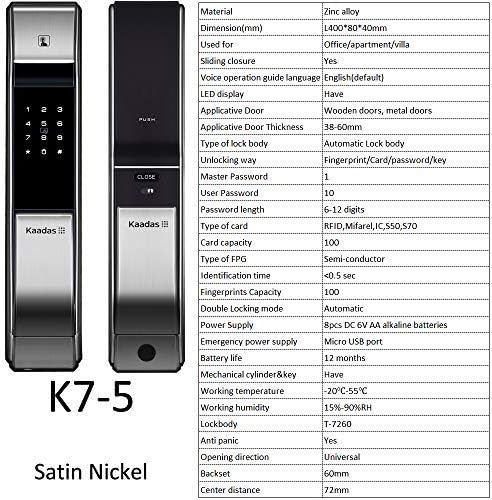
Immaġni: Quddiem u wara views of the Kaadas K7-5 Smart Lock, accompanied by a detailed table of specifications including material, dimensions, unlocking methods, and power supply.
| Materjal | Liga taż-żingu |
| Dimensjonijiet (L x W x H) | 400 x 80 x 40 mm (madwar 15.75 x 3.15 x 1.57 pulzieri) |
| Tip ta' Bieb Applikabbli | Wooden doors, metal doors |
| Ħxuna Applikabbli tal-Bieb | 38-60mm |
| Type of Lock Body | Automatic Lock body |
| Metodi tal-ftuħ | Fingerprint, Card, Password, Key |
| Master Password Capacity | 1 |
| User Password Capacity | 10 |
| Tul tal-Password | 6-12 ċifri |
| Tip ta' Karta | RFID, Mifare, IC550, 570 |
| Kapaċità tal-Kard | 100 |
| Fingerprint Type | Semi-conductor (FPC) |
| Ħin ta' Identifikazzjoni | <0.5 sek |
| Fingerprints Capacity | 100 |
| Double Locking Mode | Awtomatiku |
| Provvista tal-Enerġija | 8pcs DC 6V AA alkaline batteries |
| Provvista ta 'Enerġija ta' Emerġenza | Port mikro USB |
| Ħajja tal-batterija | Appross. 12 xhur |
| Mechanical Cylinder & Key | Iva |
| Temperatura tax-Xogħol | -20°C sa 55°C |
| Umdità tax-Xogħol | 15% -90% RH |
| Lockbody | T-7260 |
| Kontra l-paniku | Iva |
| Direzzjoni tal-Ftuħ | Universali |
| Backset | 60mm |
| Distanza taċ-Ċentru | 72mm |

Image: A technical drawing illustrating the dimensions of the Kaadas K7-5 Smart Lock, showing a height of 400mm, width of 80mm, and depth of 40mm. Note: Manual measurements may have slight deviations.
Garanzija u Appoġġ
For information regarding warranty coverage, technical support, or service, please refer to the warranty card included with your product or visit the official Kaadas websit. Tista' wkoll tikkuntattja l-punt tax-xiri tiegħek għall-għajnuna.
Manifattur: Kaadas
Ask a question about this manual
Ask about setup, troubleshooting, compatibility, parts, safety, or missing instructions. Manuals+ will review the question and use this page’s manual context to help answer it.