
1. Introduzzjoni
This manual provides instructions for the proper setup, operation, and maintenance of your Acer B247Y 23.8-inch LED LCD Monitor. Please read this manual thoroughly before using your monitor to ensure optimal performance and to prevent damage.
The Acer B247Y is a 23.8-inch Full HD (1920 x 1080) monitor featuring an IPS panel for wide viewing angles, an anti-glare display, and a frameless design on three sides. It includes multiple connectivity options and an ergonomic stand for comfortable viewing.
2. Kontenut tal-Pakkett
Iċċekkja li l-oġġetti kollha huma preżenti fil-pakkett tiegħek. Jekk xi oġġetti huma neqsin jew bil-ħsara, ikkuntattja lill-bejjiegħ tiegħek.
- Acer B247Y 23.8-inch LED LCD Monitor
- Stand tal-Monitor (Bażi u Għonq)
- Power Adapter (Internal) and Power Cable
- Kejbil VGA
- Kejbil DisplayPort 1.2
- Cable HDMI
- Audio-in Cable (if included)
- Audio-out Cable (if included)
- Manwal għall-Utent (dan id-dokument)
3. Setup
3.1 L-Immuntar tal-Istand tal-Monitor
The monitor comes with a detachable foot stand. Follow these steps to assemble:
- Oħroġ il-monitor u l-komponenti tal-istand mill-imballaġġ bir-reqqa.
- Waħħal l-għonq tal-istand mal-pannell tal-monitor. Kun żgur li jikklikkja sew f'postu.
- Attach the stand base to the stand neck. Tighten any screws if provided, usually located on the underside of the base.
- Poġġi l-monitor immuntat fuq wiċċ stabbli u ċatt.
Nota: The monitor also supports VESA mount (100 x 100 mm) for wall or arm mounting. Refer to your VESA mount kit instructions for installation.
3.2 Konnessjoni tal-Monitor
Qabbad il-monitor mal-kompjuter tiegħek jew apparat ieħor billi tuża l-kejbils xierqa.
- Konnessjoni tal-vidjo:
- Qabbad tarf wieħed tal-kejbil DisplayPort mal-output DisplayPort fuq il-kompjuter tiegħek u t-tarf l-ieħor mal-input DisplayPort fuq il-monitor.
- Alternatively, connect an HDMI cable from your computer's HDMI output to the monitor's HDMI input.
- For older systems, connect a VGA cable from your computer's VGA output to the monitor's VGA input.
- Konnessjoni tal-Awdjo:
- If using VGA or DisplayPort without audio, connect an audio cable from your computer's audio output to the monitor's audio-in port for integrated speakers.
- To connect external speakers or headphones, use the monitor's audio-out port.
- Konnessjoni tal-Enerġija:
- Qabbad il-kejbil tal-enerġija mad-dħul tal-enerġija tal-monitor, imbagħad daħħal it-tarf l-ieħor f'sokit elettriku ertjat.

Figure 3.2.1: Acer B247Y Monitor with Stand. This image illustrates the overall appearance of the monitor when fully assembled on its stand.
4. Istruzzjonijiet Operattivi
4.1 Tixgħel/Jitfi
Agħfas il-buttuna tal-qawwa, li ġeneralment tinsab fin-naħa t'isfel tal-lemin jew wara tal-monitor, biex tixgħel jew titfi l-monitor. Id-dawl indikatur tal-qawwa jixgħel meta l-monitor ikun mixgħul.
4.2 Adjusting Monitor Settings (OSD)
The monitor features an On-Screen Display (OSD) menu for adjusting various settings. Use the control buttons (typically located near the power button) to navigate and select options within the OSD menu.
Is-settings komuni tal-OSD jinkludu:
- Stampa: Brightness, Contrast, Color Temperature, Gamma, Acer eColor Management modes (e.g., Dark Room, Eco).
- Awdjo: Volume control for integrated speakers or audio-out.
- Input: Select the active video input source (VGA, DisplayPort, HDMI).
- OSD: OSD timeout, language.
- Ġestjoni: Irrisettja għad-difetti tal-fabbrika.
4.3 Aġġustamenti Ergonomiċi
The Acer B247Y monitor stand offers several ergonomic adjustments to optimize your viewesperjenza:
- Mejjel: Adjust the screen angle from -5 degrees to 25 degrees (forward/backward).
- Dawwar: Rotate the monitor horizontally up to +/- 45 degrees.
- Aġġustament Għoli: Aġġusta l-għoli tal-iskrin sa 120mm.
- Pivot: Dawwar l-iskrin 90 grad għal ritratt viewing.
5. Manutenzjoni
Manutenzjoni xierqa tiżgura l-lonġevità u l-prestazzjoni ottimali tal-monitor tiegħek.
- Tindif tal-Iskrin: Imsaħ l-iskrin bil-mod b'ċarruta ratba u mingħajr suf. Għal marki persistenti, dampen the cloth with a small amount of water or a non-abrasive screen cleaner. Do not spray liquid directly onto the screen.
- Tindif tas-Casing: Uża drapp artab u niexef biex tnaddaf il-monitor casing. Evita li tuża deterġenti qawwija jew prodotti tat-tindif li joborxu.
- Ventilazzjoni: Kun żgur li l-fetħiet tal-ventilazzjoni fuq il-monitor mhumiex imblukkati biex tevita li jisħon iżżejjed.
- Itfi: Always turn off the monitor and unplug it from the power outlet before cleaning or when not in use for extended periods.
6 Issolvi l-problemi
Jekk tiltaqa' ma' problemi bil-monitor tiegħek, irreferi għall-passi komuni li ġejjin għas-soluzzjoni tal-problemi:
- No Power / Monitor Does Not Turn On:
- Ensure the power cable is securely connected to both the monitor and a working electrical outlet.
- Ivverifika li s-sokit tal-enerġija jaħdem billi tqabbad apparat ieħor.
- Agħfas il-buttuna tal-qawwa b'mod sod.
- No Image / "No Signal" Message:
- Check that the video cable (DisplayPort, HDMI, or VGA) is securely connected to both the monitor and your computer.
- Kun żgur li l-kompjuter tiegħek huwa mixgħul u mhux fil-modalità sleep.
- Uża l-menù OSD biex tagħżel manwalment is-sors tad-dħul korrett.
- Ipprova kejbil jew port tal-vidjo differenti jekk disponibbli.
- L-Immaġni hija Distorta jew Mhux Ċara:
- Ensure the display resolution on your computer is set to the monitor's native resolution (1920 x 1080).
- Adjust brightness, contrast, and other picture settings via the OSD menu.
- Check for any physical damage to the screen or cables.
- L-ebda ħoss mill-ispikers:
- Increase the volume using the OSD menu or your computer's sound settings.
- Ensure the audio cable (if used) is properly connected.
- Ivverifika li l-apparat tal-ħruġ tal-awdjo korrett huwa magħżul fis-settings tal-ħoss tal-kompjuter tiegħek.
7. Speċifikazzjonijiet
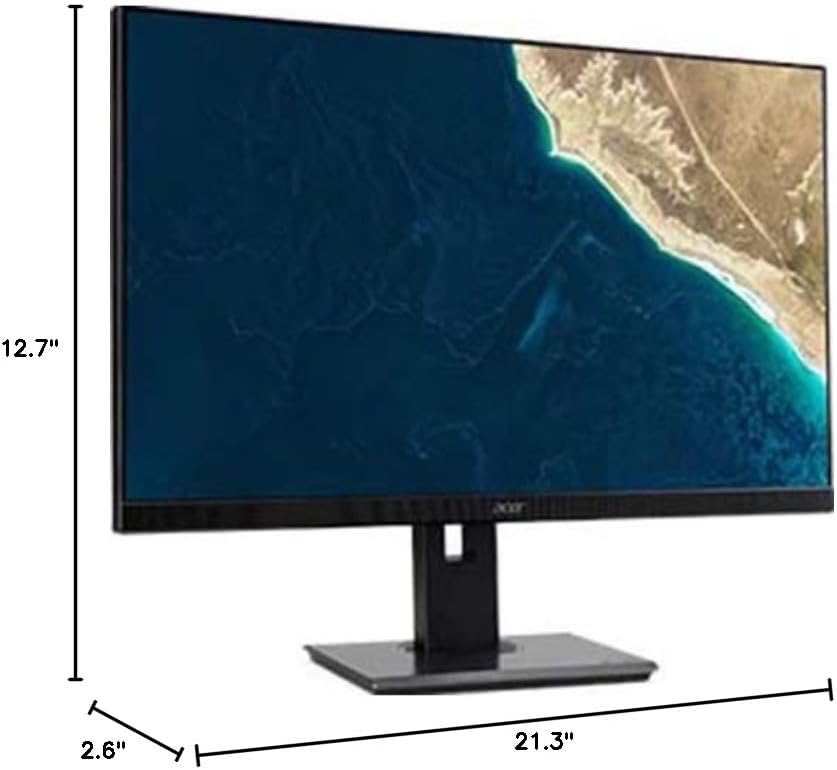
Figure 7.1.1: Acer B247Y Monitor Dimensions. This image shows the approximate height (12.7"), width (21.3"), and depth (2.6") of the monitor without the stand.
| Karatteristika | Speċifikazzjoni |
|---|---|
| Numru tal-Mudell | B247Y |
| Daqs tal-Iskrin | 23.8 pulzieri (60.5 ċm) |
| Tip ta 'Wiri | LED LCD, IPS Panel, Anti-glare (AG) |
| Riżoluzzjoni Massima | 1920 x 1080 (Full HD) |
| Proporzjon ta' l-aspett | 16:9 |
| Riffriskar Rata | 75 Hz |
| Ħin ta' Rispons | 4ms (gray-to-gray) |
| Luminożità (tipika) | 250 cd/m² |
| Proporzjon tal-Kuntrast Nattiv | 1,000:1 |
| Proporzjon ta' Kuntrast Dinamika | 100,000,000:1 |
| ViewAngoli (H / V) | 178° / 178° |
| Konnettività | VGA, DisplayPort 1.2, HDMI, Audio-in, Audio-out |
| Kelliema Integrati | 2 x 2.0W |
| Aġġustamenti Ergonomiċi | Tilt (-5° to 25°), Swivel (+/- 45°), Height Adjustment (120mm), Pivot (90°) |
| VESA Mount Support | 100 x 100 mm |
| Dimensjonijiet bi Stand (W x H x D) | 21.3" x 14.9"~19.6" x 7.6" (54.0cm x 37.9cm~49.9cm x 19.3cm) |
| Piż ma Stand | 12.3 lb (5.6 kg) |
| Adapter tal-Enerġija | Intern |
| Kulur | Iswed |
8. Garanzija u Appoġġ
Your Acer B247Y monitor comes with a Limited Three-Year Warranty. Please retain your proof of purchase for warranty claims.
For technical support, service, or warranty inquiries, please refer to the official Acer support website or contact their customer service department. Contact information can typically be found on the Acer webis-sit jew fil-karta tal-garanzija inkluża mal-prodott tiegħek.
Kensington Lock: The monitor supports a Kensington lock for security. Attach a compatible Kensington lock (sold separately) to the security slot on the monitor to deter theft.