
1. Introduzzjoni
Thank you for choosing the Logic Life30 Smartwatch. This device is designed to integrate seamlessly into your active lifestyle, offering features such as Bluetooth calling, fitness tracking, sleep monitoring, and real-time notifications. This manual provides detailed instructions for setup, operation, and maintenance to ensure optimal performance and longevity of your smartwatch.

Image 1.1: Logic Life30 Smartwatches in multiple colors, showcasing different display options including a dialer, messages, contacts, time, date, and heart rate monitor.
2. Informazzjoni dwar is-Sigurtà
- Tippruvax tiżżarma, issewwi, jew timmodifika l-apparat. Dan jista' jannulla l-garanzija u jikkawża ħsara.
- Żomm l-apparat 'il bogħod minn temperaturi estremi, dawl tax-xemx dirett, u umdità għolja.
- Evita li tesponi l-apparat għal impatti jew waqgħat qawwija.
- Use only the provided charging cable and adapter. Using unauthorized accessories may cause damage or fire.
- Consult a medical professional before starting any new exercise regimen, especially if you have pre-existing health conditions. The heart rate monitor is for reference only and should not be used for medical diagnosis.
- Żomm l-apparat fejn ma jintlaħaqx mit-tfal u l-annimali domestiċi.
- Naddaf l-apparat b'ċarruta ratba u niexfa. Tużax kimiċi ħarxa jew materjali li joborxu.
3. Kontenut tal-Pakkett
Jekk jogħġbok iċċekkja l-kontenut tal-pakkett meta tiftaħ il-kaxxa. Jekk xi oġġetti huma nieqsa jew bil-ħsara, ikkuntattja l-appoġġ għall-klijenti.
- Logic Life30 Smartwatch
- Cable tal-Iċċarġjar tal-USB
- Manwal għall-Utent (dan id-dokument)
4. Device Overview
Familiarize yourself with the physical components of your Logic Life30 Smartwatch.
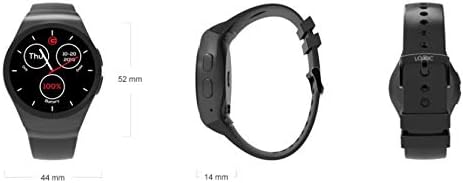
Immaġni 4.1: Minn quddiem, mill-ġenb, u minn wara views of the Logic Life30 Smartwatch with dimensions (44mm width, 52mm height, 14mm thickness).
4.1 Quddiem View
- IPS LCD Touch Display: The main interface for interacting with the smartwatch.
4.2 Ġenb View
- Buttuna tal-Qawwa: Used to power on/off the device and wake/sleep the screen.
- Mikrofonu: Għal kmandi tal-vuċi u sejħiet.
4.3 Lura View

Stampa 4.2: Wara view of the Logic Life30 Smartwatch, highlighting the optical heart rate sensor and magnetic charging contacts.
- Sensor tar-rata tal-qalb: Monitors your heart rate.
- Kuntatti tal-Iċċarġjar: For connecting the magnetic USB charging cable.
- Kelliem: For audio output during calls or media playback.
5. Setup
5.1 Iċċarġjar tal-Ismartwatch
- Connect the USB charging cable to a power adapter (not included) or a computer's USB port.
- Align the magnetic end of the charging cable with the charging contacts on the back of the smartwatch. It will snap into place.
- The watch display will show a charging indicator. Allow the device to fully charge before first use (approximately 2 hours).
5.2 Tixgħel/Jitfi
- Biex Tixgħel: Press and hold the Power Button on the side of the watch until the Logic logo appears.
- Biex Tifi: Press and hold the Power Button, then select "Power Off" on the screen.
5.3 Pairing with Your Smartphone (Bluetooth)
To access all features, including calls, notifications, and data synchronization, pair your Life30 Smartwatch with your smartphone via Bluetooth.
- Ensure your smartwatch is powered on and Bluetooth is enabled on your smartphone.
- Fuq l-ismartwatch tiegħek, mur fis-settings tal-Bluetooth.
- On your smartphone, open Bluetooth settings and search for available devices.
- Select "Logic Life30" (or similar name) from the list of found devices on your smartphone.
- Ikkonferma t-talba ta' tqabbil kemm fuq l-ismartphone kif ukoll fuq l-ismartwatch tiegħek.
5.4 Installazzjoni tal-Applikazzjoni ta' Akkumpanjament
For full functionality, including fitness data tracking and advanced settings, download the recommended companion app from your smartphone's app store. Refer to the smartwatch's display or packaging for the specific app name or QR code.
- Scan the QR code displayed on the smartwatch or in the quick start guide, or search for the app name in your phone's app store.
- Install the app and follow the on-screen instructions to create an account and connect your Life30 Smartwatch.
6. Istruzzjonijiet Operattivi
6.1 Navigazzjoni tal-Interfaċċja
- Swipe 'l fuq/'l isfel: Skrollja fil-menus jew fin-notifiki.
- Swipe Xellug/Lemin: Access different screens, widgets, or app lists.
- Tektek: Agħżel oġġett jew iftaħ applikazzjoni.
- Agħfas il-buttuna tal-enerġija: Erġa' lura għall-iskrin tad-dar jew qajjem/irqad id-displej.
6.2 Karatteristiċi ta' Komunikazzjoni
- Tagħmel/Rċeviment Sejħiet: Once paired via Bluetooth, you can dial numbers directly from the watch or answer incoming calls.
- Messaġġi: View incoming text messages and social media notifications directly on your watch.
- Kuntatti: Access your phone's contact list from the smartwatch.
6.3 Traċċar tas-Saħħa u l-Fitness

Image 6.1: The Logic Life30 Smartwatch supports fitness tracking, monitoring activities like running.
- Monitor tar-rata tal-qalb: Access the heart rate app to measure your current heart rate. The watch can also log your heart rate over time.
- Pedometer: Tracks your steps, distance, and estimated calories burned throughout the day.
- Monitor tal-irqad: Jimmonitorja x-xejriet tal-irqad tiegħek, inkluż irqad fil-fond, irqad ħafif, u l-ħinijiet tal-qawmien.
- Tifkira Sedentarja: Notifies you when you have been inactive for too long, encouraging you to move.
6.4 Multimedia and Other Features
- Camera/Remote Camera: Use the built-in camera (if available) or control your smartphone's camera remotely from the smartwatch.
- Plejer tal-MP3/MP4: Play music or videos stored on the device or control media playback on your connected smartphone.
- Reġistratur tal-Ħoss: Record audio directly from the smartwatch.
- Calculator, Calendar, Alarm, Stopwatch: Standard utility applications.
- Kontra s-serq: Helps locate your phone if it's out of range or alerts you if the connection is lost.
- Assistent tal-Vuċi: Access your phone's voice assistant through the smartwatch.
6.5 Personalizzazzjoni
- Uċuħ tal-Għassa: Personalize your smartwatch by choosing from various pre-installed watch faces or downloading new ones via the companion app.
- Temi: Adjust the overall visual theme of the smartwatch interface.
7. Manutenzjoni
7.1 Tindif tal-Ismartwatch Tiegħek
- Wipe the screen and body of the watch with a soft, lint-free cloth.
- Għal tebgħat iebsa, ftit dampen the cloth with water. Avoid using harsh cleaning agents, solvents, or abrasive materials.
- Kun żgur li l-kuntatti tal-iċċarġjar huma nodfa u niexfa qabel ma tiċċarġja biex tevita l-korrużjoni.
7.2 Ħażna
- Meta ma tkunx qed tużah għal perjodi twal, aħżen l-ismartwatch f'post frisk u niexef.
- Charge the device periodically (e.g., every 3 months) to prevent deep discharge of the battery.
8 Issolvi l-problemi
| Problema | Soluzzjoni Possibbli |
|---|---|
| L-ismartwatch mhux se jixgħel. | Kun żgur li l-apparat ikun iċċarġjat kompletament. Qabbad mal-ċarġer għal mill-inqas 30 minuta. |
| Ma tistax tqabbad ma' smartphone. |
|
| Notifiki ma jaslux. |
|
| Il-qari tar-rata tal-qalb mhux preċiż. | Kun żgur li l-arloġġ jintlibes sew fuq il-polz tiegħek, la issikkat wisq u lanqas maħlul wisq. Naddaf is-sensor fuq wara tal-arloġġ. |
| L-iskrin ma jirrispondix. | Restart the smartwatch by pressing and holding the power button. If the issue persists, ensure the screen is clean and dry. |
9. Speċifikazzjonijiet
| Karatteristika | Dettall |
|---|---|
| Isem tal-Mudell | Ħajja30 |
| Brand | Loġika |
| Wiri | 1.3 Inch IPS LCD Touch Screen |
| Konnettività | Bluetooth |
| Komunikazzjoni bla fili | Bluetooth |
| Karatteristiċi Speċjali | Email, Sleep Monitor, Notifications, Heart Rate Monitor, Pedometer, Remote Camera, MP3/MP4 Player |
| Input tal-Interface tal-Bniedem | Touchscreen |
| Dimensjonijiet tal-Prodott | 3.81 x 1.3 x 4.5 ċm (1.5 x 0.51 x 1.77 pulzieri) |
| Piż tal-oġġett | 426 g (0.94 libbra) |
| Għażliet tal-Kulur | Silver/White (other colors may be available) |
| Forma | Round |
10. Garanzija u Appoġġ
10.1 Informazzjoni dwar Garanzija
The Logic Life30 Smartwatch comes with a standard manufacturer's warranty. Please refer to the warranty card included in your package or visit the official Logic websit għal termini u kundizzjonijiet dettaljati dwar il-kopertura tal-garanzija, it-tul ta' żmien, u l-proċess tat-talbiet.
10.2 Appoġġ għall-Klijent
For technical assistance, troubleshooting, or any questions regarding your Logic Life30 Smartwatch, please contact Logic customer support. Contact information can typically be found on the official Logic webis-sit jew fuq l-imballaġġ tal-prodott.
- Appoġġ onlajn: Visit the official Logic websit għal FAQs, artikli ta' appoġġ, u formoli ta' kuntatt.
- Appoġġ bl-Email: Irreferi għad-dokumentazzjoni tal-prodott tiegħek għall-indirizz elettroniku tal-appoġġ għall-klijenti.
- Appoġġ tat-Telefon: Refer to your product documentation for customer service phone numbers.