
1. Prodott Aktarview
The SmartGen HGM6320T automatic control module is specifically engineered for mobile communication base stations. This controller offers configurable functions to suit various station requirements, enabling automatic control of different generator types. It monitors engine room temperature and battery voltage, and manages mains/load and mains/double Automatic Transfer Switch (ATS) operations. In the event of an alarm, the system can notify servicing personnel via short message.
The HGM6320T features a large Liquid Crystal Display (LCD) with a back-lit screen, offering selectable Chinese and English interfaces. Its design incorporates a compact structure, advanced circuitry, simplified connections, and high reliability, all controlled by a microprocessor and operated via touch buttons.
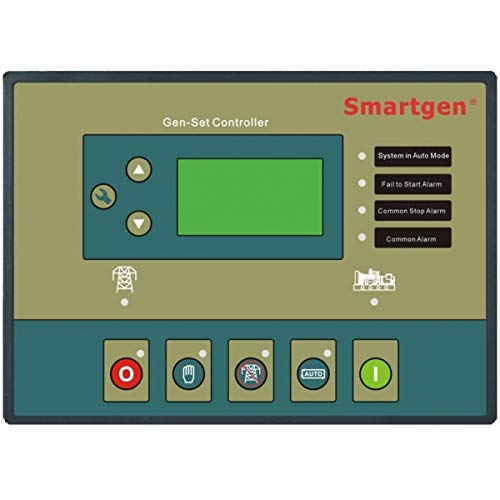
Stampa 1.1: Quddiem view of the HGM6320T Generator Controller, showing the large LCD screen and touch button interface.
2. Informazzjoni dwar is-Sigurtà
- Aqra l-istruzzjonijiet kollha bir-reqqa qabel l-installazzjoni u t-tħaddim.
- Kun żgur li s-sorsi kollha tal-enerġija huma skonnettjati qabel ma twettaq kwalunkwe wajers jew manutenzjoni.
- L-installazzjoni u s-servizz għandhom jitwettqu biss minn persunal kwalifikat.
- Verify all connections are secure and correctly polarized to prevent damage to the unit or connected equipment.
- Protect the controller from moisture, extreme temperatures, and direct sunlight.
3. Setup
3.1 Disimballaġġ
- Carefully remove the HGM6320T controller from its packaging.
- Inspect the unit for any signs of physical damage. If damage is found, contact your supplier immediately.
- Żomm il-materjali tal-ippakkjar għal trasport jew ħażna fil-futur.
3.2 Installazzjoni
The HGM6320T controller is designed for panel mounting. Ensure adequate space for ventilation and wiring connections at the rear of the unit.
- Provvista tal-Enerġija: Connect the controller to a stable DC power source as specified in the technical data.
- Konnessjonijiet tal-Ġeneratur: Wire the generator's start/stop, fuel, and other control signals to the designated terminals.
- Mains/Load Connections: Connect the mains and load sensing inputs, and the ATS control outputs. The controller can manage two ATS units with mains priority.
- Konnessjonijiet tas-Sensor: Connect engine water temperature, oil pressure, and fuel level sensors. An external temperature sensor can be connected to monitor room temperature, enabling automatic air conditioning control.
- Interfaces tal-Komunikazzjoni: Utilize the RS232/RS485 communication interface for remote control, measurement, and communication via the international standard MODBUS protocol.
- SMS Module: If using the SMS function, ensure the SMS module is correctly connected and configured.
4. Istruzzjonijiet Operattivi
4.1 Control Panel Overview
The front panel features a large LCD for displaying operational parameters and status, along with touch buttons for navigation and control. The LCD provides precise measurement and display of almost all related electricity parameters, water temperature, oil pressure, and fuel level.
4.2 Operazzjoni Bażika
- Qawwa Mixgħul: Apply power to the controller. The LCD will illuminate, displaying the initial status or main menu.
- Navigazzjoni fil-menu: Use the touch buttons to navigate through menus and adjust settings. Refer to the on-screen prompts for specific actions.
- Generator Start/Stop: The controller can automatically start and stop the generator based on configured conditions (e.g., mains failure, remote start signal). Manual start/stop options are also available.
4.3 Karatteristiċi Avvanzati
- Funzjoni tal-SMS: Configure up to 5 cell phone numbers to receive SMS messages regarding mains status (normal/abnormal), genset start/stop, power failure, and ATS transfer timer events.
- Crank Disconnect Conditions: The controller supports four configurable conditions for crank disconnect: mains abnormal signal, remote start signal, room temperature, and battery voltage. These conditions can be combined as needed.
- Kontroll tat-temperatura tal-kamra: When an external temperature sensor is connected, the controller can monitor room temperature and automatically activate air conditioning if the temperature exceeds a set threshold.
- ATS Control: The HGM6320T can control two ATS units, with mains having priority for power transfer.
- Scheduled Operations: Set a regular time in each month or week for automatic generator startup or shutdown.
- Night Start Prohibition: A function is available to prohibit generator starts during nighttime hours.
- Kontroll mill-Bogħod u Monitoraġġ: Through the RS232/RS485 interface and MODBUS protocol, remote control, measurement, and communication of the genset can be achieved.
- Room Fan Control: The controller can automatically manage room fans.
- Access Detection: Features access detection to enhance the security of the engine room.
- Time & Energy Tracking: Includes a real calendar, clock, accumulation of running time, and accumulated output electric energy display.
5. Manutenzjoni
- Tindif regolari: Żomm id-displej u l-buttuni tal-kontrollur nodfa billi tuża drapp artab u niexef. Evita prodotti tat-tindif jew solventi li joborxu.
- Kontrolli tal-Konnessjoni: Spezzjona perjodikament il-konnessjonijiet tal-wajers kollha għal issikkar u sinjali ta' korrużjoni.
- Aġġornamenti tal-Firmware: Iċċekkja l-manifattur webżur is-sit għal kwalunkwe aġġornament tal-firmware disponibbli biex tiżgura prestazzjoni ottimali u aċċess għal karatteristiċi ġodda.
- Spezzjoni tal-batterija: If the controller has an internal battery for real-time clock or memory backup, ensure it is functioning correctly and replace if necessary according to manufacturer guidelines.
6 Issolvi l-problemi
| Problema | Kawża Possibbli | Soluzzjoni |
|---|---|---|
| Il-kontrollur ma jixgħelx | Ebda provvista tal-enerġija; Wajers mhux korretti; Fjus maħruq | Check power input; Verify wiring connections; Replace fuse if necessary |
| Generator fails to start | Low fuel; Low battery voltage; Engine fault; Incorrect start parameters | Check fuel level; Check battery and charging system; Inspect engine for faults; Verify controller start settings |
| Communication error (RS232/RS485) | Incorrect wiring; Wrong communication settings; Damaged cable | Check communication wiring; Verify baud rate and protocol settings; Replace cable if damaged |
| SMS messages not sent | SMS module not connected; Incorrect phone numbers; Network issues | Ensure SMS module is connected and powered; Verify configured phone numbers; Check cellular network signal |
7. Speċifikazzjonijiet
| Karatteristika | Dettall |
|---|---|
| Brand | SmartGen |
| Mudell | HGM6320T |
| Piż tal-oġġett | 0.9 Kilogrammi |
| Manifattur | SMARTGEN |
| Wiri | Large LCD with back-light |
| Lingwa tal-Interface | Chinese, English (selectable) |
| Tip ta' Kontroll | Microprocessor, Touch Button |
| Komunikazzjoni | RS232/RS485, MODBUS protocol |
| Kontroll ATS | 2 ATS units, mains priority |
| Karatteristiċi Speċjali | SMS function, Room temperature monitoring, Scheduled start/stop, Night start prohibition, Room fan control, Access detection, Real calendar/clock, Running time/energy accumulation |
8. Garanzija u Appoġġ
SmartGen products are typically covered by a manufacturer's warranty against defects in materials and workmanship. The specific duration and terms of the warranty may vary by region and purchase date. Please refer to the warranty card included with your product or contact your local SmartGen distributor for detailed information.
For technical support, troubleshooting assistance, or inquiries regarding spare parts, please contact SmartGen-America or your authorized SmartGen dealer. When contacting support, please have your product model (HGM6320T) and serial number available.
Riżorsi onlajn: Visit the official SmartGen websit għal dokumentazzjoni tal-prodott, FAQs, u aġġornamenti tas-softwer.