
Introduzzjoni
This manual provides essential instructions for the safe and effective use of your Andoer Portable 1080P Digital Camera D11773S. Please read this manual thoroughly before operating the device and retain it for future reference. This digital camera is designed for capturing high-resolution photos and videos, featuring a 48MP image sensor, 1080P video recording, 8X digital zoom, and a 2.7-inch LCD screen.
Informazzjoni dwar is-Sigurtà
- Tesponix il-kamera għall-ilma jew l-umdità.
- Evita li twaqqa’ l-kamera jew li tissottomettiha għal impatti qawwija.
- Żomm il-kamera 'l bogħod minn kampi manjetiċi qawwija.
- Do not attempt to disassemble or modify the camera. Repairs should only be performed by qualified personnel.
- Use only the specified battery type and charging cable.
- Aħżen il-kamera f'post frisk u niexef meta ma tkunx qed tuża.
- Żomm fejn ma jintlaħaqx mit-tfal żgħar.
Kontenut tal-Pakkett
Ivverifika li l-oġġetti kollha huma preżenti fil-pakkett:
- Andoer Portable Digital Camera (Model D11773S)
- Lithium Battery (3.7V 550mAh)
- Kejbil ta' Ċarġ tat-Tip-Ċ
- Ċinga tal-polz
- Wettaq Bag
- Manwal għall-Utent

Image: Contents of the camera package, showing the camera, battery, USB-C cable, wrist strap, carry bag, and user manual.
Camera Matulview
Familiarize yourself with the main components of your camera.
Quddiem View

Immaġni: Quddiem view of the Andoer D11773S camera. Key features visible include the digital lens, built-in flash, and the 2.7" TFT display and 48 Mega pixels indicators.
- Lenti: Jiġbor immaġini u vidjows.
- Flash: Jipprovdi dawl f'kundizzjonijiet ta' dawl baxx.
- Mikrofonu: Jirrekordja l-awdjo waqt il-qbid tal-vidjow.
Wara View

Immaġni: Wara view of the Andoer D11773S camera, displaying the 2.7-inch LCD screen and various control buttons for navigation and settings.
- LCD Screen (2.7 Inch): Wirjiet diretti view, menus, and playback.
- Buttuni tal-Kontroll: For menu navigation, mode selection, zoom, and playback.
- Kelliem: Għad-daqq tal-awdjo.
Ġenb View u Dimensjonijiet

Image: Diagram illustrating the dimensions of the Andoer D11773S camera: 9.2cm length, 6.1cm width, and 1.4cm thickness.
- USB Port (Type-C): Għall-iċċarġjar u t-trasferiment tad-dejta.
- Slot tal-Kard tal-Memorja: For inserting a Micro SD card.
- Kompartiment tal-batterija: Houses the rechargeable lithium battery.
Setup
1. Iċċarġjar tal-batterija
- Insert the provided lithium battery into the camera's battery compartment.
- Connect the camera to a power source (e.g., computer USB port or USB wall adapter) using the supplied Type-C charge cable.
- Id-dawl indikatur tal-iċċarġjar jixgħel. Ladarba jkun iċċarġjat kompletament, id-dawl jista’ jibdel il-kulur jew jintefa.
2. Daħħal Kard tal-Memorja
The camera requires a Class-10 external Micro SD memory card (not included) with a maximum capacity of 128GB.
- Sib l-islott tal-karta tal-memorja fuq in-naħa tal-kamera.
- Insert the Micro SD card with the metal contacts facing the front of the camera until it clicks into place.
- To remove, gently press the card inward until it springs out.
Istruzzjonijiet Operattivi
Qawwa mixgħul/mitfi
- Biex tixgħel, agħfas u żomm il-buttuna Power.
- Biex titfi, agħfas u żomm il-buttuna tal-Enerġija mill-ġdid.
Jieħdu Ritratti
The camera supports picture resolutions up to 48MP.
- Ixgħel il-kamera.
- Agħmel qafas għar-ritratt tiegħek billi tuża l-iskrin LCD ta' 2.7 pulzieri.
- Press the Shutter button halfway to focus (if applicable), then fully press to capture the photo.

Image: Visual representation of the camera's capabilities, showing a 48MP photo example and a 1080P video example.
Reġistrar Vidjows
The camera supports video resolution up to 1920x1080 (1080P).
- Switch the camera to video recording mode (refer to on-screen icons or mode button).
- Agħfas il-buttuna Irrekordja biex tibda tirrekordja.
- Agħfas il-buttuna Irrekordja mill-ġdid biex tieqaf tirrekordja.
Funzjoni Zoom
The camera features 8X digital zoom.
- Use the zoom buttons (often marked 'W' for Wide and 'T' for Telephoto) to adjust the zoom level.
Settings tal-Flash
The built-in flash can be used in dark conditions.
- Access the flash settings through the camera's menu to select modes like Auto Flash, Fill-in Flash, Red-eye Reduction, or Flash Off.
Special Features: Anti-Shake, Face Detect, Smile Capture, Self-Timer
These features enhance your photography experience.
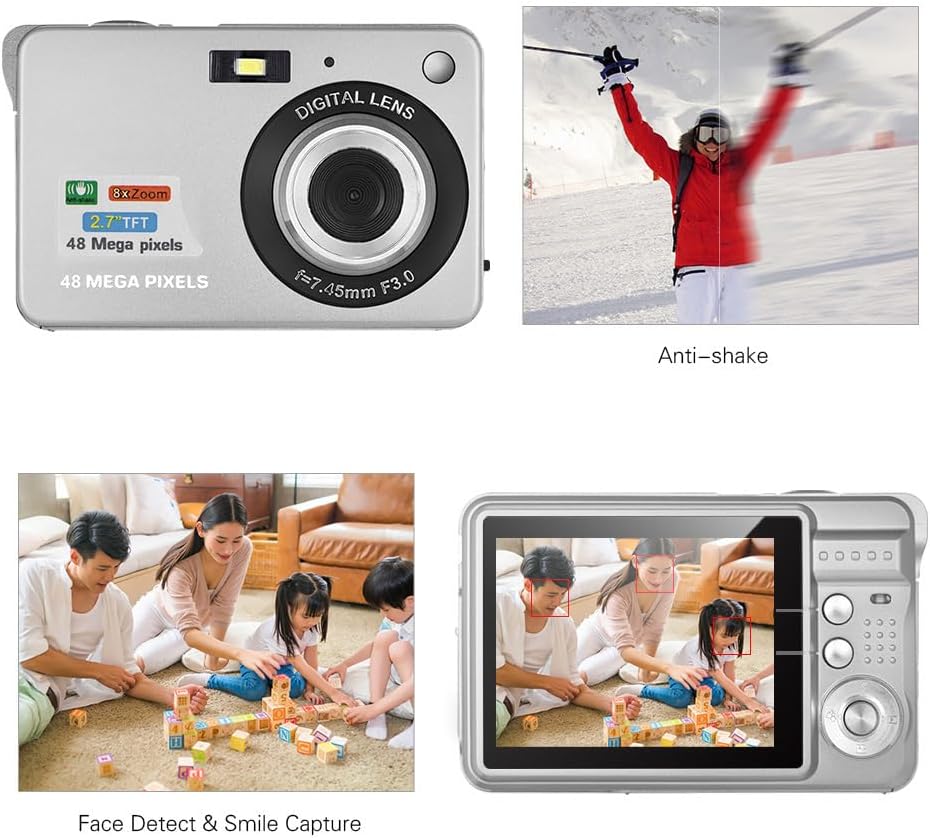
Image: Demonstrations of the camera's Anti-shake function (reducing blur from movement) and Face Detect & Smile Capture (identifying faces and automatically taking a photo when a smile is detected).
- Kontra t-Tħawwad: Helps reduce blur caused by camera movement. This feature is typically enabled by default or can be toggled in settings.
- Face Detect & Smile Capture: The camera can detect faces and automatically capture a photo when a smile is detected. Enable these options in the camera's menu.
- Self-Timer: Set a delay (2, 5, or 10 seconds) before the photo is taken, allowing you to be in the shot.
Modalità Makro
For close-up photography of small objects.

Image: A close-up photograph of an ant, demonstrating the camera's Macro Mode capability for detailed shots of small subjects.
- Activate Macro Mode through the camera's menu or a dedicated button for close-up shots.
Modalità Daqq
- Agħfas il-buttuna Daqq biex terġa' ddaħħalview ritratti u vidjows maqbuda fuq l-iskrin LCD.
- Use the navigation buttons to scroll through your media.
Konnessjoni ma' Kompjuter
You can transfer photos and videos to a computer using the supplied Type-C USB cable.
- Kun żgur li l-kamera tkun mixgħula.
- Connect one end of the Type-C USB cable to the camera's USB port and the other end to an available USB port on your computer.
- The camera should appear as a removable disk or media device on your computer.
- Open the camera's folder to access and transfer your files.
- Oħroġ l-apparat mill-kompjuter tiegħek b'mod sigur qabel ma skonnettja l-kejbil.
Manutenzjoni
- Tindif: Use a soft, dry cloth to clean the camera body. For the lens and LCD screen, use a specialized lens cleaning cloth and solution. Do not use abrasive cleaners.
- Ħażna: When not in use for extended periods, remove the battery and store the camera in a cool, dry place, preferably in its carry bag.
- Kura tal-batterija: Recharge the battery periodically even if not in use to maintain its lifespan.
Issolvi l-problemi
| Problema | Soluzzjoni Possibbli |
|---|---|
| Il-kamera ma tixgħelx. | Kun żgur li l-batterija hija ċċarġjata kompletament u mdaħħla b'mod korrett. |
| Ma nistax nieħu ritratti/nirrekordja vidjows. | Check if a memory card is inserted and has sufficient free space. Ensure the camera is in the correct mode. |
| L-immaġini huma mċajpra. | Ensure the lens is clean. Hold the camera steady during capture. Check lighting conditions and use flash if necessary. |
| Kamera mhux rikonoxxuta mill-kompjuter. | Ensure the USB cable is securely connected. Try a different USB port or restart the computer. |
| Il-batterija tiskula malajr. | Reduce LCD brightness. Limit flash usage. Ensure the camera is powered off when not in use. |
Speċifikazzjonijiet
| Karatteristika | Dettall |
|---|---|
| Sensor tal-Immaġni | Sensor CMOS |
| Wiri | 2.7 Pulzier LCD |
| File Format | JPEG (Photo), AVI (Video) |
| Riżoluzzjoni tal-Istampa | Up to 48M (8000x6000) |
| Riżoluzzjoni tal-vidjo | 1920x1080 (1080P), 1280x720 |
| Zoom Diġitali | 8X |
| Kumpens ta' Espożizzjoni | EV-3 għal EV+3 |
| Self-Timer | Mitfi / 2 sek / 5 sek / 10 sek |
| Karatteristiċi Speċjali | Anti-Shake, Face Detect, Smile Capture |
| Provvista tal-Enerġija | 1 * Lithium battery (3.7V 550mAh) |
| Karta tal-Memorja Appoġġjata | Class-10 Micro SD, max. 128GB (not included) |
| Interface | USB tat-tip C |
| Dimensjonijiet (L*W*H) | 9.2 * 6.1 * 1.4 cm / 3.6 * 2.4 * 0.5 inch |
| Piż | 99g / 3.5oz |
| Sistema Appoġġjata | Windows XP, VISTA, WIN7, MAC |
Garanzija u Appoġġ
This product comes with a standard manufacturer's warranty. Please refer to the warranty card included in your package for specific terms and conditions. For technical support, troubleshooting assistance, or further inquiries, please visit the official Andoer webis-sit jew ikkuntattja lid-dipartiment tas-servizz tal-konsumatur tagħhom. Żomm l-irċevuta tax-xiri tiegħek bħala prova tax-xiri għal talbiet ta’ garanzija.
Appoġġ onlajn: Visit the Andoer Store on Amazon