
1. Introduzzjoni
Thank you for choosing the ToughTested 24,000 mAh Solar Power Bank. This device is designed to provide reliable portable power for your electronic devices, especially in outdoor and emergency situations. This manual contains important information regarding the safe and efficient use, maintenance, and troubleshooting of your power bank. Please read it thoroughly before use and retain it for future reference.
2. Prodott Aktarview
2.1 Karatteristiċi ewlenin
- Massive 24,000 mAh Capacity: Jipprovdi ċċarġjar multiplu għal smartphones, tablets, u apparati oħra li jaħdmu bil-USB.
- Pannelli Solari ta' Effiċjenza Għolja: Supplementary charging via sunlight, converting solar energy efficiently.
- Portijiet multipli tal-iċċarġjar: Includes 2 USB-A ports and 1 fast-charging USB-C port for simultaneous device charging.
- Durable and Rugged Design: IP67 rated for water, dust, and shock resistance, suitable for harsh environments.
- Teknoloġija tal-Iċċarġjar Intelliġenti: Instasense Power Sharing detects and delivers optimal charge for connected devices.
- Torċa LED Integrata: Features a 4-mode LED flashlight for emergency lighting.
2.2 Kontenut tal-Pakkett
- ToughTested 24,000 mAh Solar Power Bank
- USB-C għal USB-C Cable
- Cable USB-A għal Mikro-USB
- Manwal ta' Istruzzjoni
2.3 Dijagramma tal-Prodott

Figura 1: Quddiem view of the ToughTested Solar Power Bank, showing the solar panel and rugged casing.
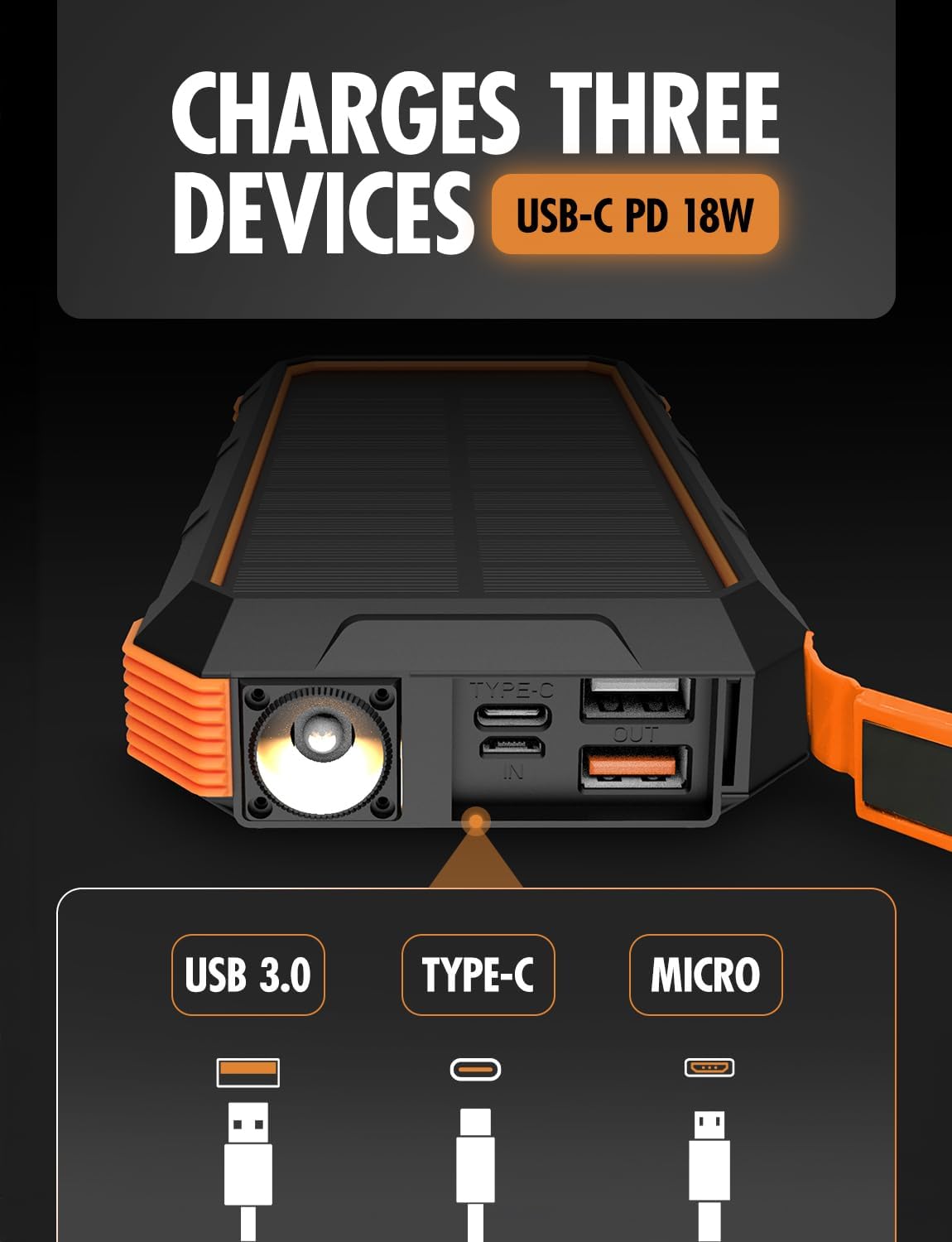
Figura 2: Ġenb view of the power bank, highlighting the USB-C (input/output), USB 3.0 (output), and Micro-USB (input) ports, along with the LED flashlight.
3. Setup
3.1 L-Iċċarġjar Inizjali tal-Power Bank
Before first use, fully charge the power bank using a wall adapter. This ensures the internal battery is conditioned for optimal performance.
- Qabbad il-kejbil USB-C provdut mal-port USB-C fuq il-power bank.
- Qabbad it-tarf l-ieħor tal-kejbil USB-C ma' adapter tal-ħajt USB kompatibbli (mhux inkluż).
- Allow the power bank to charge until all battery indicator lights are solid, indicating a full charge.
The USB-C port supports 18W Power Delivery (PD) for faster charging of the power bank itself.

Figure 3: Illustration of the power bank's PD fast charging capability, indicating 18W power delivery.
4. Istruzzjonijiet Operattivi
4.1 Iċċarġjar tal-Power Bank
Your ToughTested Solar Power Bank can be charged via two methods:
- Wall Adapter (Recommended for primary charging): Use the USB-C port with a wall adapter for the fastest and most efficient charge.
- Solar Panel (Supplementary charging): Place the power bank in direct sunlight. The solar panel will convert sunlight into energy to charge the internal battery. Note that solar charging is slower and intended for emergency or supplementary power, not as a primary charging method.
4.2 Iċċarġjar tat-Tagħmir Tiegħek
The power bank features multiple output ports to charge various devices simultaneously.
- Qabbad il-kejbil tal-iċċarġjar tat-tagħmir tiegħek ma' wieħed mill-portijiet tal-ħruġ disponibbli (USB-A jew USB-C) fuq il-power bank.
- Qabbad it-tarf l-ieħor tal-kejbil mat-tagħmir tiegħek.
- The power bank will automatically begin charging your device. The Instasense Power Sharing Technology will detect your device's charging requirements and deliver the optimal current.
- Monitor your device's charging status. Disconnect once fully charged.
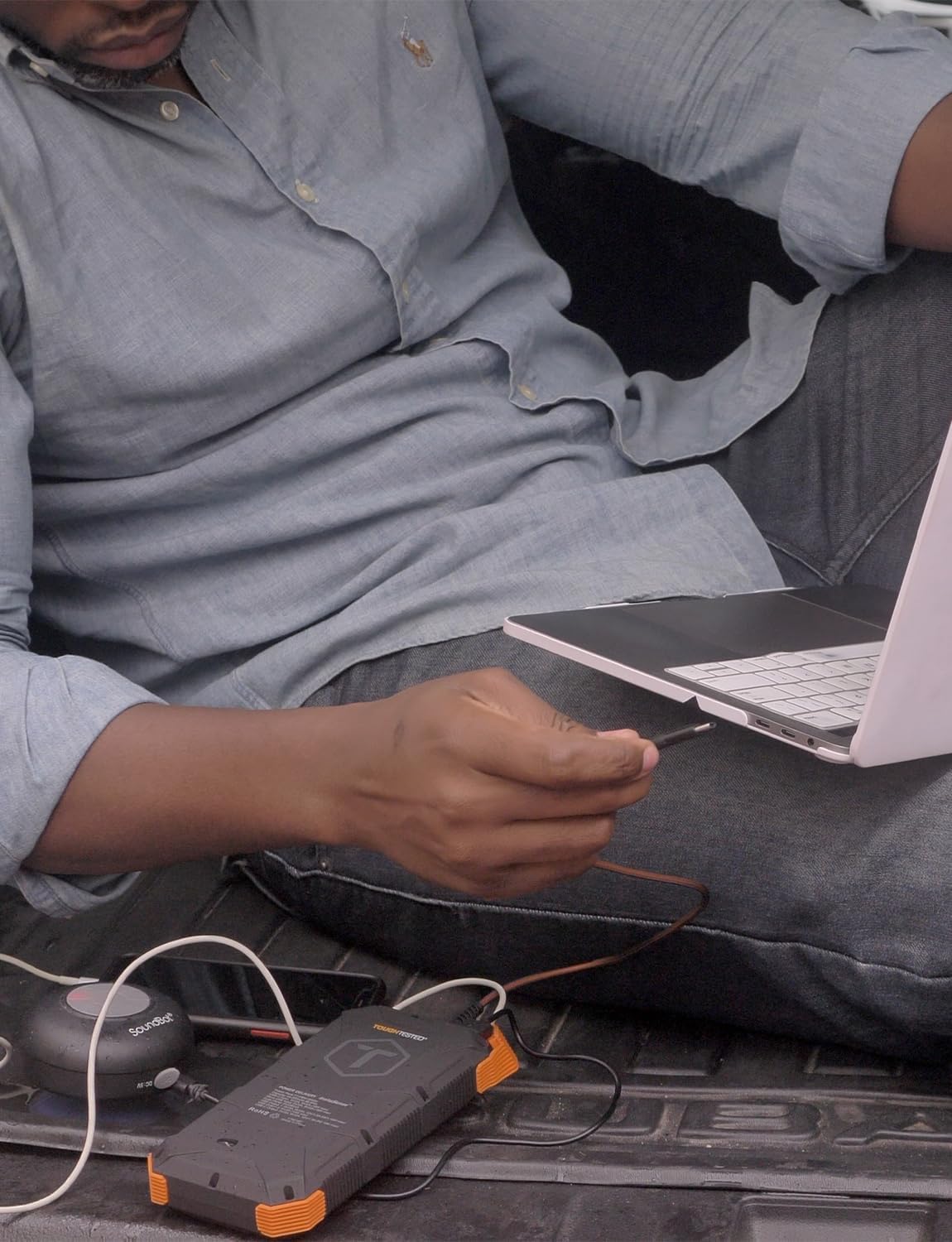
Figure 4: A user charging a laptop using the ToughTested Solar Power Bank, demonstrating its multi-device charging capability.
4.3 Tħaddim tal-Flashlight LED
The integrated LED flashlight has four modes: Standard, SOS, Strobe, and Off.
- Biex tixgħel: Press and hold the power button for approximately 3 seconds. The flashlight will turn on in Standard mode.
- Biex tiċċikla l-modi: Briefly press the power button to switch between Standard, SOS, and Strobe modes.
- Biex titfi: Agħfas u żomm il-buttuna tal-qawwa għal madwar 3 sekondi.

Figure 5: The power bank with its ultra-bright LED flashlight activated.
5. Manutenzjoni
5.1 Tindif
Wipe the power bank with a soft, dry cloth. For stubborn dirt, a slightly damp cloth can be used. Ensure all ports are dry before use. Do not use harsh chemicals or abrasive cleaners.
5.2 Ħażna
Store the power bank in a cool, dry place away from direct sunlight and extreme temperatures. For long-term storage, it is recommended to charge the power bank to approximately 50-75% every 3-6 months to maintain battery health.
5.3 Durabilità
The power bank is IP67 rated, meaning it is protected against dust ingress and can withstand immersion in water up to 1 meter for 30 minutes. While rugged, avoid intentional submersion or exposing it to high-pressure water jets.

Figure 6: The power bank's weather-proof housing, showing its resistance to water and dust. Note: Product is IP67 rated, image may show IP66.
6 Issolvi l-problemi
- Il-power bank mhux qed jiċċarġja:
- Kun żgur li l-kejbil tal-iċċarġjar huwa konness sew kemm mal-port tad-dħul tal-power bank kif ukoll mas-sors tal-enerġija.
- Verify the wall adapter or USB port is functional.
- If using solar charging, ensure the solar panel is exposed to direct sunlight and is clean. Solar charging is slow and primarily supplementary.
- L-apparat mhux qed jiċċarġja mill-power bank:
- Iċċekkja jekk il-bank tal-enerġija għandux biżżejjed ħlas.
- Ensure the charging cable between the power bank and your device is functional and securely connected.
- Ipprova port tal-ħruġ differenti fuq il-power bank.
- Some devices may require the power button on the power bank to be pressed to initiate charging.
- Il-flashlight mhux qed jaħdem:
- Kun żgur li l-power bank għandu ċ-ċarġ.
- Press and hold the power button for 3 seconds to activate the flashlight.
7. Speċifikazzjonijiet
| Karatteristika | Dettall |
|---|---|
| Numru tal-Mudell | TT-PBW-SW24 |
| Kapaċità tal-batterija | 24,000 mAh |
| Input (USB-C) | 5V/3A (15W), Power Delivery (PD) |
| Output (USB-C) | 5V/3A (15W), Power Delivery (PD) |
| Output (USB-A) | 5V/3A (15W) |
| Panel Solari | High-efficiency 400mAh |
| Klassifikazzjoni li ma jgħaddix ilma / trab | IP67 |
| Dimensjonijiet | 2 x 4 x 8 pulzieri |
| Piż | 1 lira |
| Karatteristiċi Speċjali | 4-Mode LED Flashlight, Instasense Power Sharing |
8. Informazzjoni dwar is-Sigurtà
- Tiżżarmax, tiftaħx, jew tqattax il-pakkett tal-batterija.
- Tesponix il-power bank għas-sħana jew għan-nar. Evita li taħżnu fid-dawl tax-xemx dirett.
- M'għandekx ċirkwit qasir il-pakkett tal-batterija. Taħżinx il-pakketti tal-batteriji bl-addoċċ f'kaxxa jew kexxun fejn jistgħu jqassru lil xulxin jew jiġu shortcircuited minn materjali konduttivi.
- In the event of a battery leak, do not allow the liquid to come into contact with the skin or eyes. If contact has been made, wash the affected area with copious amounts of water and seek medical advice.
- Żomm il-bank tal-enerġija nadif u niexef.
- Tħallix batterija fuq ħlas fit-tul meta ma tkunx qed tintuża.
- Tissuġġettax il-bank tal-enerġija għal xokk mekkaniku.
- Dispose of the power bank according to local regulations. Do not dispose of as household waste.
- Propożizzjoni 65 ta' Kalifornja Twissija: Dan il-prodott jista 'jkun fih kimiċi magħrufa mill-Istat ta' Kalifornja li jikkawżaw kanċer u difetti fit-twelid jew ħsara riproduttiva oħra.
9. Garanzija u Appoġġ
The ToughTested 24,000 mAh Solar Power Bank is backed by a 5-Year ToughCare Warranty, ensuring durability and performance. For warranty claims, technical support, or any questions regarding your product, please contact ToughTested customer service through their official websit jew il-bejjiegħ bl-imnut minn fejn inxtara l-prodott.

Figure 7: Product packaging indicating the 5-Year Warranty and key features.