
1. Introduzzjoni
This manual provides essential information for setting up, operating, maintaining, and troubleshooting your Lenovo ThinkPad A485 Series Laptop. Designed for business users, the ThinkPad A485 offers optimized performance, security, and portability. It features an AMD Ryzen 3 PRO 2300U quad-core processor, 4GB of DDR4 RAM, and a 500GB 7200 rpm hard drive. This guide will help you maximize your laptop's capabilities.
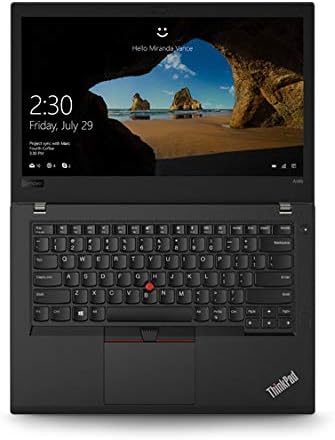
Image: The Lenovo ThinkPad A485 laptop shown open, displaying the keyboard, touchpad, and a screen with a login prompt. The ThinkPad logo is visible on the palm rest.
2. X'hemm fil-Kaxxa
Carefully unpack your new Lenovo ThinkPad A485 laptop. The package should contain the following items:
- Lenovo ThinkPad A485 Series Laptop
- Adapter AC
Jekk xi oġġetti huma nieqsa jew bil-ħsara, jekk jogħġbok ikkuntattja lill-bejjiegħ tiegħek jew lill-appoġġ ta' Lenovo immedjatament.
3. Setup
3.1 L-Ewwel Tixgħel u l-Iċċarġjar
- Qabbad l-adapter tal-AC mal-port tad-dħul tal-enerġija tal-laptop u mbagħad ma' sokit tal-enerġija.
- Iftaħ l-għatu tal-laptop.
- Agħfas il-buttuna tal-qawwa, li tipikament tinsab 'il fuq mit-tastiera, biex tixgħel il-laptop.
- Follow the on-screen instructions to complete the initial setup of Windows 10 Pro. This includes setting up your user account, network connection, and basic preferences.
3.2 Konnessjoni tal-Periferali
Your ThinkPad A485 is equipped with various ports for connecting external devices:
- Portijiet USB 3.1 Ġen 1 tat-Tip Ċ (x2): For connecting modern USB-C devices, external displays, or charging.
- Port USB 3.1 Ġen 1 tat-Tip A (x1): For standard USB devices like mice, keyboards, or external drives.
- Port USB 3.1 Ġen 2 tat-Tip A (x1): Offers faster data transfer speeds for compatible USB-A devices.
- Port HDMI: Għall-konnessjoni ma' monitors jew projetturi esterni.
- Port Ethernet: Għal konnessjonijiet tan-netwerk bil-fili.
- Awdjo Jack: Għal headphones jew kelliema esterni.

Image: The left side of the Lenovo ThinkPad A485 laptop, displaying two USB-C ports, one USB-A port, and a ventilation grill.

Image: The right side of the Lenovo ThinkPad A485 laptop, showing a USB-A port, HDMI port, Ethernet port, and an SD card reader slot.
4. Istruzzjonijiet Operattivi
4.1 Modalità Mixgħul/Mitfi u Modalità Sleep
- Qawwa Mixgħul: Agħfas il-buttuna tal-qawwa.
- Itfi: Click the Windows Start button, then Power > Shut down.
- Ibda mill-ġdid: Click the Windows Start button, then Power > Restart.
- Irqad: Close the laptop lid or click the Windows Start button, then Power > Sleep.
4.2 Tastiera u Touchpad
The ThinkPad A485 features a full-sized keyboard and a precision touchpad. The red TrackPoint in the center of the keyboard provides an alternative navigation method.
- Touchpad: Use multi-touch gestures for scrolling, zooming, and other functions. Refer to Windows settings for customization.
- TrackPoint: Use the TrackPoint to move the cursor and the associated buttons below the spacebar for left, right, and middle clicks.
4.3 Konnessjoni mal-Wi-Fi
- Click the network icon in the system tray (bottom-right corner of the screen).
- Agħżel in-netwerk Wi-Fi mixtieq tiegħek mil-lista.
- Click 'Connect' and enter the network security key if prompted.
4.4 Qarrej tal-Marki tas-Swaba'
Your laptop includes a fingerprint reader for enhanced security and quick login. To set it up:
- Mur fis-Settings tal-Windows > Kontijiet > Għażliet tad-dħul.
- Under 'Windows Hello Fingerprint', click 'Set up' and follow the on-screen instructions to register your fingerprints.
5. Manutenzjoni
5.1 Tindif tal-Laptop
- Uża drapp ratba u mingħajr ħelu ftit dampNaddaf bl-ilma jew b'prodott tat-tindif tal-iskrin biex tnaddaf id-displej.
- Għat-tastiera u x-chassis, uża drapp artab. Evita kimiċi ħarxa jew materjali li joborxu.
- Naddaf il-gradilji tal-ventilazzjoni perjodikament biex tiżgura fluss tal-arja xieraq u tevita li tissaħħan iżżejjed.
5.2 Kura tal-Batterija
- Biex ittawwal il-ħajja tal-batterija, evita li tiċċarġja kompletament il-batterija ta' spiss.
- Aħżen il-laptop f'post frisk u niexef jekk ma tużahx għal perjodi twal.
- The average battery life is approximately 5 hours, but this can vary based on usage.
5.3 Aġġornamenti tas-Software
Regularly update your operating system and drivers to ensure optimal performance and security. Windows Update can be accessed via Settings > Update & Security > Windows Update.
6 Issolvi l-problemi
6.1 Kwistjonijiet Komuni u Soluzzjonijiet
- Il-laptop ma jixgħelx: Kun żgur li l-adapter tal-AC huwa konness sew u li s-sokit tal-enerġija jaħdem sew. Ipprova żomm il-buttuna tal-qawwa għal 10-15-il sekonda biex tagħmel hard reset.
- Prestazzjoni bil-mod: Close unnecessary applications, check for background processes, ensure sufficient free space on the hard drive, and run a system scan for malware.
- Kwistjonijiet ta' konnessjoni Wi-Fi: Restart your router and laptop. Check if other devices can connect to the network. Update Wi-Fi drivers if necessary.
- Il-qarrej tal-marki tas-swaba' mhux qed jaħdem: Ensure your fingers are clean and dry. Re-register your fingerprints in Windows settings if the issue persists.
- Problemi bl-iskrin (l-ebda wiri, teptip): Connect an external monitor to check if the issue is with the laptop's display or graphics card. Restart the laptop.
6.2 Ikkuntattja l-Appoġġ
If you encounter issues that cannot be resolved using the troubleshooting steps above, please visit the official Lenovo support website or contact their customer service for further assistance. Have your laptop's model number (20MU000QUS) and serial number ready.
7. Speċifikazzjonijiet
Below are the key technical specifications for the Lenovo ThinkPad A485 Series Laptop (Model 20MU000QUS):
| Karatteristika | Speċifikazzjoni |
|---|---|
| Proċessur | AMD Ryzen 3 PRO 2300U (2.0 GHz) |
| RAM | 4 GB DDR4 (2400 MHz) |
| Ħażna | HDD ta' 500 GB (7200 RPM, Serial ATA) |
| Grafika | AMD Radeon Vega 6 (Integrated) |
| Wiri | 14 Inches (1366 x 768 pixels, Max Resolution: 1920x1080) |
| Sistema Operattiva | Windows 10 Pro |
| Konnettività bla fili | 802.11g |
| Portijiet | 2x USB 3.1 Gen 1 Type-C, 1x USB 3.1 Gen 1 Type-A, 1x USB 3.1 Gen 2 Type-A, HDMI, Ethernet, Audio Jack |
| Karatteristiċi Speċjali | Qarrej tal-marki tas-swaba' |
| Ħajja tal-batterija | Approximately 5 hours (1 Lithium Ion battery included) |
| Piż | 3.64 liri |
| Dimensjonijiet (LxWxH) | 18.5 x 11.87 x 3 pulzieri |
8. Garanzija u Appoġġ
Your Lenovo ThinkPad A485 laptop comes with a standard manufacturer's warranty. For detailed information regarding warranty terms, coverage, and how to make a claim, please refer to the warranty card included with your product or visit the official Lenovo support websit.
For technical support, driver downloads, and service information, please visit the Appoġġ Lenovo websit. You will need your product's model number (20MU000QUS) and serial number to access specific support resources.