
1. Introduzzjoni
This manual provides essential instructions for the safe and effective use of your DIGITEK DSG-005 3-Axis Handheld Gimbal Stabilizer. Please read this manual thoroughly before operating the device and retain it for future reference.
The DIGITEK DSG-005 is designed to provide stable and smooth footage for smartphones and GoPro cameras. It features a 3-axis stabilization system, intelligent shooting modes, and a long operational time.

Image 1: DIGITEK DSG-005 3-Axis Handheld Gimbal Stabilizer with smartphone mounted, displaying key features and a QR code for app download.
2. Kontenut tal-Pakkett
Kun żgur li l-oġġetti kollha huma preżenti fil-pakkett:
- 1 x DIGITEK DSG-005 Gimbal Stabilizer
- 1 x Belt
- 1 x Cable tal-Iċċarġjar
- 1 x Mini Tripod Leg
- 1 x Gimbal Catalogue (Manual)
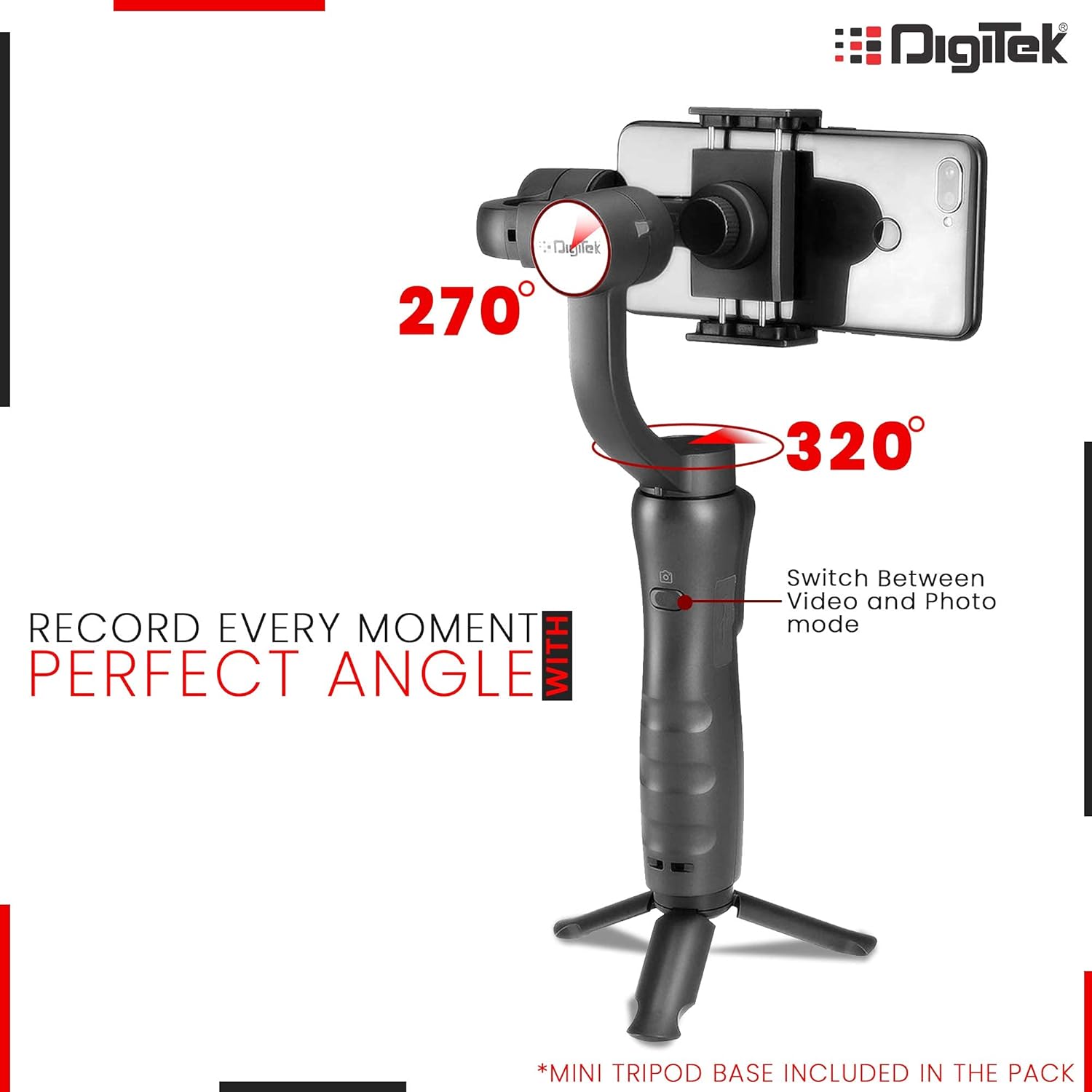
Image 2: The DIGITEK DSG-005 gimbal stabilizer and its accessories neatly packed inside a black, shock-proof hard carry case with red trim.
3. Prodott Aktarview
Familiarize yourself with the components of your DSG-005 gimbal stabilizer:

Image 3: The handle of the gimbal, highlighting the joystick for pan/tilt/speed, mode function button, and power on/off button.
- Smartphone Clamp: Secures your smartphone or GoPro.
- Roll Motor: Controls the roll axis for stabilization.
- Mutur Mejjel: Controls the tilt axis for stabilization.
- Pan Motor: Controls the pan axis for stabilization.
- Joysticks: Controls pan, tilt, and speed.
- Buttuna mixgħul/mitfi: Turns the gimbal on or off.
- Buttuna Agħżel il-Modalità: Cycles through different operating modes.
- Zoom Slider (W/T): Adjusts zoom in/out.
- Mikro USB Charging Port: For charging the gimbal.
- Port tal-Ħruġ USB: Can be used to charge a smartphone from the gimbal.
- Indikaturi: Display battery level and mode status.
4. Setup
4.1. Iċċarġjar tal-Gimbal
Before initial use, fully charge the gimbal. The charging time for the lithium battery is approximately 3-4 hours.
- Connect the provided charging cable to the Micro USB Charging Port on the gimbal.
- Qabbad it-tarf l-ieħor tal-kejbil ma 'sors ta' enerġija USB adattat.
- Id-dwal indikaturi juru l-istatus tal-iċċarġjar.
The gimbal can also function as a power bank to charge your smartphone via its USB Output Port.

Image 4: An illustration of the gimbal's handle with labels pointing to the USB interface for charging a smartphone through the gimbal and the Micro USB interface for charging the gimbal itself.
4.2. L-Immuntar tal-Ismartphone
- Remove your smartphone's protective case, if any, for optimal balance.
- Expand the smartphone clamp and carefully place your smartphone into the holder.
- Slide the smartphone all the way to the right until it touches the Tilt Motor.
4.3. Manual Balancing (Critical Step)
WARNING: Do NOT switch on the gimbal without proper manual balancing. Failure to do so may lead to motor damage and fast battery draining.
Proper balancing is crucial for the gimbal's performance and longevity. If the smartphone does not stay leveled when mounted, follow these steps:
- Ħoll il-Pum tal-bilanċ tar-Roll.
- Make small adjustments by sliding the horizontal arm until the mobile intersects the stabilizer with a 70-100 degree angle.
- Issikka l-Invita tal-kbir wara li t-telefon ikun ibbilanċjat sew fil-livell biex tiżgura operazzjonijiet normali.

Image 5: A visual guide demonstrating how to place a smartphone into the mounting clip, slide it until it touches the tilt motor, and then adjust the roll balance knob and thumb screw for proper leveling.
Video 1: A detailed instructional video demonstrating the manual balancing process for the DIGITEK DSG-005 gimbal stabilizer, including unfolding, attaching the tripod, placing the smartphone, and adjusting the clamps and knobs for perfect balance.
4.4. Installazzjoni tal-App u Konnessjoni Bluetooth
For enhanced features and control, download the Gimbal Pro App.
- Skennja l-kodiċi QR fuq l-imballaġġ tal-prodott jew żur https://flowcode.com/p/dX8vRxaV3 to download the Gimbal Pro App for Android or iOS.
- Kun żgur li l-Bluetooth tal-ismartphone tiegħek huwa attivat.
- If your smartphone was previously connected to other gimbals, please turn them off. If this gimbal was connected to other smartphones, turn off their Bluetooth.
- Hold the Power button on the gimbal to turn on its wireless connectivity.
- Fittex għal new devices on your smartphone's Bluetooth settings and connect to "STABILIZER_9CB565" (or similar).
- Open the Gimbal Pro App to unlock the full experience.
5. Modi u Karatteristiċi Operattivi
5.1. Power On/Off
Press and hold the Power On/Off button for a few seconds to turn the gimbal on or off.
5.2. Għażla tal-Mod
The gimbal offers intelligent shooting modes for versatile capture:
- Modalità Pan: Allows horizontal panning.
- Modalità Mejjel: Allows vertical tilting.
- Modalità Lock: Locks the camera in a fixed direction.
- Modalità Segwi: The gimbal automatically follows the target, keeping the picture stable and smooth.

Image 6: The gimbal with a smartphone mounted, illustrating its range of motion for 270-degree roll and 320-degree pan, along with a button to switch between video and photo modes.
5.3. Kontroll tal-Joystick
Use the joystick to precisely control the pan and tilt movements of your smartphone and adjust the speed of movement.
5.4. Zoom In/Out
Utilize the W/T slider to smoothly zoom in or out during recording, adding dynamic visual impact to your footage.
5.5. Advanced Features (via App)
When connected to the Gimbal Pro App, you can access advanced features:
- Face & Object Tracking: The gimbal will automatically follow the target, ensuring it remains in frame.
- Vidjo Time-Lapse: Compress time and capture fleeting experiences.
- Panoramic Shots: Capture multiple photos and stitch them together for seamless panoramic images.
Video 2: An official product video demonstrating the DIGITEK DSG-005 gimbal stabilizer in action, highlighting its smooth cinematic shots, face detection, low-angle shooting, and ease of use for capturing stable video.
6. Manutenzjoni
- Żomm il-gimbal nadif u ħieles mit-trab u l-fdalijiet.
- Store the gimbal in its shock-proof hard carry case when not in use to protect it from damage.
- Evita li tesponi l-gimbal għal temperaturi estremi jew umdità.
- Tippruvax tiżżarma jew issewwi l-gimbal int stess. Ikkuntattja l-appoġġ għall-klijenti għall-għajnuna.
7 Issolvi l-problemi
7.1. Gimbal Not Stabilizing / Motor Overheating
- Ensure the smartphone is manually balanced correctly before powering on the gimbal. Refer to Section 4.3.
- Improper balancing puts excessive pressure on the motors, leading to overheating and reduced battery life.
7.2. Ħajja Qasira tal-Batterija
- Kun żgur li l-gimbal ikun iċċarġjat kompletament qabel l-użu.
- Verify that the smartphone is manually balanced. An unbalanced gimbal consumes more power.
7.3. Kwistjonijiet ta' Konnessjoni Bluetooth
- Ensure Bluetooth is enabled on your smartphone and the gimbal.
- Forget any previously paired gimbal devices from your smartphone's Bluetooth settings.
- Restart both the gimbal and your smartphone, then attempt to pair again.
7.4. App Crashing / Features Not Working
- Ensure you have the latest version of the Gimbal Pro App installed.
- Neħħi l-cache tal-app jew erġa' installa l-app.
- Verify that your smartphone meets the app's minimum system requirements.
8. Speċifikazzjonijiet
| Karatteristika | Dettall |
|---|---|
| Numru tal-Mudell | DSG 005 |
| Brand | Digitek |
| Dimensjonijiet (LxWxH) | 29 x 13 x 29 ċm |
| Piż tal-oġġett | 440 g |
| Apparati Kompatibbli | Cellphone (Smartphones & GoPro) |
| Kulur | Iswed |
| Ħin tal-Iċċarġjar | 3-4 Sigħat |
| Ħin Operattiv | Up to 12 hours (depending on balancing) |
| Komponenti Inklużi | 1 Gimbal, 1 Belt, 1 Charging Cable, 1 Leg, Gimbal Catalogue |
9. Garanzija u Appoġġ
9.1. Informazzjoni dwar Garanzija
Dan il-prodott jiġi ma 'a 1 Year Standard Brand Warranty.
9.2. Appoġġ għall-Klijent
For any technical issues or further assistance, please contact Digitek Gimbal Customer Care at 011 4707 4444.