
Introduzzjoni
This manual provides detailed instructions for the setup, operation, and maintenance of your TOZO T8 True Wireless Earbuds. Please read this manual thoroughly before using the product to ensure proper function and longevity.
X'hemm fil-Kaxxa
Meta tiftaħ il-pakkett, jekk jogħġbok kun żgur li l-oġġetti kollha elenkati hawn taħt huma preżenti:
- TOZO T8 True Wireless Earbuds (Left and Right)
- Kawża tal-Iċċarġjar
- Cable tal-Iċċarġjar tal-USB
- Manwal għall-Utent
- Ear Cushions (3 sets: Small, Medium, Large)

Image: Contents of the TOZO T8 package, including earbuds, charging case, and accessories.
Setup
1. Iċċarġjar Inizjali
Before first use, fully charge the earbuds and the charging case. Connect the provided USB cable to the charging port on the case and a power source. The indicator light on the case will show charging status.

Image: The TOZO T8 charging case with earbuds, illustrating the charging process.
2. It-tqabbil mat-Tagħmir Tiegħek
- Remove both earbuds from the charging case. They will automatically power on and connect to each other. You will hear an audio cue "Connected", followed by "Left Channel" and "Right Channel".
- Ippermetti l-Bluetooth fuq il-mowbajl tiegħek jew apparat ieħor.
- Fittex għal apparati Bluetooth disponibbli u agħżel "TOZO-T8-R". Do not select "TOZO-T8-L".
- Once connected, you will hear "Second Device Connected", and you can begin playing audio.

Image: Visual guide demonstrating the steps to pair TOZO T8 earbuds with a mobile device.
3. L-ilbies tal-Earbuds
Select the ear tip size that provides the best fit and seal for optimal sound quality and comfort. Gently insert the earbud into your ear canal and slightly rotate it to ensure a secure and comfortable fit.
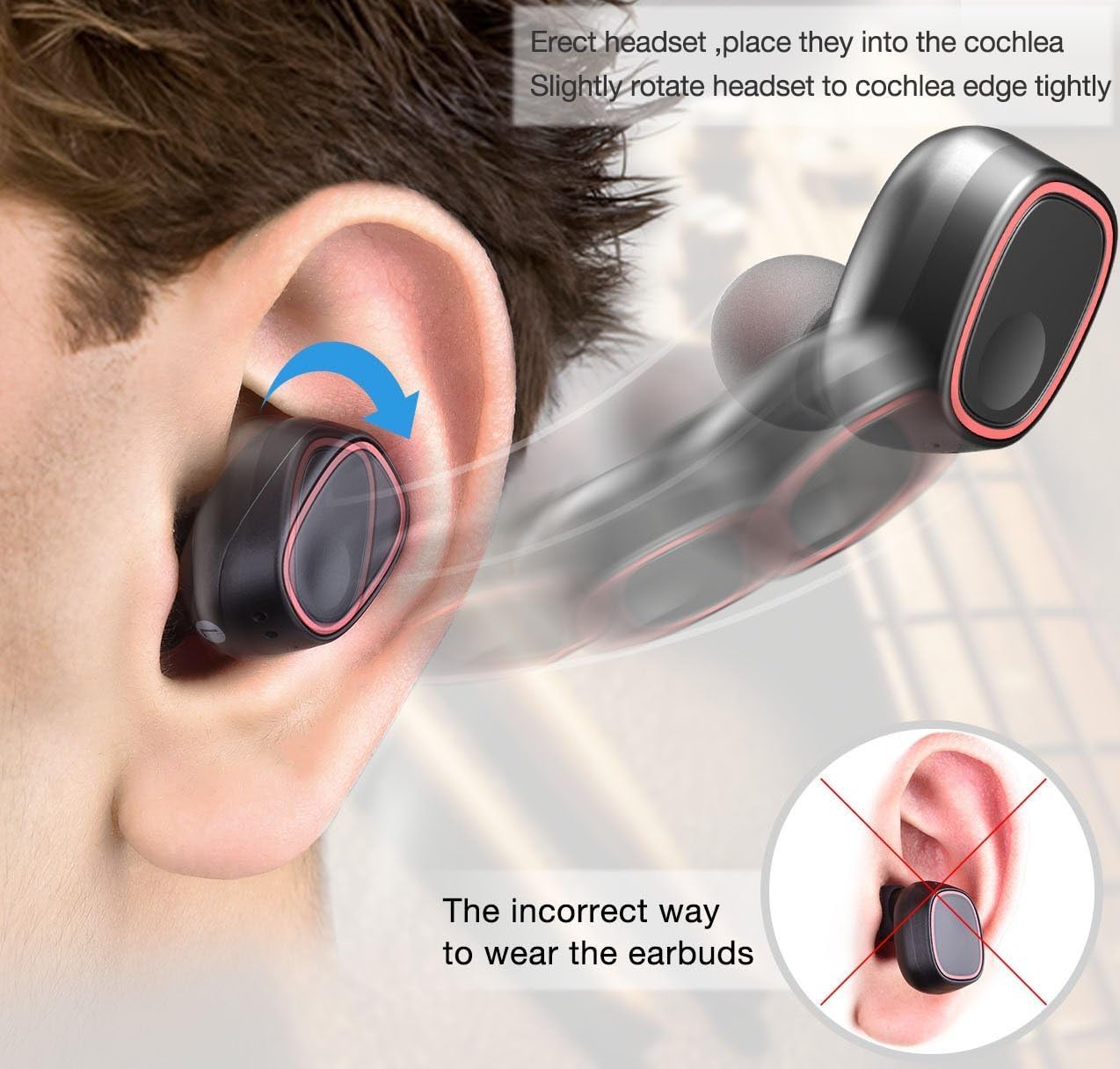
Image: Illustration detailing the proper method for wearing the earbuds and an example of an incorrect fit.
Istruzzjonijiet Operattivi
The TOZO T8 earbuds feature touch controls for various functions:
- Play/Pawsa: Tap the button on either earbud once.
- Tweġiba/Tmiem Sejħa: Tap the button on either earbud once.
- Irrifjuta Sejħa: Press and hold the button on either earbud for 2 seconds.
- Track li jmiss: Double-tap the button on the right earbud.
- Track preċedenti: Double-tap the button on the left earbud.
- Assistent tal-Vuċi: Triple-tap the button on either earbud.
The earbuds can be used individually. To use a single earbud, simply remove one from the charging case. It will automatically enter single-earbud mode. To switch back to stereo, remove the other earbud from the case.
Manutenzjoni
- Żomm il-earbuds u l-kaxxa tal-iċċarġjar nodfa u niexfa. Uża drapp artab u niexef biex timsaħhom.
- Evita li tesponi l-prodott għal temperaturi estremi, umdità, jew sustanzi korrużivi.
- Aħżen il-earbuds fil-każ tal-iċċarġjar tagħhom meta ma tkunx qed tuża biex tipproteġihom u żżommhom iċċarġjati.
- Naddaf il-kuntatti tal-iċċarġjar regolarment kemm fuq il-earbuds kif ukoll fuq il-kaxxa biex tiżgura li l-iċċarġjar isir kif suppost.
Issolvi l-problemi
| Problema | Soluzzjoni |
|---|---|
| Il-earbuds mhux qed jingħaqdu ma' xulxin. | Place both earbuds back into the charging case, then remove them again. Ensure they are fully charged. |
| Il-earbuds mhux qed jikkonnettjaw mal-apparat. | Ensure Bluetooth is enabled on your device. Forget "TOZO-T8-R" from your device's Bluetooth list and re-pair following the setup instructions. |
| Earbud wieħed biss jaħdem. | Place both earbuds back into the charging case. Ensure both are charging. Remove them simultaneously to re-establish stereo connection. |
| Kwalità tal-ħoss fqira jew volum baxx. | Ensure earbuds are properly seated in your ears and try different sized ear tips for a better seal. Clean any debris from the earbud grilles. |
| Il-kaxxa tal-iċċarġjar mhux qed tiċċarġja. | Iċċekkja l-kejbil tal-USB u l-adapter tal-enerġija. Kun żgur li l-kejbil huwa konness sew kemm mal-kaxxa kif ukoll mas-sors tal-enerġija. |
Speċifikazzjonijiet
| Karatteristika | Dettall |
|---|---|
| Brand | TOZO |
| Numru tal-Mudell | T8 |
| Teknoloġija tal-Konnettività | Wireless (Bluetooth) |
| Verżjoni Bluetooth | 4.1 |
| Medda Bluetooth | 10 Meters |
| Tqegħid tal-widnejn | Fil-widnejn |
| Kontroll tal-Ħoss | Iżolament tal-Ħoss |
| Ħajja Medja tal-Batterija (Earbuds) | 2.5 Sigħat |
| Battery Charge Time (Earbuds) | 1 Siegħa |
| Ħajja Medja tal-Batterija tal-Kaxxa tal-Ġarr | 6 Hours (provides 2-3 full charges for earbuds) |
| Livell ta 'Reżistenza għall-Ilma | Waterproof |
| Piż tal-oġġett | 0.1 Kilogrammi |
| Materjal | Silicone (Ear tips) |
Garanzija u Appoġġ
Għal informazzjoni dwar il-garanzija jew appoġġ tekniku, jekk jogħġbok irreferi għat-TOZO uffiċjali website or contact their customer service directly. Details can typically be found on the product packaging or the TOZO official support page.