
1. Introduzzjoni
The Canon PowerShot G5 X is a compact digital camera featuring a 1.0-inch, 20.2 Megapixel High-Sensitivity CMOS sensor and a built-in 2.36 million dot electronic viewfinder. This camera is designed for advanced photographers seeking high-quality stills and video with comprehensive control. It includes Wi-Fi and NFC capabilities for easy sharing and remote operation.
Il-karatteristiċi ewlenin jinkludu:
- 1.0-inch, 20.2 Megapixel High-Sensitivity CMOS sensor.
- Canon DIGIC 6 Image Processor for enhanced image quality and fast operation.
- Built-in 2.36 million dot electronic viewfinder
- Multi-angle capacitive 3.0-inch touch panel LCD with 1.04 million dots.
- Full HD 1080p video recording at 60p/30p/24p.
- Integrated Wi-Fi and NFC for wireless connectivity.
2. X'hemm fil-Kaxxa
Iċċekkja li l-oġġetti kollha huma preżenti qabel l-ewwel użu:
- Canon PowerShot G5 X Camera Body
- Pakkett tal-batterija
- Ċarġer tal-batterija
- Ċinga ta 'l-għonq

Figure 2.1: Included items with the Canon PowerShot G5 X camera.
3. Setup Inizjali
3.1 Iċċarġjar tal-batterija
- Daħħal il-batterija fil-ċarġer tal-batterija.
- Ipplaggja l-ċarġer f'sokit tal-elettriku. Id-dawl indikatur tal-iċċarġjar jixgħel.
- Once charging is complete, the indicator light will change or turn off. Remove the battery.
3.2 Daħħal il-Batterija u l-Kard tal-Memorja
- Iftaħ l-għatu tal-kompartiment tal-batterija/kard fil-qiegħ tal-kamera.
- Daħħal il-batterija ċċarġjata fil-kompartiment, waqt li tiżgura l-orjentazzjoni korretta.
- Insert a compatible SD, SDHC, or SDXC memory card into the card slot until it clicks into place.
- Agħlaq l-għatu tal-kompartiment sew.
3.3 Kif Tixgħel il-Kamera
Agħfas il- ON/OFF button located on the top of the camera to power it on. The lens will extend, and the LCD screen will activate.

Figura 3.1: Quddiem view of the Canon PowerShot G5 X.
4. It-tħaddim tal-Kamera
4.1 Modi Bażiċi ta' Sparar
Id-dial tal-modalità fuq nett tal-kamera jippermetti l-għażla ta' diversi modi ta' sparar:
- Modalità Awtomatika: For automatic settings.
- P (Programm AE): Camera sets aperture and shutter speed, but allows other adjustments.
- Av (Aperture Priority AE): Inti tissettja l-apertura, il-kamera tissettja l-veloċità tax-shutter.
- Tv (Shutter Priority AE): Inti tissettja l-veloċità tax-xater, il-kamera tissettja l-apertura.
- M (Manwal): Inti tikkontrolla kemm l-apertura kif ukoll il-veloċità tax-xater.
- Custom Modes (C1/C2): Save and recall your preferred settings.
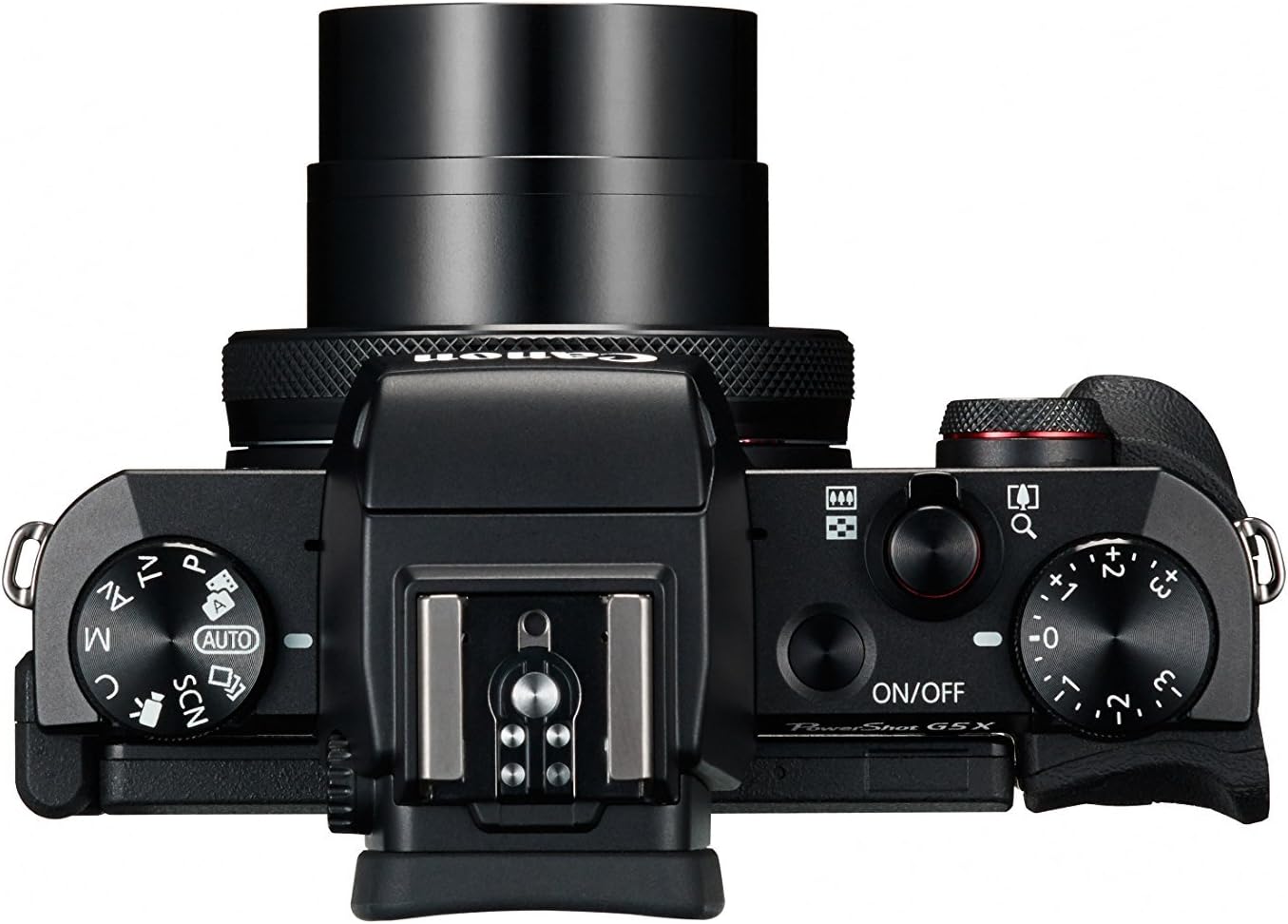
Figure 4.1: Top controls of the Canon PowerShot G5 X.
4.2 Uża l- Viewfinder and LCD Screen
Il-kamera għandha kemm elettronika viewfinder (EVF) and a multi-angle touch panel LCD. You can switch between them or use the EVF for composing shots in bright conditions. The LCD screen can be articulated for various shooting angles and touch operations.

Figure 4.2: Canon PowerShot G5 X with articulated LCD screen.

Figura 4.3: Wara view of the Canon PowerShot G5 X.
4.3 Reġistrar Vidjows
To record video, set the mode dial to the movie mode icon. Press the dedicated movie button to start and stop recording. The camera supports 1080p Full HD video at various frame rates (60p/30p/24p).
4.4 Konnettività Wi-Fi u NFC
The camera's built-in Wi-Fi and NFC functions allow for wireless transfer of images and videos to compatible smart devices or computers. Refer to the camera's menu for detailed instructions on setting up these connections.
5. Manutenzjoni u Kura
5.1 Tindif tal-Kamera
- Lenti: Use a lens brush or blower to remove dust, then gently wipe with a microfiber lens cloth. Avoid touching the lens surface directly.
- Skrin LCD: Wipe gently with a soft, dry cloth. For stubborn smudges, use a screen cleaner specifically designed for electronics.
- Korp tal-Kamera: Wipe with a soft, dry cloth. Do not use organic solvents or strong cleaning agents.
5.2 Ħażna
Meta ma tkunx qed tuża l-kamera, aħżenha f'post frisk u niexef 'il bogħod mix-xemx diretta u minn temperaturi estremi. Neħħi l-batterija jekk il-kamera ma tkunx se tintuża għal perjodu twil ta' żmien.
6 Issolvi l-problemi
This section addresses common issues you might encounter with your Canon PowerShot G5 X camera.
| Problema | Kawża / Soluzzjoni Possibbli |
|---|---|
| Il-kamera ma tixgħelx. | Battery is depleted. Charge the battery. Ensure battery is inserted correctly. |
| L-immaġini huma mċajpra. | Lens is dirty. Clean the lens. Shutter speed is too slow. Increase shutter speed or use image stabilization. Camera shake. Hold the camera steady or use a tripod. |
| Cannot connect to Wi-Fi/NFC. | Ensure Wi-Fi/NFC is enabled in camera settings. Check device compatibility and network settings. Refer to the camera's connectivity guide in the menu. |
| Żball fil-karta tal-memorja. | Il-karta tal-memorja hija mimlija. Ħassar bla bżonn files or replace card. Card is corrupted. Format the card (this will erase all data). Card is incompatible. Use a supported SD, SDHC, or SDXC card. |
| Il-flash ma jaħdimx. | Flash is set to OFF. Change flash mode to Auto or On. Subject is too far. Check flash range. |
7. Speċifikazzjonijiet
| Karatteristika | Dettall |
|---|---|
| Tip tas-Sensor | 1.0-inch High-Sensitivity CMOS |
| Riżoluzzjoni Għadha Effettiva | 20.2 MP |
| Proċessur tal-Immaġni | DIĠIKA 6 |
| Zoom ottiku | 4.2x |
| Apertura tal-Lenti | f/1.8-2.8 |
| Focal Length (35mm equivalent) | 24-100mm |
| Stabbilizzazzjoni tal-Immaġni | Diġitali |
| Viewfinder | Built-in Electronic Viewfinder (2.36 million dots) |
| Skrin LCD | 3.0-inch Multi-angle Capacitive Touch Panel (1.04 million dots) |
| Riżoluzzjoni tal-vidjo | 1080p Full HD (60p/30p/24p) |
| Konnettività | Wi-Fi, NFC, HDMI, USB |
| Midja tal-Ħażna | SD, SDHC, SDXC Memory Cards |
| Piż tal-oġġett | 1.8 Liri |
| Numru tal-Mudell | 0510C001 |
| UPC | 748926548632 |
8. Garanzija u Appoġġ
8.1 Informazzjoni dwar Garanzija
This Canon PowerShot G5 X camera comes with a 90-day limited warranty from the date of purchase. This warranty covers manufacturing defects under normal use. Please retain your proof of purchase for warranty claims.
8.2 Appoġġ għall-Klijent
For technical assistance, service, or further inquiries, please refer to the official Canon support webis-sit jew ikkuntattja lid-dipartiment tas-servizz tal-konsumatur tagħhom. L-informazzjoni ta' kuntatt tipikament tista' tinstab fuq is-sit tal-manifattur websit.