
1. Introduzzjoni
The DinoFire X16-DF-US is a rechargeable wireless presentation clicker designed to enhance your presentations. It offers a reliable 2.4GHz wireless connection, a bright red laser pointer, and intuitive controls for seamless navigation through slides. This manual provides detailed instructions for setup, operation, maintenance, and troubleshooting to ensure optimal performance of your device.

Image 1: DinoFire X16-DF-US Rechargeable Wireless Presentation Clicker. This image displays the sleek, black design of the presentation remote with its control buttons and red laser light emitting from the front.
2. Kontenut tal-Pakkett
Jekk jogħġbok ivverifika li l-oġġetti kollha huma preżenti fil-pakkett:
- 1 x Wireless Presenter Remote Control
- 1 x Wireless USB Riċevitur
- 1 x USB Iċċarġjar Cable
- 1 x Manwal tal-Utent (dan id-dokument)
3. Prodott Aktarview
Familiarize yourself with the components and controls of your DinoFire presentation clicker.

Image 2: Detailed diagram of the DinoFire X16-DF-US presentation clicker. This image shows multiple views of the device, highlighting the 'Light Hole', 'Manage Volume' buttons, 'Page UP' and 'Page Down' buttons, 'Play/Full Screen' and 'Black Screen' functions, 'Charing Port', 'USB Receiver', 'Pointer Button', 'Switch on/off' slider, 'Switch Windows' button, 'Open the Hyperlink' button, and 'Select Hyperlink' button.
- Light Hole: Emits the red laser pointer.
- Manage Volume: Adjusts system volume (buttons labeled '+' and '-').
- Page UP: Navigates to the previous slide.
- Paġna 'l isfel: Navigates to the next slide.
- Play/Full Screen: Single press for Play, Press and Hold for Full Screen.
- Skrin Iswed: Single press for Black Screen, Press and Hold for Black Screen.
- Port tal-Iċċarġjar: Micro USB port for recharging the device.
- Riċevitur USB: Stores securely within the presenter via magnetism.
- Pointer Button: Jattiva l-pointer tal-lejżer aħmar.
- Ixgħel/Itfi: Power slider to turn the device on or off.
- Ibdel it-Twieqi: Long press the TAB key button to switch between open windows.
- Open the Hyperlink: Double press the dedicated hyperlink button to open a selected hyperlink.
- Select Hyperlink: Single press the dedicated hyperlink button to select a hyperlink.
4. Setup
4.1 Iċċarġjar lill-Preżentatur
The DinoFire X16-DF-US features a built-in rechargeable battery. Before first use, or when the low power indicator flashes, charge the device using the provided USB cable.
- Connect the micro USB end of the charging cable to the charging port on the side of the presenter.
- Connect the standard USB end of the cable to a USB power source (e.g., computer USB port, USB wall adapter).
- A full charge typically takes about one hour. The device can operate for more than one week on a single charge, depending on usage.

Image 3: The DinoFire X16-DF-US presentation clicker connected to a laptop via a USB charging cable. This image illustrates the charging process, highlighting the micro USB port on the device and the USB-A connector plugged into a laptop.
4.2 Konnessjoni tar-Riċevitur USB
The wireless receiver is stored magnetically within the presenter for convenience and to prevent loss.
- Gently pull out the USB receiver from the bottom end of the presenter.
- Insert the USB receiver into an available USB port on your computer or laptop.
- The system will automatically detect and install the necessary drivers. No manual driver installation is required.

Immaġni 4: Mill-qrib view of the DinoFire X16-DF-US presentation clicker showing the magnetic storage for the USB receiver. The image demonstrates how the mini USB receiver is securely stored within the presenter's body, preventing it from being easily lost.
4.3 Tixgħel/Jitfi
Locate the ON/OFF switch on the side of the presenter. Slide it to the 'ON' position to power on the device before use, and to 'OFF' when not in use to conserve battery.
5. Istruzzjonijiet Operattivi
The DinoFire X16-DF-US offers a range of functions to control your presentation effectively.
5.1 Basic Presentation Controls
- Page Up (▲ button): Press to move to the previous slide.
- Page Down (▼ button): Press to move to the next slide.
- Play/Full Screen (□ button): Single press to start/resume presentation. Press and hold to enter full screen mode.
- Black Screen (□ button): Single press to black out the screen. Press and hold to black out the screen.
5.2 Funzjonijiet Avvanzati
- Hyperlink Control:
- Single press the dedicated hyperlink button to select a hyperlink.
- Double press the dedicated hyperlink button to open the selected hyperlink.
- Kontroll tal-Volum: Use the '+' and '-' buttons on the side of the presenter to adjust the system volume.
- Ibdel it-Twieqi: Long press the 'TAB' button (often integrated with another function button) to switch between open application windows on your computer.

Image 5: The DinoFire X16-DF-US presentation clicker demonstrating the 'Switch Windows' function. The image shows the presenter in front of a computer screen displaying multiple open application windows, illustrating the ability to switch between them.
5.3 Laser Pointer Operation
Press and hold the dedicated pointer button (often marked with a sun or star icon) to activate the red laser pointer. Release the button to turn it off.

Image 6: Close-up of the DinoFire X16-DF-US presentation clicker emitting a bright red laser beam. The image also includes a warning symbol against pointing the laser at eyes, emphasizing laser safety.
Safety Warning: Do not point the laser beam directly at people's eyes or at highly reflective surfaces. The laser is bright and can cause temporary vision impairment or eye damage.
The red laser light is effective against most backgrounds but is not recommended for use on LED, LCD, or TV screens.
5.4 Kompatibilità
The DinoFire X16-DF-US is widely compatible with various operating systems and presentation software:
- Sistemi Operattivi: Windows 2003, XP, Windows Vista, Windows 7, 8, 10, Linux, Android, Mac OS.
- Software: Microsoft PowerPoint, Keynote, Google Slides, Prezi, MS Word, Excel, ACD See, and web browsers.
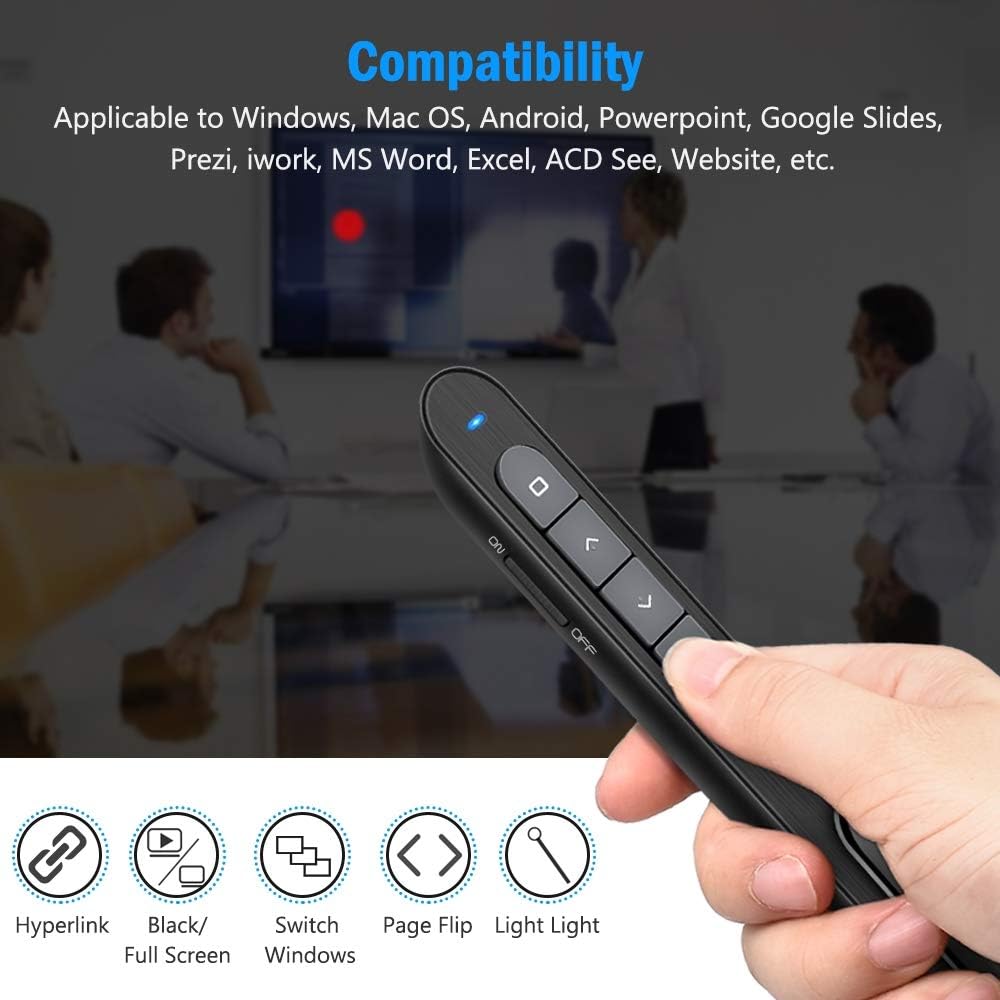
Image 7: The DinoFire X16-DF-US presentation clicker shown with various compatibility icons. This image highlights the device's compatibility with Windows, Mac OS, Android, PowerPoint, Google Slides, Prezi, iWork, MS Word, Excel, ACD See, and general website navigation.
5.5 Wireless Control Range
The presenter operates on a 2.4GHz RF frequency, providing a wireless control range of up to 100 feet (30 meters). The red laser light has a range of over 300 feet (90 meters).

Image 8: A person using the DinoFire X16-DF-US presentation clicker in a large room, pointing at a projected screen. The image emphasizes the long control range of the device, indicating a presenter control range of over 328ft and a red light range of over 656ft.
6. Manutenzjoni
6.1 Kura tal-Batterija
- Iċċarġja l-apparat għal kollox qabel l-ewwel użu.
- Evita li l-batterija tixxotta kompletament ta' spiss biex ittawwal il-ħajja tagħha.
- Aħżen l-apparat f'post frisk u niexef meta ma jkunx qed jintuża għal perjodi twal.
6.2 Tindif
Imsaħ l-apparat b'ċarruta ratba u niexfa. Tużax kimiċi ħarxa jew prodotti tat-tindif li joborxu.
6.3 USB Receiver Storage
Always store the USB receiver inside the magnetic compartment of the presenter when not in use to prevent loss.
7 Issolvi l-problemi
- Presenter not responding:
- Ensure the presenter is powered on (ON/OFF switch).
- Check if the USB receiver is securely plugged into the computer's USB port.
- Verify the presenter's battery level. Recharge if the low power indicator is flashing.
- Ipprova waħħal ir-riċevitur USB f'port USB differenti.
- Ibda mill-ġdid il-kompjuter tiegħek.
- Laser pointer not working:
- Kun żgur li l-preżentatur huwa mixgħul.
- Press and hold the laser pointer button firmly.
- Iċċekkja l-livell tal-batterija.
- Indikatur ta' Enerġija Baxxa:
- When the indicator light flashes continuously, it signifies low battery. Please charge the device immediately.
- The device will enter auto-sleep mode if unused for approximately 5 minutes to save energy.
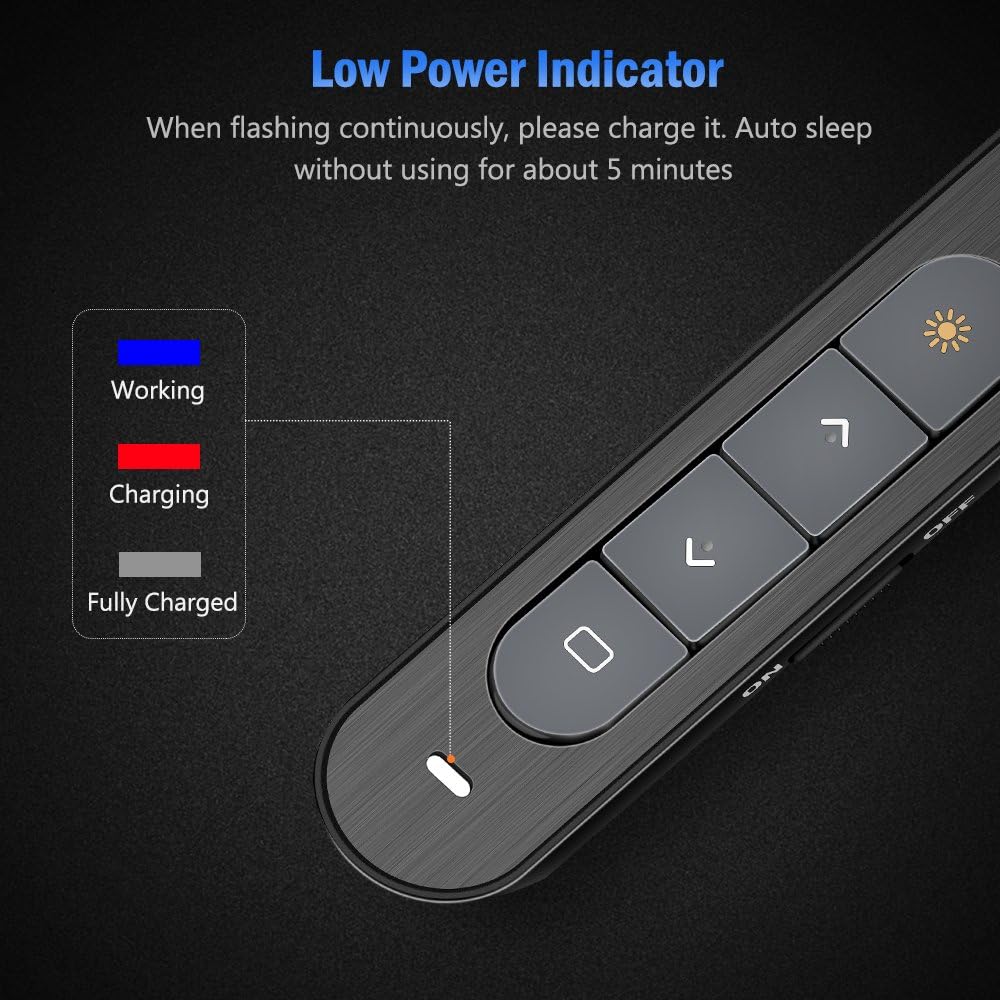
Image 9: Close-up of the DinoFire X16-DF-US presentation clicker showing the low power indicator light. The image displays a legend for the indicator light colors: blue for 'Working', red for 'Charging', and gray for 'Fully Charged', along with a visual representation of the indicator flashing when low on power.
8. Speċifikazzjonijiet
| Karatteristika | Speċifikazzjoni |
|---|---|
| Numru tal-Mudell | X16-DF-US |
| Teknoloġija | Frekwenza tar-Radju (RF) |
| Frekwenza | 2.4GHz |
| Distanza ta' Kontroll | Sa 100 pied (30m) |
| Kulur tad-Dawl tal-Laser | Aħmar |
| Laser Light Distance | Over 300ft (90m) |
| Output Max tal-Laser | <5mW |
| Tip ta 'batterija | 160 mAh Polimer tal-litju |
| Ħin tal-Iċċarġjar | Appross. 1 siegħa |
| Ħidma Voltage | 1.5V |
| Irqad Kurrenti | Inqas minn 10uA |
| Dimensjonijiet | 5.5 x 0.8 x 0.8 pulzieri (madwar) |
| Piż tal-oġġett | 1.76 uqija |
| Verżjoni USB | USB 1.1, kompatibbli mal-USB 2.0, USB 3.0 |
| Sistemi Operattivi Kompatibbli | Windows 2003/XP/Vista/7/8/10, Mac OS, Linux, Android |
9. Garanzija u Appoġġ
DinoFire offers a commitment to product quality. If the USB receiver is lost within one year of purchase, a free replacement may be provided. For further support or inquiries, please refer to the DinoFire official websit jew ikkuntattja lis-servizz tal-konsumatur tagħhom.